Best of Courier at Hackabull 2021: Speed Friender
 Aydrian HowardMay 27, 2021
During the weekend of March 13th, 2021, we sponsored Hackabull, a 24 hour virtual hackathon hosted by the Society of Hispanic Professional Engineers at the University of South Florida. This was the first hackathon Courier has sponsored. We know that events are a great way to talk directly to developers and I am a huge advocate for the value a hackathon can bring to a company with a new developer focused product. In all my years as a developer advocate and a software engineer before that, I learned how valuable hackathons can be for gathering real time feedback and building community around your product. Unfortunately, due to the pandemic, attending developer events has not been a possibility and virtual events haven't felt like the best fit. After consulting with Jonathan Gottfried of Major League Hacking (MLH), he convinced me to take another look at virtual hackathons. Jonathan gave me a short list of hackathons to consider and Hackabull was near the top. This seemed like a great choice to me because I had attended their 2018 hackathon in person and knew what to expect.
From engaging with the developer community to encouraging Courier sign ups, Hackathons have countless business benefits and opportunities. My favorite part, however, is watching the participants come up with interesting and unique ways to use Courier that we may never have thought of before. What’s great about Courier is that it is quick to implement and is immediately actionable, which the team that built Speed Friender was able to take full advantage of. Speed Friender is a Discord app that provides online speed dating for friends, and most importantly, it was built in just 24 hours.
The first step to getting teams like this one ready for the Hackathon was to help them understand more about how to use Courier and the many provider integrations together, which I was able to do through a workshop at the beginning of the event. I built the workshop around my Twitch Notification blog series and I chose to use Discord since it was part of the virtual hackathon platform.
I had one hour to guide the participants through setting up an application that would accept a Twitch EventSub webhooks when a streamer started streaming and send a notification to a Discord user using Courier.
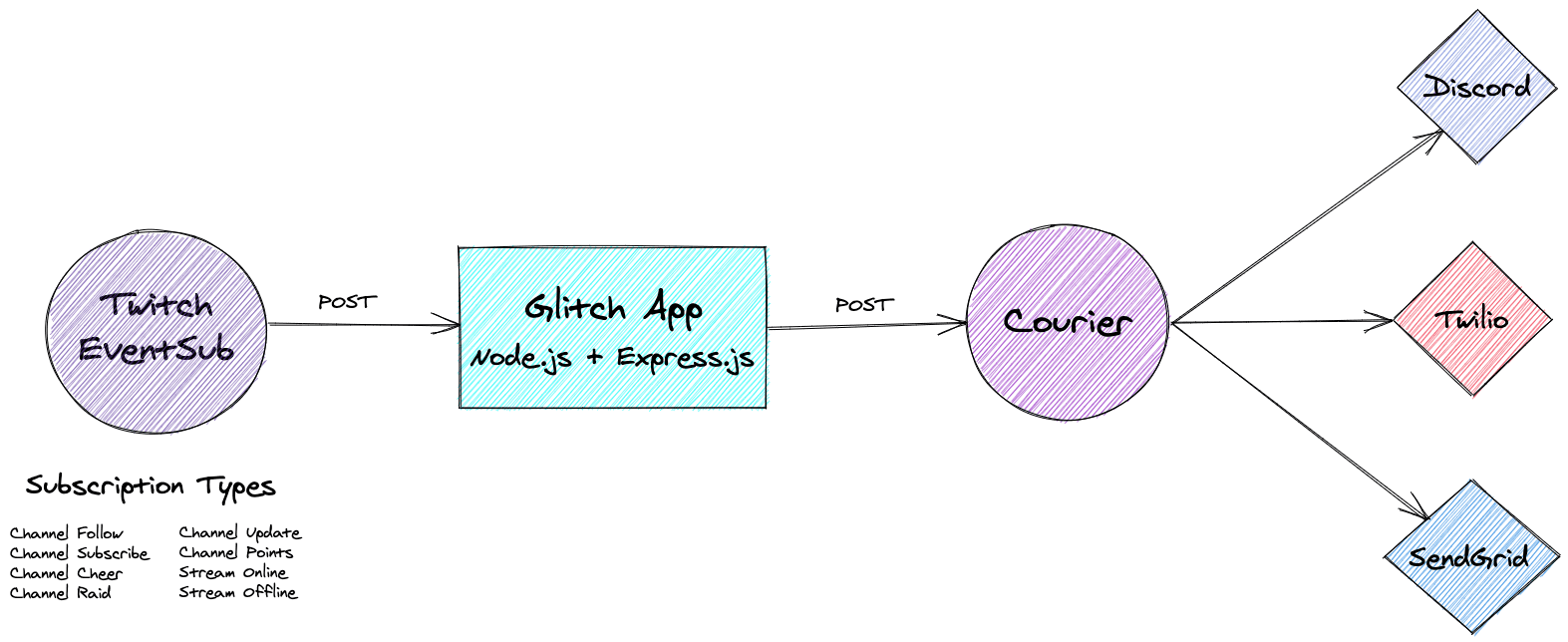
In the interest of time and to help focus the workshop on the use of Courier, I provided the participants with a Glitch application they could remix and use as a starting point. The Glitch application used Node.js and Express.js to accept POSTs from Twitch EventSub, query the Twitch API for more details, and call the Courier List Send. Once the participants created a Twitch application and updated some environment variables, they were ready to set up Courier and start building their notification.
Next, the participants created a new Courier developer account and went through the onboarding process. Once everyone was finished, we continued by setting up the Discord Integration. Courier can send messages to channels and users on behalf of a Discord Bot. Prior to the workshop, I created a Courier Bot and installed it on the Hackabull Discord Server. I shared the bot token with the participants so they would be able to send to Hackabull Discord users without having to set up their own Discord Bot.
With the Discord Integration configures, we moved on to the fun part: building the notification that would be sent when a streamer went live on Twitch. I showed the participants an example notification, how to use the stream data passed to Courier, and how to preview the notification. Then I gave them some time to be creative and ask questions.
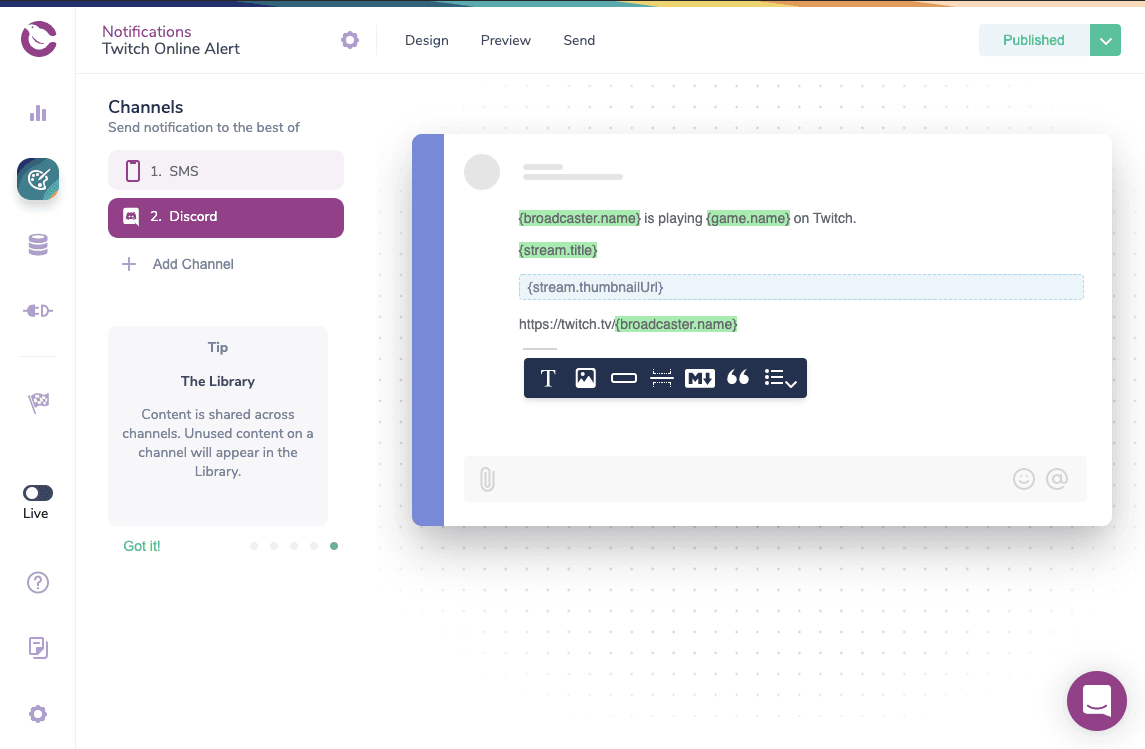
Once the notification was designed and published, we created a recipient with a Discord profile and subscribed it to the twitch.stream.online list. We were able to accomplish this using a couple cURL commands
Create a recipient with a Discord profile:
curl --request POST \--url https://api.courier.com/profiles/YOUR_ID \--header 'Accept: application/json' \--header 'Authorization: Bearer COURIER_AUTH_TOKEN' \--header 'Content-Type: application/json' \--data '{"profile":{"discord":{"user_id":"DISCORD_USER_ID"}}}'
Subscribe the recipient to the list:
curl --request PUT \--url https://api.courier.com/lists/twitch.stream.online/subscriptions/YOUR_ID \--header 'Authorization: Bearer COURIER_AUTH_TOKEN'
Finally, with our Glitch app set up and Courier account configured, we were ready to set up our Twitch subscription to start accepting the stream online events from EventSub. We did this using the Twitch CLI.
Get broadcaster id for Twitch user:
twitch api get users -q login=trycourier
Subscribe to the stream.online event:
twitch api post eventsub/subscriptions -b '{"type": "stream.online","version": "1","condition": {"broadcaster_user_id": "YOUR_BROADCASTER_ID"},"transport": {"method": "webhook","callback": "https://EXTERNAL_URL/webhook/callback","secret": "YOUR_SECRET"}}'
By the end of the workshop, all the attendees walked away with a working application that allowed them to start exploring the different features of Courier.
This workshop provided the Speed Friender team with the foundation they needed to build an application worthy of the Best Use of Courier prize.
The Speed Friender team was made up of members Mara Hart and Danielle Zevitz. Mara and Danielle are both computer science majors at the University of Virginia and Major League Hacking coaches. Mara helped found the UVA chapter of Girls Who Code and enjoys showcasing her personal projects and helping others get started coding on Twitch. Together they were inspired to build Speed Friender after noticing that new students were having trouble connecting with others due to the pandemic. To make up for the lack of spontaneous connection, they created a Discord bot that would facilitate creating connections between members and creating rooms for private conversations.
After setting up their Courier accounts to use Discord during the workshop, Mara and Danielle started looking into the capabilities of Discord bots. After a little research, they were able to create their own Discord bot and install it into their own Discord server. They handed the bot logic by adding Discord.js to the Remixed Glitch application from the workshop. After updating their Discord Integration to use their bot, they added Twilio for SMS and PostMark for email. Now using a single API call, the Discord bot is able to notify members when they have a new match using their preferred channel.
They plan to continue developing this project with their Girls Who Code chapter and put it into practice in their Discord server.
I was personally very excited about this project. The Discord Integration was my Fall 2020 Dispatch Project so it was great to see it being used at a hackathon. This project also inspired some new features I'd like to add to Pigeon Bot in our Courier Community Discord Server. Having a bot be able to spin up private rooms and then tear them down would be great handling community support requests that involve sharing sensitive information.
Similar resources

WhatsApp Business messages: types, templates, and rules
Every WhatsApp Business message is a template or a free-form message, and the type decides when you can send it and what it can look like. How businesses use each one, the template categories, the formats worth knowing, and the rules that stop messages from arriving.

WhatsApp pricing changes on October 1, 2026
On October 1, 2026, two things become billable on the WhatsApp Business Platform: free-form replies inside the 24-hour customer service window, and utility templates sent in response to a customer. If your WhatsApp volume is conversations rather than campaigns, this is not a rate tweak. It adds a line to your invoice where there used to be a zero. Here is what changes, a worked example of the cost, and what to check.

Clinical alert and notification systems: how escalation works
A clinical alert is easy to send and hard to close. This is how alerting works inside a hospital: where alerts come from, how routing by role and shift works, and how the acknowledge, timeout, escalate loop is actually built, including what happens when nobody answers.