Courier Inbox and Toasts use the same JWT-based authentication and scopes, since both connect to the same message feed. If you’ve already set up authentication for either, you can skip this step. JSON Web Tokens (JWT) Authentication
JWTs are short-lived, signed tokens used to securely authenticate and authorize connections from Courier SDKs to the Courier backend. They are the recommended authentication method in all cases.
JWT generation requires a private key which is unique to your Courier workspace, and should only be accessed in secure environments such as your backend server. A typical production JWT generation flow might look like this:
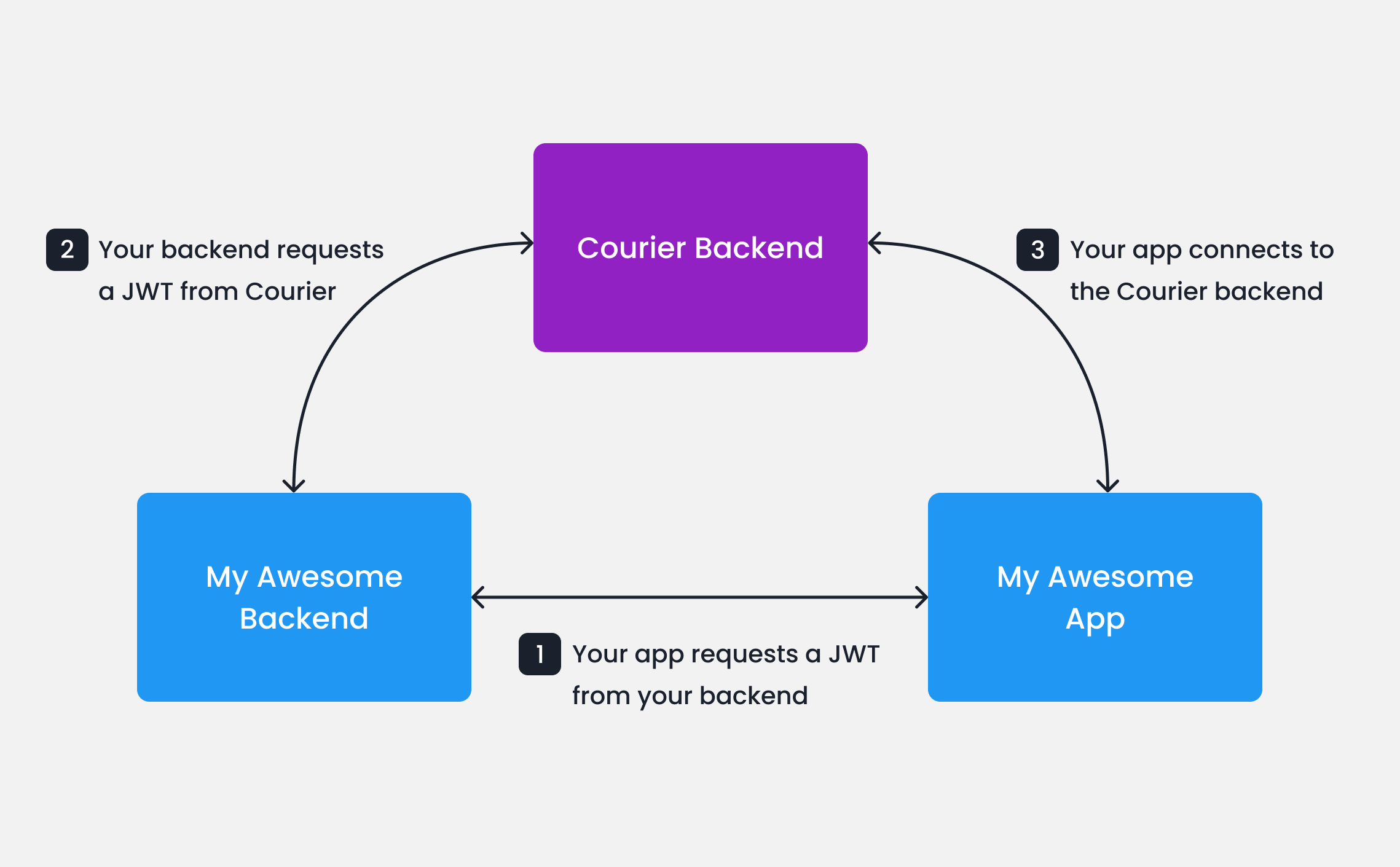
Your app calls your backend
When your app needs to authenticate a user, your app
should make a request to your own backend (ex. GET https://my-awesome-app.com/api/generate-courier-jwt).
Your backend calls Courier
Your backend returns the JWT to your app
Having received the JWT from Courier, your backend should return it to your app and pass it to the Courier SDK.
Testing JWTs in Development
To quickly get up and running with JWTs in development, you can use cURL to call the Courier Issue Token Endpoint directly.
curl --request POST \
     --url https://api.courier.com/auth/issue-token \
     --header 'Accept: application/json' \
     --header 'Authorization: Bearer $YOUR_API_KEY' \
     --header 'Content-Type: application/json' \
     --data \
 '{
    "scope": "user_id:$YOUR_USER_ID write:user-tokens inbox:read:messages inbox:write:events read:preferences write:preferences read:brands",
    "expires_in": "$YOUR_NUMBER days"
  }'
Client Key and HMAC Authentication (Deprecated)
Earlier versions of the Courier web SDKs support client key authentication with or without an HMAC signature.
The latest versions (@trycourier/courier-react v8+ and @trycourier/courier-ui-inbox v1+) remove this support.We recommend upgrading to the latest SDKs and updating existing integrations
to use JWT authentication.
userId and your Courier API Key.
import crypto from "crypto";

const userSignature =
  crypto
    .createHmac("sha256", courierApiKey)
    .update(userId)
    .digest("hex");
Always keep your Courier API keys private. Do not generate HMAC signatures in client-side code.
Next Steps

