Chapter 3
Advanced Capabilities and Use Cases
Sophisticated orchestration patterns including event-driven triggers, multi-journey coordination, and Handlebars personalization tied to CDP data. Features detailed industry implementations for SaaS trial onboarding, healthcare patient engagement, HR tech employee lifecycle, and marketplace transaction coordination with expected outcomes.
Last updated: May 2026
Event-Driven Triggers from Product Behavior
Product behavior generates the richest signals about user intent. Someone who activates a premium feature shows buying intent. A team that invites ten members demonstrates adoption. Users who stop logging in signal churn risk.
Structuring Event Data
When instrumenting product events through Twilio Segment, include properties that journeys can use for decisions. A "feature activated" event becomes more useful when it includes which feature, who activated it, and their role.

Best Practices
- Keep event schemas consistent: When your product sends
trial_startedevents, include the same properties every time - Use identify events to keep profile attributes current when users upgrade plans or change roles
- Use group events for organizational context: Associate users with company name, industry, employee count for account-based journeys
- Combine trigger types strategically: One expansion journey can trigger on high feature usage, near-full seats, or integration activation
Advanced Conditional Branching
Start with simple conditional logic and add complexity only when user behavior demands it.
Route Based on Message Engagement
After sending an email, check whether users clicked before deciding what to send next. Users who clicked are engaged. Users who didn't open need different messaging. Users where delivery failed need alternative channels. Check message engagement through step references.
Use Step References
Add a ref like welcome_email to your first send node. Later branch nodes check refs.welcome_email.status === "CLICKED". Don't send reminder emails to users who already clicked through.
Segment by Profile Attributes
Check profile.company_size or profile.industry when these attributes fundamentally change the journey path. But don't over-segment. Most users can follow the same core journey with personalization through template variables.
Multi-Journey Orchestration
Users don't experience one journey at a time. They're simultaneously in onboarding, support workflows, and feature campaigns. Design journeys that coordinate gracefully.

Frequency Caps
Set limits like 5 messages per day across all journeys. When a journey tries to send but the user hit their cap, the message gets suppressed.
Cancellation
Use cancellation to end obsolete workflows. When a user upgrades mid-trial, stop the trial onboarding journey immediately.
Priority
System alerts take priority over feature highlights. Support updates take priority over marketing campaigns.
Throttling Strategies
Notification fatigue happens when frequency exceeds value.
When to Throttle
Any time a journey might trigger multiple times in short periods: comment notifications, activity updates, system alerts.
Window Settings
- One-hour throttling: High-frequency events like comments or activity feeds
- Daily throttling: Less urgent updates like feature tips or engagement nudges
Per-User vs Global
Per-user limits apply individually. Global limits control system-wide volume during high-activity periods.
Handlebars Personalization with CDP Data
Basic Personalization
Address users by name: Hi {{profile.name}}. Reference their company: Here's how {{profile.company}} is using advanced features. Use event data: Great job activating {{data.feature_name}}!
Conditional Content
Copied!
{{#if (condition (var "profile.plan_type") "==" "enterprise")}}Your enterprise plan includes priority support.{{else}}Upgrade to enterprise for priority support.{{/if}}
Loops for Digests
Copied!
{{#each batch.items}}- {{this.user_name}}: {{this.action_description}}{{/each}}
Every trait you send through Twilio Segment's analytics.identify() becomes a profile variable.
User Preference Management
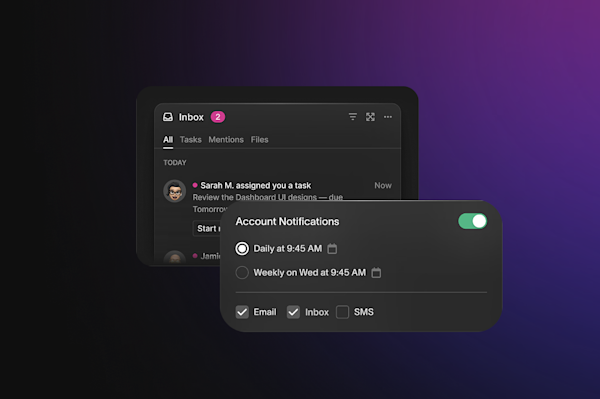
Topic-Based Controls
Group notifications into topics like "product updates", "account alerts", "feature announcements". Users opt in or out independently.
Channel Preferences Per Topic
Someone might want product updates via email but account alerts via both email and SMS.
Quiet Hours
Users set when they're available. Routine updates wait for business hours. Critical alerts override.
Smart Defaults
Critical topics like "account alerts" default to opt-in. Marketing topics like "feature highlights" default to opt-out.
SaaS: Trial Onboarding Sequence
B2B SaaS products face a challenge: users evaluate complex software in compressed timeframes while juggling other responsibilities. Static sequences treat all trial users identically, missing critical signals.
Journey Structure
| Day | Trigger/Check | Action |
|---|---|---|
| 0 | trial_started | Welcome email with personalized setup based on {{data.use_case}} |
| 1 | Check: logged in? | If no → login reminder via push/SMS |
| 3 | Branch: feature activation | High → next-step education / Low → help offers |
| 7 | Fetch engagement data | High → expansion conversation + sales Slack alert / Medium → usage tips / Low → CS outreach |
| 10-14 | Conversion messaging | Tailored to engagement level |
Results
LaunchDarkly uses Courier to send product lifecycle notifications that adapt based on which features developers explore. Developer-focused users receive API and SDK documentation. Dashboard users receive UI walkthrough content. The journey routes based on actual usage signals rather than a fixed schedule.
See how SaaS companies use Courier.
Healthcare: Patient Engagement Workflows
Healthcare providers face strict regulatory requirements. HIPAA compliance means you can't include protected health information in emails or SMS, yet patients need timely reminders.
Key Workflows
Appointment reminders triggered when EMR sends scheduled events:
- Day 7: Email with preparation instructions
- Day 3: SMS reminder with confirmation reply option
- Day 1: Final reminder through preferred channel
- Post-visit: Satisfaction survey, batched into weekly provider digests
Medication adherence with daily reminders at prescribed times via push. Missed doses escalate to care coordinators.
Lab results respect sensitivity: normal results send immediately with portal links; abnormal results notify provider first.
HIPAA Compliance
Email and SMS contain no protected health information. In-app messages can show details because the app requires authentication.
Trusted Health, which coordinates staffing notifications across 3,000+ healthcare facilities, uses authentication-gated in-app delivery for sensitive content and email for non-sensitive communications. The channel separation is enforced at the workflow level, not the application level.
Learn more about healthcare notifications.
HR Tech: Employee Lifecycle Management
HR technology platforms serve multiple companies with different policies, compliance requirements, and communication preferences. One company wants email only. Another requires Microsoft Teams. A third needs bilingual communication.
Multi-Tenant Routing
Tenant-based routing lets you define journey logic once while respecting company-specific preferences through group event associations.
Key Workflows
New hire onboarding: Pre-boarding email with schedule, day-one in-app notifications for I-9/handbook/benefits, task completion events route to next steps.
Benefits enrollment: 30-day sequences with reminders at 14, 7, and 1 day before deadline. Completions get confirmation. Misses trigger HR team notifications.
Performance reviews: Manager notifications when reviews open, weekly progress updates, employee notifications when complete.
Lattice, used by 5,000+ companies for performance management, uses Courier to send continuous feedback reminders across its platform. Journeys batch multiple reminders into digests and respect quiet hours. Omnichannel delivery uses email for detailed communications, Microsoft Teams for team notifications, SMS for urgent deadlines.
Marketplace: Transaction Workflows
Marketplace platforms coordinate communication between parties with competing information needs. Buyers want frequent updates. Sellers need immediate notification of new orders but get overwhelmed managing dozens of transactions.
Multi-Party Routing
The same transaction triggers different communication paths:
- Buyers: Email confirmations with receipts, tracking updates, delivery notifications
- Sellers: Push for immediate awareness, detailed emails with shipping addresses, payout confirmations
- Support: Escalated dispute notifications when response SLA approaches
Key Workflows
Order confirmation splits into buyer and seller paths immediately on order_placed.
Fulfillment tracking updates both parties as status changes: shipped, out for delivery, delivered.
Post-delivery requests reviews 2-3 days later, checking whether reviews already exist.
Dispute resolution notifies sellers via email and SMS, tracks response time, escalates to support if sellers don't respond within SLA.
Side, a real estate marketplace, coordinates transaction milestones between agents and clients. Each milestone triggers notifications to relevant parties through appropriate channels. High-volume sellers benefit from throttling to receive updates at manageable frequency.
See marketplace notification examples.
How many steps should a customer journey have?
Journey length should match the user's lifecycle phase. Trial onboarding journeys typically span 7–14 days with 3–8 touchpoints depending on engagement signals. Post-purchase sequences often run 30–90 days. Add steps only when they serve a specific goal based on user behavior: not to fill a calendar. A 4-step journey that responds to real signals outperforms a 12-step sequence that fires regardless of what users do.
What is the difference between a delay node and a wait-for-event node?
A delay node pauses journey execution for a fixed duration regardless of user activity. A wait-for-event node pauses until a specific action occurs, up to a configurable timeout. Use delays for time-based cadences (day 3 follow-up, 30-day retention email). Use event waits when the journey should branch based on whether a user completes a specific action: activating a feature, completing a payment, or opening an email.
How do you stop a journey midway when a user converts?
Use cancellation with a run ID or cancel tag. When a user upgrades during a trial, send a cancel request referencing the original journey's run ID. Courier stops all pending steps immediately. Tag-based cancellation lets you cancel groups of related journeys at once: for example, canceling all trial-related journeys when an account converts, regardless of which specific workflows are active.
Can multiple journeys run for the same user at the same time?
Yes, but they need coordination. Set frequency caps to limit total messages per day across all active journeys. Use cancellation to stop obsolete journeys when users complete milestones. Priority settings determine which journey's message sends when multiple queue simultaneously. Without this coordination, a user in onboarding, a re-engagement campaign, and a product announcement journey simultaneously can receive more messages in one day than they would from any single journey.
How do you test a customer journey before enabling it in production?
Use Courier's test environment to send to specific user IDs or email addresses without triggering production notifications. Use step references to verify that branching logic routes correctly based on simulated message engagement data. Test the edge cases that are hardest to reproduce in production: users who never open the first email, users who cancel mid-journey, users who trigger the same journey twice in quick succession. Confirm that cancellation, frequency caps, and fallback channels all behave correctly before enabling for all users.
Start building customer journeys in Courier. The free tier includes 10,000 notifications per month and full access to the Journeys workflow builder. Or talk to a solutions expert about your use case.
Previous chapter
Building Customer Journeys with Courier
Hands-on walkthrough of Courier's Journeys platform from Segment integration to production deployment. Covers trigger configuration, visual workflow design, conditional branching, delays, fetch data nodes, throttling, and channel-specific template creation within send nodes. Includes code examples and testing workflows.
Next chapter
Choosing Your Journey Management Platform
Structured evaluation framework comparing Courier against Braze, Iterable, Customer.io, Knock, and Novu. Covers why marketing platforms struggle with product-led journeys, the infrastructure layer advantage, ROI calculation frameworks, and migration strategies. Includes customer stories from Lattice, Twilio, LaunchDarkly, and Side.
© 2026 Courier. All rights reserved.