Chapter 2
Building customer journeys with Courier
A journey end to end: pick one of four triggers, wire up sends and branches, control timing with delays and send windows, pull live data mid-run, add an AI step, test variants, cancel cleanly, and step through exactly what happened.
Last updated: September 2026
Key takeaways
- A journey starts one of four ways: an API call, an inbound webhook, a Twilio Segment event, or a user joining an audience. Everything after the trigger lives on the canvas, not in your application code.
- You build a journey by connecting nodes (send, branch, delay, fetch, throttle, batch, digest, AI, cancel, exit), each configured in a side panel.
- Templates are channel-specific and built inside send nodes, with Handlebars for personalization.
- Any node can carry conditions, so a step is skipped rather than forced when its conditions don't hold.
- Test mode, run inspection, and version history let you step through a journey against sample or real data, and see exactly which version a given run executed.
The visual canvas
Journey design happens on a visual canvas. You drag nodes from the palette onto the graph, connect them, and configure each one in a side panel. Execution runs from the trigger downward: a node runs, then hands off to the next. Because the whole flow (branches, delays, copy, channels) lives on the canvas, you change it without a deploy, and the trigger stays the only integration point in your code.

Triggers
A journey has one trigger, chosen when you create it, and there are four types: API Invoke, Webhook, Twilio Segment, and Audience.
API triggers invoke a journey directly from your backend, for flows tied to your own application logic. Trigger it with the Courier SDK:
import Courier from "@trycourier/courier";const courier = new Courier({ apiKey: process.env.COURIER_API_KEY });const { runId } = await courier.journeys.invoke("trial-onboarding", {user_id: "user_123",data: { plan: "enterprise", trial_days: 14 },});
The call returns a runId and a 202. Courier validates data against the trigger's schema and walks the graph asynchronously. SDKs are available for Node.js, Python, Go, Ruby, Java, PHP, and .NET; see the SDK overview.
Twilio Segment triggers start a journey when a matching Segment event arrives, so you instrument your product once and route behavioral events to journeys without writing new backend calls.
Webhook triggers start a run when an event lands on one of your inbound webhooks. Payload fields become data.<field>, and the payload needs a userId so Courier can resolve a recipient. Reach for this when the event comes from a third-party tool that can post a webhook but isn't wired into your CDP.
Audience triggers start a run when a user joins an audience, which suits segments you maintain centrally rather than flows keyed to a single event.
Use API triggers for transactional flows, Twilio Segment or webhook triggers for behavioral lifecycle journeys, and audience triggers for membership-based ones.
Setting up Segment
Add Courier as a Segment destination:
- In Segment, open the Destinations catalog and add Courier.
- Pick the source to send from (your production JavaScript or server-side source).
- Paste your Courier API key.
- Enable the destination.
Your product's existing calls then flow to Courier:
analytics.track("trial_started", {plan: "enterprise",trial_days: 14,});
The event name (trial_started) becomes a trigger you can select, and the properties become data your journey branches on and personalizes with. identify calls keep profile traits current; group calls associate users with organizations for account-based journeys. RudderStack works the same way through its Courier destination.
Send nodes and templates
A send node delivers one message on one channel: email, SMS, push, in-app inbox, Slack, or Microsoft Teams, for any channel you've connected an integration for. You pick the channel when you add the node and build the template right there. Each channel gets the controls it needs: email has subject lines and HTML, SMS counts characters, Slack takes Block Kit layouts.
Every address field on the node either points at a path in the journey's data or takes a value you type. The sources are profile data, event data from the trigger, tenant properties when the invocation carries a tenant_id, an upstream fetch response, or a fixed value. Tenant data is the one to reach for when a single journey serves many customers: store the value once per tenant and every run picks up the right one.
Slack and Teams need more than an address. A Slack node takes a channel ID or a user ID or email, plus a bot token you can point at profile.slack.access_token or a tenant property so each workspace gets its own. A Teams node takes a destination, a regional service URL, and a Microsoft tenant ID when you address by user, email, or channel name.
Courier matches the channel to a provider on its own, using that channel's default from the Integrations page. Pick a different one for a single node from the node's Provider dropdown.
Omnichannel delivery works by combining send nodes with a branch that falls back to whichever channel a user has: Slack if an access token exists on the profile, else push, else email.
The template a send node uses is a journey template: created inside the journey, scoped to it, and versioned with it. Publishing the journey publishes the current draft of every linked template. That scoping cuts both ways, so it's worth knowing up front: a journey template can't be reused by a regular Send API call, and you can't import an existing workspace template into a journey. Each journey owns its own content.
Personalization with Handlebars
Templates use Handlebars to pull from the journey context, so Hi {{first_name}}, your {{plan}} trial has {{trial_days}} days left renders per recipient. Trigger schema fields, profile fields, and fetch response fields are all addressed by name this way, and the designer lists the available fields, which is the reliable way to get a reference right rather than typing one from memory. Dotted paths like profile.name also resolve where you need to be explicit.
Conditionals let one template serve many segments:
{{#if (condition (var "plan") "==" "enterprise")}}Your enterprise features are active.{{else}}Upgrade to unlock enterprise features.{{/if}}
Branching and conditional logic
A branch node evaluates conditions and routes each user down the first matching path. A Default path is always present and catches anyone who matches nothing. Conditions read from the journey context: your trigger schema fields (data.setup_completed), profile attributes (profile.company_size), tenant properties, and the response from an upstream fetch node. AI node output merges into the context too, so you can branch on a classification the model just returned.
| Condition type | Operators |
|---|---|
| Equality | is equal, is not equal |
| Text | contains, does not contain, starts with, ends with |
| Number | greater than, greater than or equal, less than, less than or equal |
| Presence | exists, does not exist |
Building a journey through the API, the same conditions are tuples: ["data.plan", "is equal", "pro"] for the binary operators, and ["data.email", "exists"] for the two presence ones.
Each path holds one or more condition groups. Conditions inside a group all have to be true (AND); add a second group and the path runs if either group is satisfied (OR), and groups can be nested when the logic needs it. Rename a path in the condition editor and the label updates on the canvas, so "First Order" beats "Path 1" when you come back to the journey in three months.
A common pattern: after a welcome email and a three-day delay, branch on setup completion. Setup done routes to advanced tips, not done routes to setup help. When a branch sends someone down a path you didn't expect, open the run in the Logs tab and click the branch node: the step context lists every condition evaluated, the actual values compared, and which path won.
Delays and timing
A delay node pauses a run in one of two modes:
- Duration: a numeric value plus a unit (minutes, hours, days, or months), measured from when the run reaches the node rather than when the journey was invoked. Through the API this is an ISO 8601 duration string, so the same node is
"mode": "duration", "duration": "PT30M". - Until: a specific date and time you pick from a date-time picker, for holding a message until a launch date. Through the API, an ISO 8601 timestamp or a reference into the journey context.
Turn on Dynamic Interval and the delay reads its value from the journey context instead of a hardcoded one, so your application controls the wait at runtime. Point it at a trigger schema field carrying an ISO 8601 duration like PT2H, or at an until field carrying a datetime.
Delays don't decide what hour of day a message lands. That belongs to the send node's send window, covered below.
Controlling the hour a message lands
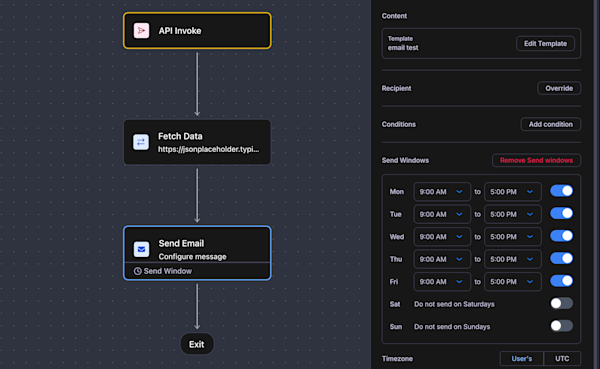
A delay controls how long a run waits. A send window on the send node controls when the message is allowed out. If a run reaches the node outside the window, delivery is held until the window opens.
Each day of the week gets its own opening and closing time, and a day left blank is blocked entirely, which is how you say "nothing on Saturdays." Set the timezone to User's and Courier resolves it from the recipient's profile, falling back to UTC when the profile doesn't have one.
If you've used other messaging tools you know this behavior as quiet hours. Courier has no workspace-wide setting by that name, and the send window is where you get it instead. It sits on the node rather than the workspace, which turns out to be the more useful shape: a routine onboarding nudge gets a Monday-to-Friday, 9-to-5 window in the recipient's own timezone, while the password reset in the same journey has no window at all and goes out at 2am as it should.
The Send API has the same behavior for messages that don't run through a journey. Pass an opening-hours expression to delay.until, like "Mo-Fr 09:00-17:00" or a split schedule "Mo-Fr 09:00-12:00,14:00-18:00", and Courier either sends immediately or holds until the next valid slot. Timezone resolves in priority order: delay.timezone first, then message.to.timezone or the profile's zoneinfo, then the profile's timezone, then UTC. The window start is inclusive and the end is exclusive, so a message that lands exactly at closing time waits for the next one.
Fetching external data
A fetch data node makes an HTTP request mid-run and merges the response into the journey context, so a branch downstream decides on live state instead of stale trigger data. Set the method (GET, POST, PUT, or DELETE) and the URL, which supports {{variable}} interpolation and has to be HTTPS. If you already have the call as a cURL command, paste it into Import cURL and the node fills itself in.
Click Execute Step in the request editor to run the call against test values. On a 2xx response Courier captures the response schema and lists the fields back on the node, so downstream branches and templates can see what's available without you guessing at the shape.
How the response combines with the existing context depends on the merge strategy:
| Strategy | Behavior |
|---|---|
| Soft Merge (default) | Adds fields that aren't already there and preserves existing values. The safe choice: trigger schema and profile data can't be clobbered by a response. |
| Overwrite | Deep-merges the response in. Response values win on conflicting keys. |
| Replace | Replaces the entire context with the response. Fields not in the response are gone. |
| None | Doesn't merge. Existing context is left untouched; if the context is empty, the response is used. |
Add a branch after the fetch to handle failures: route users whose data.health_score exists one way and everyone else another.
Throttling, batching, and digests
A throttle node limits how often a run passes a point within a window. Set a max allowed and a period, then pick a scope:
| Scope | What the cap applies to |
|---|---|
user | One recipient's sends through this point |
global | Total volume across all recipients |
dynamic | A key you supply as throttle_key, so the cap counts per whatever that key identifies |
The dynamic scope is the one worth knowing about if your customer is a company: set throttle_key to an account or tenant identifier and the cap applies per account rather than per person, so twelve users on one account share one budget instead of twelve.
When a run hits the cap, the throttle node is skipped and execution continues to the next node, so the message isn't queued for later. It doesn't go out at all.
A batch node collects events and releases them together as one payload, scoped per recipient. It releases on whichever comes first: max items (100 by default, up to 1,000), a wait period that passes with no new event arriving, or a max wait period ceiling measured from the first event. The wait period is the inactivity window that lets a quiet batch go early; the max wait is the hard stop.
Turn on Include event data and you choose which collected events ride along: a strategy of First, Last, Highest, or Lowest (the last two take a sort key like data.priority) and a count of up to 25. Downstream nodes get a batch object with count and items, and count is the true total even when you retained fewer items. A category key partitions the batch, so data.category batches each category separately instead of lumping them together.
A Send to Digest node aggregates events into a scheduled digest on a subscription topic instead. Either way a burst becomes one message: instead of 20 comment alerts in an hour, a user gets a single summary.
Conditions on any node
Branches aren't the only place conditions appear. Send, delay, fetch, batch, and AI nodes each take optional conditions using the same fields and operators. When they don't hold, the node is skipped and the run continues to the next step rather than stopping. That's how you say "only send the push if a token exists" without adding a branch and a second path for it.
The AI node
The AI node runs a frontier model inside the journey and returns structured data the rest of the flow acts on. Pick a model (Claude Opus 5, Claude Sonnet 5, GPT-5.6 Sol, and other OpenAI and Anthropic models), write a prompt with {{variable}} interpolation from journey data, and define an output schema (form mode for simple fields, JSON mode for complex shapes). The response is parsed to that schema and merged into the run.

Four things it does without an external service:
- Generate content. Tailored subject lines and body copy per recipient, instead of maintaining dozens of template variants.
- Score and route. Assess churn risk, intent, or engagement and return a category your branch reads.
- Enrich profiles. Classify a user into a persona or derive attributes, and persist them to the profile so every future journey starts with richer context.
- Produce structured data. Return JSON that a downstream fetch node writes to your CRM or warehouse.
AI nodes are billed in credits, at 100 credits per $1, and the cost per invocation depends on the model you pick. Input and output tokens past the included allowance add credits on top. A node whose conditions aren't met is skipped and consumes nothing. Web search is available for Anthropic models; it adds two credits per invocation and counts toward input token usage. Test the node in the editor with sample inputs, and run inspection shows the full prompt, the raw response, and the parsed output.
Experiments
A send node can run an experiment instead of a single template: it holds 2 to 10 template variants and splits traffic across them, so you can compare subject lines, copy, or layouts on one send without branching the journey. Each variant is a full template you edit inline, and each carries a relative weight, so weights of 60/30/10 keep most traffic on your current template while testing two alternatives.
Courier assigns recipients with a bucketing key, which is a path into the invocation rather than a literal value: user.id, user.email, or something like data.account_id when everyone on the same account should see the same variant. Courier reads the value at that path and hashes it, so the same recipient always lands in the same variant. If the path can't be resolved for a recipient, it falls back to the user ID and then the email. Assignments stay sticky when you change weights, and only re-bucket if you add or remove a variant or change the key.
The Results and Metrics views break delivery, open, and click data out per variant. When you've seen enough, you promote a variant: its template becomes the only one on the node and the experiment ends. Promotion is a manual decision; Courier doesn't pick a variant for you.
Version history
Every publish saves a snapshot. Open version history from the clock icon next to Publish and you get the list of published versions, newest marked Current.
Click one and you get it side by side with your current draft, both read-only, and you can click individual nodes in either canvas to see how they were configured at that point: the exact conditions, delay durations, schema fields, and template content that were live. That is usually the fastest way to answer "this journey started behaving differently last Tuesday."
Revert loads the chosen version into the editor as a new draft. It doesn't take effect until you publish it, and it deletes nothing, so the audit trail stays intact. Runs already in flight keep executing against the version they started on, so a revert only changes what new invocations do.
Cancelling a run
A cancel node stops a run's pending steps from inside the flow, and POST /journeys/cancel does the same thing from your own code, so you don't need a node on the canvas to stop a run. Either way you target runs one of two ways: a single run by the run_id returned when you invoked it, or a group of runs by a shared cancellation token.
The token is the more useful of the two. You template it in the journey's settings from values you can recompute later, so one call cancels every active run sharing that token, across journeys, without you tracking run IDs. Cancelling is idempotent and only touches active runs, so a run that already finished is left alone.
Testing and run inspection
Before publishing, use test mode: provide sample event data and watch each node execute, so you can confirm a branch routes a user who finished setup differently from one who didn't. After publishing, open the journey's Logs tab: run inspection steps through a real user's run node by node, showing the data at each step, which branch conditions were evaluated, and where it errored. Runs land in one of five states (Processing, Processed, Error, Waiting on a delay or throttle, or Canceled), and Courier shows the journey version that was live when the run started rather than your current draft.
To answer the same question programmatically, GET /journeys/runs lists runs across the workspace filtered by status, journey, or date range, and GET /journeys/runs/{run_id}/steps returns the step trace. Runs are retained for 95 days.
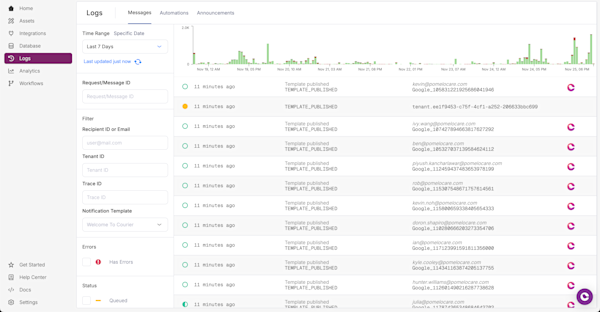
Message logs show delivery status, channels attempted, and errors, searchable by user, template, or journey. The common failures:
- The recipient has no contact info for the target channel.
- The user opted out of the message topic.
- A branch routed the user past the send node.
- A provider rate limit was hit.
The Metrics tab covers delivery performance. Total sent is a stacked bar chart with one color per journey template, and the table under it lists every template with its channel, sends, and delivery, open, and click rates. Click a row for a drawer with five charts (sent, delivery, open, click, and error rate) and a provider-level breakdown, on its own time range. Templates that existed in an earlier published version but not in your current draft still show up, prefixed "Inactive," so removing a send node doesn't erase its history. Chapter 4 turns these mechanics into full lifecycle blueprints; Chapter 3 covers what to look for in a platform. If your customer is a company rather than a person, how to build B2B customer journeys covers the account-level patterns: tenant-scoped data, addressing an admin instead of the user who tripped the event, and bucketing experiments by account.
Frequently asked questions
Can I build a journey in code instead of the visual canvas?
Yes. The Journeys API lets you create a journey, define its templates, wire the node graph, publish it, and invoke runs from your backend, and the canvas and API act on the same journey. You can design on the canvas and invoke from code, or manage the whole lifecycle programmatically when journeys are generated or kept in version control.
How does Courier receive events from Twilio Segment?
Configure Courier as a destination in your Segment workspace, and Segment forwards track, identify, and group calls automatically. Track events appear as triggers you can map to a journey, with no webhook code on your side. The Segment integration guide covers the full setup.
How do I stop a journey when a user converts early?
Cancel the run. Call POST /journeys/cancel with the run_id you got back when you invoked the journey, or with a cancellation token you templated in the journey's settings, which cancels every active run sharing that token across journeys. You can also put a cancel node in the flow itself. Courier stops all pending steps immediately, which keeps you from messaging someone who already did the thing you were driving.
How do you stop a journey from sending in the middle of the night?
Put a send window on the send node and set its timezone to the recipient's. Give each weekday an opening and closing time, leave the days you don't want to send on blank, and any run that reaches the node outside that window is held until it opens rather than delivered late at night. Courier has no workspace-wide quiet hours setting, which means you apply the window only to the nodes that should wait and leave time-critical sends in the same journey unrestricted. Outside journeys, the Send API does the same thing with an opening-hours expression on delay.until, for example "Mo-Fr 09:00-17:00".
How do I debug a journey that isn't sending messages?
Open run inspection and find the user's run; each node shows whether it's pending, completed, or errored, along with the data it saw. The usual causes are a profile with no contact info for the target channel, a user who opted out of the topic, or a branch condition that routed them away from the send node.
Can one journey run for many users at the same time?
Yes. Each user has an independent run with its own state, so one user on day 3 has no effect on another starting day 1. Throttle nodes and cross-journey frequency caps control how often any single user is reached.
Previous chapter
Customer journey management explained
Campaigns send on a calendar. Journeys send when a user does something in your product. Here is the difference, why it changes your numbers, and the nodes a journey is built from.
Next chapter
Choosing your journey management platform
The criteria that separate journey infrastructure you can rely on from a single-channel tool, what Courier is, and how LaunchDarkly, DroneDeploy, and Twilio run journeys on it.