How to get your logo in Gmail and Apple Mail
 Emily LaneSeptember 14, 2026
Watch someone go through their inbox. They aren't reading subject lines. They're scanning the left edge, pattern matching on senders, deciding in a fraction of a second what is worth opening and what is junk.
In that moment your brand gets one visual asset: a 40 pixel circle. For most companies it's a grey letter.
Here's the same real message from Apple, shown at the three levels of setup a sender can have.
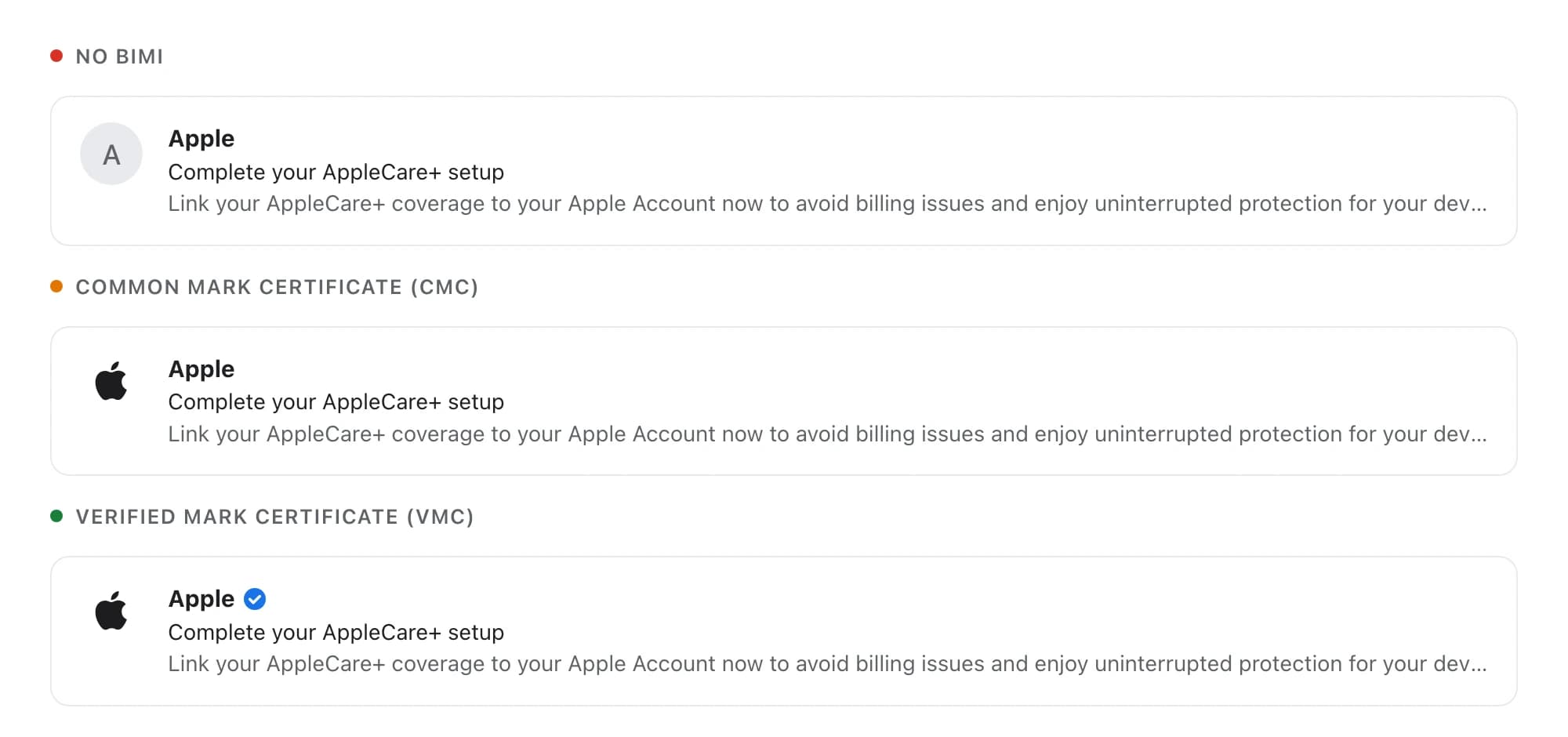
Only the bottom row is how that message actually arrives. The other two show what the same email would look like with less of the work done.
The standard is BIMI, short for Brand Indicators for Message Identification. It lets a domain publish a logo that supporting mail apps display next to its messages. Three terms come up throughout this guide:
- BIMI is the standard itself: a DNS record pointing at your logo and your certificate.
- VMC, a Verified Mark Certificate, proves the logo is yours using a registered trademark. It unlocks Apple Mail and the blue checkmark in Gmail.
- CMC, a Common Mark Certificate, proves the logo is yours using twelve months of documented use instead. Cheaper to qualify for, but Apple Mail ignores it.
What BIMI is worth to your brand and your customers
For the brand. It's the only piece of visual identity that reaches a recipient before they decide whether to open anything. Subject lines are yours to write, but the sender column is where recognition happens, and without this you're handing it to a grey initial that looks the same as everyone else's. It also travels everywhere your mail goes, including the receipts and password resets that no designer ever looks at, which for most companies is the majority of what customers actually receive from you.
For the customer. They can tell a real message from a fake one without inspecting anything. That matters most on precisely the messages criminals imitate: billing notices, delivery updates, security alerts, password resets. Your logo appearing where a forgery can't put it is a small, constant signal that this one is genuine.
And the part nobody puts in the brochure. You can't get the logo without locking your domain down first, which means the project's real output is that nobody can send email pretending to be you. For a brand, being impersonated is the expensive failure. The logo is the visible reward for preventing it.
Certificate vendors quote open rate lifts, often double digit. Those studies are vendor-sponsored and rarely controlled, so treat the numbers with suspicion. The durable argument isn't a percentage. It's that you own the sender column instead of renting a grey circle, and that your customers get a way to spot a fake.
Why you can't upload a logo to Gmail
The first thing to understand is that Gmail has no page where you submit your logo. Neither does Apple. There is no form, no review queue, no support ticket.
Think about why. If an upload form existed, anyone could upload your logo and send mail pretending to be you, and the logo would make the forgery more convincing rather than less. So mailbox providers inverted the problem.
They won't show your logo until you have proven nobody can send email pretending to be you.
That proof is the project. The logo is the reward for finishing it. Which means the bulk of the work is domain security, and the visible payoff is a 40 pixel circle.
The upside is that the security work is worth doing regardless. If you never publish a logo, you still end up with a domain that can't be spoofed.
How to set up BIMI: two DNS records and a certificate
Stripped down, the whole project is two DNS records and one purchase. What makes it a project rather than an afternoon is that they have to happen in this order, and the second one can break your email if you rush it.
1. Start listening
Two weeks, mostly waiting. Nothing changes for your recipients.
Publish a DMARC record set to do nothing except report:
_dmarc.example.com TXT "v=DMARC1; p=none; rua=mailto:dmarc@example.com"p=none means take no action. rua is where daily reports get sent. Every major mailbox provider will now send you a list of every server sending mail as your domain, how much each sends, and whether it authenticates correctly.
Expect surprises. Marketing platform, billing system, support tool, sales outreach and regular company email are usually five separate services, and most companies find at least one they had forgotten about.
Read the reports for two weeks, not two days. A monthly invoice run or a quarterly statement won't appear in a 48 hour sample, and those are precisely the senders you don't want to find out about by breaking them.
Done when: you can name every source in the report and confirm each one signs with DKIM aligned to your domain.
2. Turn the dial up
A few weeks. This is the step that can break things.
Once every legitimate sender is accounted for, walk the policy up, pausing at each stage to check the reports:
v=DMARC1; p=quarantine; pct=25;  rua=...
v=DMARC1; p=quarantine; pct=50;  rua=...
v=DMARC1; p=quarantine; pct=100; rua=...
If the reports are clean you can move faster; the staging exists to limit the blast radius when you aren't certain. At pct=25, a sender you missed sends a quarter of its mail to spam instead of all of it.
p and pct are separate, and both matter. A domain can read p=quarantine and look protected while pct=1 means the policy applies to one message in a hundred. That isn't enforcement, and Gmail won't show a logo for it. This is the single most common reason a logo never appears.
Subdomains are evaluated on their own. DMARC is checked against the domain in the visible From address. If your marketing mail goes out from news.example.com, that subdomain needs to reach enforcement in its own right, either through its own record or an sp= tag on the parent.
Done when: p=quarantine or p=reject with pct=100, on every domain you actually send from, and no legitimate sender failing in the reports.
3. Buy a certificate
One to two weeks, and one of those weeks is scheduling a person.
A file, renewed annually, that binds your logo to your company. Two types exist. Budget 1,150 to 1,500 dollars a year.
Two certificate authorities are worth approaching: DigiCert and SSL.com. DigiCert issued the first VMC and remains the default, with Bank of America, Chase, eBay and Shopify all hosting certificates there, though pricing is quote-only. SSL.com publishes its prices: 1,500 dollars a year for a VMC, 1,150 for a CMC, with discounts on multi-year terms. The BIMI Group keeps the authoritative list of approved issuers.
Ignore any guide that still recommends Entrust. They were one of the original issuers but left the business in 2025 after selling their public certificate arm to Sectigo.
Ask all of them the same question before you commit, because it decides whether you buy one certificate or several: we intend to publish a single BIMI record at our organizational domain and rely on inheritance for our sending subdomains. Does your certificate support that?
This isn't a checkout flow. The certificate authority verifies your organization the way an old-style EV certificate did, and that includes a face to face identity check: a notary, a lawyer, or a live video call where someone holds their ID up to the camera. Issuance is same day once the paperwork clears, but the paperwork needs a named human with a calendar.
You end up with a .pem file. Put it on your web server at a stable HTTPS URL.
Done when: the PEM is live at a URL you control and won't move.
4. Publish the logo
An afternoon.
Your logo has to be SVG Tiny P/S, a restricted profile rather than a normal SVG export. The BIMI Group publishes the full spec, but these are the parts that matter:
| Requirement | Value |
|---|---|
| Profile | baseProfile="tiny-ps" and version="1.2" |
| Shape | Square, 1:1 |
| File size | Under 32 KB |
| Title | A <title> element with your brand name |
| Background | A solid colour. Transparent may not render |
| Forbidden | Scripts, animation, external references, and x= or y= on the root <svg> |
Two things that catch designers. It displays at roughly 40 pixels and usually gets cropped to a circle, so send the icon rather than the horizontal lockup, and leave enough padding that the crop doesn't clip it. And because external references are banned, you can't link a webfont; any text has to be converted to paths.
For a benchmark, Apple's file is 800 by 800 and 1,109 bytes, well under the ceiling.
Host it at a stable HTTPS URL and add one more record:
default._bimi.example.com TXT "v=BIMI1; l=https://example.com/logo.svg; a=https://example.com/bimi.pem"l= is the logo. a= is the certificate. That's the entire record.
Publish it on your organizational domain only. BIMI falls back to the parent when a subdomain has no record of its own, and that inheritance is what lets one certificate cover all your sending subdomains. An extra record on a subdomain changes which domain the certificate gets matched against, and can break the thing it was meant to help.
Done when: the logo appears. Allow a few days, since receivers cache aggressively and Gmail also weighs your sending reputation before it displays anything.
VMC vs CMC: which BIMI certificate you need
The two certificate types cost about the same and produce a nearly identical result. What differs is what you have to prove, and that determines your timeline.
A Common Mark Certificate requires twelve months of documented logo use. The certificate authority looks at your website today, looks at your website on the Wayback Machine a year ago, and confirms the logo matches. No lawyers, no filings.

A Verified Mark Certificate requires a registered trademark on the logo. It gets you Apple Mail and the blue checkmark in Gmail.

| CMC | VMC | |
|---|---|---|
| Requires | 12 months of logo use | A registered trademark |
| Gmail | Logo | Logo and checkmark |
| Apple Mail | Nothing | Logo |
| Yahoo, Fastmail | Logo | Logo |
| Outlook | No BIMI support | No BIMI support |
| Cost per year | ~$1,150 | ~$1,500 |
| Time, if eligible | Days | Days |
| Time, if you must file first | n/a | 8 to 18 months |
The difference in what you see is one small blue circle. The difference in what it takes to get there can be a year.
How to get BIMI working without a trademark
Most startups don't own a registered trademark on their logo, and the cost is specific: Apple Mail and a checkmark. That's the entire penalty. Gmail, Yahoo and Fastmail all work with the cheaper certificate.
There is a mistake worth catching early. Plenty of companies have trademarked their name and assume they're covered. A name trademark protects the letters in any typeface and contains no image, so a certificate authority has nothing to embed. What BIMI needs is a trademark on the logo itself, filed as a design.
If someone tells you the company has a trademark, the follow up question is whether it covers the name or the mark.
In the US you can check this yourself for free. Look the registration up and find the field called Mark Drawing Code:
| Code | Meaning | Works for a VMC |
|---|---|---|
| 2 | Design only | Yes |
| 3 | Design with words | Yes |
| 5 | Stylized lettering | Yes |
| 4 | Plain words, no image | No |
If everything you own is code 4, there's no picture to certify.
Filing a design mark costs 350 dollars per class in USPTO fees. You can file it yourself; a firm handling it end to end runs around 1,000 dollars and covers responses if an examiner objects. Either way, expect 8 to 18 months before it grants.
Do not wait for it. Buy the cheaper certificate, get your logo into Gmail in weeks, and swap to the full certificate when the registration lands. Swapping is a one line DNS change. The only sunk cost is the first certificate.
Which mail apps support BIMI
| App | Shows the logo | Certificate needed |
|---|---|---|
| Gmail | Yes | Either type |
| Apple Mail | Yes | VMC only |
| Yahoo | Yes | None |
| Fastmail | Yes | None |
| Outlook | No | Does not support BIMI |
Flag Outlook before you promise this to anyone. If your audience is mostly corporate, a large share of them will never see it, and that changes whether the project is worth doing at all.
What a finished BIMI setup looks like
Apple publishes their entire setup at public URLs, so you can inspect a correct configuration rather than guess at one.
dig +short default._bimi.email.apple.com TXTv=BIMI1;
l=https://www.apple.com/bimi/v2/apple.svg;
a=https://www.apple.com/bimi/v2/apple.pem;Two parts. l= points at the logo. a= points at the certificate. Both are ordinary files on their website and both open in a browser.
Their DMARC records are worth looking at too:
_dmarc.email.apple.com   v=DMARC1; p=reject
_dmarc.apple.com         v=DMARC1; p=quarantine; sp=reject
They send from email.apple.com, not apple.com, and that the sending subdomain carries its own logo record and its own p=reject. DMARC is evaluated on the domain in the visible From address, so a parent domain at full enforcement doesn't rescue a subdomain that isn't. If your marketing mail goes out from a subdomain, that subdomain is the one that matters.
The logo file
Apple's logo is 1,109 bytes. Its opening lines contain every rule a designer needs:
<svg version="1.2" baseProfile="tiny-ps" id="bimi"
     xmlns="http://www.w3.org/2000/svg"
     viewBox="0 0 800 800">
  <title>Apple</title>
  <rect fill="#ffffff" width="800" height="800"/>
Four requirements, all visible there:
baseProfile="tiny-ps". A normal SVG export will be rejected.- Square. 800 by 800. Not the wide horizontal lockup with the name beside it.
- A
<title>containing the brand name. One line, easy to omit, fails validation without it. - A solid background. That white rectangle filling the canvas. Transparency isn't allowed.
If you hand a designer one reference, hand them that file.
What the receiving server checks
Every message carries the results of these checks in its headers. Here's what Gmail recorded on that AppleCare message:
dkim=pass   header.i=@email.apple.com
spf=pass    smtp.mailfrom=no_reply@email.apple.com
dmarc=pass  (p=REJECT sp=REJECT)
Three checks, all passing. That's the lock, and the logo is the reward. You can read this on any message you receive: in Gmail, open it and choose Show original.
Five ways BIMI fails silently
BIMI gives you no error when it doesn't work. No bounce, no warning, no diagnostic. The logo doesn't appear.
The pct dial left at 1. The single most common cause. Someone set DMARC up correctly years ago and never turned it up. Gmail requires exactly 100.
Swapping the logo file on its own. The logo lives inside the certificate. Replacing the image without reissuing the certificate makes the logo quietly stop appearing.
Rebranding shortly after buying. A new logo means a new certificate, and if you went the trademark route, a new application too. USPTO doesn't allow material alterations to a registered drawing. Ask whether a refresh is planned before anyone spends money.
Registering the wide logo instead of the square one. Inbox avatars are circles. What appears is your icon, not your full lockup. Whatever you certify has to match what ships, and it needs padding so the circular crop doesn't clip it.
Publishing a record on a subdomain that already inherits one. BIMI falls back to the organizational domain when a subdomain has no record of its own. That inheritance is what lets a single certificate cover your subdomains. Adding a well meaning second record at the subdomain changes which domain the certificate is matched against, and can break the thing it was meant to help.
How to check your domain's BIMI readiness
Everything that decides your timeline is public DNS, so you can check it yourself without involving anyone. Use an agent that can run commands, such as Claude Code, Codex, Cursor, Gemini CLI or Copilot in agent mode. A plain chat window can't query DNS and will invent an answer rather than admit it, which is why the prompt ends by asking for a control query.
Swap in your domain and paste the whole thing:
Audit my domain's readiness for BIMI, the feature that shows a brand logo
next to emails in Gmail. My domain is: example.com

Use public DNS lookups only. Report:

1. DMARC: read _dmarc.example.com. Report the p= policy and the pct= value
   SEPARATELY. BIMI needs p=quarantine or p=reject AND pct=100. A missing
   pct defaults to 100; any explicit value below 100 is a blocker.

2. Sending subdomains: find any subdomain with its own _dmarc record and
   report each policy. Each is evaluated on its own.

3. SPF: read the record on the root domain. List every include: and name
   the vendor behind each. Count DNS-lookup mechanisms; the limit is 10.

4. DKIM: probe common selectors and report which vendors are signing.
   Note any vendor in SPF with no matching DKIM.

5. BIMI: read default._bimi.example.com. A real record starts with v=BIMI1.
   Anything else is NOT a BIMI record, however much it looks like one.

6. Wildcards: query a name that certainly does not exist, such as
   nothing-here-9911.example.com. If it returns a TXT record, the zone has
   a wildcard and every positive TXT result above is suspect. Say so.

Before reporting any negative finding, run a control query you know should
succeed. If the control fails, the tooling is broken and the negative
result means nothing.

Finish with the single biggest blocker and an ordered list of fixes.
The last two instructions are there because both traps produce confident wrong answers. A wildcard TXT record makes every subdomain appear to have records it doesn't have. And a lookup tool that silently returns nothing looks exactly like a genuine empty result.
How long BIMI takes to set up
If your domain is already at full enforcement, you can have a logo in Gmail in two to four weeks, and most of that is certificate validation. That validation includes an identity check with a notary or a live video call, so it needs a real person scheduled.
If you aren't at enforcement, add a few weeks to find every sender and turn the dial up safely.
If you want Apple Mail and don't own a trademark on your logo, that part is a year or more. Start the cheaper certificate now and treat Apple as a later upgrade.
The logo is a small reward for work worth doing anyway: making it genuinely hard for anyone to send email pretending to be your company.
Frequently asked questions
What is BIMI?
BIMI, or Brand Indicators for Message Identification, is an email standard that lets a domain publish a logo for supporting mail apps to display next to its messages. It works through a DNS TXT record at default._bimi.yourdomain.com that points to a logo file and, in most cases, a certificate proving the logo belongs to you. Gmail, Apple Mail, Yahoo and Fastmail support it. Outlook doesn't.
What is a VMC?
A Verified Mark Certificate is the certificate type that proves your logo is yours by way of a registered trademark. It's the only option Apple Mail accepts, and the only one that produces the blue checkmark in Gmail. Expect around 1,500 dollars a year, and 8 to 18 months of waiting first if you don't already hold a registered design mark.
What is a CMC?
A Common Mark Certificate proves ownership through twelve months of documented logo use rather than a trademark. The certificate authority compares your website today against an archived copy from a year ago. It costs around 1,150 dollars a year and works in Gmail, Yahoo and Fastmail, but Apple Mail won't display a logo backed by one.
What is the difference between a VMC and a CMC?
The difference is what you have to prove, not what it looks like. A VMC requires a registered trademark; a CMC requires twelve months of prior use. Both produce the same logo in Gmail. Only a VMC adds the blue checkmark and works in Apple Mail. They cost roughly the same, so a CMC is the right choice only when a qualifying trademark doesn't exist yet.
Do I need a trademark for BIMI?
No. A trademark is required only for a VMC. Without one you can still get a CMC and display your logo in Gmail, Yahoo and Fastmail. The trademark buys Apple Mail and the checkmark, nothing else. Note that it must be a trademark on the logo itself, filed as a design; a trademark covering only the company name contains no image and can't be used.
Does BIMI require DMARC enforcement?
Yes, and this is the most common reason a logo never appears. Your domain must publish a DMARC policy of p=quarantine or p=reject with pct=100. A policy of p=none doesn't qualify, and neither does an enforcing policy applied to only a fraction of mail, such as pct=1. Subdomains are evaluated independently, so a sending subdomain needs to reach enforcement in its own right.
Does BIMI work in Outlook?
No. Microsoft has not adopted BIMI, so Outlook and Outlook.com display no logo regardless of your setup. If most of your audience is corporate and reads mail in Outlook, factor that in before committing to the project.
How much does BIMI cost?
The certificate is the only hard cost: roughly 1,150 dollars a year for a CMC or 1,500 for a VMC, renewed annually. The DNS changes are free. If you need to register a trademark for a VMC, add 350 dollars per class in USPTO fees, plus up to about 1,000 dollars if a law firm handles the filing.
Why is my BIMI logo not showing?
Work through these in order. Check that DMARC reads p=quarantine or p=reject with pct=100 on the exact domain in your From address, not only the parent. Confirm your logo is SVG Tiny P/S with a <title> element, square dimensions and a solid background. Confirm your certificate is current and covers the domain publishing the record. Then allow several days, because receivers cache results and Gmail weighs sending reputation before displaying anything. BIMI produces no error when it fails, so nothing will tell you which of these is wrong.
What is SVG Tiny P/S?
SVG Tiny Portable/Secure is the restricted SVG profile BIMI requires, and a standard SVG export will be rejected. The file must declare baseProfile="tiny-ps" and version="1.2", include a <title> element naming the brand, use a square aspect ratio, paint a solid background rather than relying on transparency, and stay under 32 KB. Scripts, animation, external references and x= or y= attributes on the root element are all forbidden. The ban on external references also means text has to be converted to paths rather than set in a linked font.
Similar resources

How to protect your email domain and sending reputation
AI agents have made spoofing cheap, and a DMARC record at p=none won't stop it. Here's how to enforce DMARC without bouncing your own mail, keep password resets apart from newsletters, protect your sending reputation, read Google Postmaster Tools, and audit your domain with six AI prompts.

HIPAA-compliant notifications: where PHI should live
A practical guide to HIPAA-compliant notifications across SMS, push, email, and an in-app inbox. One rule, applied to every channel and every place PHI gets stored, including the systems most teams forget are in scope.

Email preview tools compared: 6 that render on real devices
Most "email preview" features are simulations. These six open your email in the actual client and send back a screenshot. Here’s what each costs per preview, how much work sits between your template and the result, and which ones you can drive from code.