Building a Slack Integration for Your SaaS Notification System
 Suhas DeshpandeAugust 04, 2022
For many organizations, Slack is the software of choice for business communication. Slack’s ubiquity in modern companies makes it one of the first notification integrations a SaaS company might want to build, possibly after email and mobile push notifications.
In our experience, Slack notifications are a great way to reach business users (as Slack is mostly used in a business context) with time-sensitive alerts or action items while they’re at work. Because the users are already in work mode, Slack notifications are suitable for anything from collaboration on documents and spreadsheets to workflows like approval requests or data access permissions. Slack is less suited for notifications outside of a work context or out of working hours.
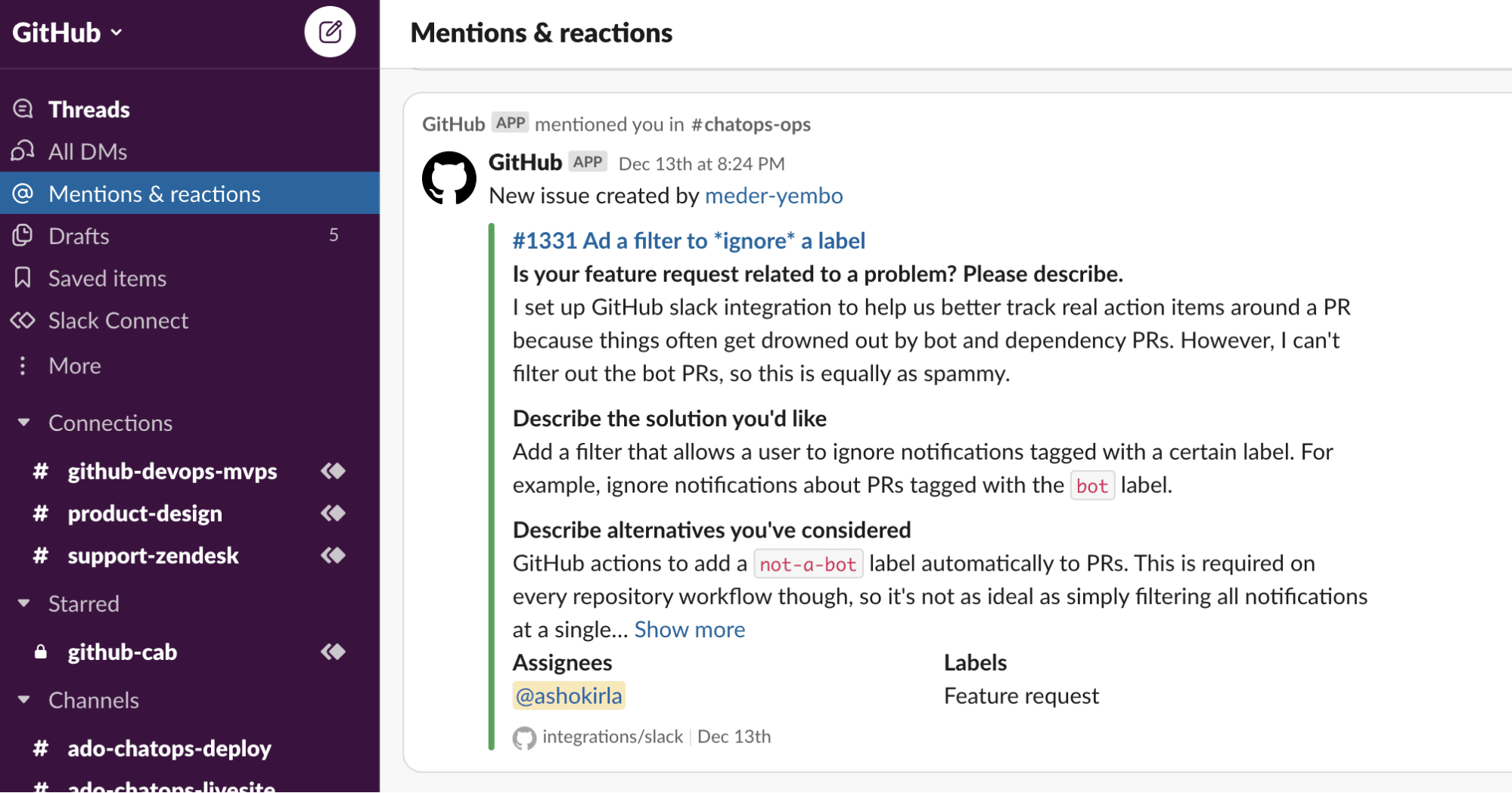
To be able to send messages in Slack, a software system must integrate with Slack’s API. The resulting integration will allow your application to send Slack messages with helpful information to a Slack channel or a direct message thread. Here’s an example of a Slack message coming from GitHub’s Slack integration:
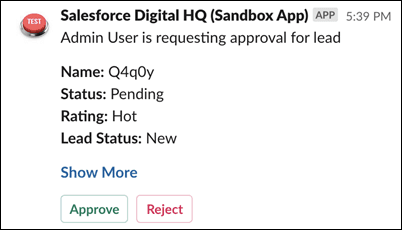
Here’s another example of a Slack integration from Salesforce:
Many organizations don’t quite know what to expect when building an integration for sending messages from their SaaS product to a Slack channel or a direct message. In this post, we offer details for developers who are planning to build a Slack integration for their product.
Technical aspects of a Slack integration
From a technical perspective, Slack offers a fairly conventional HTTP REST API, which will be straightforward to understand for developers who deal with web systems. The functionality made available through the API is extensive, and there are complex parts to it, but most Slack integrations for SaaS will likely only need to send messages. Messages are the core of Slack’s functionality, but we cover other actions that your app might need to take in Slack below.
For sending messages, the Sending Messages guide in the Slack API documentation is a helpful starting point. The steps required to send a message are:
- Create a Slack app.
- Request the correct permissions from the user.
- Compose the message using one of Slack’s message types (or blocks).
- Send the message via an API call.
The main way to send a message is the POST chat.postMessage endpoint, but it’s also possible to use other endpoints with slightly different functionality: the chat.postEphemeral endpoint, for example, sends messages that are only visible temporarily and for a specific user (helpful for things like error messages). It’s also possible, and in some cases easier, to send messages using an incoming webhook.
Beyond sending messages, other functionality that you can implement with Slack’s API includes:
- Slash commands — simple chatbot functionality via commands in Slack DMs or channels
- Editing messages that have already been sent — for example, if information has been updated
- Bots that respond to direct mentions and interactions — for example, Hubot is an implementation of such a bot used by hundreds of teams
- Bots that monitor all message traffic in a specific Slack channel or direct message thread (less common due to how inefficient it is to scan all messages in high-volume Slack channels)
Many software teams choose to develop all functionality relating to Slack or another messaging service either in a dedicated microservice (if you use microservice architecture) or at least in a separate section of your monolithic app. The reason to do this is to avoid tightly coupling the way you think about notifications to Slack’s API — doing so could cause issues when the time comes to add support for other messaging APIs. Another reason to use a separate service or namespace for the Slack integration is to implement message retries and other reliability-focused tweaks. Such code would be too complex to include inside your business logic.
In our experience, there are a few points that developers might not be thinking about when building a Slack integration, and we encourage you to consider them:
- Many of our users run into Slack API rate limits at some point during their usage cycle. So it’s likely that you will need to retry sending a message at some point because of rate limits. Consider including retry functionality from the very beginning.
- Messages sent by integrations might need to include images or other files, so consider how you’ll handle attachments. Slack offers convenient file upload functionality via the API that you can use, and it comes with built-in access controls. But you might prefer to use your own storage. In that case, authenticating requests to files can become painful because you won’t have Slack’s access control mechanism to rely on.
- Make sure that your system is compliant with relevant regulations, in case you’re sending notifications that include PII or other sensitive data. We wrote about this recently in The Developer's Guide to SaaS Compliance — check it out.
User experience of a Slack integration: Our recommendations
When we advise our customers about Slack integrations, most of our advice centers less on the implementation details and more on the product functionality and customer experience side. We see teams who are building Slack notification functionality for their SaaS focus too much on sending Slack messages and not enough on the value those notifications deliver to their users.
In this section, we offer a few recommendations on designing a helpful Slack notification experience.
Use Slack status information for optimal notification experience
Something that we find useful for many customers is keeping track of Slack statuses (the little “active” and ”away” indicators you see on people’s profiles). Consider whether you even want to send Slack notifications if someone is marked as being away in Slack — they might not be on their computer, or they might have intentionally changed their status. Is the notification you’re sending in Slack going to be actionable for someone on their phone? For many SaaS applications, the answer is no.
Our recommendation on handling status is to send Slack notifications when the user is active in Slack, and when they are not active, using a different channel like email or mobile push. We cover the topic of notification routing in Building a Routing and Preferences Service for Notifications.
Create message templates and have a workflow for updating them
In a SaaS product, it’s very unlikely that you’ll need just one type of Slack message. An app can require tens or hundreds of different notifications to be sent via Slack — and managing such large numbers of messages in your codebase can get tricky.
We recommend using templates instead of hard-coding messages in your application. It’s likely that your message templates will change over time, and you might want to add new notification types as you develop your product. By relying more on templates you can simplify the code review process — it’s easier for a peer to review a template change in a separate file than to jump between templates and code.
Another recommendation is to make templates editable outside of the code review process. This capability will enable colleagues outside of the development team to change and tweak notification templates themselves without the need to commit directly to the codebase.
Translation and language preferences
Are you going to only offer notifications in one language, or multiple? If you’re offering multiple languages, how does a user configure their preferences? You might want to add functionality within the Slack app that allows users to configure their language settings, or have a section within your web app (outside of Slack) with notification preferences. In any case, you need to store language preferences for each user and, eventually, have a good way to store translated versions of notification text as well.
We also recommend that you consider the translation workflow for notification text — the translators will likely not be able to navigate your codebase due to limited permissions or lack of technical context. Making it straightforward for the translators to work with your notification text will make it faster to implement new notification languages.
Slack integrations made easier with Courier
In this article, we’ve covered our recommendations for building a successful Slack integration for your SaaS product.
Prefer not to implement the integration yourself?
With Courier, sending a Slack message only requires one API call to Courier’s send endpoint. As part of that endpoint, Courier uses profile information to customize notifications, from individual preferences and personal information to language settings. Courier also offers templates that can be created in a well-designed web user interface (with a translation workflow built-in) and automations to define more advanced notification logic. And, by the way, once you integrate Courier, you can send other message types — like Microsoft Teams, Discord, email, SMS, and more.
If you’re interested in offloading building a strong Slack integration for your SaaS notification system, explore Courier and see if buying might be a better option than building in this case!
Illustration by Rebekka Dunlap
Similar resources

How to Design an In-App Notification Center: UX tips and examples
A design-focused guide to building an in-app notification center people actually use. Covers the UX decisions that matter (entry point, information hierarchy, read state, grouping, empty states, inline actions, real-time, accessibility), then shows three ways to execute in Courier Inbox: brand-match with a theme, take over individual pieces with render props, or go fully headless with the `useCourier` hook. Ends with a pre-ship checklist.

The Future-Proof Multichannel Notification System: Built for Humans and AI Agents
Multichannel delivery is now table stakes. In an AI world, future-proof means a notification system both your team and AI agents can build and run.
Design Studio + Journeys: The Engineering Integration Guide
This is the engineering guide for setting up Design Studio and Journeys. When you move notification logic to Courier, your architecture shifts from a push model to an event model. Your backend stops rendering templates and managing provider APIs directly, and starts emitting events. This guide covers both integration paths (direct API and Segment), how to structure the data object so PMs can build without asking for backend changes, error handling and idempotency, how to use test environments safely, and the specific code you can delete from your repo once it's running.