Courier + Segment: A Guide to Event-Driven Messaging
Kyle Seyler
August 04, 2025
Courier + Segment: A Guide to Event-Driven Messaging
Courier's integration with Segment lets you move beyond passive data collection into real-time orchestration. This post walks through how the two systems connect, what you can build, and how to implement a notification strategy using behavioral data and engagement feedback. We’ll focus on the technical mechanics, implementation and examples to guide you.
TL;DR
- Courier + Segment is a two-way integration: Segment pushes behavioral events to Courier; Courier sends engagement data back.
- You can trigger messages and create users in Courier from any Segment
track,identify, orgroupevent. - Courier logs push
sent,delivered,opened,clicked,undeliverableevents back into Segment, enriching user profiles. - Notifications should feel native to your product with sequences and multi-channel routing that are a reaction to real-time product events.
- Read more about configuring Courier as a Segment integration here: Courier + Segment Integration Docs
Why Two-Way Integration Matters
In most event-based systems, data flows in a single direction. They capture a behavior or fire an event, trigger an output, and stop there. But this linear model leaves valuable opportunities untapped. Without insight into what happens after a message is sent, teams lack the data for their next iteration. For anything at scale, from onboarding to alerts to growth campaigns, the missing piece is feedback. Without it, communication stays static when it could be adaptive.
That’s where the Courier + Segment integration becomes significantly more powerful than most. It’s not just a mechanism for triggering notifications from behavior. It’s a bi-directional flow that allows Segment to not only push user events into Courier but also receive message outcome data back from Courier. This feedback loop lets your messaging logic evolve, informed by the messages that actually work. In summary:
- Real-time behavioral data triggers messaging.
- Messaging outcomes feed back into your analytics stack.
- Future iterations or subsequent steps in the user journey are better informed
How to Set Up the Two-Way Integration
Setting up Courier and Segment together isn’t complicated, but doing it right ensures your events flow cleanly in both directions. Here’s a quick setup guide to get you started:
Step 1: Courier as a Destination in Segment
- Go to Segment > Catalog > Courier
- Configure Courier with your API key
- Enable
track, group,andidentifyevents Map traits like
email,nameandphoneto Courier contact fieldsStep 2: Courier as a Source in Segment
- In Courier, enable Segment export
- Add your Segment write key
Select which Courier events to export (e.g.,
Opened,Clicked,Delivered)Step 3: Test the Integration
- Fire a test
trackevent from your app or Segment debugger - Trigger a Courier workflow
- Open the test message
- Confirm that
Notification Openedshows up in the Segment debugger
Sending Data from Segment to Courier
“What product actions trigger a new message?”
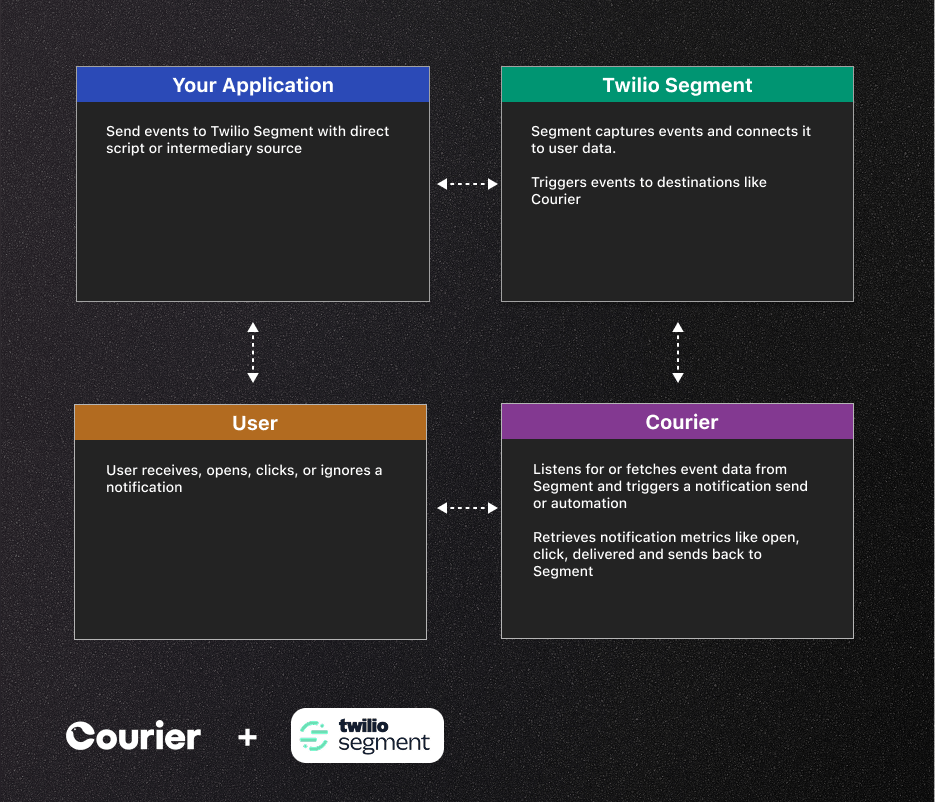
Segment functions as an event manager and customer data bus for modern product development. It looks for events to couple with a user: who did what, when, and in which context. Courier listens to this stream of structured events and turns them into targeted messages sent through the appropriate channels based on predefined logic and user preferences.
When Segment sends a track event like Trial Started or New Service Added, Courier catches that event and evaluates whether it matches any configured triggers in your notification workflows. If it does, Courier kicks off a workflow that can either send a message immediately or follow a multi-step automation (timed delays, conditional logic, or channel escalation).
What makes this effective isn’t just the triggering. It’s the way Courier uses user traits from Segment like service provided, plan type, or first name to populate and personalize the message. Teams don’t need to hand-wire templates for each use case. Courier dynamically maps these traits and injects them into your message without needing extra code.
Triggering a Notification from a Track Event
Copied!
analytics.track('Service Added', {messageId: "list-of-services-014",timestamp: "2024-07-07T08:41:59.410Z",type: "track",email: "kyle@example.org",projectId: "4GgKeBoVJkT9EZL4vAmduv",properties: {property1: 1,property2: "test",property3: true},userId: "kyle-cqw3gr",event: "UserJoined"})
Sending Engagement Data Back to Segment
"How do we know if our notifications worked?"
Sending messages without analyzing outcomes leaves teams with limited visibility into notification effectiveness. This is where the second half of this integration (sending message events from Courier back to Segment) creates significant opportunity. It allows teams to close the loop on their messaging strategy and quickly iterate.
When a user receives a notification from Courier, several actions are tracked. Courier tracks whether the message was delivered, opened, clicked, or ignored. Courier sends these outcomes into Segment as standard track events like Message Sent, Message Opened, Message Clicked, and Message Delivered. It also tracks when users match or unmatch an audience. These events help you keep your customer profiles and audience membership up to date so you can act on notification performance in real time.
Copied!
analytics.track('Message Opened', { messageId: 'segment-msg-onboarding-001', timestamp: '2024-07-07T08:41:59.410Z', email: 'kyle@example.org', template: 'welcome-series-a', userId: 'kyle-cqw3gr', event: 'Message Opened'});
With Courier sending outcomes back, Segment becomes a tool for notification telemetry.
What You Can Do With Triggered Events in Courier
Once Courier receives an event from Segment, it can do far more than just send a single message. Events can trigger powerful workflows that let you coordinate communication across channels, handle fallback logic, and personalize based on user traits.
Courier pulls in track, identify, or group events from Segment to manage audience segments, users and their traits, or product actions. From there, there are several tactics product teams can deploy:
- Create/update users: Using the identify event, Courier can use a recurring automation to create new users in the system or update their details.
- Multichannel routing: Send through the right channel based on user preferences, channel availability, or message priority. Email, SMS, push, or in-app, Courier makes it easy to configure and maintain routing logic.
- Send to Inbox: If you're using Courier's Inbox component, you can store messages directly inside your app as part of a consolidated history, reducing notification fatigue from persistent one-off deliveries.
- Multistep automation: Trigger time delays, conditional branches, API fetches, or follow-ups based on user behavior or previous message results. Teams can deploy this with a simple drag-and-drop editor and without creating code.
All of this is possible with minimal config. You define the logic in Courier or API, and Segment handles the behavioral data pipeline.
Use Case: Reengaging Inactive Users
Let’s walk through a use case we see across verticals: retention. A user signs up, maybe visits your product a few times, but never gets activated as a regular user.
Segment detects no Feature Used events, so it emits a Feature Not Used track call. Courier picks it up and triggers a multi-step workflow. First, it sends an onboarding email personalized with the user's first name and plan level. If unopened after 24 hours, Courier falls back to SMS. If that's ignored too, Courier emits an opened event as 'false' back to Segment. Now you can enroll the user into a more targeted multi-channel campaign, enroll the user in a human-in-the-loop sequence, or suppress a channel.
Developer Resources
🧾 Courier Docs: Segment Integration
🔍 Segment Docs: Courier Destination
📚 API Reference: Courier APIs
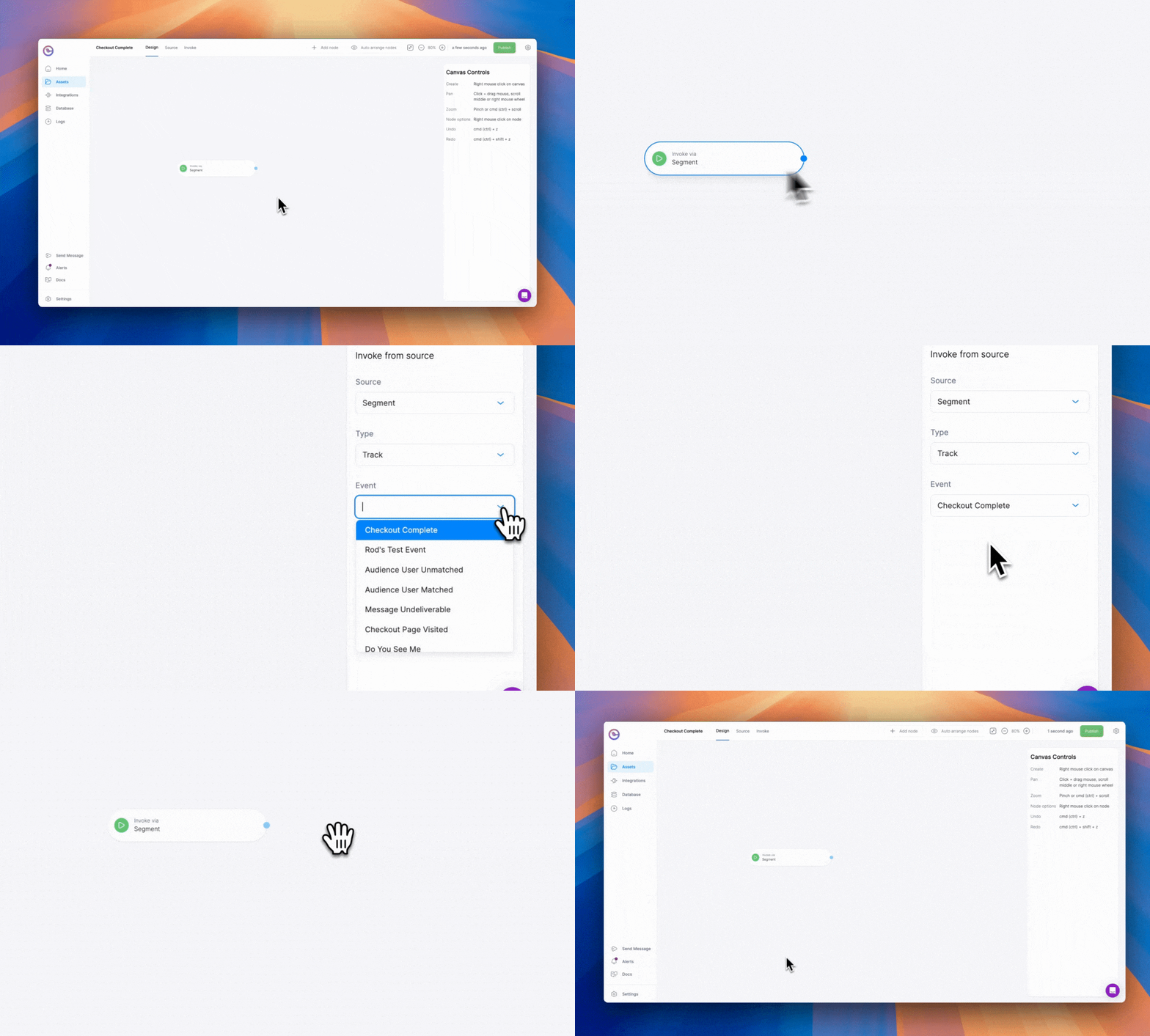
🔧 Automation API: Invoke Templates
Why This Partnership Makes Sense
Courier and Segment complement each other in all the right ways. Segment is built for collecting clean, structured user data from anywhere in your stack. Courier is built for acting on that data in real time, across channels, with smart delivery logic and outcome tracking.
But the integration becomes even more valuable if you're already working in the Twilio ecosystem. Courier supports Twilio SMS, Twilio Notify (for push), and SendGrid (for email) as first-class providers. That means you can execute delivery through infrastructure you already trust, without having to reinvent your stack. You keep the power of Twilio's deliverability and scale, but layer on Courier's orchestration and logic to move faster and adapt more intelligently.
Together, Courier and Segment give teams an event-driven messaging architecture that is responsive, measurable, and extensible. You don’t just get notifications. You get a system that sees, responds, and learns.
Similar resources
Human-in-the-loop for AI payment agents: building approval notifications that work
AI agents need human approval before taking consequential actions: financial commitments, irreversible changes, decisions that affect other people. This post covers how to design those checkpoints and build the notification infrastructure: multi-channel delivery, live context, escalation, and a back-and-forth question loop between reviewers and the agent.
By Eric Lee
May 26, 2026
AI Tools for Product Managers: The Modern PM Stack
The modern PM stack runs on AI at every step: Cursor and Claude Code for build, Pencil and Claude Design for prototyping, Courier for notifications and agent communication, Segment for routing product events and engagement data, PostHog for analytics and LLM evals, and a knowledge system like Notion for shared memory across humans and agents.
By Kyle Seyler
April 28, 2026
Throttling notifications across product, transactional, and marketing streams
A notification throttle that drops every event over a limit works fine for marketing nurtures and fails for product notifications, because product events carry context users actually need. The fix is pairing throttling with auto-batch: overflow events feed a batch node that rolls them up into a single digest, optionally rewritten by an AI node that prioritizes and summarizes the contents. This guide covers per-stream throttle setups for transactional, product, and marketing flows, and how the Courier Journeys AI node and fetch-data node fit into the pattern.
By Kyle Seyler
April 16, 2026
© 2026 Courier. All rights reserved.