Experiments: A/B test your messages inside Journeys
 Thomas SchiavoneJuly 09, 2026
Stop guessing which subject line, copy, or layout works. Test them on live traffic, right inside your journey.
Today we're adding Experiments to Journeys: A/B testing built into your messaging. Put up to ten variants of a message on a single send, watch how each performs on real traffic, and promote the one you want.
Testing a message used to mean a separate tool, or building the plumbing yourself: consistent bucketing, sticky assignments, per-variant analytics stitched back together. Now it's part of the send node you already have.
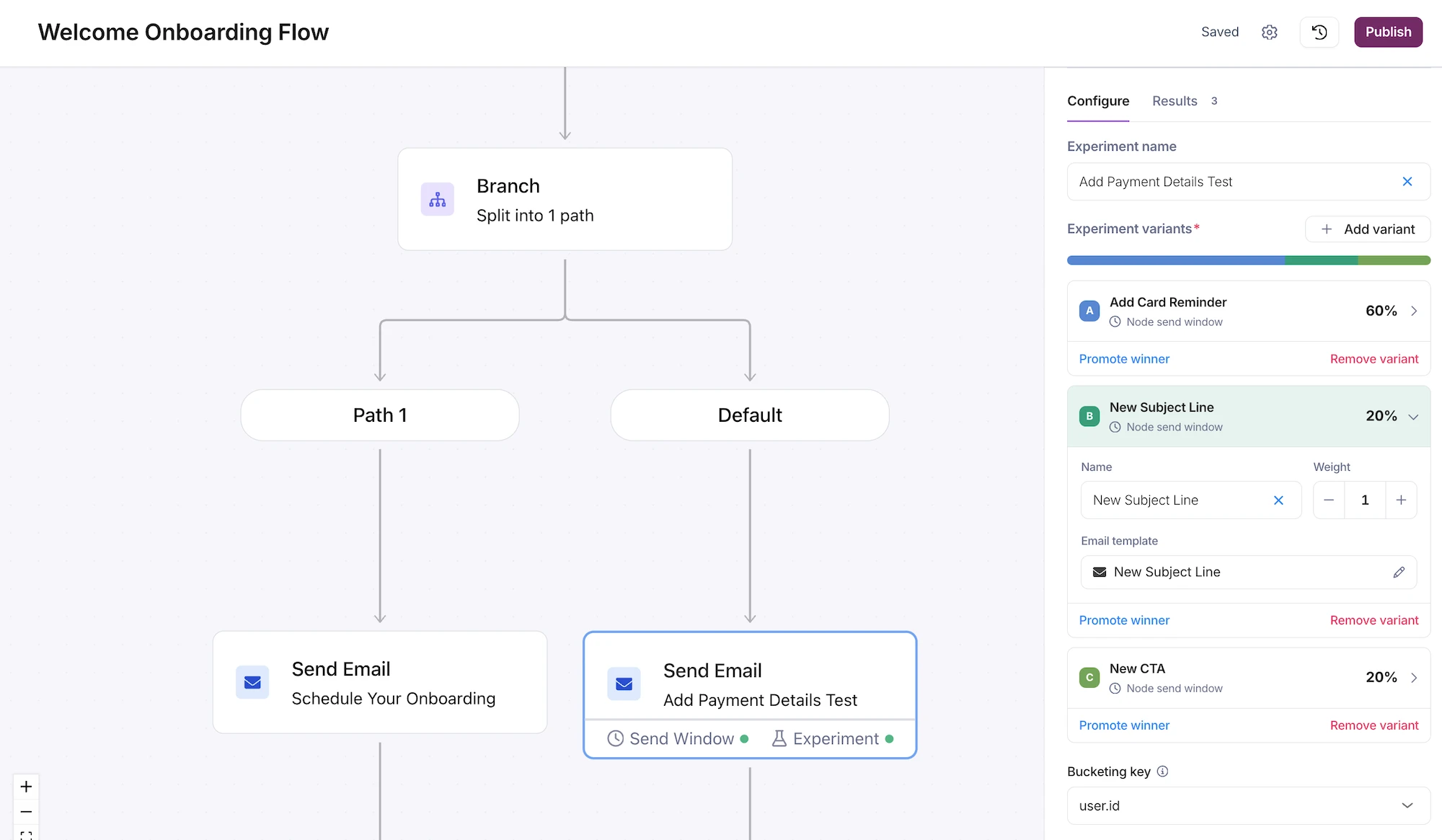
What Experiments gives you
The classic A/B test is the simplest case, but you're not limited to two. Add an experiment to a send node in place of its single template. Courier assigns each recipient a variant, splits traffic by weight, and tracks how each performs.
Variants are full templates
Each variant is a full journey template, so anything you can change in a template can differ between variants: subject line, body copy, layout, call to action, even channel-specific content. Run 2 to 10 variants on a single send and edit each one inline, the same way you edit any template.
Bucketing that stays put
You pick a bucketing key, a value from the invocation like user.id or data.account_id, and Courier hashes it to assign each recipient to a variant. The assignment is deterministic and sticky: the same user always lands in the same variant, and stays there across sends even as you adjust weights. Change a variant's weight, template, or copy and nobody gets reshuffled. Add or remove a variant, or change the key, and the experiment starts fresh.
Weights you can dial
Weights are relative, not percentages you have to balance. Give three variants 6, 3, and 1 and traffic splits 60/30/10. Set a variant to 0 to pause it without deleting it. That makes gradual rollout simple: start a new template at a low weight, watch it, and turn it up as you gain confidence.
Metrics where your journey already lives
Every variant tracks sent, delivered, opened, clicked, and error counts. The Results and Metrics views break the numbers down per variant, next to the rest of your journey's analytics, so you compare variants without exporting anything or leaving the editor.
What you can build
- Subject-line tests. Run two or three subject lines against the same body and promote the one with the best open rate.
- Onboarding copy tests. Try a short welcome against a longer, more detailed one and see which drives more activation clicks.
- Gradual rollouts. Ship a redesigned receipt to a sliver of traffic, confirm it renders and performs, then raise its weight until it's taking everything.
- CTA tests. Compare "Start your trial" against "See it in action" on the same email, no application code involved.
Each of these normally means a separate testing tool and a pile of glue code. Here they're a few variants on a node you already have.
Build it in the UI, in code, or with an agent
Everything you set up in the visual editor is available through the Journeys API, experiments included. An experiment is just part of the journey definition: in place of message.template, a send node carries an experiment object.
{"type": "send","message": {},"experiment": {"bucketingKey": "user.id","variants": [{ "id": "control", "weight": 6, "templateId": "ntf_control" },{ "id": "short", "weight": 3, "templateId": "ntf_short" },{ "id": "emoji", "weight": 1, "templateId": "ntf_emoji" }]}}
Because it's all API-driven, you don't have to write that JSON by hand. Courier exposes its full API to AI agents through a hosted MCP server and a CLI. Describe the test in plain language, "run three subject-line variants at 60/30/10, bucketed on user.id," and your agent builds the journey. UI, code, or agent: it's the same journey underneath.
Available now
Experiments are available in Journeys today.
- Open a journey in the Courier app
- Add or select a send node and create an experiment
- Add your variants, set their weights, and publish
Or start with the Experiments docs to see how bucketing, stickiness, and promotion work.
Promotion is always your call. Courier shows you how each variant performs; you decide which one to keep and when to end the test.
Get started: Read the Experiments docs or open Journeys.
Similar resources

Introducing Cross-Device Email Preview: see your email on real devices before you send
Cross-Device Email Preview renders your template on the real clients you pick, from Outlook on Windows to dark mode on iPhone, and returns a screenshot of each one. Pick from 96 clients across 21 apps without leaving Design Studio.

New settings page, easier to use, with new background colors
Courier settings has been redesigned. Workspace pages and developer pages are grouped separately, every page says what it's for, and the app now comes in light or dark with nine background colors.

Broadcasts: send one-time messages to your users, right from Courier
Broadcasts lets you send a one-time message to a group of your users, now or on a schedule, without leaving Courier.