

API Invoke
The schema you put on an API Invoke trigger is a contract between your application and Courier, but it’s advisory rather than enforced. Courier does not reject invocations that omit schema fields. If your payload is missing a field that a node references, the journey proceeds until it reaches that node and then fails there. An accurate schema keeps things predictable and makes building in the editor much faster.Define a Schema
Add schema fields in the trigger panel. Each field has a name and a type.
Schema fields propagate as variables throughout the journey. Any downstream node (send, branch, fetch, throttle) references them as
data.<field_name>, so a field named order_total is data.order_total.

API trigger with four schema fields defined: order_id (String), order_total (Number), is_first_order (Boolean), order_date (Datetime)
Invoke via API
Send a POST request to start the journey for a user. Endpoint:POST /journeys/{journeyId}/invoke
The request body accepts three fields. You must provide either user_id or a profile with contact information (like an email address); data is always optional.
runId you can use to track the journey execution in Run Inspection.
Invoke with Profile Only
If you don’t have a stored Courier user, you can invoke with just aprofile containing contact information. Courier will use the profile data to deliver messages without requiring a user ID.
Profile Enrichment
When you invoke a journey with auser_id, Courier loads the user’s stored profile and merges it with any profile data you include in the request. Request fields override stored fields with the same key; stored fields not present in the request are preserved.
Tenant-Scoped Profiles
If your application uses tenants, include the tenant ID in the profile context. Courier will load the user’s tenant-scoped profile data. You can reference tenant properties from any node in the journey. A common use is per-customer delivery settings, like the channel and credentials a send node should use for that tenant.cURL Preview
The journey editor writes the request for you. Click Show next to Invoke cURL in the trigger configuration panel to get the command with your journey ID and schema fields already filled in.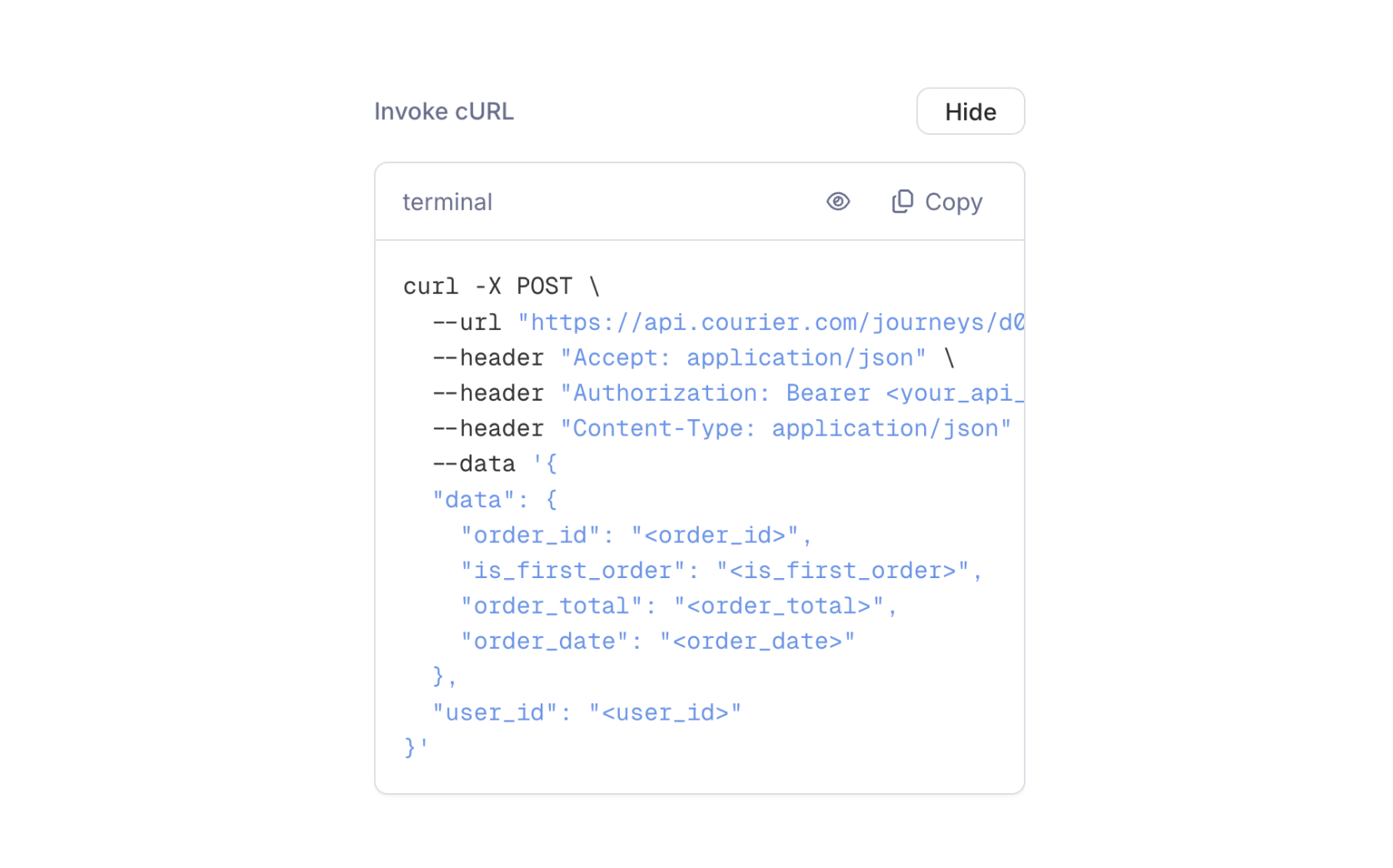
The Invoke cURL panel, with the journey ID and schema fields pre-filled as placeholders
Error Handling
Webhook
The Webhook trigger listens on an inbound webhook, so register that webhook and send it some real traffic before you build the journey. You select it by name in the trigger panel, and the editor learns the payload shape from events it has already received.Every payload needs a
userId that matches a Courier user. Courier resolves the recipient from it, and a run can’t start without one.Configure the Trigger
The Event dropdown lists event names Courier has already received on that source, so send a few real events through the webhook before you configure the trigger. You can also type an event name that hasn’t arrived yet. Changing the Source clears the Event.
Available Data
Courier parses the JSON body and makes its fields available to downstream nodes asdata.<field>. The editor infers the field list from payloads it has already received on that source, flattened up to four levels deep; anything nested deeper appears as a single object field.
If you haven’t narrowed to a single event, the editor unions fields across every event recorded on that source, so a suggested field may not be present on every payload. Selecting an Event gives you a more accurate field list.
Twilio Segment
The Twilio Segment trigger connects a journey to your existing Twilio Segment event stream, so there’s no new integration code to write. Segment acts as the event bus: the same events you push to analytics, your CRM, and your marketing tools can start journeys in Courier.The
userId on a Twilio Segment track event must be a valid Courier Profile ID, or the journey won’t start.Configure the Trigger
The Twilio Segment trigger takes one required field, Source Event. The dropdown lists the events Courier has already received from your Segment workspace, so an event has to have reached Courier at least once before it appears.
Twilio Segment trigger configuration with a Source Event dropdown showing available events from your Segment workspace
Supported Event Types
Available Data
Courier flattens the Segment event into variables for downstream nodes. Like the Webhook trigger, the editor infers the field list from events it has already received, so the hints get better once real traffic arrives.Traits are the exception. They’re exposed under
user, not under data.Audience
The Audience trigger fires on membership, not on an event you send. Audiences are dynamic, and Courier maintains membership as profiles change, so a user who newly matches the audience filter enters the journey on their own. An audience of users whoseplan is trial and whose trial_ends_at falls within seven days drives a trial-expiry sequence, with users entering as their profiles change.
Configure the Trigger
Select an audience in the trigger panel. The panel shows that audience’s current member count so you can confirm you picked the right one.Available Data
The Audience trigger exposes the selected audience’s ID asdata.audience_id to every downstream node. No other audience metadata is available on the trigger context.
Trigger Conditions
Every trigger type supports optional conditions, which narrow what actually starts a journey. Conditions are evaluated before the run begins: if any condition fails, an API invocation is rejected with422, and a webhook, Twilio Segment, or audience event is ignored.
Conditions use the same operators available in branch nodes: equals, not equals, greater than, less than, contains, and more. You can reference any field in the trigger’s data context. A journey on Twilio Segment Track events could filter for data.event equals Order Completed and data.properties.total greater than 100 so it only runs for high-value orders.
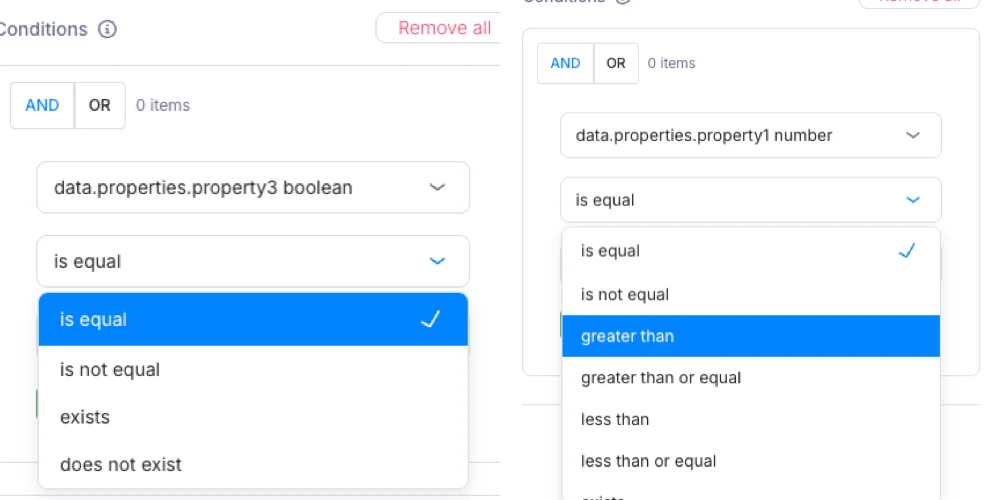
Journeys will automatically detect your data type and adjust the operator accordingly.