Chapter 3
Notification Center Best Practices
How to design notifications users actually read: content, format, batching, preferences, performance, security, and the different constraints on web and mobile apps.
Last updated: July 2026
Key takeaways
- Users scan notifications, they don't read them. Front-load the who, what, and why so a notification makes sense in about two seconds.
- Match the format to the urgency: inbox for things worth keeping, toast for confirmations, badge for glanceable counts, push for genuinely urgent alerts.
- Batching is the highest-impact fix for notification fatigue. One "10 new comments" beats 10 separate notifications with identical information value.
- Give users real control: per-type and per-channel preferences, quiet hours, and an easy opt-out that isn't "delete your account."
- Notification content can be sensitive. Secure the connection (WSS), authenticate every request, isolate user data server-side, and plan for GDPR, CCPA, and HIPAA.
- Web and mobile apps enforce these under different limits. On web, watch tab focus and ask for browser-push permission in context. On mobile, respect the OS push-permission prompt, Do Not Disturb, and battery, and deep-link into the right screen.
Designing effective notifications
Users don't read notifications carefully. They scan them, usually while doing something else, and make a split-second call about whether something matters. Front-loading the important information and cutting the rest makes that scan easier. (For the visual side of this, the row anatomy, the unread signal, and empty and error states, see our guide to designing an in-app notification center.)

A good notification tells you who, what, and why in about two seconds. "Sarah approved your design" says Sarah is the actor, approval is the action, and your design is the subject. "Homepage mockups for Project Alpha are ready for development" adds the context that helps you understand what to do next. "View design" gives you the obvious action.
Compare that to "Update" as a title and "There has been a change in the status of one of your items" as the body. You learned nothing except that you have to click through to find out what happened, and that's the kind of notification that trains users to ignore your system.
Be specific
Instead of "payment processed," say "Visa ending in 4242 charged $49.99." Instead of "new comment," say "Sarah commented on Q4 Planning." Instead of "action required," say "review contract for new client Acme Corp." You already have this data, you're only choosing whether to include it.
| Do | Instead of |
|---|---|
| "Sarah approved your design" | "Update" |
| "Visa ending in 4242 charged $49.99" | "Payment processed" |
| "10 new comments on Q4 Roadmap" | 10 separate "New comment" notifications |
| Schedule digests for business hours in the recipient's time zone | Sending at 3am local time |
| Per-category opt-out controls | All-or-nothing notification settings |
Match the format to the urgency
The format should match the urgency and the action required. Treating every notification the same is how a system gets ignored.
Inbox messages work best for updates users might want to reference later: non-urgent activity, status changes with lasting value, and anything worth keeping as a record. They're persistent and browsable.
Toast notifications are for success or failure confirmations right after an action, time-sensitive alerts that need attention now, and brief information that loses relevance quickly. They disappear on their own, which signals the information is ephemeral.
Badges are for glanceable information that doesn't interrupt. The number on the bell tells users something is waiting without forcing them to deal with it.
Push notifications are the most interruptive, so use them sparingly: critical alerts when users are outside your app, true emergencies, and carefully considered re-engagement.
Use the loudest format for everything and users learn your notifications are always crying wolf. Match format to urgency, and they'll trust that when you do send something urgent, it's actually urgent.
User experience principles
Every notification competes with everything else in a user's life: work, family, friends, other apps, the physical world. Attention is scarce. Ask yourself, "would I want to be interrupted for this?" If the answer is no, don't send it.
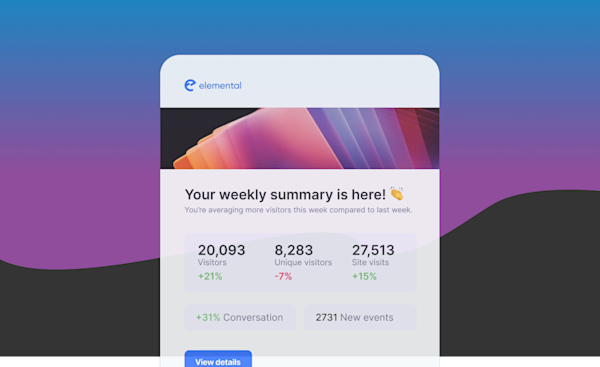
If someone is getting notifications every few minutes, something is wrong with your logic. Either you're notifying about things that don't matter, you're not batching similar updates, or you're not respecting preferences. Users who feel bombarded turn everything off.
Batching
If someone gets 10 comments on a thread in an hour, send one notification that says "10 new comments" instead of 10 separate ones. The information value is identical and the interruption cost is a tenth.
Courier's digests handle this through workflow configuration. You define what counts as similar, set a time window for grouping, choose a template for the combined notification, and specify when batches go out. The system can also skip the digest if the user has already seen the updates.
User control
Users need real control over their notification experience. At a minimum:
- Clear preferences for each notification type
- Channel selection per notification category
- An easy way to opt out without deleting their account
- Respect for quiet hours and do-not-disturb settings
Courier's preference management handles this through a hosted preference center. Users set preferences at different levels of granularity, and the Courier API enforces them automatically.
Timing
Good timing takes context. A "complete your profile" prompt while someone is racing to finish a time-sensitive task isn't helpful; the same prompt next time they log in is.
Use workflows to add delays and conditional logic that respect user state. Send onboarding prompts after a successful first action, not in the middle of one. Schedule digests for when users typically check in. Respect time zones so you're not waking someone at 3am.
Keeping the inbox manageable
An inbox with 500 unread notifications is useless. Help users manage volume:
- Auto-archive read notifications after a reasonable period, like 30 days
- Set expiration dates on time-sensitive notifications
- Provide "mark all as read" for when someone falls behind
- Make archiving and deletion trivially easy
Web and mobile apps: different constraints
These practices hold everywhere, but a web app and a mobile app enforce them under different limits.
Web apps
- Users often have the tab open, so a real-time toast lands while they're looking. A toast in a background tab is missed, so keep anything critical in the inbox where it persists.
- There's no OS notification budget, but browser push, for when the tab is closed, needs explicit permission. Ask in context, after the user has seen why it's useful, not on first load.
- You have room to work with: a full-page inbox and a bell dropdown both fit. Match the surface to how often users check.
Mobile apps
- The OS restricts background execution, so you can't rely on an open connection to reach a user who left the app. Use push through APNs or FCM to bring them back, and let the in-app inbox sync on foreground.
- Push permission is a one-time, high-stakes prompt, especially on iOS. Ask after the user hits a moment where notifications clearly help, not at launch, or you get a no you can't undo.
- Respect OS-level Do Not Disturb and Focus modes and the user's system notification settings. Fighting them gets your app muted or uninstalled.
- Watch battery and data. Aggressive reconnection or polling drains both; the SDK's managed connection handles this, but a custom build has to.
- Deep-link every notification to the exact screen it's about, not just the app. On a small screen, a short title that leads with the action matters even more than on web.
Common pitfalls
Over-notification
The usual pattern is notifying for every minor event regardless of importance, not batching similar updates, and treating everything as equally urgent.
The fix takes an honest look at what actually deserves a notification. Does a user need to know immediately that someone liked their post from three weeks ago? Probably not. Do they need to know their payment failed and their account downgrades tomorrow? Definitely. Map your notification types, assign realistic urgency levels, add rate limiting, and use batching for anything non-urgent.
Poor message quality
Generic titles like "Update" or "Document shared" don't give users enough to decide whether something needs attention. "Sarah shared Q4 Budget with you" does. Write content guidelines that spell out the required information for each notification type, review templates regularly, and test every link and action before you ship.
Technical failures
Technical issues create visible problems:
- Poor offline handling. Users miss notifications during connectivity drops, or see duplicates on reconnect.
- Missing error states. Blank screens or infinite spinners.
- Weak WebSocket management. Real-time delivery fails, or excessive reconnection drains battery.
- No cross-device sync. Users see unread notifications on their phone that they already cleared on their laptop.
- Performance problems. The inbox takes seconds to load or scrolls with jank.
Fix these by testing offline scenarios explicitly, handling every error case, monitoring WebSocket health, verifying cross-device sync on real devices, and using pagination plus virtual scrolling for large message counts.
No personalization
Sending identical notifications to every user means power users get overwhelmed while casual users miss what matters. Segment on behavior, preferences, or role and tailor accordingly. Use templates with dynamic data so content adapts to context, pick SDKs that support theming, and test with different user personas.
Performance and scalability
Frontend performance
The in-app inbox needs to stay fast on both web and mobile apps, even when a user has thousands of notifications. Pagination avoids loading everything at once by fetching in reasonable chunks. Virtual scrolling only renders the notifications actually visible, so memory stays constant regardless of count. Lazy-loading images prevents slow initial loads. Optimistic updates make the interface feel instant: a user marks something read, the UI updates immediately, and the request goes out in the background.
With Courier's SDKs most of this is handled for you. The inbox component implements pagination and virtual scrolling, the WebSocket library manages connections with heartbeats, and state management uses optimistic updates by default.
Backend efficiency
Batch API calls when you can. Cache user preferences instead of hitting the database for every notification. Rate-limit per user to prevent runaway loops. Use message queues to buffer spikes. Courier's infrastructure handles this with automatic scaling, built-in queuing, and monitoring.
Real-time at scale
WebSocket connections are stateful and long-lived, so they consume server resources the entire time a user is connected. At 100,000 concurrent users you need real infrastructure: connection pooling, automatic reconnection, offline queuing, heartbeats, and graceful degradation to polling when WebSockets are blocked. Courier's WebSocket infrastructure is built for this, so notifications feel instant without burning resources or draining battery.
Security and privacy
Data protection
Notification content can be extremely sensitive: a healthcare app sending test results, a fintech app showing an account balance, a messaging app previewing a message. That data needs the same protection as the rest of your app.
Secure WebSocket connections over WSS are mandatory, not optional. JWT authentication verifies identity before any notification is delivered. Token expiration keeps old tokens from working forever. Audit logging tracks who accessed what and when.
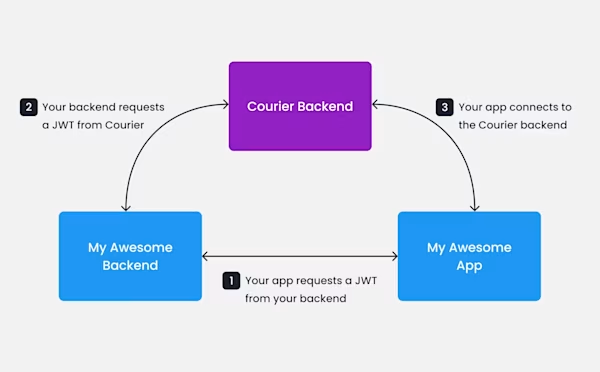
Courier handles authentication and connection security for you. You provide user IDs and signed JWTs, Courier verifies them on the backend, and notifications only flow to authenticated, authorized users.
User data isolation
Users should only ever see their own notifications. Server-side authorization has to verify every request, because you can't trust client-side filtering: a malicious user can modify their client code to request other users' data. User-scoped queries filter by user ID at the database level, and in B2B apps, tenant isolation enforces workspace boundaries. Courier's architecture enforces this automatically: the client requests notifications with an authenticated JWT, and the backend verifies the token, extracts the user ID, and returns only that user's notifications.
Compliance
GDPR requires that users can access their notification data, delete their history on request, export their data in a portable format, give clear consent, and understand what you collect. CCPA requires disclosure of data collection, opt-out rights, and deletion on request. That means APIs for data export, deletion workflows that actually remove notification data, preference management with clear opt-out controls, and audit logs.
Healthcare apps face a stricter bar under HIPAA: notification content must not include protected health information in email or SMS. Trusted Health, which coordinates time-sensitive nursing notifications with thousands of healthcare facilities, routes anything carrying PHI through authenticated in-app channels, so email and SMS carry no protected data. Courier's preference center provides the opt-out controls, and the API supports data export and deletion.
Frequently asked questions
How many notifications is too many?
There's no universal number, but rising unsubscribe rates and users disabling categories are reliable signals that you've crossed the line. Track opt-out rates per notification type. If one category drives most of the unsubscribes, cut its frequency or make it opt-in rather than changing everything at once. Rate limiting in Courier caps notifications per user per time window without touching your application logic.
What should a notification title include?
A title should name the actor (who), the action (what), and the object (what specifically). "Sarah commented on Q4 Roadmap" is complete; "New comment" is not. Users decide whether to read or ignore in seconds, so give them enough to decide without clicking through. When there's a monetary amount, a deadline, or an identity involved, put it in the title. The body is for context and actions.
How do you handle notifications when a user is offline?
Store notifications in a persistent inbox that loads when the user returns, and queue push notifications for delivery when the device reconnects. For time-sensitive alerts, workflows let you configure retry windows and fallback channels. An alert that expires in four hours shouldn't arrive six hours late, so set expiration times and suppress stale alerts rather than delivering them after they've lost relevance.
When should you use a digest instead of individual notifications?
Use a digest when several events share a topic and none of them individually needs immediate action. Comment threads, activity summaries, and daily reports work well batched. Time-sensitive alerts like payment failures, security events, and deployment failures should send individually regardless of volume. Courier digests let you define the window and the merge criteria so the batching logic lives in workflow configuration, not your application code.
How do you keep the notification inbox from becoming overwhelming?
Set automatic archive times for read notifications: 30 to 90 days is common, depending on how long your users reference old alerts. Add expiration dates to time-sensitive items so they don't linger. Make bulk-read and archive actions easy to reach from the main inbox. Users abandon notification systems that become unmanageable, so a navigable inbox matters as much as reliable delivery.
---
Previous chapter
How to Add a Notification Center to Your App
How to add an in-app notification center to a web app or mobile app: the three-layer architecture, then working React, iOS, Android, and React Native setup with the constraints of each.
Next chapter
Build vs Buy a Notification Center
An honest look at building a notification center versus buying one: what building really costs, when it's worth it, and how Courier compares to Novu, MagicBell, Liveblocks, and OneSignal.