Every WhatsApp Business message type and the rules for each
Every WhatsApp Business message type, from templates and buttons to carousels, Flows, and calls, plus the opt-in, limits, and policies that apply to each.
Updated Sep 26, 2026
Last updated: September 2026.
WhatsApp isn't one channel. It's two, and the customer decides which one you're in.
If they messaged you in the last 24 hours, you can send almost anything, with no approval. If they didn't, every message has to be a template Meta approved in advance, and Meta decides whether it counts as marketing.
Key takeaways
- Every WhatsApp Business message is either a template, approved by Meta and sendable any time, or a free-form message, which needs no approval but only works within 24 hours of the customer's last message or call.
- Templates are marketing, utility, or authentication. Anything mixed or unclear counts as marketing.
- Beyond text, you get carousels, limited-time offers, coupon codes, catalogs, payments, reply buttons, lists, location requests, Flows (in-chat forms), and calls.
- Every message is subject to opt-in, messaging limits, quality ratings, and a per-person cap on marketing. WhatsApp doesn't deliver marketing templates to US numbers at all.
- Bots that serve your own business are fine. General-purpose AI assistants aren't.
How business messages work on WhatsApp
The WhatsApp Business Platform, often called the WhatsApp Business API, is how businesses message customers at scale. You can connect to it directly through Meta's Cloud API. It's separate from the WhatsApp Business app, which small businesses run from a phone. Either way, your messages land in the same app people use to talk to their friends and family, which is why Meta is strict about what you send.
Every WhatsApp Business message is one of two kinds: a template or a free-form message.
Templates
A WhatsApp message template is a message you write in advance and get approved by Meta. The wording is fixed, with blanks for the parts that change:
Hi {{first_name}}, your order {{order_number}} has shipped and should arrive {{delivery_date}}.
You fill in the blanks when you send it. Once it's approved, you can send it any time, including as the first message someone ever gets from you.
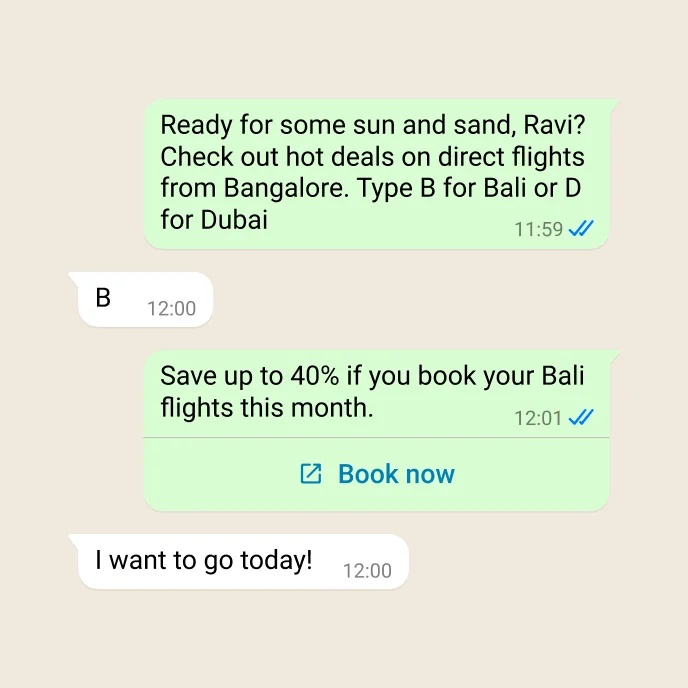
A marketing template.
Free-form messages (session messages)
A free-form message, also called a session message or non-template message, is anything you send without a template: text, photos, documents, voice notes, reply buttons, menus, product carousels, and forms. You write it on the spot, the way a support agent types a reply or a bot answers a question. No approval.
The catch is timing. You can only send one in the 24 hours after the customer last messaged or called you.
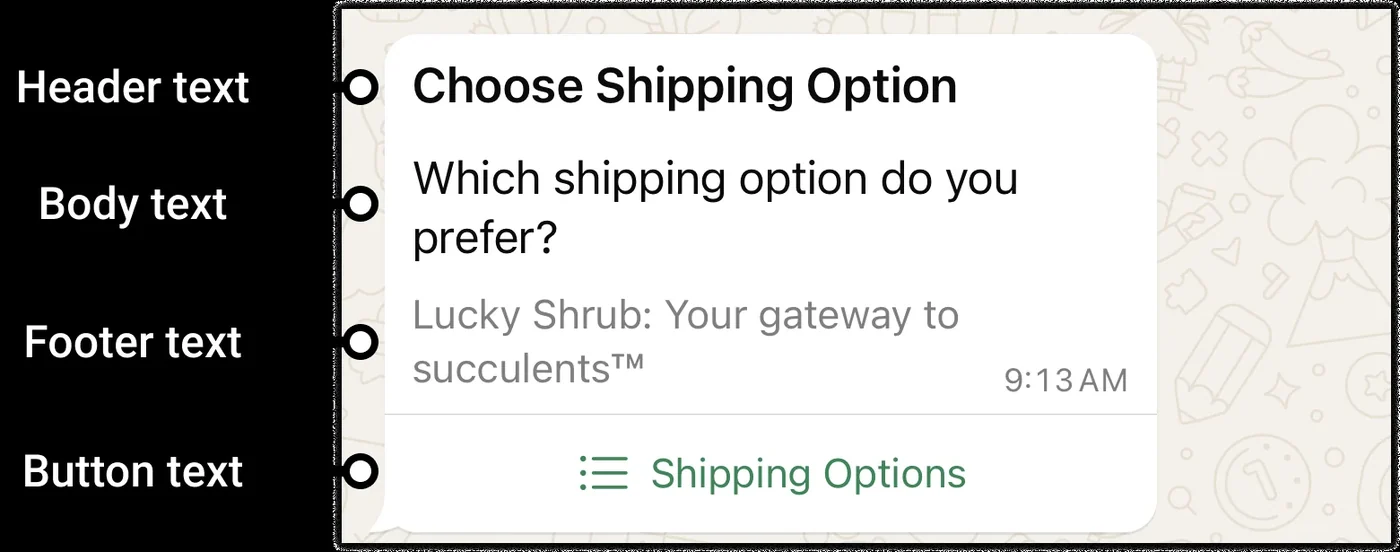
A free-form list message.
How the two fit together
Here's a typical order:
- Maya orders. You send a utility template: "Thanks for order 4417. We'll message you when it ships."
- She replies, "Can I get it faster?" That opens the window.
- You answer free-form with a list of shipping options. She picks one. Each message from her resets the 24 hours.
- Three days later it ships. The window closed long ago, so the update is a template again.
Templates handle everything you start. Free-form handles everything the customer starts. So design your templates to get a reply, because a reply opens the easy channel.
The 24-hour customer service window
The customer service window, often called WhatsApp's 24-hour rule, is the 24 hours after a customer's last message or call. While it's open, you can send any message type, with no template and no approval. Every new message or call from the customer resets it to a full 24 hours. Once it closes, you're back to templates until they get in touch again.
WhatsApp template categories
Every template is marketing, utility, or authentication. The category decides how hard Meta reviews it and which formats it can use.
| Category | What it's for | Examples |
|---|---|---|
| Marketing | Anything that promotes, sells, or re-engages | Product launches, sales, abandoned-cart reminders, app promotion, birthday offers |
| Utility | A follow-up to something the customer did, or an essential alert | Order and delivery updates, account alerts, feedback surveys, fraud alerts, outage notices, product recalls |
| Authentication | One-time passcodes, and nothing else | Sign-up verification, login codes, account recovery |
Meta reviews every template before you can use it, which takes up to 24 hours.
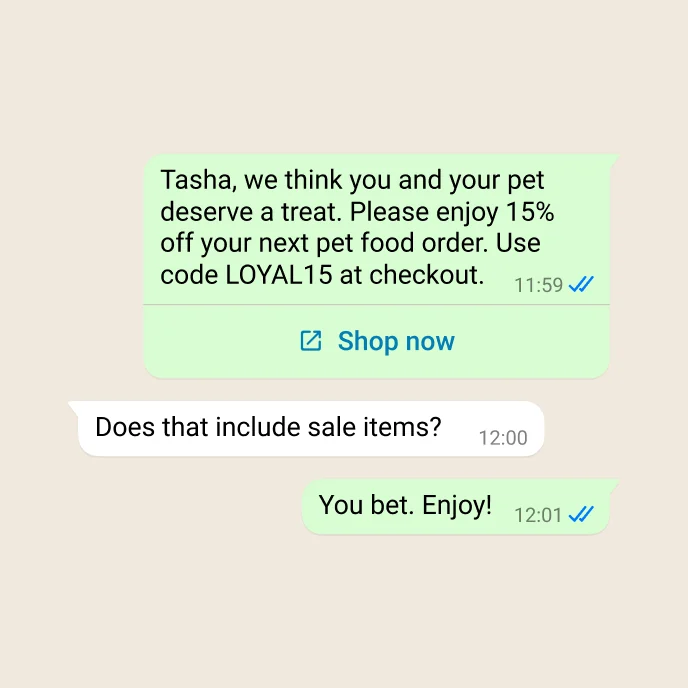
A marketing template: a personal offer with a code and a link.
How Meta tells utility from marketing
Utility has to pass two tests. It can't be promotional, and it has to relate to something specific the customer did, like an order or an account change, or be essential, like a fraud alert.
| Reads as utility | Reads as marketing |
|---|---|
| "Your order is confirmed. We'll let you know once your package is on its way." | "As a thank you for your last order, enjoy 15% off your next one." |
| A delivery update with a tracking link | "You left items in your cart! Don't worry, we saved them." |
| A fraud alert on the customer's account | "Did you know? We installed a new tower in your area." |
- Mixed content is marketing. One promo line in an order update makes the whole template marketing. So does a body that's nothing but "Congratulations!" or a single blank. Cart reminders are marketing even when the customer asked for them.
- Meta changes the category for you. Submit something as utility that reads as marketing and it's approved as marketing. Meta also re-checks approved templates and can move them later.
- Only authentication templates can carry passcodes.
Keep utility templates boring on purpose, and send promotions as their own templates.
What templates can look like
A standard template has up to four parts: an optional header (text, an image, a video, a document, or a map pin), the body, an optional footer line, and buttons. Buttons can send a quick reply, open a web page, start a call, copy a code, or open a form or your catalog.
Mock yours up in the WhatsApp preview generator before you submit it.
Beyond the standard layout, Meta has formats built for specific jobs. Most are marketing-only.
Media card carousel
Your message, then up to 10 cards the customer swipes through, each with an image or video, a short description, and buttons. Link buttons open the browser, which takes the customer out of WhatsApp. Marketing only.
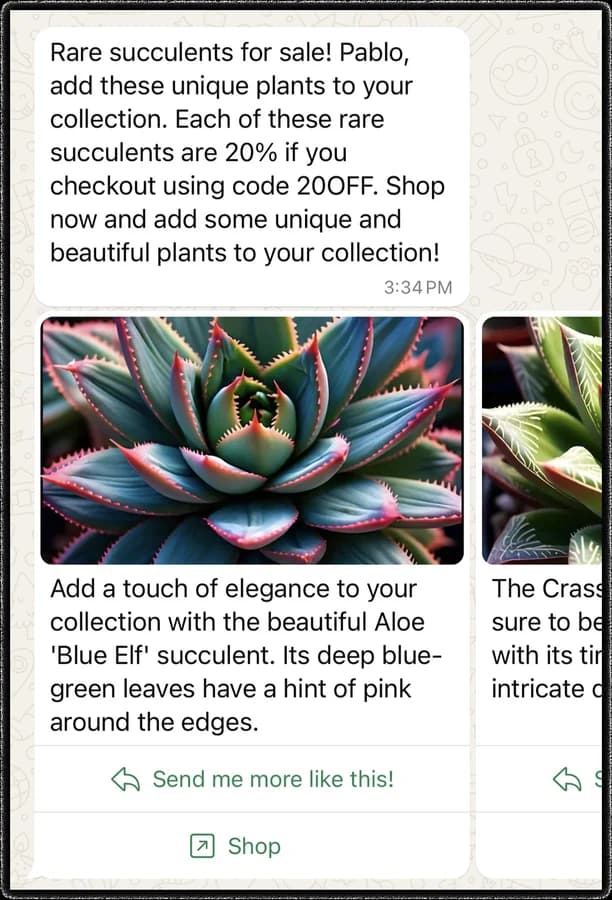
A media card carousel.
Product card carousel
The same swipeable layout, but each card pulls a product's image, name, and price from your catalog. A View button keeps the customer in WhatsApp, where they can add it to a cart and order, and you get the order back as data. Use a link button instead and they leave WhatsApp, and no order comes back. If you have a catalog, the View button is the better choice.
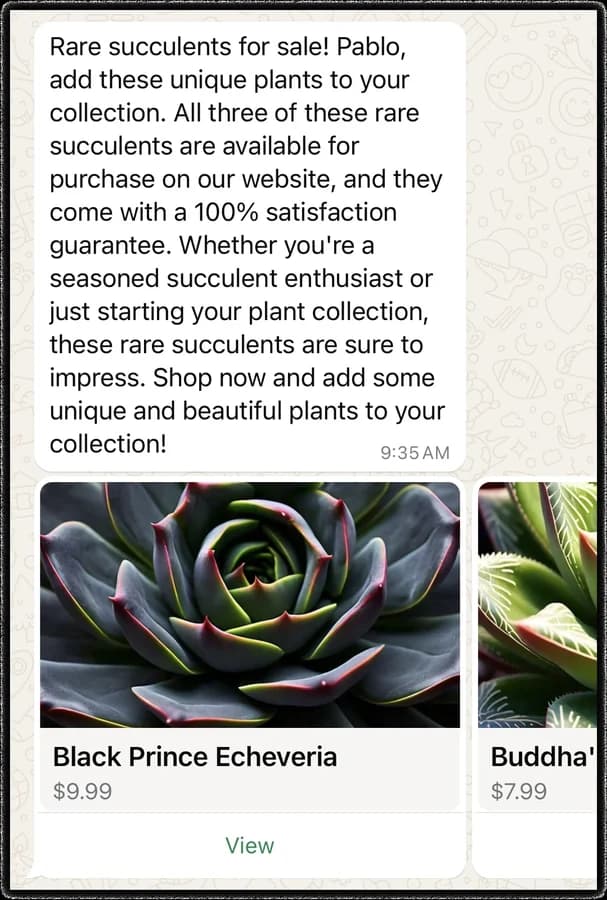
A product card carousel.
Limited-time offer
A marketing template with an expiry countdown and an offer code. On WhatsApp Web and desktop, people don't see the offer, only a note that a message arrived.
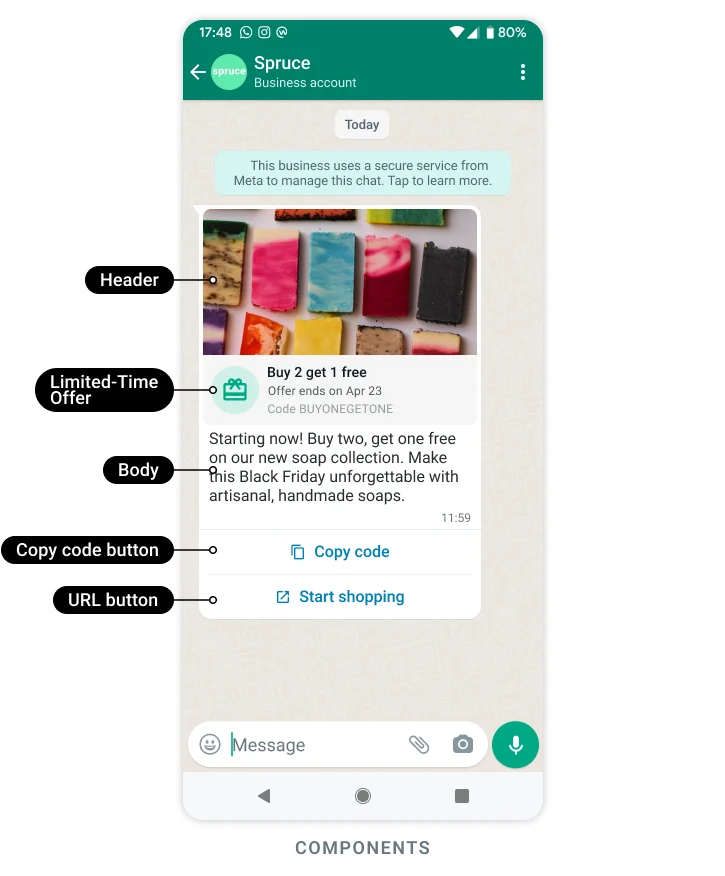
A limited-time offer.
Coupon code
A marketing template with a button that copies a code to the clipboard, ready to paste at checkout. It doesn't work on WhatsApp Web.
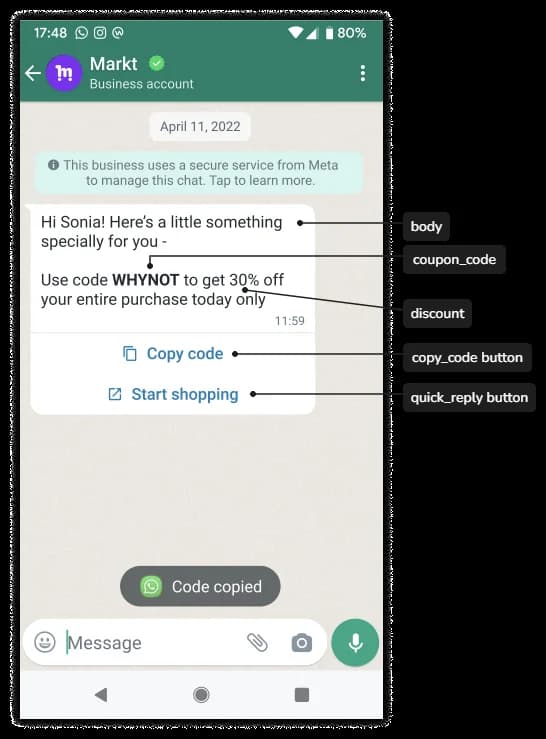
A coupon code template.
Catalog and multi-product templates
A catalog template is a marketing message with a View catalog button that opens your catalog in the chat. A multi-product template shows up to 30 products, grouped into sections, so the customer can build a cart without leaving WhatsApp. Both need a product catalog connected to your WhatsApp account.
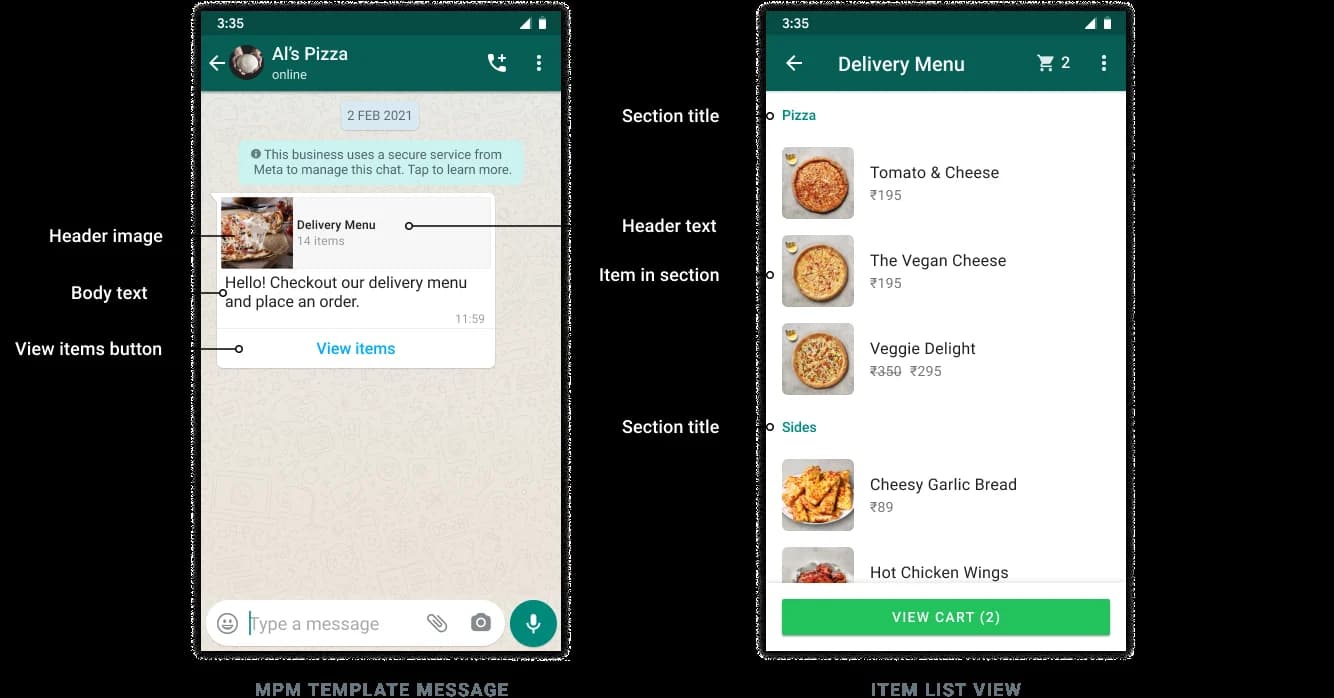
A multi-product template and the list it opens.
Order and payment templates
In Brazil and India, templates can carry an itemized order and let the customer pay without leaving the chat.
| Market | Template | What it does |
|---|---|---|
| Brazil | Order details | Itemized order, total, and payment options. Utility or marketing |
| Brazil | Payment request | Payment buttons for Pix, boleto, or a payment link, no order details needed |
| India | Order details | Itemized order with payment. Utility only |
| India | Order status | Updates an order after the window has closed: processing, shipped, completed, canceled, and so on |
| India | Checkout button | A marketing template showing products with a checkout button |
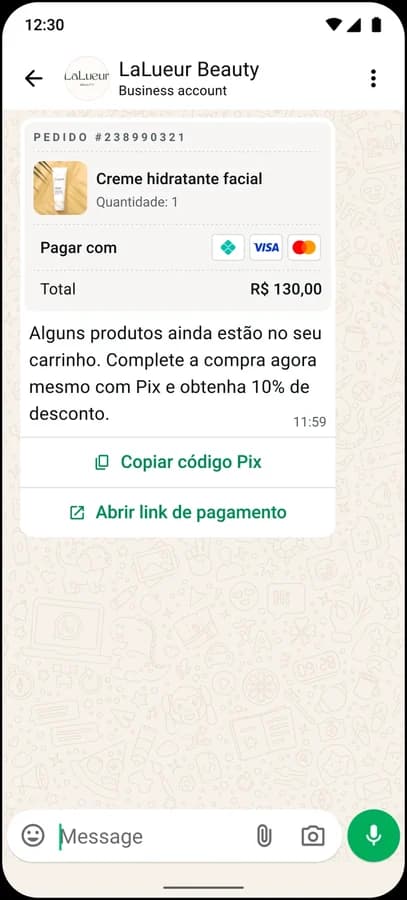
An order details template in Brazil.
Call permission request
A message asking the customer if you can call them on WhatsApp. You need their permission before you call, and you can ask with a marketing or utility template, or free-form inside the window.
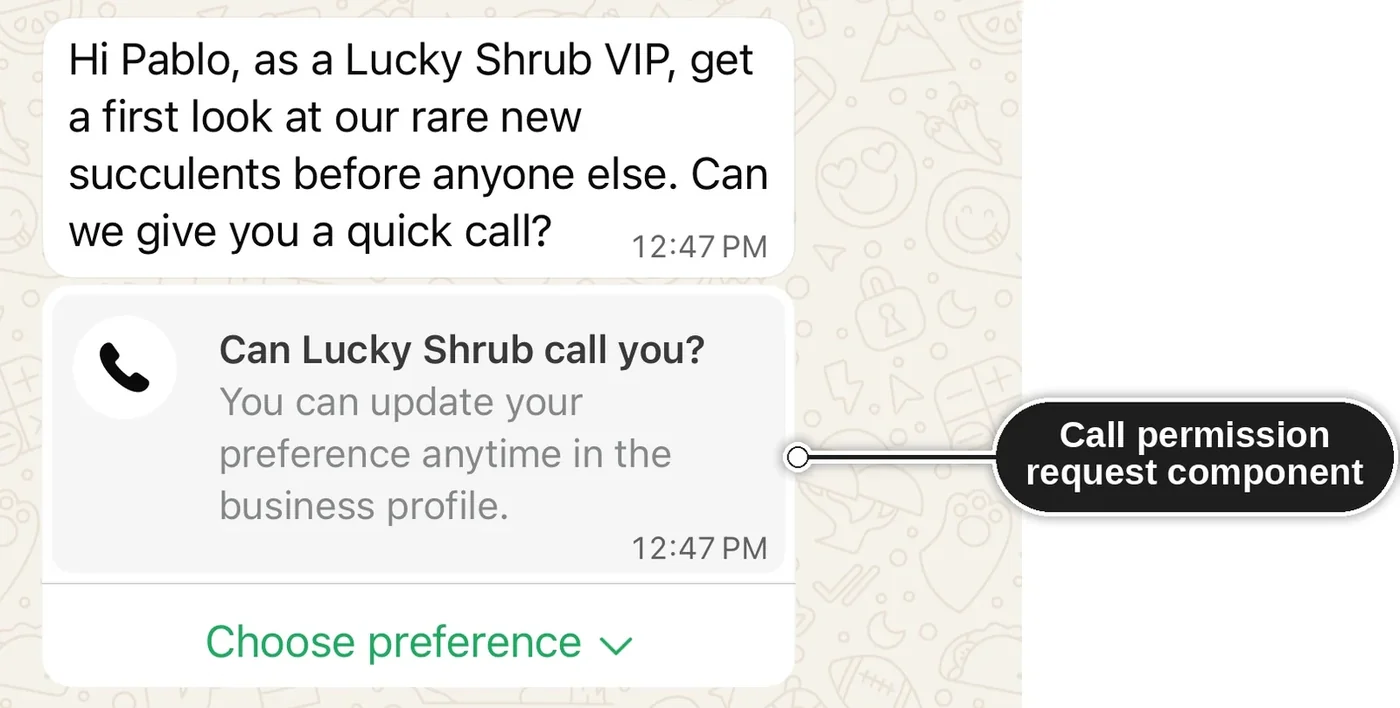
A call permission request.
Authentication templates
Authentication templates have the strictest rules. The wording is fixed: "code is your verification code," plus an optional security warning and expiry note. No links, images, or emojis.
What you choose is how the code gets into your app:
| Button | How it works | Where it works |
|---|---|---|
| Copy code | The customer taps to copy the code, then pastes it | Everywhere |
| One-tap autofill | The customer taps once and the code fills into your app | Android apps set up for it |
| Zero-tap | Your app picks up the code with no tap at all | Android apps set up for it |
On iOS 26 and later, the code also shows up as a keyboard suggestion, with no work on your side.
The code only shows in full on the customer's main phone, and a code that can't be delivered quickly is dropped rather than arriving late.
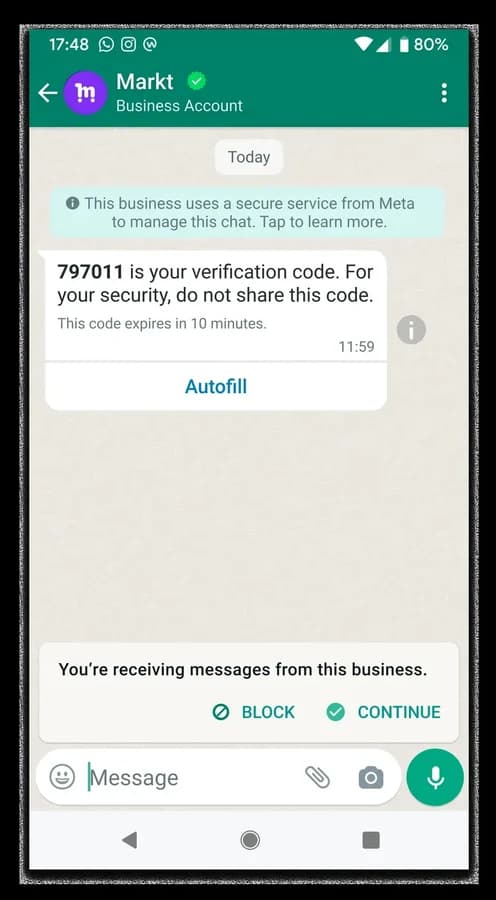
An authentication template with one-tap autofill.
Free-form messages
Inside the window, you can send almost anything without a template. It falls into four groups:
- Everyday messages: text with link previews, photos, videos, voice notes, documents, stickers, a location pin, a contact card, or an emoji reaction.
- Interactive messages: up to three reply buttons, a list that opens a menu, a link button instead of a raw URL, a button that asks for the customer's location, a swipeable carousel, or a button that starts a call. In India, you can also send a delivery address form.
- Shopping messages: one product or a selection from your catalog, a product carousel, or a button that opens the whole catalog. The customer can build a cart and send it to you in the chat.
- Forms: a WhatsApp Flow, covered next.
You can also show typing indicators, mark messages as read, and quote the customer's message in your reply. They make a business chat feel like a person is there.
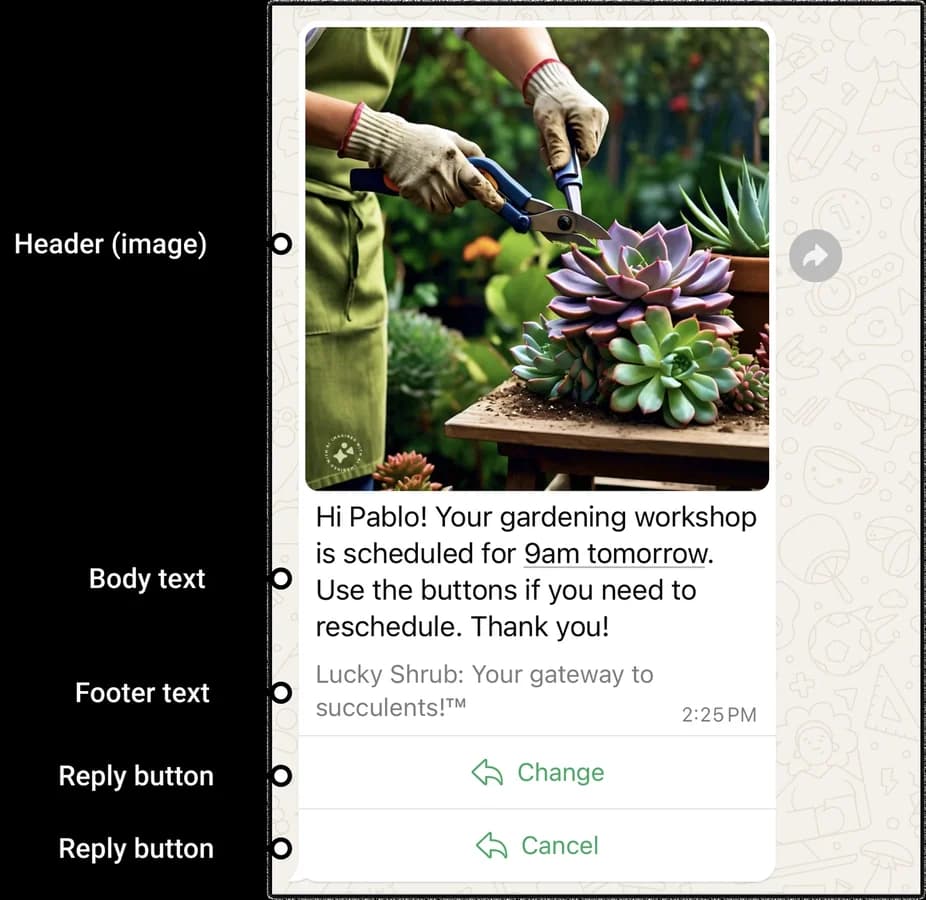
Reply buttons.
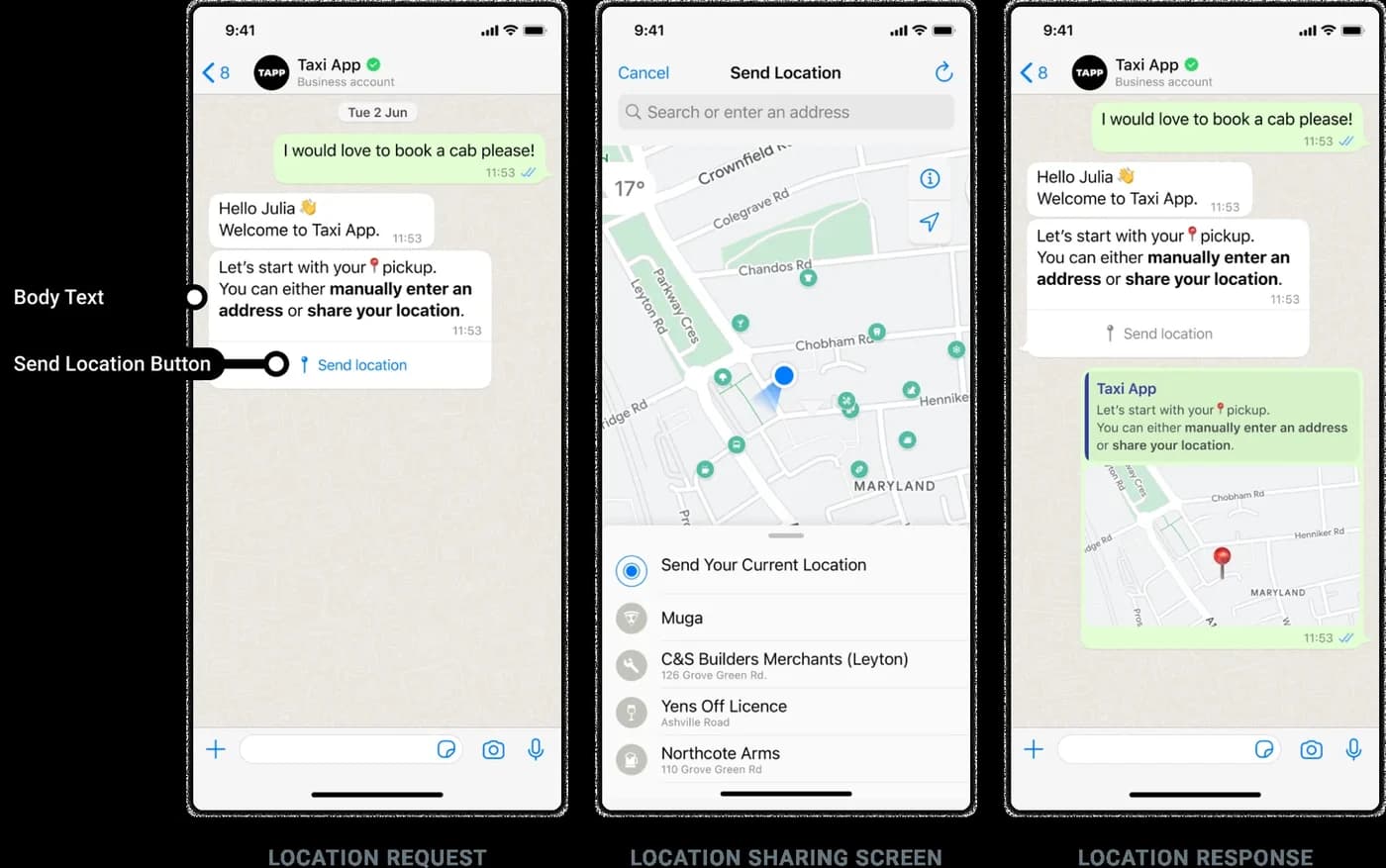
A location request, from ask to answer.
Free-form messages can be promotional, too. If a customer is already talking to you, you can make them an offer without a marketing template.
WhatsApp Flows
A Flow is a form that opens inside the chat. It can run over several screens, with text fields, dropdowns, date pickers, checkboxes, opt-ins, and uploads, and it can show or hide parts based on earlier answers. The customer never leaves WhatsApp, and the answers come back to you as data. Flows are the right tool for bookings, sign-ups, lead capture, surveys, and support intake.
You send a Flow one of two ways. Outside the window, it's a template with a Flow button, so it needs approval. Inside the window, it's a free-form message with a button that opens it.
Meta's template library has ready-made Flow templates for customer feedback and failed deliveries.
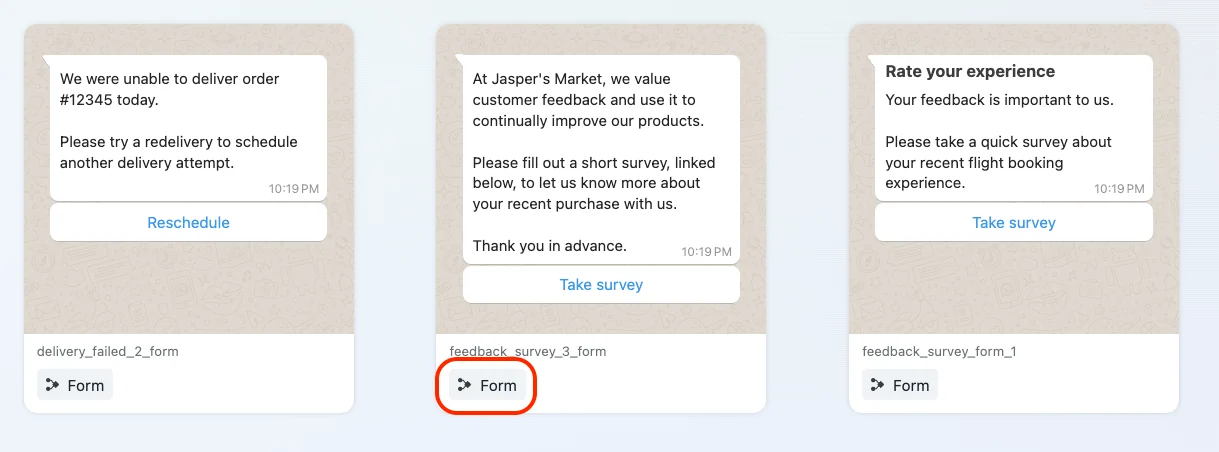
Form templates from Meta's template library, built on Flows.
WhatsApp calls
Customers can call your business from WhatsApp any time. Their call opens or refreshes the 24-hour window, whether you pick up or not.
Calling them takes permission. You get it when you send a call permission request, when they call you and you've turned on callback permission, or when they grant it from your business profile. They choose temporary permission, which lasts 7 days, or permanent, which lasts until they take it back. Meta limits how often you can ask and how many calls you can make, and your call only refreshes the window if they answer.
You can also put a Call on WhatsApp button under a message so they can call you in one tap. Calls don't work in groups.
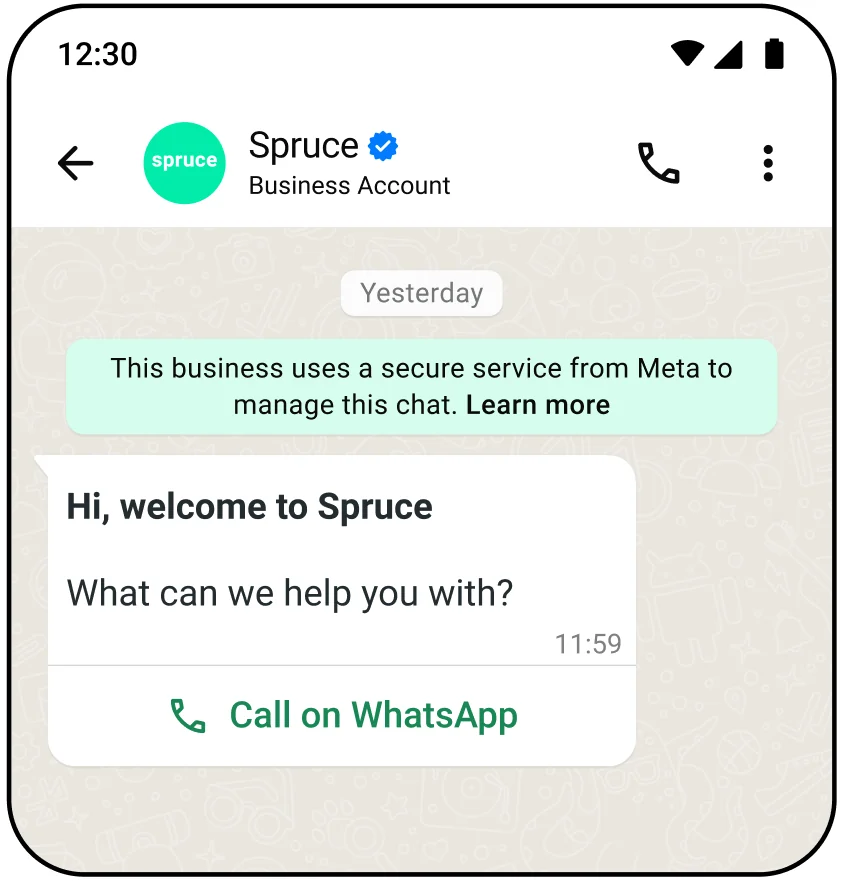
A call button message.
Other ways to send
- Marketing Messages API (formerly Marketing Messages Lite). A second way to send marketing templates, with delivery tuned for engagement, GIF headers, and benchmarks against similar businesses.
- Direct Send. Send utility messages without creating templates first. Meta generates a matching template behind the scenes.
- Groups. Businesses with an Official Business Account can message small groups of up to 8 people, who join from an invite link. Groups take text, media, and templates, but not interactive messages, authentication templates, shopping messages, or calls. Write separate templates for groups, since template metrics don't cover them.
- Meta Business Agent. Meta's own AI agent, which answers customers inside the window for you.
- Usernames. WhatsApp is rolling out usernames for customers and businesses. When a customer turns one on, you may get a business-scoped user ID instead of their phone number.
Your business identity
People decide whether to trust a message partly on who it's from.
- Display name. Your business name, shown on your profile and, once verified, at the top of chats.
- Business verification. Verifying your business with Meta raises your messaging limit from 250 to 2,000, and it's required for an Official Business Account.
- Official Business Account. A blue checkmark beside your name, and a number people can find in WhatsApp search. To qualify, you need a verified business, an approved display name, two-step verification, and at least 30 days on the platform.
The rules that apply to every WhatsApp message
Opt-in
You need someone's phone number and permission before you message them. The opt-in has to name your business and make clear what they're agreeing to. It doesn't have to mention WhatsApp, as long as it meets local law, so a checkbox on your website, in your app, or at checkout works.
Customers control your marketing from inside WhatsApp, under Offers and announcements. They can mark it Interested or Not interested, or stop it altogether. Once they stop, your marketing templates to them fail. Utility and authentication messages still arrive.
Messaging limits
Your messaging limit is how many different people you can start conversations with in a rolling 24 hours. It belongs to your business portfolio, so every phone number you have shares it.
| Limit | How you get there |
|---|---|
| 250 | Where every new business portfolio starts |
| 2,000 | Verify your business, or send 2,000 messages outside the window to different customers within 30 days, using high-quality templates |
| 10,000, then 100,000, then unlimited | Automatic, as you use your limit with good quality |
Replies inside an open window don't count, so support conversations never touch your limit. A campaign to 5,000 new customers in your first week will. Verify your business before you plan your first campaign.
Quality ratings and paused templates
Meta rates each template green, yellow, or red based on how people react: blocks, reports, and low read rates pull it down. Drop to red and the template is paused for 3 hours, then 6, and disabled the third time.
New templates, templates coming back from a pause, and templates without a green rating can also be paced: Meta sends to part of your audience first and holds the rest while feedback comes in. If the feedback is bad, the template is paused and the held messages are dropped.
Per-user marketing limits
WhatsApp also caps how many marketing templates each person gets from all businesses combined. There's no published number. If your message hits the cap, it fails, so wait a day before trying that person again. Marketing sent inside an open window doesn't count.
No marketing templates to US numbers
As of September 2026, WhatsApp doesn't deliver marketing templates to US phone numbers at all. Utility templates, authentication templates, and free-form replies still go through. In the US, treat WhatsApp as a support and conversation channel, not a marketing one.
What you can't send
WhatsApp's Business Messaging Policy bans promoting or selling firearms, drugs, adult products, dating services, multi-level marketing, payday loans and debt collection, real or virtual currency offerings, and anything fraudulent or misleading, among others. Political parties, politicians, and campaigns can't use the platform at all.
A few of those, like alcohol, online gambling, and over-the-counter drugs, are allowed in specific countries, for people over 18, with no in-chat sales.
The policy also covers what customers tell you. Don't ask for full card numbers, bank account numbers, or ID numbers in the chat, don't share one customer's conversation with another, and publish a privacy policy.
AI chatbots
A bot that serves your own business, like a support assistant or an order tracker, is fine. What Meta bans is offering a general-purpose AI assistant as the product itself, except where the law requires it.
Any bot needs a clear way to reach a person.
What happens when you break the rules
Meta's enforcement steps up with repeat problems:
- A 1- or 3-day block on sending templates
- A 5-, 7-, or 30-day block on sending anything
- An account lock, lifted only by appeal
- A permanent ban
Severe harm, like scams or selling illegal drugs, skips the steps and ends in immediate removal.
Rules by country
| Where | What's different |
|---|---|
| United States | Marketing templates aren't delivered |
| India | Address request messages. Order details (utility only), order status, and checkout button templates |
| Brazil | Order details and payment request templates, with Pix, boleto, and payment links. The only country where general-purpose AI assistants are allowed |
| Listed countries only | Messaging about alcohol, online gambling (Australia, Japan, Colombia, Mexico, and Peru), and over-the-counter drugs, for people over 18 |
Which WhatsApp message type to use
| Job | What to send | Category |
|---|---|---|
| Order confirmation and shipping updates | Template with a tracking link, or a map pin header | Utility |
| Login or sign-up code | Authentication template with copy code or autofill | Authentication |
| Appointment reminder | Template with confirm and reschedule quick replies | Utility |
| Fraud or security alert | Plain template, nothing promotional | Utility |
| Feedback survey | Template with a Flow button | Utility |
| Flash sale | Limited-time offer template | Marketing |
| New collection | Media card or product card carousel | Marketing |
| Abandoned cart | Product card carousel, or a template with the item | Marketing |
| Win back a lapsed customer | Coupon code template | Marketing |
| Lead capture or sign-up | Template with a Flow button | Marketing |
| Support triage | List message or reply buttons | Free-form, inside the window |
| Delivery address or pickup point | Location request, or an address request in India | Free-form, inside the window |
| Payment in Brazil or India | Order details template | Utility |
| High-value sales follow-up | Call permission request, then a WhatsApp call | Marketing or utility |
What each message type costs is covered in WhatsApp pricing, explained, and what changes on October 1, 2026 is in WhatsApp pricing changes on October 1, 2026.
Getting a template approved
You submit each template with a name, a category, a language, and a sample value for each variable. Each language is its own version of the template, so a template in five languages is five submissions.
Variables come in two styles. Named variables look like {{first_name}}, and positional ones look like {{1}}, {{2}}. Positional is the default. These are the formatting problems that most often get a template rejected:
- A variable at the very start or end of the message
- Positional variables out of order, like
{{1}},{{2}},{{5}} - Too many variables for the length of the message
- Asking for sensitive details, like a full card number, or anything else the policies rule out
A template moves through these states in WhatsApp Manager:
| Status | What it means |
|---|---|
| In review | Being checked. Up to 24 hours |
| Rejected | Failed review or breaks a policy. You can edit and resubmit, or appeal |
| Active: quality pending, high, medium, or low | Approved and sending, with a quality rating based on customer feedback |
| Paused | Stopped for a few hours after negative feedback or low read rates |
| Disabled | Stopped for good after repeated negative feedback |
| Appeal requested | You've appealed. Meta decides within 24 hours |
Until your business portfolio is verified, each account can hold 250 templates; after verification, and once a phone number has an approved display name, it's 6,000. You can create 100 templates an hour. And a template that goes 12 months without being sent is archived automatically, then deleted 28 days later unless you restore it.
Limits by message type
Template parts and buttons
| Part | What it holds | Limit |
|---|---|---|
| Header | Text, an image, a video, a document, or a map pin | Text headers: 60 characters |
| Body | Your message, with variables | 1,024 characters |
| Footer | A short line of small print | 60 characters |
| Buttons | Any mix of the types below | Up to 10 |
Map pin headers are for utility and marketing templates only.
| Button | What it does | Limit per template |
|---|---|---|
| Quick reply | Sends a preset reply back to you | Up to 10, with 25-character labels |
| URL | Opens a web page in the browser | 2 |
| Phone number | Starts a regular phone call | 1 |
| Copy code | Copies a code to the clipboard | 1 |
| Voice call | Starts a WhatsApp call to your business | |
| Flow | Opens a WhatsApp Flow | |
| Catalog and multi-product | Opens your catalog, or a set of products |
With more than three buttons, the message shows two and puts the rest behind a See all options button.
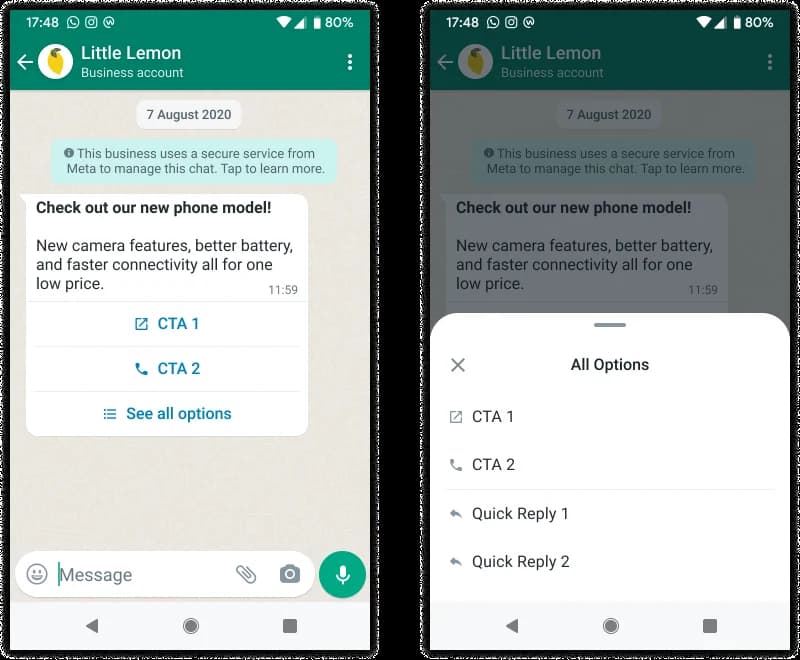
With more than three buttons, the rest move behind See all options.
Special template formats
| Format | Limits |
|---|---|
| Media card carousel | Up to 10 cards. Card text up to 160 characters. Up to 2 buttons per card. Every card has the same layout |
| Product card carousel | Up to 10 cards. You define two when you create the template |
| Limited-time offer | Offer headline 16 characters, code 15, body 600. No footer |
| Coupon code | Code up to 20 characters |
| Multi-product template | Up to 30 products in up to 10 sections. Can't be forwarded |
| Payment request (Brazil) | Up to 3 payment buttons, each a different method |
| Authentication | Variables up to 15 characters |
Free-form messages
| Message type | Limits |
|---|---|
| Text | 4,096 characters |
| Image | JPEG or PNG, 5 MB |
| Video | MP4 or 3GPP, 16 MB |
| Audio and voice notes | 16 MB |
| Document | PDF, spreadsheet, slide deck, or text file, 100 MB |
| Sticker | WebP, 100 KB static, 500 KB animated |
| Reply buttons | Up to 3, with 20-character labels |
| List | Up to 10 options across up to 10 sections. Option titles 24 characters, descriptions 72 |
| Location request | Body up to 1,024 characters |
| Media carousel | 2 to 10 cards. Each needs an image or video, and either one link button or one or more quick replies, matched across all cards |
| Product messages | Up to 30 products. Customers can forward them |
| Call button | 20-character label. Active for 7 days by default, up to 30 |
Flows, calls, and groups
| What | Limit |
|---|---|
| Flow components | Up to 50 per screen |
| Call permission requests | 1 per 24 hours and 2 per 7 days, per customer. Both reset after any connected call |
| Connected calls | 100 every 24 hours, per business number |
| Unanswered calls | After 2 in a row, WhatsApp asks the customer to reconsider. After 4, permission is revoked |
| Before you can place calls | A messaging limit of at least 2,000 |
| Group size | Up to 8 people |
| Groups | Up to 10,000 per business number |
Delivery and expiry
Every template has a time-to-live, after which WhatsApp stops trying to deliver it:
| Category | Default | You can set |
|---|---|---|
| Authentication | 10 minutes | 30 seconds to 15 minutes |
| Utility | 30 days | 30 seconds to 12 hours |
| Marketing | 30 days | 12 hours to 30 days, through the Marketing Messages API only |
A short expiry matters for anything time-bound. A pickup reminder that lands a day late is worse than no reminder.
Order isn't guaranteed either. Send three messages in a row and they may arrive in a different order. If the sequence matters, wait for each one to be delivered before sending the next.
WhatsApp Web and desktop
| Format | What happens on Web and desktop |
|---|---|
| Templates with 4 or more buttons, or quick replies mixed with other buttons | Can't be opened. The customer is told to use their phone |
| Limited-time offers | The offer doesn't show, only a note that a message arrived |
| Coupon codes | Not supported on WhatsApp Web |
| Authentication templates | Masked on linked devices. The customer checks their phone |
| Single and multi-product messages | Supported |
Sending speed
You can send one message every 6 seconds to the same person, with short bursts of up to 45. Past that, messages fail until you slow down, which mostly affects bots that send several messages in a row.
Across all your customers, each phone number can send up to 80 messages a second. A number that messages 100,000 or more people a day outside the window, on a portfolio with an unlimited limit and with medium quality or better, is upgraded to 1,000 a second automatically.
WhatsApp Business terms
| Term | Meaning |
|---|---|
| WhatsApp Business Platform | Meta's API for businesses messaging customers at scale, often called the WhatsApp Business API. Sent through Meta's Cloud API |
| Template | A message approved by Meta in advance, which can be sent at any time |
| Free-form message | Any message sent without a template. Also called a session message or non-template message. Only allowed inside the customer service window |
| Customer service window | The 24 hours after a customer's last message or call, during which free-form messages are allowed. Often called the 24-hour rule |
| Template category | Marketing, utility, or authentication. Decides how a template is reviewed and which formats it can use |
| Interactive message | A free-form message with buttons, a list, a carousel, or another tappable element |
| WhatsApp Flow | A form that opens inside the chat and returns the customer's answers as data |
| Messaging limit | How many different people a business can start conversations with in a rolling 24 hours |
| Quality rating | Meta's green, yellow, or red score for a template, based on how customers react to it |
| Official Business Account | A verified business account with a blue checkmark, required for groups |
Error codes worth knowing
Your engineers will see these when a message doesn't go through.
| Code | What happened |
|---|---|
| 131047 | More than 24 hours since the customer last messaged you. Send a template instead |
| 131026 | Couldn't deliver, for example because the number isn't on WhatsApp or the app is out of date |
| 131049 | Held back by the per-user marketing cap. Wait 24 hours before trying again |
| 131050 | The customer stopped marketing messages from you. Don't retry |
| 131056 | Too many messages to the same person too quickly |
| 130429 | Your number hit its messages-per-second limit |
| 132001 | The template doesn't exist in that language, or isn't approved |
| 132015 | The template is paused for low quality |
| 132016 | The template was paused too many times and is now disabled |
Sources
Every limit and rule here comes from Meta's documentation and WhatsApp's policies:
- Template categorization
- Template components
- Messaging limits
- Per-user marketing template limits
- Get opt-in for WhatsApp
- Message time-to-live
- Error codes
- WhatsApp Business Messaging Policy
- Meta Terms for WhatsApp Business Platform
Images: Meta, WhatsApp Business Platform documentation.
FAQ
Frequently asked questions
Keep exploring
More guides
One API, every channel
Ship notifications without the boilerplate
Courier gives you one API for email, SMS, push, and chat, with templates, routing, retries, and delivery logs built in.
Last updated Sep 26, 2026. Code samples are illustrative; provider APIs and pricing change over time, so check each provider’s docs before relying on them.