Apple Intelligence finally got smart. Here's how it changes the notifications your users see.
 Emily LaneJuly 22, 2026
Apple Intelligence spent its first year as a punchline. The notification summaries that shipped with iOS 18 confidently rewrote real news headlines into things that never happened, badly enough that the BBC complained, Apple pulled the feature for news apps, and slapped a warning on the rest.
That era is ending. At WWDC in June, Apple introduced its third generation of on-device models, and they are a real step up. iOS 27 ships around September 14 with those models built in. The AI that reads, ranks, groups, and summarizes notifications on the lock screen is now genuinely capable.
Which is why you should care. That model now sits between the notification you send and what your user sees, deciding whether it shows in full, gets summarized, sinks to the bottom of a stack, or is silenced. Notification handling is still the roughest edge of an otherwise-improved system, so how you write a notification now decides which Apple Intelligence your user gets: the smart one, or the one that mangles your message.
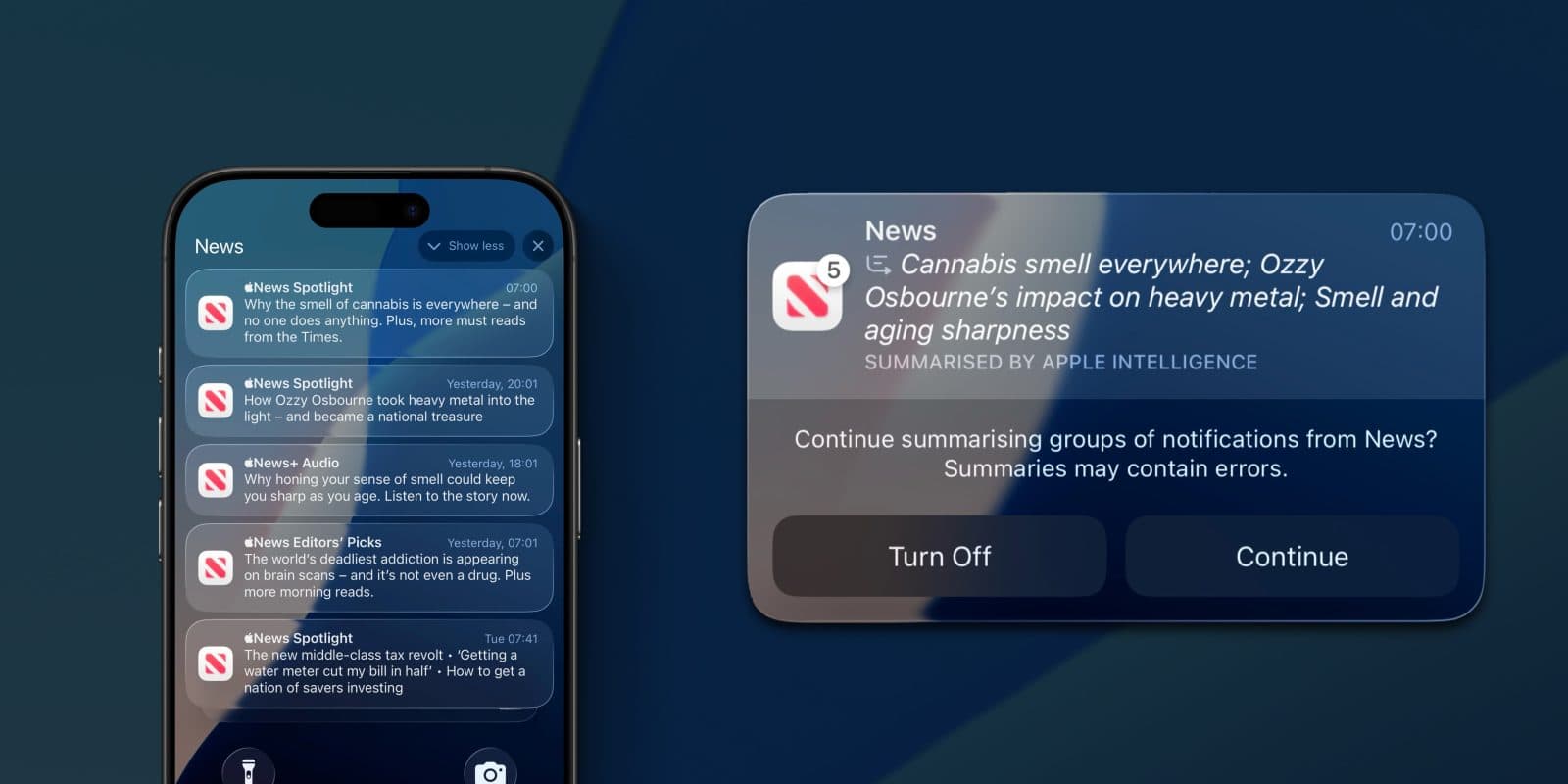
This is the feature. iOS took a stack of News alerts and rewrote them into a single line. The italics and the "Summarized by Apple Intelligence" label are the only sign your original text was touched. (Screenshot via 9to5Mac.)
What Apple actually shipped: small models that run on your phone
A foundation model is a general-purpose AI trained to handle language tasks like summarizing, ranking, and rewriting. Most of the models people know, like the ones behind ChatGPT or Gemini, are large and run in a data center. An on-device model is a smaller version that runs entirely on the phone's own chip. It never sends your data to a server, it works with no internet connection, and it responds instantly because there is no round trip to the cloud.
For years the trade-off was that small meant weak. A model tiny enough to run on a phone was not good enough to trust with anything that mattered. That trade-off is what changed in 2026.
Apple's third-generation foundation models, built with Google using its Gemini technology, come in two tiers:
| Tier | Where it runs | What it's for |
|---|---|---|
| On-device models | Entirely on the iPhone | Fast, private, always-available tasks like notification summaries, ranking, and Writing Tools |
| Private Cloud Compute models | Apple's servers, some on Google Cloud hardware | Heavier requests that need a larger model, with Apple's privacy guarantees |
The on-device tier is the one that matters for notifications, since summarization has always run locally on the phone. It now pairs a roughly 3-billion-parameter core model with a larger 20-billion-parameter model that uses a sparse design, activating only a small fraction of its parameters per request. That is the trick that lets it run fast on a phone: large in knowledge, light in the work it does per response. Both models are multimodal and support more than 28 languages.
By Apple's own preference testing, its new on-device model is preferred over last year's on-device model more than twice as often. Those are Apple's internal evaluations rather than independent benchmarks, so treat the exact figures with the usual caution, but the direction is not in dispute and the broader tech press agrees the models improved meaningfully.
Three properties make small on-device models a genuinely big deal, and they are the same three that shape your notifications:
- Private. Because the model runs on the device, the content it processes, including your notifications, does not leave the phone. Apple describes its on-device features as running entirely on device, with nothing shared with Apple or anyone else.
- Instant. No network round trip means the model can summarize and rank notifications the moment they arrive, on the lock screen, every time.
- Free and always on. There is no per-request cost and no server dependency, so Apple can afford to run this model on everything, all the time, rather than reserving it for special cases.
The upshot: the thing editing your notifications is no longer a toy, it is a competent model running on the phone all the time. Apple even opened it to developers through its Foundation Models framework, so the same class of model that reads your notifications is one your own app can call directly, on-device and at no cost. If you want the deeper version of how these models actually work, we took them apart in a companion piece on how Apple's on-device AI works.
A better model raises the stakes, it doesn't remove them
Here is the catch. The 2026 upgrade made the model better, not infallible. Apple added controls and disclosure after the news-summary mess, but it never claimed to have fixed summary accuracy, and reviewers still call notification handling the weakest part of an otherwise-improved system.
So a smarter model does not make your message safe. It still botches a notification that gives it nothing clean to work with. What is different now is that it is trusted by default, so it is doing more to your notifications, more often, than ever.
What a capable model now does to your notifications
Every notification you send passes through the on-device model before a human sees it. Four things happen, and each is now done well enough to change your outcomes:
- Summarized. When notifications stack up, iOS replaces them with one AI-generated line. It does not truncate, it reads your title and body and rewrites them. Clean, self-contained text gets a clean summary; vague or context-dependent text gets a fluent, confident guess. Better comprehension cuts both ways.
- Ranked. Apple Intelligence sorts incoming notifications by inferred importance, surfacing what matters and batching the rest into a summary the user may never open. A smarter model is a stricter editor: better at promoting a real alert, better at burying filler. Specific and relevant wins, marketing loses.
- Grouped. iOS bundles related notifications into one thread. You steer this with the
thread-idkey in your payload. Group deliberately and the model summarizes a tidy set; leave it to chance and it may stitch unrelated alerts together, which is where meanings blur. - Filtered. Focus modes, including AI-driven Reduce Interruptions, can hold a notification back entirely. This is the one to watch: it is not reordering your message, it is deciding whether the user sees it at all, and a better model makes that call more often.
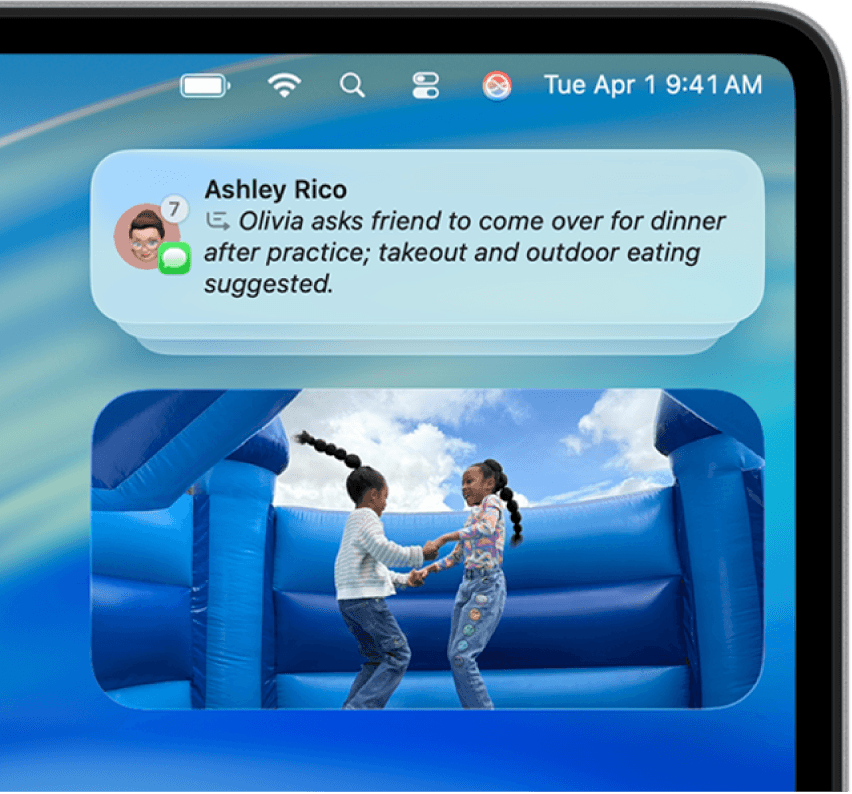
Summarizing in action: seven messages from one thread collapsed into one AI-written sentence. Note the "7" badge. Clean input, clean summary. Give it something vague and it fills the gaps with a guess. (Apple support guide.)
The shift: the lock screen used to show your notification roughly as written. Now a competent model reads it, weighs it, rewrites it, and sometimes hides it. A useful notification gets treated better than ever. A lazy one gets flattened or dropped, and you never see it happen.
You don't get a dial. The content is the dial.
Most teams' first instinct is to look for a setting. There isn't one. Apple ships no developer API, no payload key, and no opt-out for the lock-screen AI summary. The levers people reach for, relevanceScore and interruptionLevel, are years older than Apple Intelligence and control a different feature: grouping, priority, and the scheduled Notification Summary from iOS 15. Apple has never documented that they steer the AI rewrite. There is no flag you can send that tells the model "summarize me this way."
So the only thing you control is the words. A capable model represents a clear, self-contained notification faithfully and confidently mangles a vague one. The text is the entire interface, which means the fix is copy discipline, not configuration.
Apple's own guidance has said as much for years. Its Human Interface Guidelines tell developers to "use complete sentences, sentence case, and proper punctuation, and don't truncate your message." Written before Apple Intelligence existed, it is now also the recipe for a notification that survives summarization.
If your team has optimized content to get quoted by AI search engines, this is the same problem. Getting cited cleanly by a language model and getting summarized cleanly on the lock screen come down to the same habits, because both are a model reading your text and deciding how to represent it:
- Lead with the point. Put the who and the what first. Models and truncation both keep the opening and drop the tail.
- Make each message self-contained. A summarizer reads your notification on its own terms. If it only makes sense next to another message, it gets read wrong.
- Say it literally. Plain, specific language survives. Wordplay, teasers, and tone-as-meaning get flattened out.
- One idea per message. A single clear claim summarizes cleanly. Two half-ideas blur into one wrong one.
Get those right and you are not fighting the model. You are giving it exactly what it is good at.
What breaks with your current notifications
Anything that needs surrounding context to make sense gets summarized wrong:
- Teaser copy. "You won't believe what just happened" gives the model nothing to summarize, so it invents a meaning.
- Multi-part messages. Split one thought across two notifications and the summary sees half of it.
- Emoji and hype as content. If the meaning lives in tone rather than words, the summary strips it out.
- Marketing blasts. Generic promo copy is exactly what ranking demotes and summaries flatten to nothing.
The levers you do have
You cannot dial the summary, but you can still shape grouping, breakthrough, and fallback. Just use them for what they actually do:
- Group with
thread-id. Set it so iOS bundles related messages the way you intend instead of stitching unrelated alerts together. - Reserve
time-sensitivefor genuinely urgent messages. This interruption level breaks through Focus and the scheduled summary, but users can switch it off per app, so overuse gets you muted. It is not a summary control. - Don't make the lock screen your only shot. It is now a lossy, AI-mediated surface, so anything critical should also reach the user in the app and, where it fits, in email.
A well-formed push puts the meaning in the text and uses the metadata honestly:
{"aps": {"alert": {"title": "Order shipped","body": "Your order #4021 is on the way, arriving Thursday."},"thread-id": "order-4021","interruption-level": "time-sensitive","relevance-score": 0.9}}
The title carries the meaning by itself. The body adds specifics without leaning on any other notification. thread-id keeps this order's updates together, time-sensitive fits because a shipping update is something the user is actually waiting on, and relevance-score marks it as the one to feature if it lands in the scheduled summary. Compare the version that breaks: a title of "Good news!" over a body of "Tap to see what's happening with your stuff." The model has nothing to preserve, so it drops it or guesses.
Do this before iOS 27 ships
You have a few weeks, and the job is an audit: go through what you already send and fix the copy that will not survive summarization. Rewrite anything that leans on curiosity or context, group related messages with thread IDs, demote time-sensitive notifications that are not urgent, and make sure anything critical also lands somewhere other than the lock screen. The push notification preview generator is a quick way to start: paste in a title and body and see what the lock screen shows before the summarizer gets to it.
You do not have to do it by hand. This is exactly the kind of bounded, tool-driven work an AI agent is good at. If you send through Courier, point an agent at your account through the API or the MCP server: it reads the notification templates and message history you actually ship, flags the copy that will summarize badly, and proposes rewrites. Approve the ones you want, and it writes them back and republishes. A review that would eat a sprint becomes an afternoon.
Where Courier fits
The theme running through all of this is that the lock screen is no longer a channel you fully control. An AI edits it, and the same message rarely works everywhere. That is the problem Courier is built for.
With Courier, that is a setup problem, not a rewrite-everything problem:
- Per-channel content. Tune your push copy for the AI-summary reality while your email and in-app inbox carry the full message.
- Multichannel fallback. A summarized or silenced push is not the end of the road. The user still gets the information through a channel that shows it in full.
- Preferences. Let people choose how they hear from you, an answer of its own to a phone that keeps getting more aggressive about silencing noise.
- One system for everyone. Engineers, marketers, and AI agents work from the same Courier setup through the UI or the API, so the person tuning notification structure and the person writing the copy are not stuck in different tools.
Apple Intelligence getting smart is good news. It just moves the work. The model will do its job well when you give it something clear to work with. Give it that, everywhere your message needs to land, and the smartest version of the lock screen works for you instead of against you.
Similar resources
How to get your logo in Gmail and Apple Mail
BIMI puts your logo next to your emails in Gmail and Apple Mail, but there is no upload form. It is earned by locking your domain down. Here is the whole project: what it costs, how long it takes, and the five ways it fails silently.

HIPAA-compliant notifications: where PHI should live
A practical guide to HIPAA-compliant notifications across SMS, push, email, and an in-app inbox. One rule, applied to every channel and every place PHI gets stored, including the systems most teams forget are in scope.
Email preview tools compared: 6 that render on real devices
Most "email preview" features are simulations. These six open your email in the actual client and send back a screenshot. Here’s what each costs per preview, how much work sits between your template and the result, and which ones you can drive from code.