Embed a notification preferences center with one web component
 Mike MillerJune 04, 2026
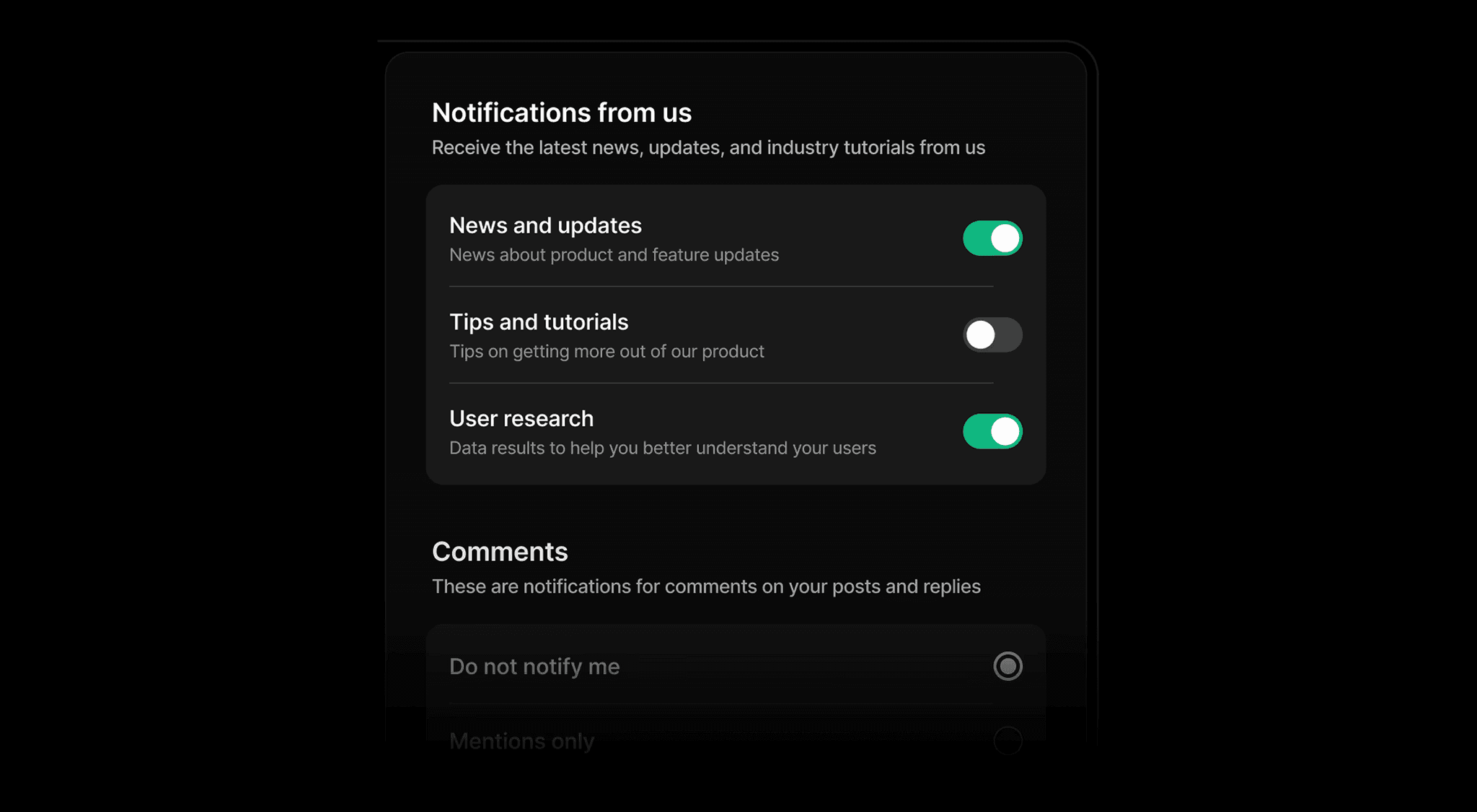
You can now drop a full notification preferences center into any web app with a single HTML element. The new @trycourier/courier-ui-preferences package (v1.0.2) ships a <courier-preferences> Web Component that lets your users opt in and out of topics, pick which channels deliver each one, and set digest schedules, all without you building or maintaining the preference UI yourself.
TL;DR
- The new @trycourier/courier-ui-preferences package (v1.0.2) renders a full notification preferences center from a single <courier-preferences> element.
- It's a standard Web Component, so it works with React, Vue, Svelte, Angular, or plain HTML. No framework lock-in, no wrapper required.
- Users opt in and out of topics, pick which channels (email, push, SMS, and more) deliver each one, and set per-topic digest schedules.
- Light and dark theming through setLightTheme(), setDarkTheme(), and setMode(), plus custom channel names with setChannelLabels().
- It reuses your existing Courier Inbox auth. Add the read:preferences and write:preferences scopes and you're set.
- On React, it's bundled into @trycourier/courier-react (v9.2.0) as the CourierPreferences component, so there's no separate install.
What the notification preferences center handles
The component renders a complete preferences center backed by your Courier configuration. It handles:
- Topics and sections. Preferences are grouped into sections of topics, so users opt in or out of the things they actually care about instead of one global on/off switch.
- Channel routing. Users choose which channels (email, push, SMS, and more) deliver each topic.
- Digest scheduling. Configurable digest delivery schedules per topic, so users can batch the lower-priority stuff instead of muting it.
- Theming. Full light and dark theme support through setLightTheme(), setDarkTheme(), and setMode().
- Custom labels. Rename channels in the UI with setChannelLabels() to match how you talk about them in your product.
It reuses your existing Courier Inbox auth. If you already have Inbox running, you add the read:preferences and write:preferences scopes and you're set. No second auth flow to wire up.
Add it to a web app
Install it from npm:
npm install @trycourier/courier-ui-preferences
Add the <courier-preferences> element to your markup, and authenticate it the same way you authenticate Inbox by passing a userId and a jwt. That's the whole integration. The element fetches the user's topics, renders the sections, and writes changes back to Courier as the user toggles them.
From there, a few things you can modify on the element to make it yours:
- setLightTheme() and setDarkTheme() set your light and dark palettes.
- setMode() switches between them.
- setChannelLabels() renames the channels shown in the UI (for example, push to "Mobile push" or sms to "Text message").
Using React? It's already there
If you're on React, the preferences UI is bundled into @trycourier/courier-react as of v9.2.0, so you don't install @trycourier/courier-ui-preferences separately. Grab the React package:
npm install @trycourier/courier-react
Then import the CourierPreferences component directly and you get the same topics, channels, digests, and theming, exposed as a React component with props instead of element methods.
Why a preferences center matters
A preferences center is what keeps users from reaching for the global unsubscribe button. When the only control you give someone is "all notifications on" or "all notifications off," people who are mildly annoyed by one type of message opt out of everything, including the messages they'd actually want. Topic-level and channel-level control lets them turn down the noise without going dark, which is the practical fix for alert fatigue.
This matters more because Courier handles all three kinds of messages a product sends: transactional (password resets, receipts), product (mentions, status changes, activity), and marketing (announcements, nurtures). Those streams have very different value to a user, so a single preference switch is the wrong tool. A good preferences center lets someone keep their transactional and product notifications while dialing marketing down to a weekly digest, instead of bailing on everything at once.

It matters even more when your customers have multiple lines of business. A marketplace has sellers and buyers, and the same person can be both. The notifications a seller wants (a new order, a payout) are not the notifications a buyer wants (shipping updates, price drops), so their preferences need to be scoped to the role and organization they're acting in, not flattened into one global profile. Courier's tenant model handles exactly this. See how it fits together for marketplaces and in our guide on building multi-tenant customer messaging, where tenant-scoped preferences, branding, and routing all line up.
Building that UI yourself is more work than it looks. You need to model topics, persist per-user and per-channel state, handle digest scheduling, keep the UI in sync with sends, and theme it to match your product. This package handles that surface so you can spend the time on your actual notifications. You can read more about the broader approach on the User Preferences page.
Try it
There's a live demo you can poke at, including the theming controls:
Grab the package that fits your stack:
- Web Components: @trycourier/courier-ui-preferences
- React: @trycourier/courier-react
Expanded docs are on the way, and a hosted preference page is under construction for teams who'd rather not embed anything at all. More to come.
Ready to try it? Start sending for free and drop the component into your app. If you're working through preferences across multiple lines of business or multi-tenant setups, request a demo and we'll walk through how tenant-scoped preferences and user preferences fit your product.
Frequently asked questions
What is a notification preferences center?
A notification preferences center is the UI where your users control which notifications they get and how. Instead of one global on/off switch, it lets them opt in and out of individual topics, choose which channels (email, push, SMS, and more) deliver each one, and pick a digest schedule on topics that offer one. That way people can turn down the noise without unsubscribing from everything.
Which frameworks does the <courier-preferences> Web Component support?
The courier-preferences element is a standard Web Component, so it works in any JavaScript framework or plain HTML. React, Vue, and Angular also have their own packages (@trycourier/courier-react, @trycourier/courier-vue, and @trycourier/courier-angular) that provide a preferences component.
How do I authenticate the preferences component?
It reuses the same authentication as Courier Inbox. You pass a userId and a JWT generated on your backend, and the token needs the read:preferences and write:preferences scopes. If you already run Inbox, you add those scopes to your existing token and you are set, with no second auth flow to wire up.
Can I use the notification preferences center in React?
Yes. The CourierPreferences component ships in @trycourier/courier-react, so you don't install @trycourier/courier-ui-preferences separately. You import it and configure it with props such as lightTheme, darkTheme, mode, and channelLabels instead of calling element methods.
How do I theme the preferences center?
The component supports light and dark themes through setLightTheme(), setDarkTheme(), and setMode(). You can also rename the channels shown in the UI with setChannelLabels(), for example changing push to "Mobile push" or sms to "Text message".
Similar resources

Broadcasts: send one-time messages to your users, right from Courier
Broadcasts lets you send a one-time message to a group of your users, now or on a schedule, without leaving Courier.

What we shipped this month: May 2026 Edition
Courier shipped five launches in May 2026: AI Agent in Journeys (GA), the new Journeys API for code-driven flows, Custom Environments, Design Studio styling controls, and Courier Console v3. Each one closes a gap between writing software and shipping the messages that go with it.

Courier Console v3: Redesigned From the Ground Up
Courier Console v3 is rolling out now with a faster, cleaner interface, improved navigation, and a more consistent experience across every workflow.