How to Build a Notification Center for Web & Mobile
 Kyle SeylerOctober 17, 2025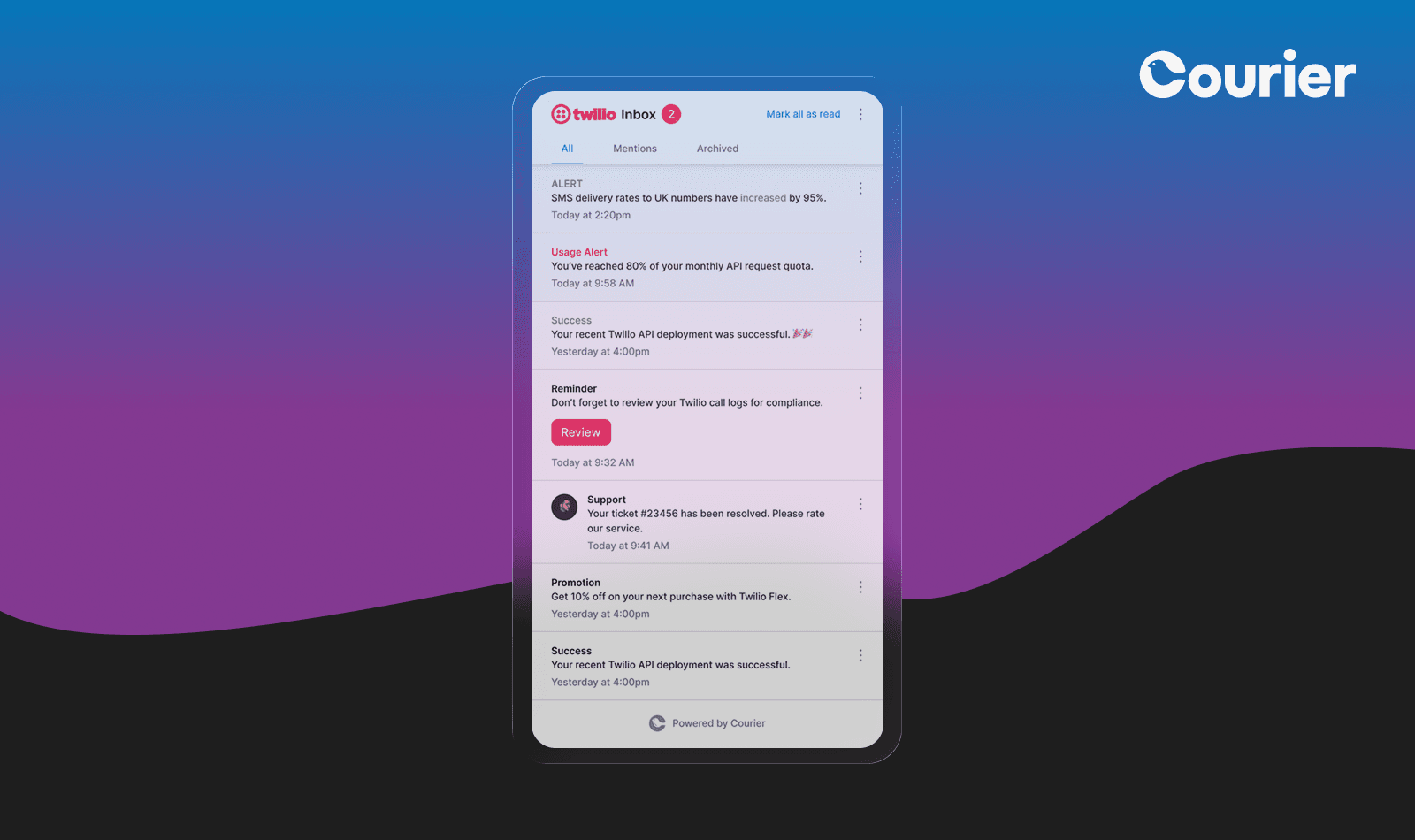
The notification center is a familiar pattern: a bell, an unread count, and a panel of what happened since you last looked. It has become standard in modern web and mobile apps because it works for users, giving them one place to catch up on their own time, rather than relying on a push or email they might miss.
It is also deceptively deep to build. Behind that bell sit real-time delivery, read/unread state kept consistent across sessions and devices, and, often, integrations for push, email, and SMS. That is why a production-grade notification center has traditionally taken a small team months. This guide shows how a notification center actually works, how to build one with React, React Native, iOS, Android, Flutter, or vanilla JavaScript, and how to judge how much of it is worth building yourself.
This guide covers building the system. For the visual design and UX side, how the feed, rows, unread states, and empty states should actually look and behave, see the companion guide How to Design an In-App Notification Center.
In This Article
- What is a Notification Center?
- How a Notification Center Works
- The Build vs. Buy Decision
- Implementing a Notification Center with Courier
- React Native Mobile Notification Center
- Sending Beyond the Inbox
- User Preferences
- Implementation Best Practices
- Courier vs. Building Custom or Other Solutions
- Before you ship: a design checklist
- Getting Started with Courier
What is a Notification Center?
A notification center is a centralized hub within an application where users view, manage, and interact with all their notifications. The pattern is now everywhere: think of the notification bells you see on Facebook, LinkedIn, GitHub, and Slack.
Most notification centers are built from a few standard parts:
- Inbox feed: a persistent, scrollable list of past notifications.
- Real-time updates: new items appear instantly, usually over WebSockets or SSE, without a refresh.
- Toasts: brief, non-intrusive alerts for new events, paired with the persistent inbox.
- Badge counter: an unread count that stays in sync across the app.
- Read/unread state: tracking what has been seen, persisted across sessions and devices.
- Archive and delete: letting users clear notifications or remove them from the feed.
How a Notification Center Works
Under the surface, a notification center is a small system with four moving parts. The UI users see sits on top of them.
A data model and store. Every notification is a record tied to a user, with a type, a payload, a timestamp, and a read/unread flag. You need somewhere to persist these and query them per user, with pagination for long histories.
A real-time channel. New notifications have to reach an open app without a refresh, which means a WebSocket or Server-Sent Events (SSE) connection, plus the work around it: authentication, reconnection with backoff, and heartbeats to detect dropped sockets.
State and cross-device sync. The read/unread status, the unread count, and archived items have to stay consistent when a user has the app open in two tabs or on two devices. Marking something read in one place should update everywhere.
Reach beyond the inbox (optional). Many notification centers pair the in-app feed with push, email, or SMS so a message still lands when the user is away. That is a separate delivery concern layered on top of the inbox.
Get those four right and the parts users see (a feed, a bell, a badge, toasts) sit cleanly on top. Most of the difficulty, and nearly all of the ongoing maintenance, lives in those four.
The Build vs. Buy Decision
An agent can scaffold a working inbox in an afternoon, so starting one is no longer the hard part. Keeping it running is. Once it exists, the WebSocket layer, the data store, cross-device state, and every provider integration are yours to secure, scale, and debug at 3am, for as long as the product lives.
So the real question is not whether you can build it, but whether you want to own it. Buy when notifications aren't your core product and the maintenance would pull focus from what is. Build when you have genuinely unusual requirements and the team to maintain them.
What building it yourself involves
From scratch, you implement and then maintain all four parts from the previous section plus the UI on top: the inbox and toast components, the real-time layer, the data model and API, cross-device state, and, if you go multi-channel, the push, email, and SMS integrations and the routing between them. The initial build is faster than it used to be, but the maintenance, scaling, and provider costs are yours for as long as the product lives.
Using Courier
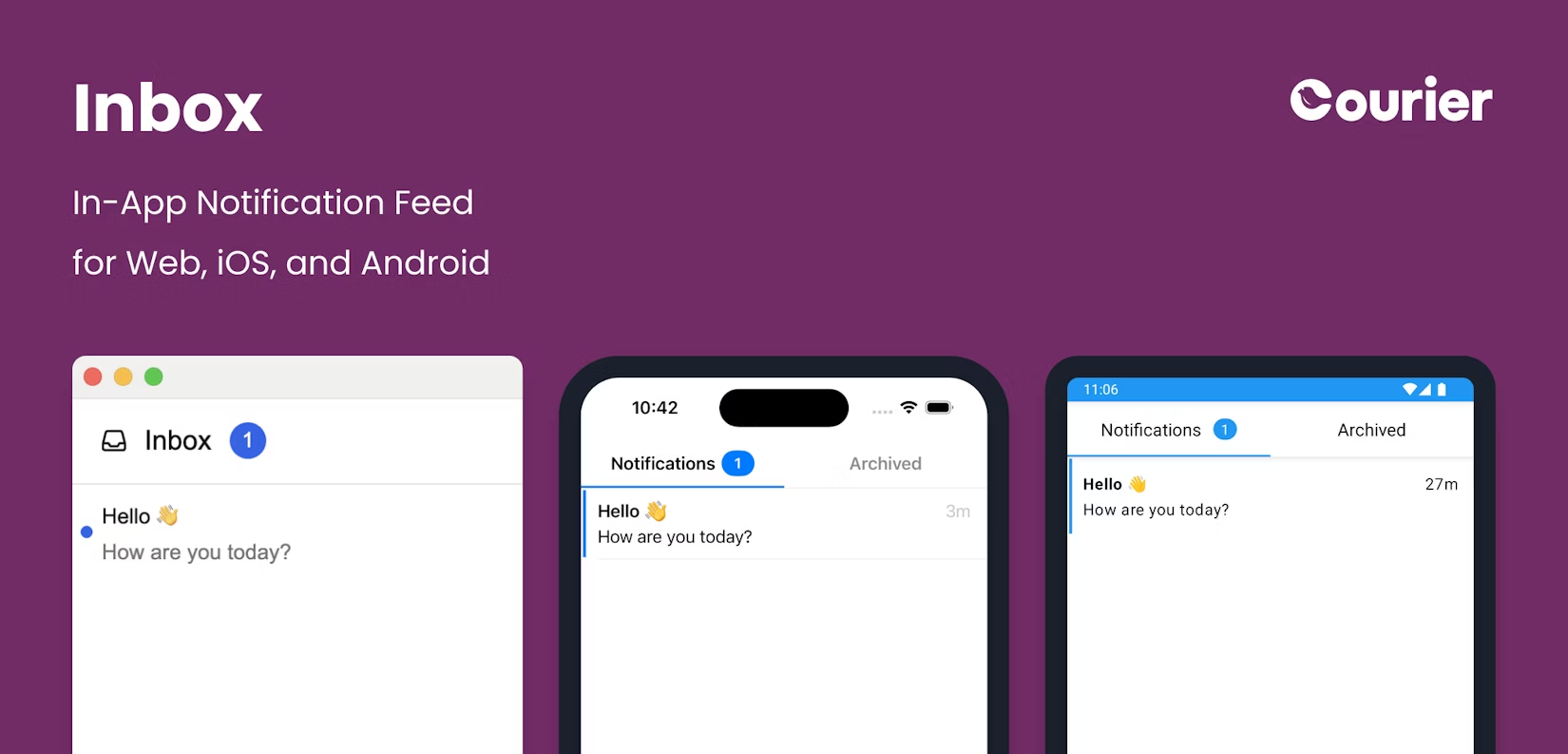
Courier provides that body as managed infrastructure, so you build the product and not the plumbing:
- Pre-built UI components: drop-in inbox, toast, and preference components for React and mobile, fully themeable.
- Managed real-time and state: hosted WebSocket delivery, read/unread tracking, and cross-device sync, with no servers to run.
- One API for every channel: a single call reaches the inbox and, when you need it, push, email, and SMS.
Implementing a Notification Center with Courier
Start with the core inbox component, then add real-time toasts, then customize.
Three levels of control
Courier Inbox meets you at three levels, a spectrum from out-of-the-box to fully custom. The more of the UI you take over, the more design freedom you get and the more you own; the infrastructure underneath (sign-in, real-time, pagination, read state) stays Courier's at every level.
| Approach | How much you customize | Effort to build and maintain | Best when |
|---|---|---|---|
| 1 · Theme it | Colors, fonts, radius, spacing | Very low | The default layout works and you need it on-brand |
| 2 · Extend the blocks | Swap the parts you pick: the row, header, or empty state | Low | The layout is close, but a piece (usually the row) needs custom markup or actions |
| 3 · Headless | The entire UI, any layout you can imagine | Medium to high | You need something nothing like a default inbox and want it fully custom |
Most teams theme, then reach for render props on the row. For the design reasoning behind each level, with worked examples, see How to Design an In-App Notification Center.
Setting Up Your React Project
Install the Courier React SDK, @trycourier/courier-react, via npm or yarn. It supports React 18+ out of the box, with @trycourier/courier-react-17 available for React 17 projects.
Implementing the Notification Inbox Component
The simplest implementation is a few lines. This gives you a working notification center that mirrors the pattern on Facebook or LinkedIn:
import { useEffect } from 'react';import { CourierInbox, useCourier } from '@trycourier/courier-react';export default function App() {const courier = useCourier();useEffect(() => {// Generate a JWT for your user (do this on your backend server)const jwt = 'eyJhbGciOiJIUzI1NiIsInR5cCI6IkpXVCJ9...';// Authenticate the user with the inboxcourier.shared.signIn({userId: 'user-123',jwt: jwt,});}, [courier]);return <CourierInbox />;}
That single component gives you:
- A functional inbox with scrolling and infinite pagination
- Real-time delivery over managed WebSockets
- Automatic read/unread state and a live badge count
- Offline support with local caching
- A responsive layout for desktop and mobile
CourierInbox handles the parts that are tedious to build by hand: the WebSocket connection, reconnection logic, state, and rendering.
Popup Menu Pattern
For navigation bars and headers, CourierInboxPopupMenu gives you a bell icon with a badge that opens a dropdown feed, the pattern you see in GitHub and Slack. It drops into existing navigation and manages state, positioning, and responsive behavior for you. View popup menu examples in the Courier Web repository.
Customizing Your Notification Center
Courier components are themeable through configuration objects: colors, fonts, spacing, and borders to match your design system, with light and dark modes and responsive breakpoints. For deeper changes, override individual sections like the header, footer, or list item while keeping the built-in real-time and state behavior. See customization examples, or the theming documentation for the full API.
Adding Toast Notifications
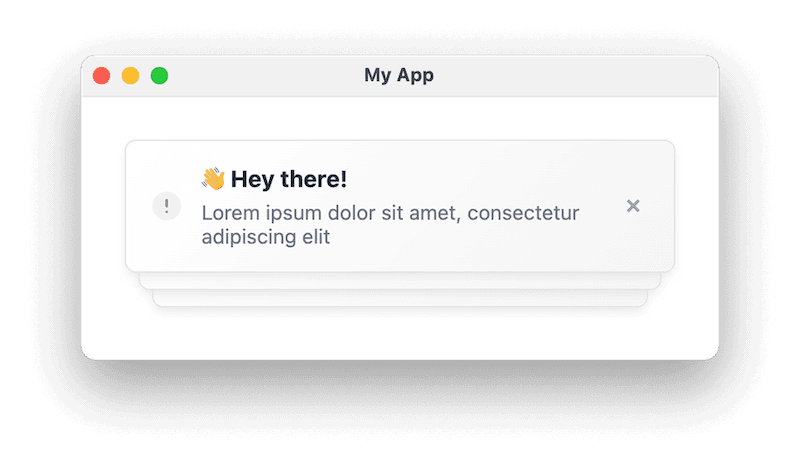
Toasts are brief, non-intrusive alerts for time-sensitive events: a confirmation, a new message, a live update. Courier Toast adds a <CourierToast /> component that synchronizes with the inbox automatically. When a notification arrives, it appears as both a temporary toast and a permanent inbox entry, with the badge updating in step.
State Management and Cross-Device Sync
Courier keeps notification state consistent for you, including the hard part: read/unread status across devices. Open the app in two tabs, mark something read in one, and the other updates over the same WebSocket connection that powers the inbox. It can also reconcile across channels, so opening an email version of a notification marks the matching inbox item as read. You can tune this per integration in the Courier Integration Manager.
Accessing Notification Data Programmatically
For custom UIs, the useCourier hook gives you direct access: fetch messages with filtering and pagination, mark them read or unread, archive or delete them, track interactions, and manage preferences. See the SDK reference for the full API.
React Native Mobile Notification Center
Mobile apps need notification centers just as much as web apps. Courier's React Native SDK gives you the same drop-in inbox for iOS and Android:
import Courier, { CourierInboxView } from '@trycourier/courier-react-native';// Sign the user in once (generate the JWT on your backend)await Courier.shared.signIn({userId: 'user-123',accessToken: jwt,});// Then drop the inbox into your layout<CourierInboxView style={{ flex: 1 }} />;
You get a native inbox for both platforms with real-time delivery, offline caching, cross-platform state sync, and deep linking, plus native gestures like swipe-to-dismiss and pull-to-refresh out of the box.
Native Push Notification Integration
Push on mobile needs platform-specific setup for Firebase Cloud Messaging (Android) and Apple Push Notification Service (iOS). Courier handles device token registration and refresh, deep link routing, and badge sync. You register tokens and handle tap events; Courier manages the FCM and APNS details. See the React Native guide for setup.
Cross-Platform SDKs
Beyond React Native, Courier provides native SDKs for iOS (Swift), Android (Kotlin), and Flutter. All share one API design and sync state through Courier's backend, so a notification appears across web, iOS, and Android with consistent state.
Sending Beyond the Inbox
The inbox is one channel. When a notification should also reach users who aren't currently in the app, Courier can send the same message across push, email, SMS, Slack, and more from a single call. Sends run on your server with your API key, never in the browser:
import Courier from '@trycourier/courier';// Runs on your backend (reads COURIER_API_KEY from the environment)const courier = new Courier();await courier.send.message({message: {to: { user_id: 'user-123' },content: {title: 'New comment on your post',body: 'Sarah replied: "Great insight! I have a follow-up question..."',},routing: {method: 'all',channels: ['inbox', 'push', 'email', 'sms'],},},});
Courier applies each user's channel preferences and routing rules at send time, and can fall back from one channel to another (email first, then SMS if unopened, for example). Designing that routing is its own topic; the multi-channel onboarding cookbook covers it.
User Preferences
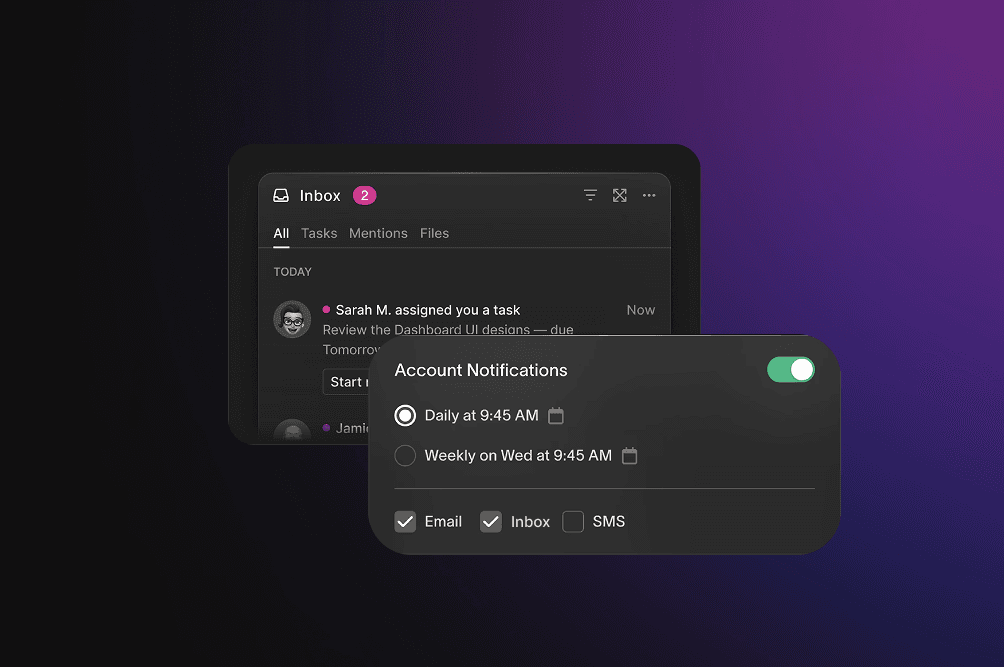
Letting users control what they receive is part of a good notification center, not an afterthought. Courier provides pre-built preference components where users set notification categories (marketing, security, product updates), per-channel preferences, quiet hours, and digest mode, without you building the UI or the storage behind it. Preferences are enforced automatically at send time, so your application code doesn't need to check them. You can also manage them via the API for custom or admin interfaces.
Implementation Best Practices
Whether you build the center or adopt a platform, a few things separate production from a demo:
- Real-time resilience: manage the WebSocket with reconnection backoff and heartbeats, and queue locally while offline so nothing is lost on a dropped connection.
- Performance at scale: virtualize long lists, paginate on scroll, cache recent items, and debounce rapid state changes to stay responsive with thousands of notifications.
- Accessibility: use ARIA labels, screen-reader live regions for new items, keyboard navigation, and focus management, aiming at WCAG AA.
- Testing: cover state with unit tests, full flows with integration tests, and real-device push behavior on both iOS and Android.
Courier's SDKs handle the real-time and performance items for you; see the documentation for details.
Courier vs. Building Custom or Other Solutions
When comparing options, weigh the total cost of ownership, not only the upfront build. The "Build Custom" column is the one to read closely: cheap to start, most expensive to keep. Competitor details below reflect each vendor's published documentation as of September 2026; check current pricing before you decide.
| Feature | Courier | Novu | OneSignal | Build Custom |
|---|---|---|---|---|
| In-app notification center | ✓ Drop-in React component with full UI | ✓ Pre-built notification center components | ✓ In-app messaging (limited inbox) | ✗ Build yourself |
| Multi-channel support | ✓ In-app, push, email, SMS, Slack, Teams, WhatsApp | ✓ Email, push, SMS, in-app, Slack, Teams, Discord | ✓ Push, in-app, email, SMS (push-focused) | ✗ Integrate each service separately |
| Pre-built UI components | ✓ React, React Native, iOS, Android, Flutter, JavaScript | ✓ React, Vue, Angular components | Limited (push and basic in-app) | ✗ Design and build yourself |
| Notification state management | ✓ Built-in with cross-channel sync | ✓ Basic (no cross-channel sync) | ✓ Basic, per channel | ✗ Build it |
| User preference management | ✓ Per-category, per-channel, quiet hours, digest | ✓ Channel and category level | ✓ Channel preferences and segmentation | ✗ Build UI and backend |
| Cross-channel synchronization | ✓ Automatic (email open marks inbox read) | ✗ Manual | ✗ Not provided | ✗ Build custom tracking |
| WebSocket infrastructure | ✓ Managed | ✓ Managed or self-host | ✓ Managed | ✗ Deploy and manage yourself |
| Open-source option | ✗ Proprietary | ✓ MIT license, self-hostable | ✗ Proprietary | You own all the code |
| Development time | Days | 1-2 weeks | 1-2 weeks (push); longer for full multi-channel | Longest, and ongoing |
| Ongoing maintenance | Very low (managed) | Low (cloud) or Medium (self-hosted) | Low (managed) | High (servers, connections, providers) |
| Provider failover | ✓ Built-in | ✗ Not provided | ✗ Not provided | ✗ Build yourself |
| Pricing (free tier) | 10,000 sends/month | 10,000 notifications/month | 10,000 subscribers | No vendor fee, but real infra and engineering cost |
| Best for | Complete multi-channel with full UI components | Open-source flexibility | Push-focused applications | Highly custom needs with a team to maintain them |
Twilio Chose Courier for Their Notification Center
Even Twilio, a communications platform, chose not to build this in-house and used Courier to power its in-app notifications, integrating Courier's Web Inbox into the Twilio Console to turn a fragmented approach into a centralized, real-time feed.
As Raghav Katyal, Technical Lead at Twilio, put it:
"We chose Courier because the depth of the inbox and multi-channel integrations allowed us to choose one notification platform for all products and teams at Twilio."
When a company that specializes in communications infrastructure reaches for Courier instead of building its own, it's a strong signal of how much a notification center really involves.
Before you ship: a design checklist
Principles are easy to agree with and easy to forget under deadline. Run this against the real thing, with real data, before it goes out:
- Load a realistic backlog, not three demo rows. A busy week (fifty or so notifications) is where a flat feed turns into a wall and you find out whether you need time grouping or bundling.
- Empty it. Is the empty state intentional, or does it look broken?
- Break it. Kill the network and confirm the error state is human and offers a retry.
- Count past nine. Does the badge cap (
9+) or does it render247? - Tab through it. Can you reach and trigger every action with the keyboard, with visible focus?
- Check contrast in both modes. Do muted timestamps still pass AA in light and dark?
- Drop to a phone-width viewport. Does the dropdown become a usable full-screen sheet, and are tap targets at least 44px?
- Watch a live one arrive. Does the feed update on its own, and does anything time-sensitive toast without stealing focus?
For the reasoning behind each check, see How to Design an In-App Notification Center.
Getting Started with Courier
Getting started takes a few steps:
- Sign up for free at courier.com, no credit card required, includes 10,000 sends per month
- Install the SDK for your platform (React, React Native, iOS, Android, Flutter, or vanilla JavaScript)
- Authenticate users with JWT tokens generated on your backend
- Drop in the inbox component, which works with sensible defaults
- Send your first notification from the API or dashboard
- Customize colors, fonts, and layout to match your brand
Prefer to let your agent do it? Point Cursor or Claude Code at the Courier CLI for AI agents and have it set up the channels, send a test, and wire the inbox into your app.
FAQ: React Notification Center
What is a notification center in React?
A notification center in React is a UI component that displays a centralized feed of in-app notifications, typically with real-time updates, a badge counter, read/unread state, and history. Modern notification centers also connect to channels like email, push, and SMS for a unified experience.
How do I build a notification system in React?
You can build one from scratch with custom components, a WebSocket layer, a data store, and state management, or use a platform like Courier that provides drop-in components. With Courier, install @trycourier/courier-react, authenticate users with a JWT, and drop in the <CourierInbox /> component. This takes hours instead of months.
Should I build or buy a notification center?
Build it if you have unusual requirements and a team to own the real-time layer, storage, and provider integrations long term. Buy it if notifications aren't your core product and you'd rather not carry that maintenance. The main cost of building isn't the initial work, it's operating it afterward.
How long does it take to build a notification center?
An agent can scaffold a working inbox in an afternoon; the cost that lasts is operating it, the real-time layer, cross-device state, and provider integrations, for the life of the product. With a platform like Courier that provides drop-in components and managed infrastructure, you get a production result in days and skip that ownership.
Can I customize Courier's notification center?
Yes. Adjust colors, fonts, spacing, and layout through theme configuration, or override component rendering with your own React components, while keeping built-in real-time and state behavior.
How does notification state sync across channels and devices?
Courier tracks engagement across channels and devices. If a user opens an email version of a notification, Courier marks the matching inbox item as read and updates the badge on every open device in real time, with no extra code.
What's the difference between toast and inbox notifications?
Toasts are temporary messages that appear briefly (typically 3-5 seconds) to alert users of new events. Inbox notifications are persistent and stored in a feed users can review, search, and manage. They work together: toasts for immediate awareness, the inbox for history.
Is Courier free to use?
Yes. Courier's free Developer plan includes 10,000 sends per month across all channels (in-app, email, SMS, push, Slack), plus journeys, the MCP server, CLI, and SDKs. Beyond that, the Business plan is pay-as-you-go at $0.005 per send.
Can I use Courier with React Native?
Yes. Courier provides a dedicated React Native SDK (@trycourier/courier-react-native) with native iOS and Android components. Its API mirrors the web SDK, and Courier also offers native SDKs for iOS (Swift), Android (Kotlin), and Flutter.
Conclusion
A notification center is a familiar piece of UI sitting on a surprisingly deep system: a store, a real-time channel, cross-device state, and optional reach into other channels. Building it is well within reach, especially with an agent. The real question is whether you want to own and operate it afterward. If notifications aren't your core product, Courier gives you the components and managed infrastructure so you don't have to.
- Sign up for free (10,000 sends per month)
- Read the docs
Similar resources

HIPAA-compliant notifications: where PHI should live
A practical guide to HIPAA-compliant notifications across SMS, push, email, and an in-app inbox. One rule, applied to every channel and every place PHI gets stored, including the systems most teams forget are in scope.

How to get your logo in Gmail and Apple Mail
BIMI puts your logo next to your emails in Gmail and Apple Mail, but there is no upload form. It is earned by locking your domain down. Here is the whole project: what it costs, how long it takes, and the five ways it fails silently.

Email preview tools compared: 6 that render on real devices
Most "email preview" features are simulations. These six open your email in the actual client and send back a screenshot. Here’s what each costs per preview, how much work sits between your template and the result, and which ones you can drive from code.