The Product Manager's Guide To Building Notification Systems: Optimized Automation Logic

- Part 1: Product Notification Experience
- Part 2: Decoupling Templates From Code
- Part 3: User Preferences Management
- Part 4: Omni-Channel Analytics
Notifications are an essential building block of every modern application and are now a core part of the user experience. They let you interact with your users by, for example, alerting them to potential risks, informing them about new product features, or simply engaging them through friendly check-in messages. Care must be taken, however — from the user’s viewpoint, the line between being engaged by relevant, timely notifications and feeling harassed can be thin. That’s why it’s so crucial to customize your notification experience to your users’ individual needs.
Using automation tools, developers can implement the kind of thoughtful, tailored notification experience that your users want. In this post, you will learn the different ways in which low-code and no-code automation tools help you build a better notification experience, while taking the burden of implementing the complex logic off your engineers’ shoulders.
Customization through automation
Automated functionalities like audience filters, complex workflows, and channel routing help you craft notification experiences that your users will happily engage in. Historically, these features come at a cost — the more customizability you want to include in your notification experience, the more resources are required to implement and maintain those features in your code base.
As a product manager, you need to think about how you can enable your developers to set up a notification logic that provides your users with a bespoke and smooth notification experience — without having to significantly rework your code base to support every customization you’ll potentially require. To achieve this, integrating existing tools with robust automation is key.
The first step towards automated customization is to understand what your users want and need. To that end, it’s useful to analyze how your users perceive the messages you send them — both through data analytics and by asking your users directly. You can then use that knowledge to send them helpful tips at the right time, as opposed to just sending out blanket notifications.
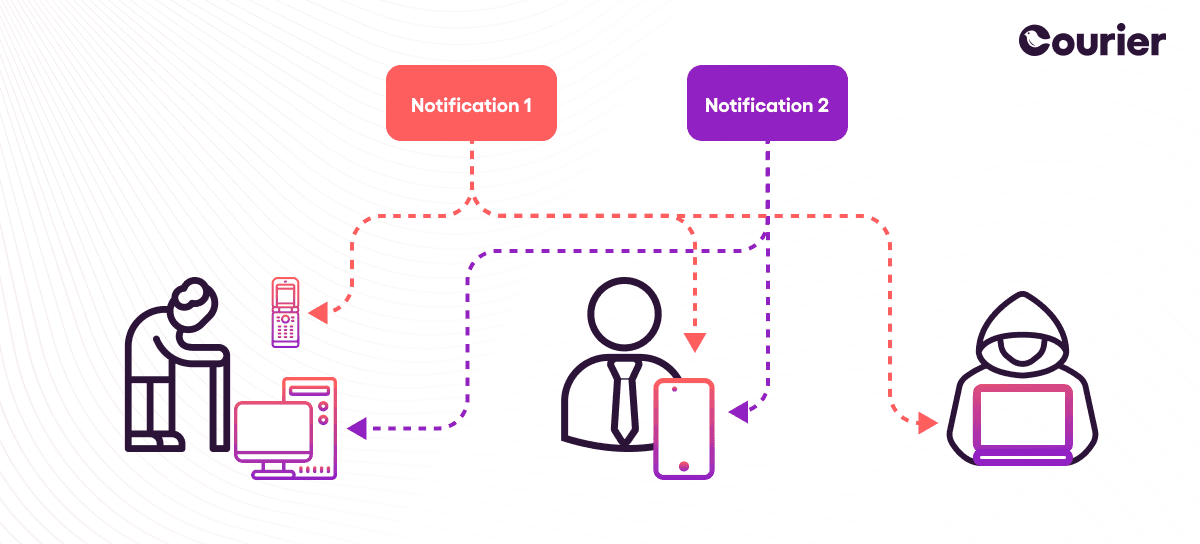
Once you have established your requirements, you need to choose and implement the right tools. Automation tools come with dynamic configuration capabilities that let you tailor your notification experience to the individual needs of different users. By integrating finer-grained customization into your notification logic, you can ensure the relevance of your notifications to your customers. Here are a few examples of a customized notification experience:
- Targeted announcements: Rather than sending out feature announcements indiscriminately, they only arrive in the inboxes of customers whose user profile signals that they might have an interest — and who are not already using said feature.
- Multi-channel notifications: Critical alerts should reach the right person at the right time — with multi-channel notifications, the notification logic picks the most suitable channel and sending time to ensure that users see the message and can react accordingly
- Tailored content: To avoid spamming users with content they have no interest in, organizations can tailor the subject matter, channel, and timing of their digests so that the people who receive them will actually want to engage with them.
Strategies for automation
To make sure that your users get the best notification experience possible, your developers should employ multiple customization strategies in a way that will result in a much more personal feel. Let’s have a closer look at the three core strategies behind user notification customization:
Audience
Many notification systems use lists to organize their user data. Lists allow you to put user profiles into cohorts, according to different criteria — for instance, their profession or their place of residence. You can then use these lists to send out notifications that are targeted towards a specific group and thus feel more relevant than a one-for-all message. But do you know what’s even better than lists? Audiences!
With audiences, you can define user cohorts dynamically based on a set of criteria. Rather than working with static lists of users, you can quickly filter your users’ profiles to assemble an audience. For instance, you’d only want to send out notifications about a holiday-related sale to people located somewhere where that particular holiday is celebrated. Since your users’ location data is subject to change, it makes sense to use a dynamic audience filter rather than a static list.
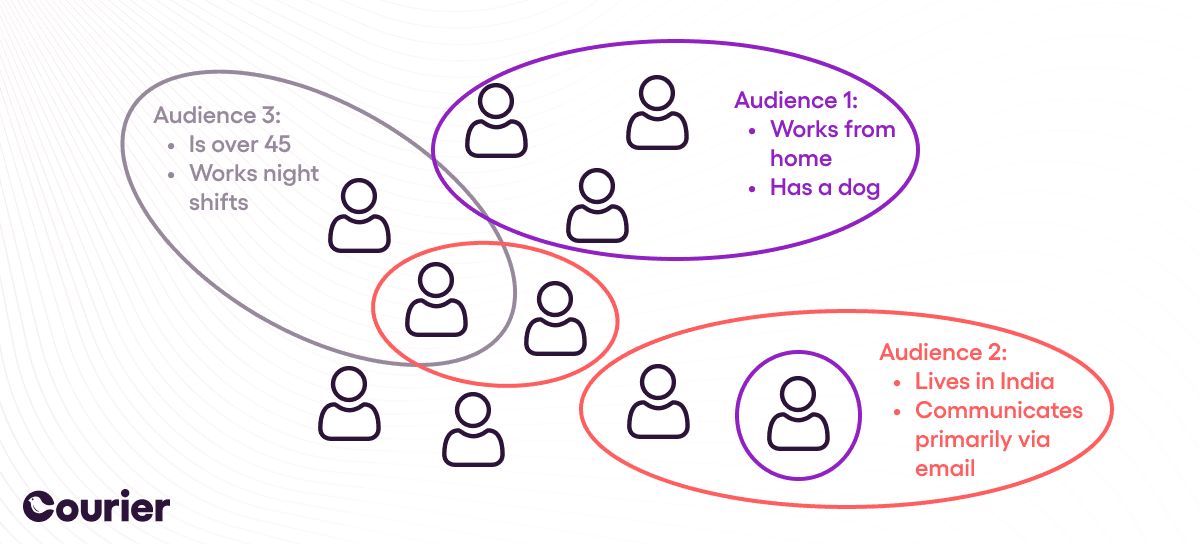
Another useful basis for filtering is usage data: Let's say you want to distribute instructions on how to set up video calls faster. Getting this information in your inbox may seem like a godsend to those users who have been using a time-consuming call setup process up until now. On the other hand, it's useless for those who either already use your feature or haven't shown any interest in video calls in the past.
Audience filters are a prime example of how user data, when collected and stored in a safe and GDPR-compliant manner, can be used to improve your users’ lives by offering them a more tailored and meaningful notification experience.
Multichannel routing
When and where are two factors that contribute immensely to how a user perceives the notification experience. As we’ve highlighted throughout this series, receiving a message at the wrong time or through the wrong channel can create a lot of frustration for users. Choosing the right channel and time, on the other hand, can go a long way towards providing a satisfying notification experience that integrates seamlessly into your users’ lives.
Preference management with high customizability is extremely important, as it gives your users a sense of control over how and when they are notified. Additionally, your organization may apply its learnings about which channels work best under which circumstances towards building a complex routing system.
With multi-channel routing, you can specify a ranking order for notification channels. For example, you can show a notification in the browser first, and if the user isn’t online, or has disabled in-browser notifications, you can send them a push notification to their phone.
Complex workflows
Notifications should rarely be statically defined. Rather, you should identify where your users are in their product journey, and send them messages that support, help and encourage them. Workflows help you respond to the different paths a user’s journey with your product might take.
As an example, let’s take someone signing up as a new user to your service. You’ll probably want to send them a friendly welcome message through their preferred notification channel. Then, if your new sign-up doesn’t interact with your application within a certain time-span, you might want to opt for a gentle reminder by sending them a push notification or Slack message that details some first actions they could take. Finally, you could reach out to them via email (perhaps after a week or so of inactivity) and suggest that they schedule an appointment with a team member to address the issues that are keeping them from using your product. This gentle escalation encourages your new user to engage without bombarding them with alerts.
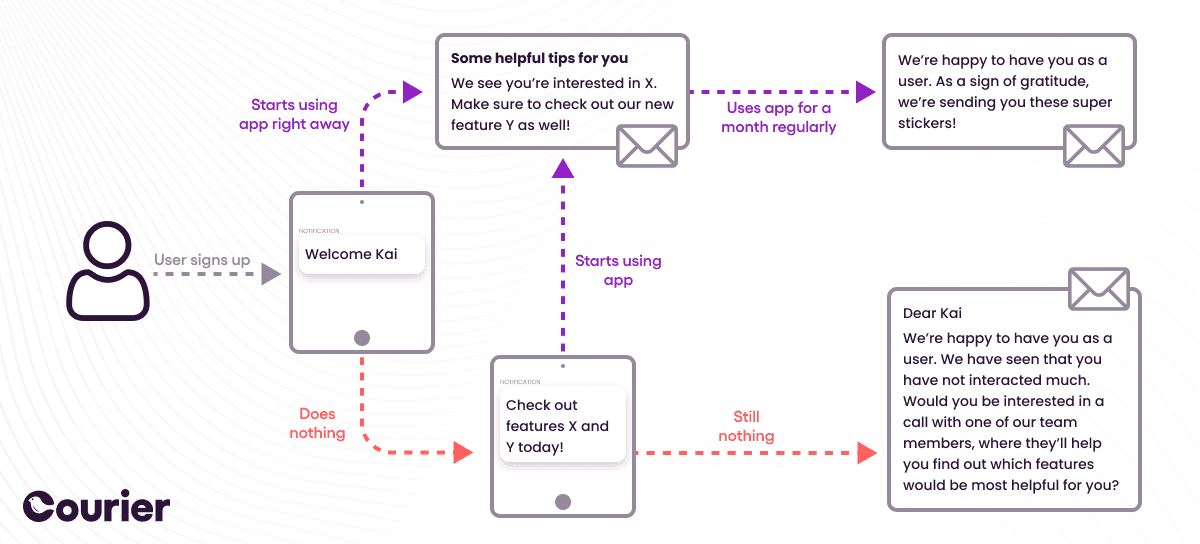
Thanks to triggers and other notification logic, you can build complex workflows that allow you to match the different experiences your users might have with your product. Such complex workflows are an example of how automation can actually provide a more personalized feel than mainly static notification procedures that were implemented manually.
When does it make sense to send notifications manually?
Automation should be at the core of your notification functionality. As the number of users grows, it becomes much harder to manually implement the notification logic required to cultivate a steady and happy user base.
Nevertheless, there are cases when it makes sense to send notifications without the help of an automation tool. You primarily need manual notifications for one-time events — such as device login notifications, password resets, product updates, and company announcements.
Notably, such notifications are relatively independent of your users’ actual product journey, as they are determined by what your organization needs to communicate to its users regardless of their notification preferences. For example, a user must be made aware of a potential data leak irrespective of their notification preferences. However, this type of notification should be few and far between. The focus of notifications should always remain the user’s experience with the product — and everything related to that can actually be automated.
To automate or not to automate?
We now have a strong case for automating your notification logic. Automation benefits your users by giving them a more customized and satisfying experience. It also benefits your developers, who can go back to focusing on your product’s core features, knowing that the notification logic is taken care of.
Similar resources
Know the moment users change notification preferences
Every preference change in Courier now reaches your systems two ways. A `preferences:user:updated` webhook fires the moment a user opts in, opts out, or changes a topic's channels, wherever they made the change. `GET /preferences/logs` returns the history, newest first, with the previous value where Courier knows it. Keep your CRM, warehouse, or marketing tools in step with what users chose.

Courier vs Customer.io: 2026 messaging platform comparison
Courier and Customer.io both send across email, push, SMS, and in-app, but they are not priced or built the same way. Courier bills by the send, puts journeys, experiments, broadcasts, an in-app inbox, preferences, and 50+ delivery providers on one platform, and exposes all of it through an API, a CLI, and an MCP server. Customer.io bills by the number of profiles in your database and fits a marketing team that needs deep behavioral segmentation. This comparison covers pricing, journeys, channels, in-app messaging, localization, and preferences, with every competitor figure linked to Customer.io's own pages.

Your notification analytics are now available by API
If it's in the Courier dashboard, it's on the API. Analytics was one of the last screens where that wasn't true. GET /notifications/{id}/metrics returns sends, deliveries, opens, clicks, errors, and undeliverable counts per template as a time series, broken out by provider and channel, so the numbers can live in your own product or go straight to an agent.