How to protect your email domain and sending reputation
 Thomas SchiavoneOctober 23, 2026
AI-driven hacking is on the rise, and your email domain is one of the easiest things to abuse. Attackers use AI to find vulnerabilities, write exploits, and run phishing campaigns faster than teams can respond, and this month alone has brought a steady run of incidents.
Email is the easiest way in, and your domain is the perfect disguise. Attackers use AI agents to write the code that sends spoofed mail, and to write the mail itself: a convincing invoice, password reset, or support reply in your company's voice, thousands at a time. We see it all the time now, far more often than before agents.
Most domains aren't ready for it. We regularly see companies with a DMARC record who believe they're protected while spoofed email still reaches people. The record usually says p=none, left over from setup, which tells receivers to deliver spoofed mail as normal.
The damage doesn't stop at the people who get fooled. Spoofed mail that gets delivered carries your domain, and the complaints it draws can count against you. Let malicious agents damage your reputation and inbox providers start filtering your real mail: password resets, receipts, and even your team's everyday corporate email from Google Workspace or Microsoft 365. You need to protect your domain before someone else uses it.
Protecting your email domain means keeping it from being spoofed and keeping the mail you send trusted by inbox providers. It covers authentication (SPF, DKIM, and DMARC), separating transactional and marketing email, and the sending habits that protect your reputation over time.
Key takeaways
- AI has made spoofing cheap and fast, and spoofed mail that gets through can get your real email, including corporate email, filtered or blocked.
- A DMARC record at
p=nonedoesn't stop spoofing.p=rejectdoes, and you get there safely by finding every legitimate sender first. - RFC 9989 (May 2026) removed DMARC's
pcttag. A record built onpct=1isn't protection. - Transactional and marketing email should use separate subdomains, DKIM keys, return-paths, and provider accounts, so a bad campaign can't delay password resets.
- Gmail requires a spam rate under 0.3% and recommends under 0.1%. Google Postmaster Tools shows your rate and whether you meet Gmail's sender requirements.
- Six copy-paste AI prompts below audit your DNS records, DMARC reports, senders, sending streams, Postmaster data, and stale DNS in minutes.
Why anyone can send email as your domain
Email doesn't check the From address when a message is sent. The receiving mail server does the checking, using records you publish in DNS. Without those records, or with a weak policy, anyone with a mail server can put @yourdomain.com in the From line. Nobody needs to break into your account. They claim your name.
Three records divide the work:
| Record | Lives at | Answers | Breaks when |
|---|---|---|---|
| SPF | TXT on the domain (or bounce subdomain) | Which servers may send for this domain? | Mail is forwarded; more than 10 DNS lookups |
| DKIM | TXT or CNAME at selector._domainkey | Was this signed by a key the domain controls? | A sender isn't set up to sign with your domain |
| DMARC | TXT at _dmarc | Does SPF or DKIM pass and align? If not, what should happen? | Policy is none |
Alignment is the part most people miss. SPF or DKIM passing isn't enough: the domain that passes has to match the domain in the visible From address. A support desk sending through its own shared infrastructure can pass SPF for its domain and still fail DMARC for yours.
Forwarding breaks SPF, because the forwarding server isn't in your SPF record. It doesn't break DKIM, because the signature travels with the message. That's why every legitimate sender should sign with DKIM on your domain.
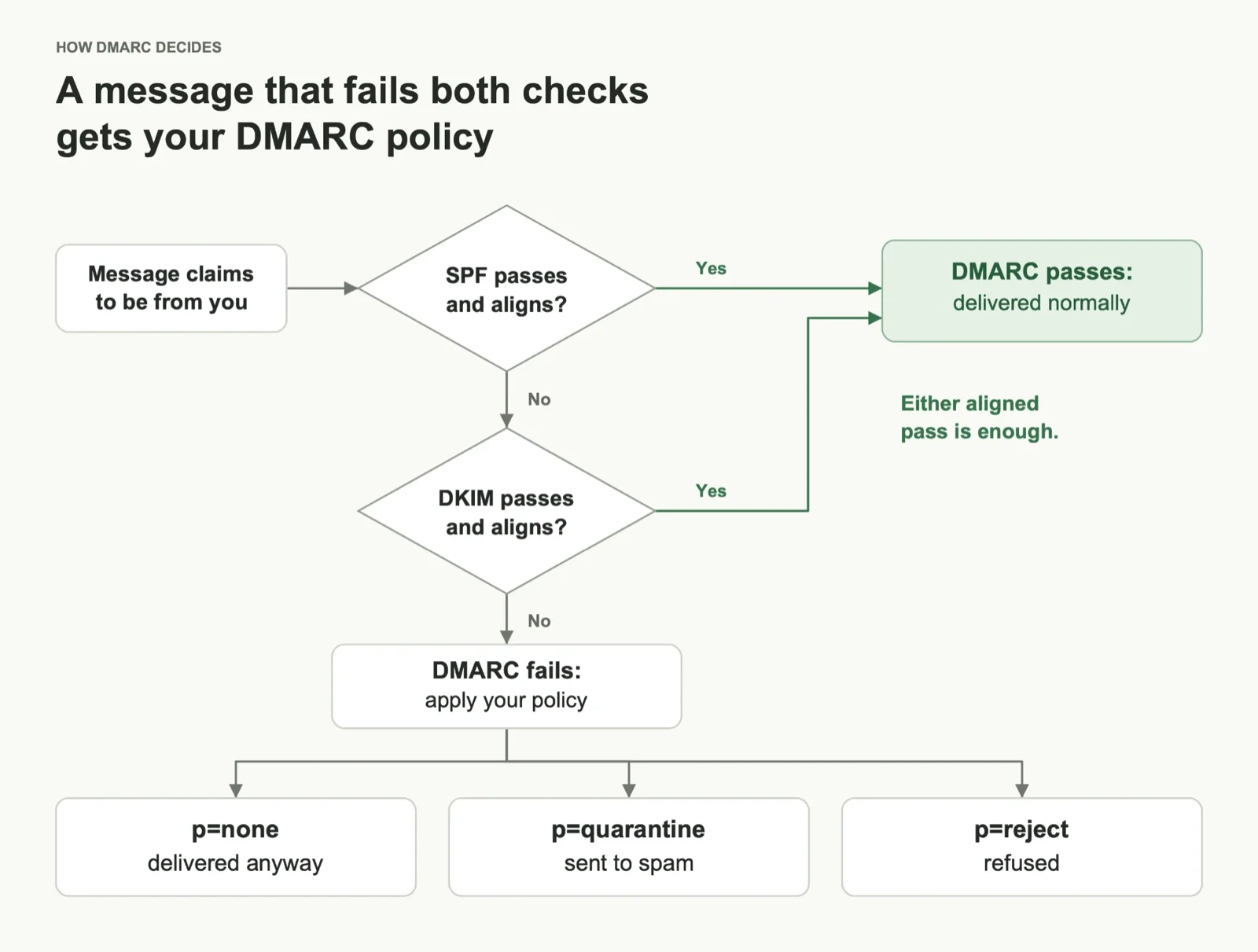
Get to p=reject without breaking your own mail
The safe path is monitor, fix, then enforce. Skip the inventory and you either stay at p=none forever or bounce your own invoices on the day you switch.
- Turn on reporting. Publish
p=nonewith arua=address and point it at a report reader. DMARC Digests takes one change to your DMARC record and sorts senders into known, unknown, and forwarded, which does most of the inventory for you. Postmark's free DMARC monitoring sends a weekly digest if you're smaller; dmarcian and Valimail cover enterprise needs. - Inventory every sender for 2 to 4 weeks. Put each source in one of three buckets: legitimate and passing, legitimate but failing, and unknown.
- Fix the legitimate failures. Set up DKIM on your domain for each vendor (CRM, support desk, billing, marketing platform) and a custom return-path so SPF aligns.
- Move to quarantine, then reject. Don't ramp with
pct. Under the original spec,p=quarantine; pct=1applied your policy to 1% of failing mail and delivered the rest, and RFC 9989 (May 2026) removed the tag because receivers never applied it consistently. Uset=yfor a short test window instead, with an end date. - Keep reading reports. A new tool nobody told IT about will start failing the day it goes live.
A few things trip people up while reading reports:
- Reports name networks, not vendors. A source labeled SparkPost, Mailgun, or SES is often a SaaS tool sending for you. Reverse DNS on the sending IP (
mta-123.yourvendor.com.sparkpostmail.com) usually tells you who. - Forwarded mail looks alarming and usually isn't. Sources showing DKIM pass and SPF fail, from webmail providers or cloud IPs, are typically forwards of your own mail.
- SPF has a 10-lookup limit. Every
include:costs lookups. Remove vendors you no longer use before you hit it. - Key length matters. 1024-bit DKIM keys still work, but use 2048-bit where the vendor offers it. If the record is a CNAME to the vendor, only the vendor can rotate the key.
- Subdomains need cover too. Add
sp=rejectso nobody can spoofanything.yourdomain.com.
Here's where you want to end up:
_dmarc.example.com TXT "v=DMARC1; p=reject; sp=reject; rua=mailto:dmarc@example.com"Keep transactional and marketing email apart
Once the domain is locked down, split your streams so a bad campaign can't send password resets to spam. Marketing email draws more complaints than transactional email, and mailbox providers score reputation per sending identity. Mix the two and one complaint spike from a newsletter can delay login codes, receipts, and alerts. Google's sender guidelines say the same: keep promotional content out of transactional messages.
A subdomain is the first layer, and our subdomain guide covers DNS setup and warm-up. The other layers isolate what a subdomain can't:
| Layer | Transactional | Marketing | What it isolates |
|---|---|---|---|
| From subdomain | notify.example.com (or root) | news.example.com | Domain reputation, Gmail filtering |
| DKIM key | Its own selector and key | Its own selector and key | Signing reputation; a leaked key affects one stream |
| Return-path | bounce.notify.example.com | bounce.news.example.com | SPF alignment and bounce handling |
| Provider account | e.g. Postmark transactional stream | e.g. a marketing platform or SendGrid subuser | Throttling, suspensions, shared-IP neighbors |
| IP addresses | Dedicated IP if volume supports it | Separate dedicated or shared pool | IP reputation and blocklists |
| DMARC | p=reject via sp= or its own record | Same | Spoofing per stream |
Subdomains give strong isolation, not total isolation: providers still associate a subdomain with its parent. Decide per message, not per team. A receipt from the billing tool is transactional; a "we miss you" email from the product is marketing. Put unsubscribe headers on marketing email only, and never let a transactional template pick up promotional content.
In Courier, each stream gets its own routing strategy pointing at its own provider, and each template's From address uses that stream's subdomain. Password resets go through Postmark from notify., the newsletter goes through SendGrid from news., and the two never share a pipe. Because templates read the strategy at send time, you can change a stream's provider or failover order without touching code. Send from your own domain covers the setup.
Everyday sending habits
Authentication gets you in the door; habits keep you there. Most deliverability problems we see come from slow drift: stale lists, forgotten domains, and vendors nobody removed.
- Keep complaints low. Gmail requires a spam rate under 0.3% and recommends staying under 0.1%. Make unsubscribing easy and honor it fast. Our email sender requirements guide covers the full Gmail, Yahoo, and Outlook rules.
- Clean lists continuously. Suppress hard bounces right away, sunset contacts who haven't engaged in months, and never buy lists.
- Use consistent senders, not no-reply. A stable From address per message type (
receipts@,alerts@,news@) teaches filters and people what to expect. Route replies somewhere a person reads them: people reply to receipts and alerts anyway, and replies are a positive signal to inbox providers. - Lock down domains that don't send. Parked and lookalike domains you own should publish
v=spf1 -alland a DMARC record atp=reject, so nobody borrows them. - Prune DNS. Remove SPF includes and DKIM records for vendors you've dropped, and delete CNAMEs pointing at services you no longer use. A dangling CNAME can let someone take over the subdomain.
- Brand your links. A custom tracking domain keeps links on your own domain instead of a shared one.
- Warm up anything new. New domains, subdomains, and IPs need gradually increasing volume.
- Go further once the basics hold. BIMI shows your logo in supporting inboxes and requires
p=quarantineorp=reject. MTA-STS with TLS reporting protects mail coming in.
Watch Gmail's view with Google Postmaster Tools
Google Postmaster Tools is the only first-party view of how Gmail treats your mail, and it's free. Add every domain you send from and verify each with a DNS TXT record. Do it before you change your DMARC policy, so you can see the effect.
Two dashboards matter most:
- Compliance status checks your mail against Gmail's sender requirements, item by item: authentication, alignment, encryption, DNS records, spam rate, and unsubscribe for bulk senders. Anything failing here is a fix to make this week.
- Spam rate is the user-reported spam rate for mail delivered to Gmail inboxes. A spike right after a campaign is the clearest sign your streams need separating.
Postmaster Tools v2 retired the Domain and IP reputation dashboards (Google's notice). Older guides that tell you to watch for "domain reputation: High" are out of date. Charts also need volume: a low-volume domain can show sparse or empty data, which doesn't mean everything's fine.
Gmail isn't the only inbox. Use Microsoft SNDS for Outlook traffic and Yahoo Sender Hub for Yahoo and AOL.
Audit your domain with AI prompts
Prompts 1, 2, and 6 need an AI agent that can run commands, like Claude Code, Cursor, or Codex, because they look up live DNS. Prompts 3, 4, and 5 work in any AI chat with the file, screenshot, or text attached. Replace example.com with your domain.
1. Audit DMARC, SPF, and DKIM (agent)
Audit email authentication for example.com. Use a public resolver (dig @1.1.1.1). Check one known domain first, like _dmarc.google.com; if that returns nothing, your DNS isn't working, so stop and tell me instead of reporting records as missing. If a lookup comes back empty, run it again against a second resolver (dig @8.8.8.8) before reporting the record as missing. Don't change any DNS records.

Run:
  dig @1.1.1.1 +short TXT _dmarc.example.com
  dig @1.1.1.1 +short TXT example.com
  dig @1.1.1.1 +short TXT <selector>._domainkey.example.com for each selector below
In the second output, find the record starting v=spf1. If _dmarc is a CNAME, report which domain it's delegated to.

Then give me a table covering:
1. DMARC policy (p=, sp=, t=), and whether it enforces on all failing mail. Flag pct below 100 as a problem; pct=100 is harmless leftover from the old spec.
2. Whether rua= is set, and where reports go.
3. How many DNS lookups SPF uses, counting nested includes (the limit is 10). Don't guess which includes are unused; list each include with the vendor it belongs to so I can confirm.
4. Whether each DKIM selector exists, its key length, and whether it's a CNAME to a vendor. If SPF includes a vendor but none of my selectors match that vendor, say so: it means a selector is missing from my list.
5. The three changes that would most improve protection, in order.

My DKIM selectors: [list them. To find one, open an email from each tool, view the original, and copy the s= value from the DKIM-Signature header. If unknown, try google, s1, s2, k1, selector1, and selector2, and tell me the result is incomplete.]
2. Read your DMARC reports (agent)
My DMARC aggregate reports for example.com are in [folder path] (XML, zip, or gz). Combine them and build one table of every sending source: source IP, reverse DNS (run dig @1.1.1.1 +short -x on each IP), message count, SPF result and alignment, DKIM result and alignment, and DMARC result. Group the sources as: legitimate and passing, legitimate but failing, likely forwarding, and unknown. Treat a source as a likely legitimate vendor when the reverse DNS, the SPF or DKIM domains in the report, or the vendor's published SPF ranges point to it, and say which evidence you used. For each legitimate source that fails, name the vendor and what to configure (DKIM on my domain, custom return-path). If nothing points to a vendor, mark it unknown instead of guessing.3. Inventory your senders (chat)
These tools send email for us: [e.g. Google Workspace, HubSpot Marketing Hub, Zendesk Support, Stripe customer emails, Postmark]. For each one, tell me: whether it sends as our domain or its own by default, how to set up DKIM signing with our domain, whether it supports a custom return-path or bounce domain for SPF alignment (or whether that doesn't apply, for example because mail goes out from our own mailboxes), and which SPF include it needs, if any. Put the answers in one table, then the setup steps per tool. Use web search for current setup docs, only link pages you've opened, and say so when you aren't sure.4. Check whether your streams are really separate (chat)
To get the headers in Gmail, open the email and choose ⋮ › Show original.
Below are the full headers of two emails we sent: a password reset and a marketing newsletter. Compare them on: From domain, Reply-To, DKIM d= domain and selector, Return-Path domain, sending IP, the SPF, DKIM, and DMARC results in the Authentication-Results header, List-Unsubscribe and List-Unsubscribe-Post headers, link and tracking domains, and the sending provider. Tell me what the two streams share (domain, key, return-path, IP, or provider) and what to separate first.

[paste both sets of headers]
5. Read Google Postmaster Tools (chat)
I've attached screenshots from Google Postmaster Tools for example.com: the Compliance status page and the last 30 days of the spam rate chart. Explain, in plain language, every row that isn't marked as passing. For the spam rate, tell me the highest daily value you can read and its date, and whether it's under Gmail's 0.3% limit and its 0.1% recommendation. If a chart is empty or says there isn't enough data, say that: it isn't a pass. Then list the fixes in order of impact.6. Find stale and risky DNS records (agent)
Here's an export of every DNS record for example.com: [paste the zone file or DNS provider export]. Don't change any records. If a lookup comes back empty, run it again against a second resolver (dig @8.8.8.8) before reporting the record as missing. Using dig @1.1.1.1 (and curl for the HTTP check), flag:
- CNAMEs whose targets don't resolve, or whose HTTPS response is the vendor's "not found" or "no such app/bucket/site" page (possible subdomain takeover).
- SPF includes and DKIM selectors, each with the vendor it belongs to, so I can mark the ones we've dropped.
- Subdomains whose effective DMARC policy is weaker than p=reject, counting the policy they inherit from the parent's sp= or p=.
Then check these domains we own but don't send from: [list them]. For each, flag a missing v=spf1 -all or a DMARC record below p=reject. If a domain has MX records or DKIM keys, warn me that it may be sending before you recommend -all. Mark which items need a person to confirm.
Wrapping up
Every week your domain sits at p=none is a week anyone, or any agent, can send as you. Start with the first prompt above. It takes a few minutes and tells you where your domain stands today. Let reports run for a few weeks, fix the senders that fail, then move to p=reject. When you're ready to split your streams, set up a routing strategy per stream in Courier so each one goes through its own provider and sender identity.
Frequently asked questions
How do I protect my email domain from spoofing?
Set up SPF and DKIM for every service that sends as your domain, then publish a DMARC record and move it to p=reject once your DMARC reports show every legitimate sender passing. Add sp=reject to cover subdomains, and give domains you don't send from v=spf1 -all and a DMARC record at p=reject.
Is p=none enough to stop spoofing?
No. p=none tells receivers to deliver failing mail as normal and send you reports. It's the right first step for finding your senders, but it doesn't stop anyone from sending as your domain. Gmail accepts p=none for its bulk-sender requirement, which is why so many domains stop there.
Does the DMARC pct tag still work?
RFC 9989, published in May 2026, removed pct and replaced it with t=y for testing and t=n for enforcement. Receivers following the new spec ignore pct, and receivers on the old spec rarely applied values between 0 and 100 consistently. Remove it from your record.
Should transactional and marketing email use different subdomains?
Yes. Mailbox providers track reputation per sending domain, so a separate subdomain keeps marketing complaints from affecting password resets and receipts. For stronger isolation, also give each stream its own DKIM key, return-path, and provider account.
Does Postmaster Tools still show domain reputation?
No. Postmaster Tools v2 retired the Domain and IP reputation dashboards. Use the Compliance status dashboard, your spam rate, and your DMARC aggregate reports instead.
Does Courier need access to my DMARC record?
No. Courier routes your email to the provider you've connected, such as Postmark, SendGrid, Amazon SES, or Mailgun, and that provider signs and sends it. Alignment comes from the DKIM and return-path you set up with the provider on your domain.
Similar resources

How to get your logo in Gmail and Apple Mail
BIMI puts your logo next to your emails in Gmail and Apple Mail, but there is no upload form. It is earned by locking your domain down. Here is the whole project: what it costs, how long it takes, and the five ways it fails silently.

HIPAA-compliant notifications: where PHI should live
A practical guide to HIPAA-compliant notifications across SMS, push, email, and an in-app inbox. One rule, applied to every channel and every place PHI gets stored, including the systems most teams forget are in scope.

Email preview tools compared: 6 that render on real devices
Most "email preview" features are simulations. These six open your email in the actual client and send back a screenshot. Here’s what each costs per preview, how much work sits between your template and the result, and which ones you can drive from code.