Test Courier emails end to end with your AI agent
 Thomas SchiavoneOctober 02, 2026
Your code has tests. Your emails get a preview and a test send to yourself, and then they ship.
Here's what a real test catches. We pasted an order-shipped sentence into a password reset email and pointed its button at a staging server. The scripted checks caught the staging link, and a send with no first name caught "Hi ,". Only the review caught the sentence that didn't belong. Then the agent fixed all three, published the template in Test, and reran the test until every check passed.
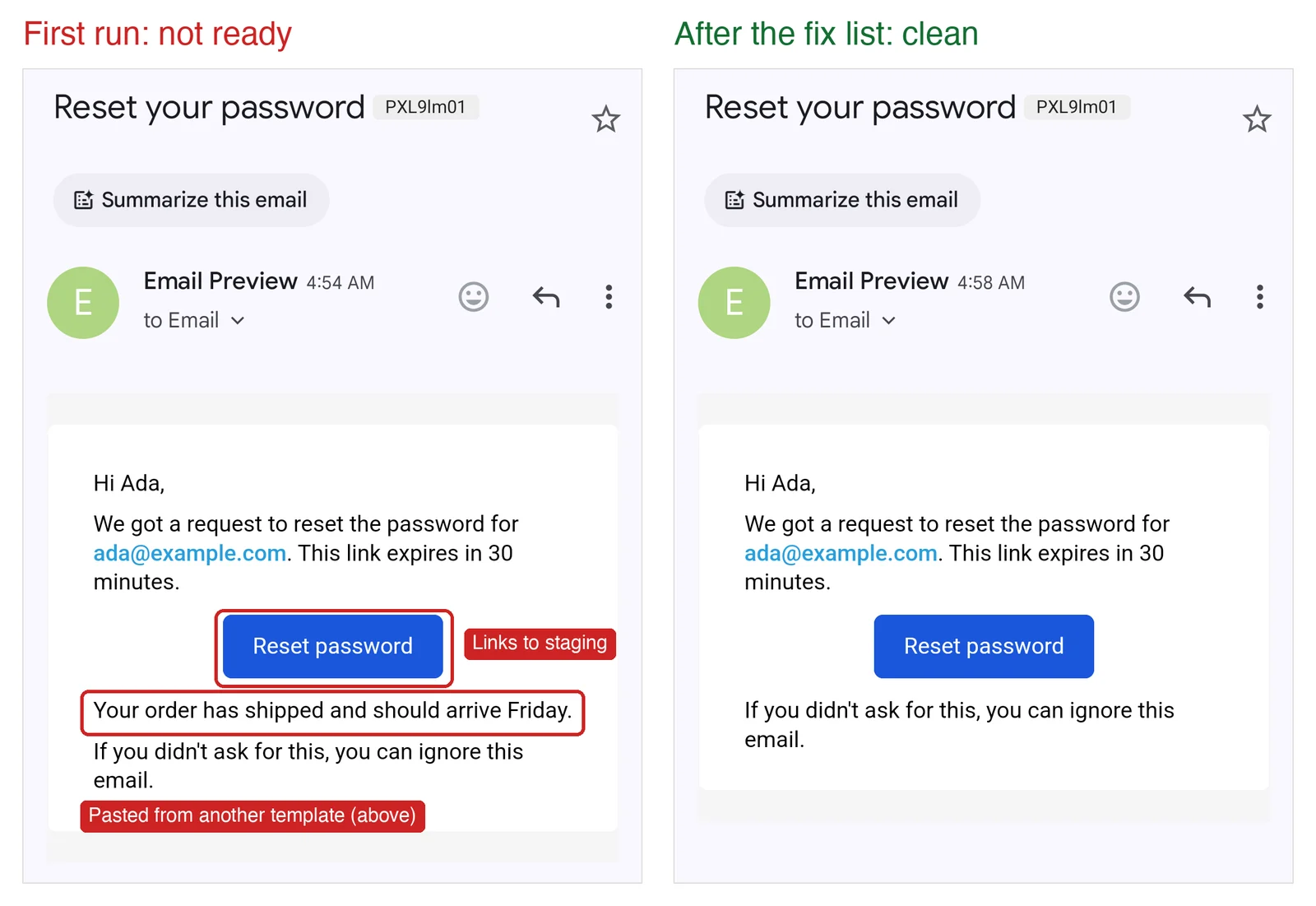
Give your coding agent an AgentMail inbox, and it can test your Courier emails the same way: send the change, check what arrives, and review how it renders. The prompts below take you from a one-off check to a repeatable test.
Key takeaways
- Script the checks that have a right answer: variables, links, and SPF, DKIM, and DMARC.
- Have your agent review the rest, like copy that doesn't belong, and flag anything subjective for a human.
- Promote a change only when every check passes, the review finds nothing to fix, and you've signed off on anything flagged.
How it works
- Send the template from your Courier Test environment to fresh AgentMail addresses: once with normal test data, once with optional fields missing, and once with long values.
- Run the scripted checks on what arrives.
- Run Courier Device Preview to get screenshots from real email clients.
- Have your agent review the email and screenshots, and write a fix list.
A run takes a few minutes. In our testing, each email arrived in 5 to 20 seconds, and Device Preview took about a minute.
Set up
Install the skills. The Courier and AgentMail skills teach your agent each API:
npx skills add trycourier/courier-skillsnpx skills add agentmail-to/agentmail-skillsInstall the SDKs:
npm install @trycourier/courier agentmail- Set your keys. Set
COURIER_API_KEYto the API key for your Courier Test environment andAGENTMAIL_API_KEYto your AgentMail key. Your Test environment needs your email provider connected. - Create an AgentMail inbox in the AgentMail console, such as
acme-e2e@agentmail.to. - Pick your devices. Use Courier Recommended, or build your own device set with as many or as few clients as you want.
- Work in Test. Make template changes in your Test environment and publish them there, since the test sends the published version.
The test uses one AgentMail inbox (the free plan allows 3) and gives each send its own address with a short + tag, like acme-e2e+ship-1727740000@agentmail.to. Keep the part before the @ to 64 characters or fewer, or Courier rejects the send as UNROUTABLE.
Try it first
You don't need a test suite to start. Ask your agent for a one-off check:
Send my password reset template from my Courier Test environment to afresh +tag address on [inbox-username]@agentmail.to, with realistic testdata. Read the email in AgentMail and tell me anything that looks wrong.Report only checks you actually performed.
The agent sends the email, reads what arrived, and reports back in a minute or so. When you want that on every change, turn it into a test.
Build the end-to-end test
Save the review prompt from the next section as review-prompt.md. Then paste this into your coding agent, whether that's Claude Code, Codex, Cursor, or another, and fill in the brackets:
Use the Courier and AgentMail skills to build an end-to-end test for myCourier email templates: [template names]. Work only in my Courier Testenvironment and never publish to Production. Read COURIER_API_KEY andAGENTMAIL_API_KEY from the environment and never commit them.First, for each template, draft expected/<template-id>.json from thetemplate, with three variants: normal data, optional fields missing, andlong values. For each, record the test data, the expected subject, thetext that must appear, the section order, and every link with where itgoes and whether it's single-use. Ask me which fields are optional, flaganything suspicious, like a staging host or copy that doesn't belong,and keep the draft in expected-draft/ until I approve it. Never changean approved file without asking.Then write email-test.mjs. It fails if any of these templates lacks anapproved file in expected/, and for each one:1. Loads the expected email.2. Sends each variant to its own fresh address on my AgentMail inbox:[inbox-username]+<short-tag>-<timestamp>@agentmail.to, with a shorttag for the template and variant and 64 characters or fewer beforethe @. Never send anywhere else.3. Waits up to 90 seconds for each email, matching it by its exactaddress and including spam and unauthenticated messages. Fails earlyif Courier reports UNROUTABLE or UNDELIVERABLE. Then fails if:- the subject doesn't match that variant's expected subject;- required text for that variant is missing from the HTML or plaintext (ignore the "(mailto:...)" Courier adds after addresses), orthe email has "{{", "undefined", "null", an unfilled {placeholder}outside style blocks, or dangling punctuation like "Hi ,";- a required link is missing, an unexpected link appears, or areceived link doesn't match its approved destination. Account fortracking redirects, and skip mailto links to test values. Checkthat the other received links load, but never open unsubscribe,preference, or single-use links: check those URLs only;- SPF, DKIM, or DMARC doesn't pass in the Authentication-Resultsheader.4. For the normal and long-value variants, runs a Device Preview on[device set name] with template_version "published", and saves eachscreenshot at full resolution, labeled with its variant and clientname from previews.listDevices().5. Saves each email to results/<template-id>/ and the screenshots toscreenshots/<template-id>/, and has a --scripted-only flag that skipsDevice Preview.Then run it, and review each template yourself with review-prompt.md.Slice any screenshot taller than 2,000 px so small text stays readable.Write email-test-report.md with the scripted failures first. A changeisn't ready if a check fails, anything is marked FIX, or a NEEDS A HUMANitem is waiting on me. Record my sign-offs in the expected file so theystay resolved. Show me the report, then add the scripted checks to CI.
Review each email
This is review-prompt.md. Claude Code, Codex, and Cursor can all read screenshots, so the review runs on whatever model your agent uses. To run it without an agent, see the FAQ.
You're reviewing one template's emails, sent through Courier to myAgentMail inbox. You have the approved expectations in expected/, everyreceived variant (subject, HTML, plain text, headers, and link results)in results/<template-id>/, and Device Preview screenshots inscreenshots/<template-id>/. Review every received variant, plus allavailable screenshots, and label findings by variant and client.Judge only what a script can't:- The copy reads right, in the expected order, with nothing missing,repeated, or out of place.- Each link and button says what it does and goes where a user expects.- In every screenshot, nothing is cut off, hidden, overlapping,unreadable in dark mode, or badly cropped, and mobile stacks sensibly.- The plain text says the same thing as the HTML.Ignore the preview sender, mail-app UI, font substitution, smallspacing differences, and anything the expected file marks as signed off.Rate each finding LOOKS GOOD, FIX (a clear defect; suggest a changewhen possible), or NEEDS A HUMAN (it's subjective, like brand, tone, orlegal copy, or you aren't sure). Quote the evidence for every rating. Noevidence means NEEDS A HUMAN. Identify which clients are affected; don'tinfer the cause from that alone.Return a table with these columns: Rating | Finding | Variant |Client | Evidence. Then write a fix list another agent can apply andverify by rerunning the test: the template ID, element, what's wrong,evidence, and suggested change.
Hand the fix list to another agent, or back to the same one:
Apply the fixes in email-test-report.md in my Courier Test environment,publish the updated templates there, then rerun the test and review. Ifthe rerun fails, show me why before trying again. Never publish toProduction or change approved expectations without asking.
What a run catches
These are real results from a Courier Test environment sending through Resend, with a fresh coding agent following this post.
The password reset from the top. We planted two mistakes. The agent's report found three, plus one for a human:
| Rating | Finding | Variant |
|---|---|---|
| FIX | An order-shipped sentence sits between the button and the closing line | All |
| FIX | The Reset password button goes to staging.example.com, not the approved host | All |
| FIX | The greeting reads "Hi ," when there's no first name | Optional fields missing |
| NEEDS A HUMAN | The email never names the product or sender | All |
The fixes had one surprise of their own: the agent's first fallback for a missing name made every greeting read "Hi there,", even for Ada. The rerun caught that too, and after the second fix every check passed and the review found nothing to fix.
Other runs. Three earlier runs by fresh agents caught the same password reset mistakes. One also found a gap in a template we thought was clean: an order email with no delivery date said "It should arrive by ." and nothing else. In our own run on a planted "Order shipped" email, every scripted check passed while the review caught a password-reset line pasted in from another template and a button labeled "View your invoice" that goes to order tracking. That review ran on GPT-6 Luna through its API, as described in the FAQ.
When a check fails
Look up the message in Courier's message logs, or ask your agent to:
| What you see | Where to look |
|---|---|
The message is UNROUTABLE or UNDELIVERABLE | The log's reason and error, such as no provider for the channel or a recipient who unsubscribed |
| No message in the logs | The API response, and whether you're looking at the right environment's logs |
| The email in the logs has blanks or the wrong content | Your template, or test data that doesn't match its variables |
| The email in the logs is right, but the inbox copy differs | Anything that changes the email after it leaves Courier, such as your email provider |
Courier says SENT, but nothing arrived in time | Your provider's events for a bounce or block, the recipient address, and your domain's SPF, DKIM, and DMARC |
SPF, DKIM, and DMARC are the DNS records that prove an email comes from your domain. AgentMail drops email that explicitly fails them without a bounce, so your provider can still report it as sent. Debug delivery shows how to check each record.
When to test
| Change in Courier | Run |
|---|---|
| Edit a template's content | Scripted checks and the review |
| Change a template's design or brand | The full test |
| Change routing, providers, or DNS | Scripted checks |
| Move a change to Production | Scripted checks, with your Production key |
You can also run the scripted checks every hour against Production to catch what nobody changed on purpose, like a DNS record or a provider outage.
Run it in CI
This job runs the scripted checks on every pull request. Started by hand, it adds Device Preview. Either way, it saves the results and screenshots for your agent to review. Commit a package-lock.json for npm ci:
name: Email testson:pull_request:workflow_dispatch:concurrency:group: email-tests-${{ github.ref }}cancel-in-progress: truejobs:email:runs-on: ubuntu-latesttimeout-minutes: 15steps:- uses: actions/checkout@v4- uses: actions/setup-node@v4with:node-version: 22- run: npm ci- run: node email-test.mjs ${{ github.event_name == 'pull_request' && '--scripted-only' || '' }}env:COURIER_API_KEY: ${{ secrets.COURIER_TEST_API_KEY }}AGENTMAIL_API_KEY: ${{ secrets.AGENTMAIL_API_KEY }}- uses: actions/upload-artifact@v4if: always()with:name: email-test-resultspath: |results/screenshots/
Frequently asked questions
What is end-to-end email testing?
End-to-end email testing sends a real email through your email provider to a real inbox, then checks what arrived. It catches what a preview misses: blank variables, broken links, routing mistakes, and failed SPF, DKIM, or DMARC.
How is a real inbox different from an email sandbox?
A sandbox or mock SMTP server catches the email before it reaches your email provider, so it never tests your provider, your DNS, or Courier's routing. A real inbox gets the email the way your users do.
Can I use a Gmail account instead of AgentMail?
You can, but your tests then depend on OAuth tokens or IMAP credentials. AgentMail inboxes are created and read with an API key, and plus-addressing gives every test its own address.
Can I run the review without a coding agent?
Yes. Send the review prompt, the approved expectations, every received variant, and the screenshots to a vision model through its API. The same release rule applies: a FIX blocks the change, and a NEEDS A HUMAN item needs your sign-off. We use GPT-6 Luna (gpt-6-luna) with reasoning effort set to high, through the OpenAI Responses API, sending each screenshot as an input_image with detail set to original. Across six reviews in our testing, each took 18 to 55 seconds and cost under a cent. Let your agent check every email before it ships covers why we picked it.
Similar resources
Let your agent check every email before it ships
Courier Device Preview gives your coding agent real screenshots from Outlook, Gmail, and Apple Mail. Here's the prompt and workflow to have it check every email, fix the draft, and check again before you publish.

Courier vs Customer.io: 2026 messaging platform comparison
Courier and Customer.io both send across email, push, SMS, and in-app, but they are not priced or built the same way. Courier bills by the send, puts journeys, experiments, broadcasts, an in-app inbox, preferences, and 50+ delivery providers on one platform, and exposes all of it through an API, a CLI, and an MCP server. Customer.io bills by the number of profiles in your database and fits a marketing team that needs deep behavioral segmentation. This comparison covers pricing, journeys, channels, in-app messaging, localization, and preferences, with every competitor figure linked to Customer.io's own pages.

Customer messaging tools that don't need engineers
Most companies run two systems: a marketing tool for campaigns, and something else for product notifications. Here are nine tools product and growth teams can run without engineering, what still needs a developer, and what each one costs.