Turn customer context into personalized messaging with AI
 Thomas SchiavoneMay 01, 2026
Turn customer context into personalized messaging with AI
When customer messaging works, it feels timely, relevant, and specific to what someone is doing in your product. A new user gets the right onboarding nudge. A high-intent account gets routed toward the right follow-up. A disengaged user gets a different path before they disappear.
The hard part has always been making that happen at scale. You can write more branches, more template variants, and more routing rules, but that complexity piles up quickly. The more personalized the experience gets, the harder it becomes to maintain.
The AI node in Journeys gives you a better way to build adaptive messaging. It can classify users, score intent, generate notification copy, enrich profiles, and route each journey based on the context you already have. Instead of mapping every possible path by hand, you define what you want the model to return and use that structured output in the rest of the workflow.
The AI node rolled out to enterprise customers when we launched Journeys in March. Today, it's generally available to every Courier customer.
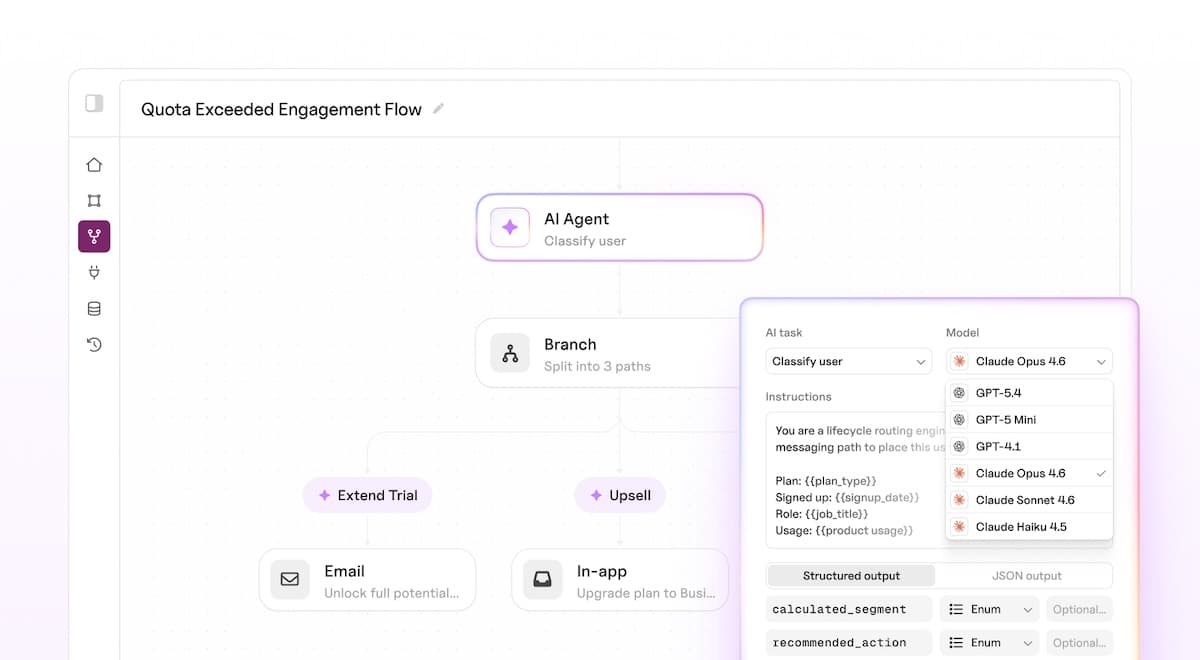
Make every journey respond to customer context
AI is useful in user messaging when it can do more than generate text. In Journeys, the AI node sits inside the workflow, so its output can decide what happens next: which branch a user takes, which notification they receive, what copy appears in the template, or what gets saved back to their profile.
Here's what that looks like in practice:
- Personalized notification copy at scale. Feed signup data, feature usage, and plan tier into the AI node. Get back a tailored subject line, body copy, and recommended next action for each recipient. One journey can replace dozens of template variants.
- Behavioral scoring and intent routing. Pass product signals (pages visited, features activated, support tickets filed) to the model. Get back a structured score and classification. Branch the journey so high-intent users and disengaged users land in different flows.
- Profile enrichment without a data pipeline. Classify users into personas or lifecycle stages based on activity. Persist the result to their profile so every future journey starts with richer context.
- Real-time information pulled mid-journey. Toggle web search for Anthropic models so the model can look up current data before responding. Generate notifications that reference recent company news, public pricing pages, or anything else outside your journey context.
- Adaptive tone and channel selection. Let the model decide how to deliver, not only what to say. Return a tone or channel_preference field and branch into different send paths based on the model's output.
Each of these would normally live in a separate service or require you to maintain conditional logic across dozens of templates. With the AI node, they're one step on the canvas.
All of these patterns use the same core loop: prompt, schema, structured output, downstream action.
How AI becomes part of the journey
You place an AI node anywhere on the journey canvas. When a run reaches it:
- Courier assembles the prompt you've written, interpolating journey context (trigger fields, profile data, upstream fetch responses) into {{variable}} placeholders.
- Courier sends the prompt and your output schema to the model you selected.
- The model responds with structured JSON matching your schema.
- Courier parses that response and merges the fields into the journey context.
From that point, every downstream node can reference the AI output the same way it references any other data in the journey. Use it in branch conditions, send templates, fetch URLs, or pass it into another AI node.
Frontier models, ready to call from any node
You pick the model per node, so different steps in the same journey can use different models. Use a smaller model for predictable structured tasks. Use a larger model when the prompt needs more context, more reasoning, or higher-quality generated copy.
OpenAI
| Model | Best for |
|---|---|
| GPT-5.5 | Complex reasoning, multi-step analysis, nuanced copy generation |
| GPT-5.4 | Strong general-purpose performance across classification and generation |
| GPT-5.4 Mini | Reliable structured output for scoring, extraction, and routing |
| GPT-5.4 Nano | Low-cost option for high-volume classification and simple field extraction |
| GPT-5 Nano | Lowest-cost option for boolean flags and single-field parsing |
Anthropic
| Model | Best for |
|---|---|
| Claude Opus 4.7 | Deep analysis, long-form generation, complex multi-field output |
| Claude Opus 4.6 | Detailed reasoning, structured summaries, profile enrichment |
| Claude Sonnet 4.6 | Balanced performance for personalization and content generation |
| Claude Haiku 4.5 | Fast classification, intent detection, simple structured responses |
Anthropic models also support web search, letting the model query the internet for real-time information before it responds.
The practical starting point: use Haiku or GPT-5.4 Mini for classification, extraction, and scoring. Move up to larger models when the output needs more reasoning or when copy quality matters more than throughput.
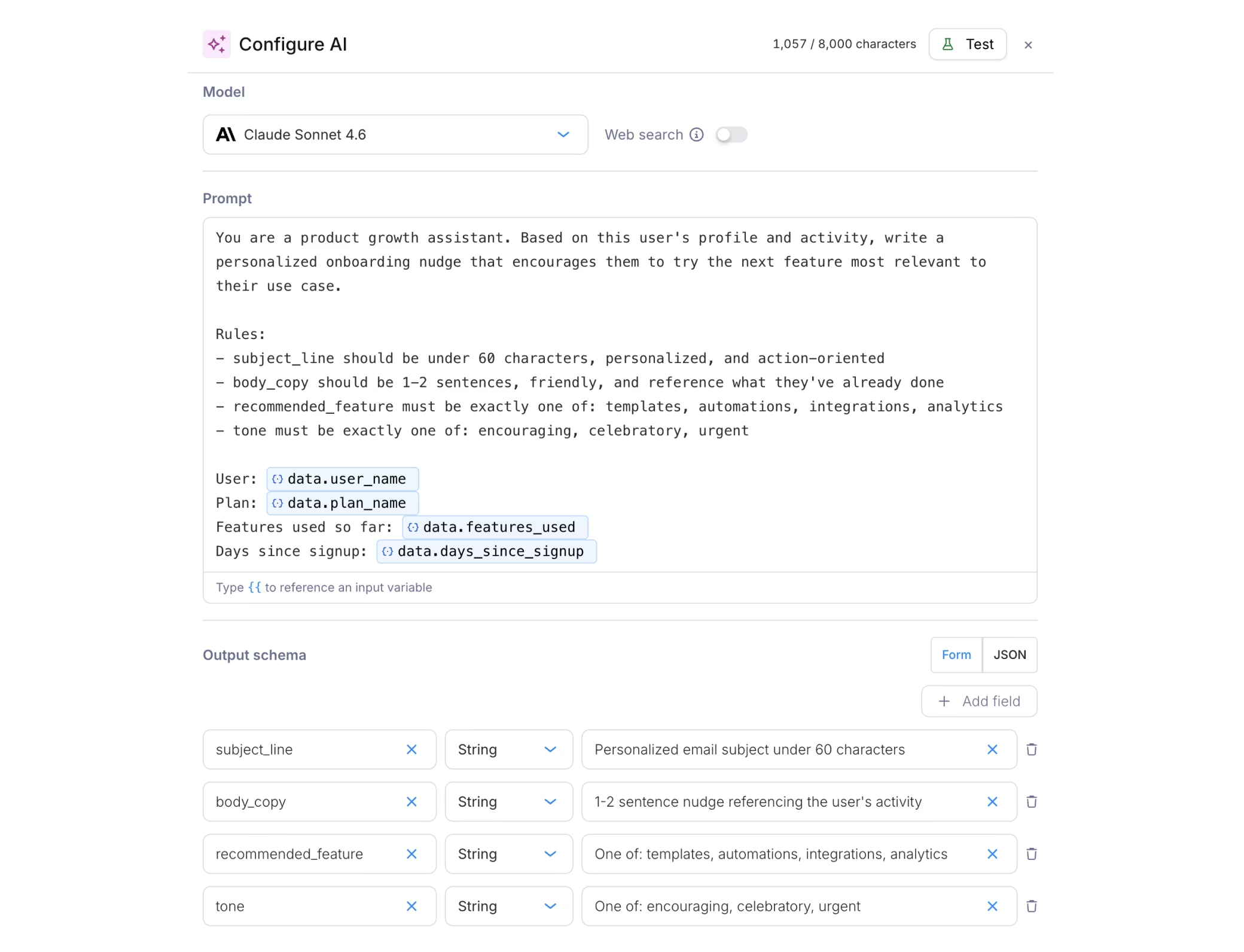
Structured answers you can trust and act on
Define exactly what the model returns
You define the shape of the model's response upfront. Add fields with names and types (string, number, boolean) in form mode, or paste a JSON Schema directly. The model returns structured JSON that your branch conditions, send templates, and downstream nodes use directly.
No free-form text to parse. You define the contract, the model fills it.
Prompt with full journey context
Your prompt has access to everything available in the journey at that point: trigger schema fields, user profile data, and responses from upstream fetch nodes. Type {{ in the prompt editor to autocomplete available fields. A token counter shows prompt size in real time.
Web search
Web search is available for Anthropic models. When toggled on, the model can query the internet before responding. Use it when your prompt needs current information that isn't in the journey context, like a company's latest funding round or pricing from a public pricing page.
Conditional execution
AI nodes support conditions. If the conditions aren't met when the run reaches the node, it's skipped and no credits are consumed. This lets you run AI selectively (only for certain segments, only on certain paths) and keep costs predictable.
See what AI will decide before users do
The configuration drawer has a Test button that runs the prompt against the selected model with sample variable values. You see the parsed JSON output immediately, so you can validate structure, check quality, and handle edge cases before the journey goes live.
Iterate on prompts and schemas without triggering real runs. When the output looks right, publish.
Know exactly what AI decided and why
Every AI node execution is inspectable in Run Inspection. Click the AI node step in any run to see:
- Which model ran and whether web search was enabled
- The fully resolved prompt (all variables substituted)
- The output schema that was sent
- The model's structured JSON response
- Input and output token counts
If the node fails (model error, timeout, malformed response), the step surfaces the error. The journey continues, but no AI output merges into context. You can add a branch condition downstream to handle the missing fields gracefully.
Start building
The AI node is available to all Courier customers today. If you've been using Journeys, you already have access.
- Open any journey in the Journeys editor
- Add an AI node to your canvas
- Select a model, write your prompt, define your output schema, and test
- Publish and go live
Or start with the AI node documentation for full configuration details and examples. For pricing, see AI node billing.
New to Journeys? The Journeys overview covers the visual workflow builder, triggers, branching, and all the other node types. Add AI nodes wherever you need intelligence in your flows.
Similar resources

Your Entire Lifecycle Marketing Department, Run from Claude Fable 5
With the rollout of Claude' Fable model, one thing is becoming increasingly clear. Marketing execution (especially the long-tail work), will be done in an AI editor. In Courier, connect your agent to the MCP server or CLI, install Courier Skills, and keep a small folder of markdown context files. From there, one person with a coding agent covers the work that used to require a lifecycle marketer, an email designer, a marketing ops hire, and an engineer: building journeys, shipping templates, auditing every notification, and debugging delivery without opening a dashboard.

Create a customer journey from AI coding agent
Use Courier's Journey API to create multistep customer engagement workflows from your coding agent of choice. Describe the kind of journey you'd like to create, answer a few questions, and publish to the platform.

Courier journeys, as code
Most journeys don't die because they were hard to build — they die because they're hard to change. A day-5 nudge written before a new activation event existed still fires for users who hit the milestone on day two. Courier journeys are now programmable: a public Journeys API with SDKs, a CLI, and an agent skill on top. Describe a flow to your coding agent, get an ASCII diagram, ship it. Full post covers the access points, an example end-to-end, and the one gotcha worth knowing (`output_schema` is mandatory on AI nodes).