Create a customer journey from AI coding agent
 Kyle SeylerMay 20, 2026
TL;DR
For decades now, product messages and lifecycle programs have been a multi-week affair. Developing the strategy, design reviews, implementing the workflow steps, and piping in the data. At Courier we've made the visual creation of customer journeys significantly easier for a single growth or product manager to implement in a fraction of the time. But we've also opened up a new way to build multistep messaging programs. We just released the create journeys API to develop any journey from code or AI agents. Use natural language to create multistep journeys, add data and conditions, design templates, track progress, and iterate.
The case for journeys-as-code
The visual journey designer is a great way to build visually, and see how data flows through branches and messages. You can sit down with it and build a complex journey in an afternoon, branch logic and all, without writing a line of code. For one-off campaigns and stakeholder review that has been the right tradeoff for years, and nothing about the API changes that.
What changes the tradeoff is scale. A team running modern lifecycle messaging is not running one journey. They're running renewal, winback, trial activation, power-user nudges, churn-risk escalations, and a dozen smaller programs that each touch live user data and shift every quarter as the product shifts. Keeping all of them current inside a point-and-click editor is a job nobody actually signs up for, and the symptom is journeys that get built once and then quietly drift out of step with the product. The work of lifecycle messaging stops being design and becomes maintenance.
For a wider look at what else lives in this category, including CDP-bundled builders, lifecycle marketing suites, and other orchestration platforms, the customer journey orchestration tools guide compares the options side by side.
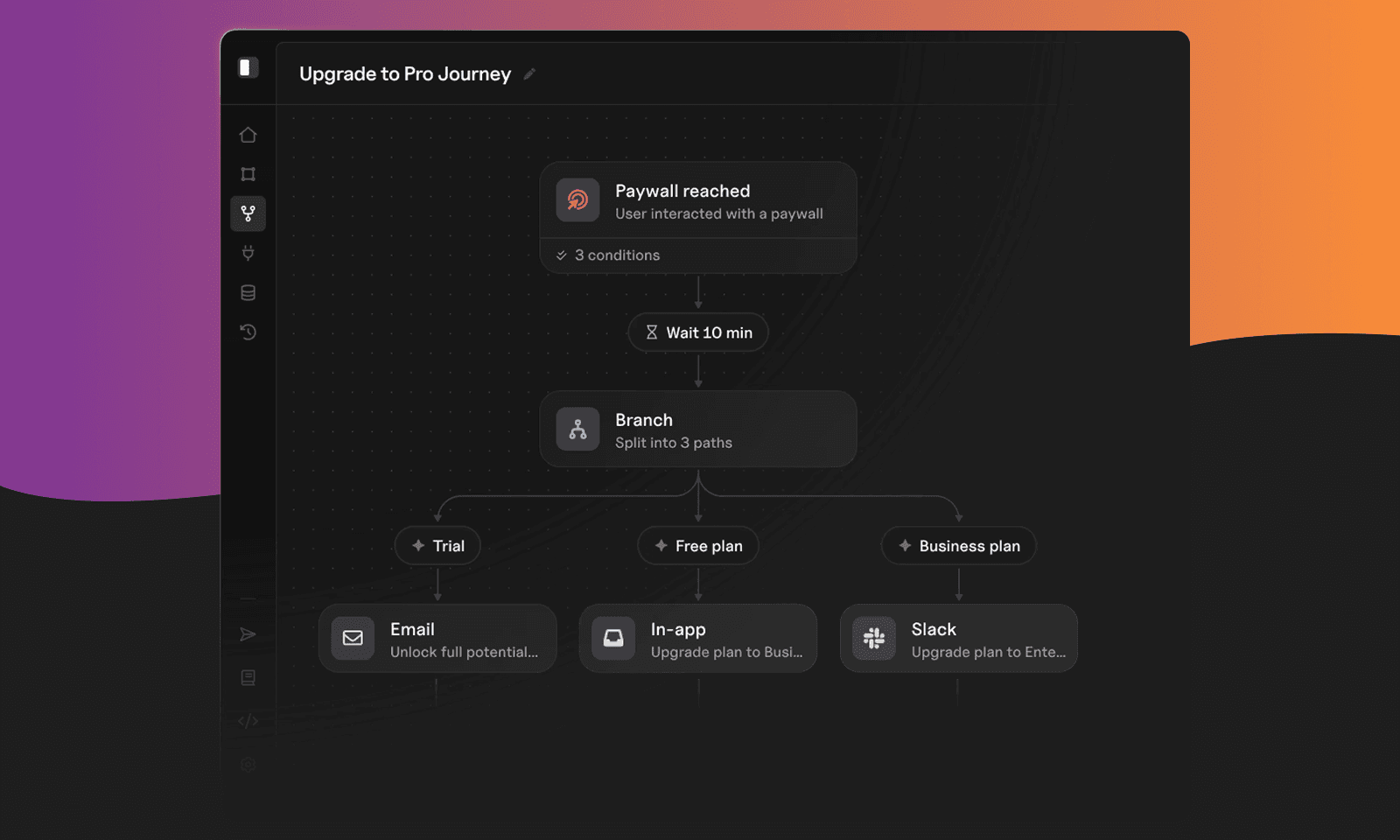
The loop you actually want is design, test, expand. Draft a journey in plain language, plug it into your data pipeline, watch how the runs perform, and let either a person or an AI agent suggest the next variant. That loop only runs cleanly when journey definitions are code: JSON bodies you can version-control, diff against last quarter's version, replace, and roll forward without a single click in the editor. Once journeys live in the same repos and pull request flow as the product, the rest of the lifecycle program starts to behave like the rest of the codebase.
Journeys, as code
The Journeys API is what makes that loop possible. Every journey in Courier is, underneath the visual editor, a JSON body that POST /journeys creates. The SDKs in Node, Python, Go, Java, and C#, the Courier CLI, and the /courier-journeys-create agent skill all wrap that same call. The visual designer still works, and most teams will keep using it for one-off campaigns and stakeholder walkthroughs, but it is no longer the only way in.
What the code path adds is the iteration loop you already have on the rest of your stack. Journey definitions live next to the product code that emits the events. Changes go through pull requests, with diffs your team can actually read. The journey for a release ships with the release, and the journey for last quarter's experiment can be deleted instead of left to rot in the editor with a half-remembered owner.
The shape of a journey body
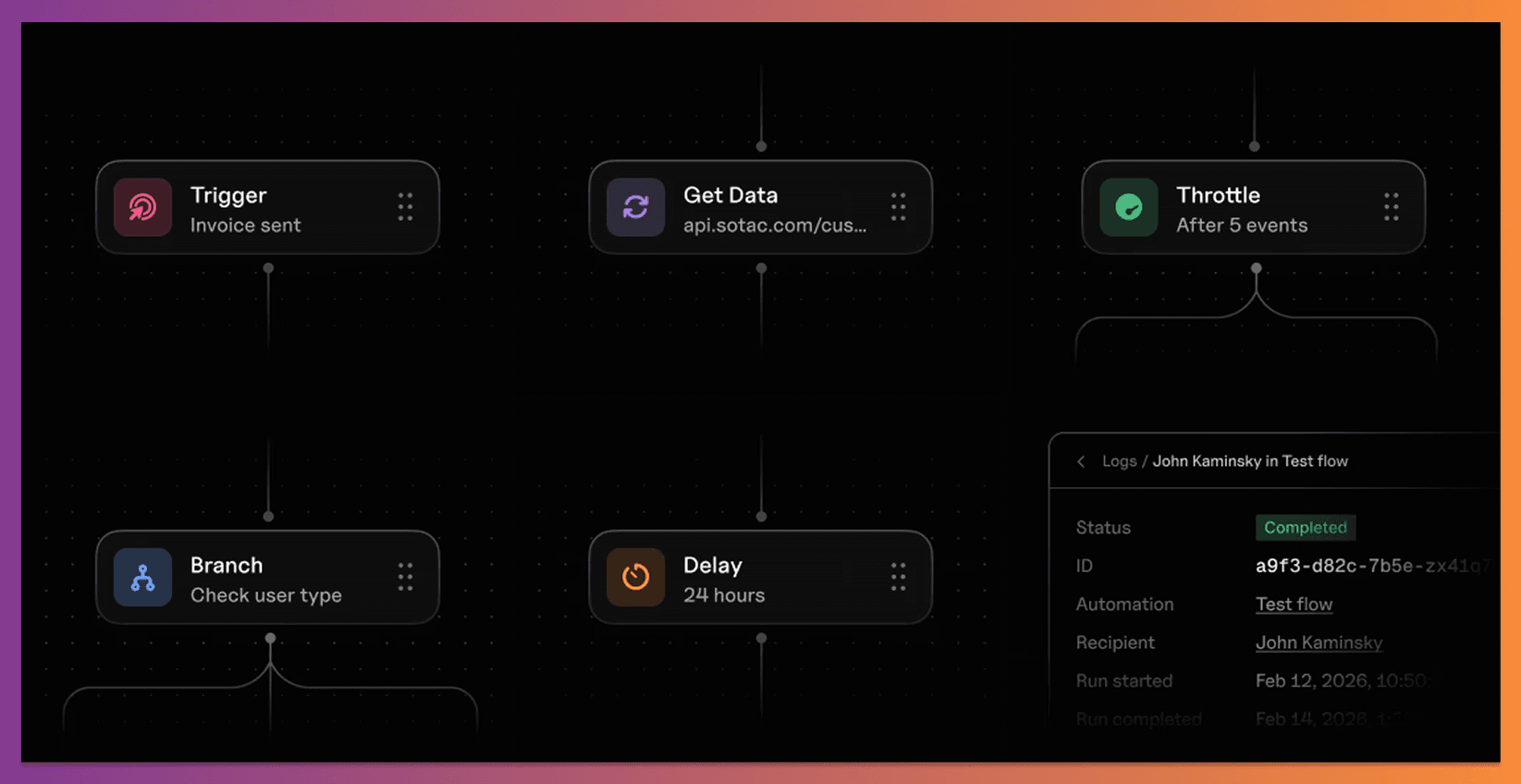
A journey body is a name plus a list of nodes. Six node types cover almost everything you'll build:
- send: emit a message on one or more channels via a referenced template
- delay: pause for a duration, until a timestamp, or until a templated value resolved at run time
- branch: split paths on a condition, with a required default path so no user falls off the edge
- fetch: pull data from your API into the journey's state so the rest of the nodes can read it
- ai: make a runtime decision or write copy, with an output_schema that downstream nodes can rely on
- throttle: cap concurrent runs so a journey can't stampede a downstream service
Most of these are straightforward to write by hand. The ai node is the one worth a closer look, because the output_schema it carries is the contract the next nodes read from. A classifier that routes users into one of three lifecycle segments looks like this:
{"type": "ai","user_prompt": "Classify based on segment, weeks_till_renewal, arr, tools_used, dau.","output_schema": {"type": "object","properties": {"classification": {"type": "string","enum": ["high_touch", "at_risk", "engaged"]}},"required": ["classification"]}}
A branch node downstream reads classification and routes to one of three sub-flows, each of which can run its own AI copy step, fan out across channels, or wait on a delay before following up. The full body for a journey of that shape is laid out in our AI node blog, and the Journeys API reference has every endpoint shape, including create a journey, publish a journey, and create a journey-scoped template. Templates referenced by send nodes live in the inline at the journey level via the Manage Journey Templates API, which keeps a journey self-contained on first publish.
A walkthrough of a complete flow
To make all of that concrete, here is one journey out of the many you'll run. It triggers on an API call, classifies the user with AI, branches on the result, sub-branches again on user data, drafts channel-appropriate copy with AI, and sends in parallel:
┌────────────────────────────┐│ trigger (api-invoke) ││ account_name, segment, arr, ││ dau, projects, latest_…, ││ seats_available │└──────────────┬───────────────┘│▼┌────────────────────────────┐│ ai decider ││ → data. ││ classification ││ (healthy | needs_attention ││ | at_risk) │└──────────────┬───────────────┘│▼┌────────────────────────────┐│ branch on ││ data.classification │└──┬──────────┬──────────┬───--┘│ │ │at_risk needs_attention healthy│ │ │▼ ▼ ▼┌─────────┐ ┌─────────┐ ┌─────────┐│ ai │ │ ai │ │ ai ││ copy │ │ copy. │ │ copy. │└────┬────┘ └────┬────┘ └────┬────┘│ │ │▼ ▼ ▼┌─────────┐ ┌─────────┐ ┌─────────┐│ send │ │ send │ │ send ││ sms │ │ push │ │ email │└────┬────┘ └────┬────┘ └────┬────┘│ │ │└────────────┴────────────┘│▼┌─────────┐│ exit │└─────────┘
The trigger lands with whatever user state you want the journey to see, populated by the API call that invoked it. The ai classifier maps that state into one of three buckets, and a branch routes each bucket down its own path. The high_touch and engaged paths sub-branch a second time on user data, picking between a milestone push and an expansion push depending on usage signals. Each leaf has an AI copy step that drafts the message text for the specific channel before the parallel sends fire, so the same send node template can be reused across paths and still carry path-appropriate copy. The high_touch path adds a nine-day pause and a follow-up, giving you a built-in retry without writing a cron job.
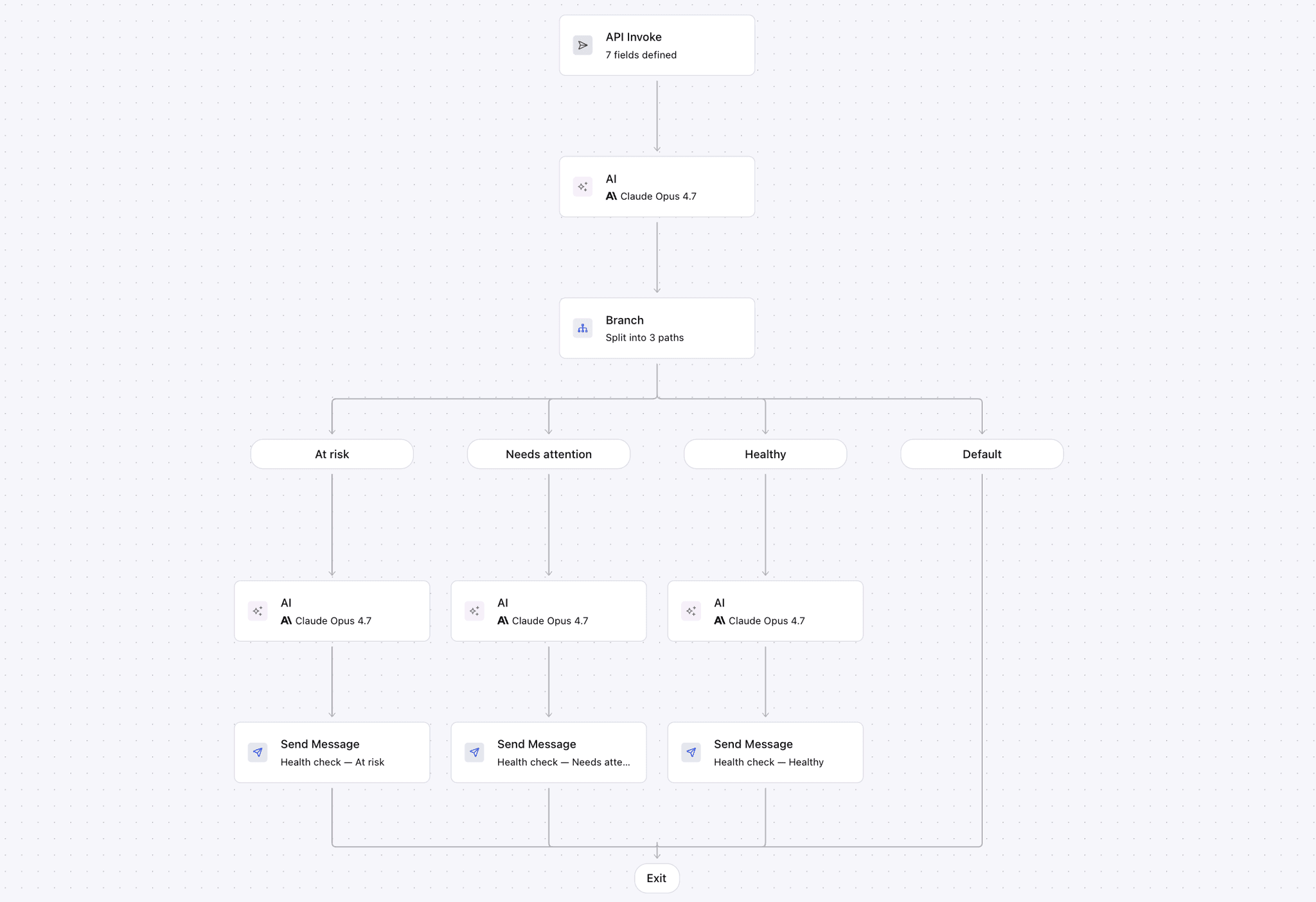
The shape generalizes. Swap the trigger and the segmentation around and the same skeleton supports trial-to-paid expansion, post-purchase nurture, dormancy reactivation, or any lifecycle program where the right next message depends on data you only know at run time. The point is not the specific use case, it is that the journey is a single declarative body you can read alongside a teammate, edit, and re-deploy.
Pick your SDK
Every SDK posts the same journey body to the same endpoint. Pick the one that lives next to your existing services, set COURIER_API_KEY, and follow the SDK's create-journey reference to ship the body.
| Language | Install | Docs |
|---|---|---|
| Node | npm install @trycourier/courier | Node SDK |
| Python | pip install trycourier | Python SDK |
| Go | go get github.com/trycourier/courier-go/v3 | Go SDK |
| Java | Maven com.courier:courier-api-java | Java SDK |
| C# | dotnet add package Courier | C# SDK |
| CLI | npm install -g @trycourier/cli | Courier CLI |
The agent skill, end to end
The fastest way into the API, especially on the first journey, is the /courier-journeys-create agent skill. It is an open-source skill that lives in the courier-skills bundle and runs inside any coding agent that loads skills: Claude Code, Cursor, Windsurf, Cline, and any other agent that supports the format. The skill itself is a markdown spec plus a few helpers, so you can read what it is going to do before you run it.
What the skill handles for you:
- It interviews you on the shape. You start with a prose description of the journey you want (the trigger, the branches, the channels, the delays). The skill asks the questions you would otherwise discover the hard way: what should the default path be when a user matches no branch, are delays calendar-time or business hours only, should the ai nodes return just a classification or a confidence score the branches can read, and should templates be journey-scoped or pulled from the studio.
- It drafts the JSON body. Once the gaps are filled, the skill assembles the full journey body, including the output_schema for every ai node, the conditions on every branch, and the channel routing on every send. If a send references a template that doesn't exist yet, the skill creates a journey-scoped template inline so the journey is publishable on the first try.
- It renders the journey as ASCII for sign-off. Before anything is posted, the skill draws the journey as a diagram in plain text so you can read it the way a stakeholder would, catch any branch that does not make sense, and either approve or send the skill back to revise. The diagram you saw above is the same format the skill prints.
- It posts the body via the API. On approval, the skill calls POST /journeys, captures the journey ID, and runs publish-a-journey so the journey is live. The result is the same as if you had written the body by hand and posted it through an SDK, except the drafting time is minutes instead of an afternoon.
Before you run the skill, come with the API fields or segment events you want the trigger to carry. If you name them explicitly (segment, weeks_till_renewal, arr, tools_used, dau), the skill wires those names through every branch condition and every AI prompt without guessing, and the journey reads cleanly on first review. Skip that step and the skill drafts generic placeholders you have to rename later.
A starting prompt for the journey diagrammed above:
/courier-journeys-createBuild a multistep journey.Trigger: api-invokeTrigger data: segment, weeks_till_renewal, arr, tools_used, dauClassify with AI into one of: at_risk | needs_attention | healthyBranch on the classification.
The skill responds with the questions it needs answered before it draws and posts:
- "Do you already have templates for each channel and path, or should I create journey-scoped templates inline so the AI copy step writes into them?"
- "AI classifier output_schema: classification ∈ {needs_attention, at_risk, healthy}. Want a confidence score too, or anything else downstream branches should see?"
- "For the sub-branches, what is the default path when a user matches neither option? Skip the path entirely, or treat them as the lower-touch variant?"
- "Delay before the high_touch SMS follow-up: flat P9D, or business hours only?"
- "Trigger: api-invoke (you call POST /journeys/{id}/invoke from your backend) or event-based (Courier listens for an inbound CRM sync)?"
You answer, the skill draws the journey for a final yes/no, and runs the same POST /journeys an SDK call would. To install it, clone courier-skills into your agent's skills directory (~/.claude/skills/ for Claude Code, ~/.cursor/skills/ for Cursor, the equivalent for Cline and Windsurf), or follow the full per-agent paths in the installation README.
Where this lands
SDK, CLI, and skill all post the same body. Most teams end up using more than one of them: the skill for drafting and the early iterations, an SDK call inside a deploy pipeline for the production journey, the CLI for ad-hoc operations like republishing a journey after a config change. Whichever surface you reach for, the journey lives in code from day one, the iteration loop is a pull request instead of a UI excavation, and the next person to pick up the work can read what is there instead of clicking through it.
Related reading
- Customer journeys, then and now: how journey-building moved from sprints to drag-and-drop, and where code fits
- AI-powered customer messaging with Courier Journeys: what the ai node is doing under the hood
- Claude Design: build a multichannel onboarding series in 30 minutes: the design-side skill in the same family
- How to manage templates with the CLI and MCP: the template prerequisite this post points back to
Similar resources

Your Entire Lifecycle Marketing Department, Run from Claude Fable 5
With the rollout of Claude' Fable model, one thing is becoming increasingly clear. Marketing execution (especially the long-tail work), will be done in an AI editor. In Courier, connect your agent to the MCP server or CLI, install Courier Skills, and keep a small folder of markdown context files. From there, one person with a coding agent covers the work that used to require a lifecycle marketer, an email designer, a marketing ops hire, and an engineer: building journeys, shipping templates, auditing every notification, and debugging delivery without opening a dashboard.

Courier journeys, as code
Most journeys don't die because they were hard to build — they die because they're hard to change. A day-5 nudge written before a new activation event existed still fires for users who hit the milestone on day two. Courier journeys are now programmable: a public Journeys API with SDKs, a CLI, and an agent skill on top. Describe a flow to your coding agent, get an ASCII diagram, ship it. Full post covers the access points, an example end-to-end, and the one gotcha worth knowing (`output_schema` is mandatory on AI nodes).

Turn customer context into personalized messaging with AI
Build adaptive customer messaging with Courier Journeys. Use AI nodes to classify users, generate notification copy, enrich profiles, and route each workflow based on structured AI output.