Your Entire Lifecycle Marketing Department, Run from Claude Fable 5
 Kyle SeylerJune 09, 2026
You can run a complete lifecycle marketing operation from an AI coding agent. Strategy, template design, journey building, QA, auditing, debugging, and reporting all work through Courier's CLI, API, and Agent Skills in Claude Code, Cursor, or Codex. This guide covers the full setup and the prompts that run each function.
TLDR: Install Courier's CLI and set your API key, install Courier Skills so the agent understands notification patterns before it builds anything, and keep a lifecycle/ folder of markdown files that hold your strategy, voice, and channel rules. From there, one person with a coding agent covers the work that used to require a lifecycle marketer, an email designer, a marketing ops hire, and an engineer: building journeys, shipping templates, auditing every notification you send, and debugging delivery failures without opening a dashboard.
Why lifecycle marketing moved into the editor
Lifecycle marketers used to live in tools like Braze or Iterable, file tickets for every template change, and wait on engineering for anything custom. Campaign ideas died in backlogs because the distance between "we should send this" and "this is sending" ran through three teams and two sprint cycles.
Coding agents collapse that distance. With the Courier CLI in its shell, the agent can see your actual templates, users, journeys, and delivery logs. It doesn't generate plausible-looking campaign configs. It reads your workspace and acts on it. You describe the flow. The agent builds it.
The agents keep getting better at exactly this kind of work. Claude Fable 5, released June 9, is Anthropic's most capable generally available model, and the company reports its lead over earlier Claude models grows with task length and complexity. That matters more for a program than for any single task. A campaign is a chain: the plan shapes the templates, the templates feed the journey, the journey gets tested against the plan, and the audit checks all of it. Small errors compound across a chain, so a model that is somewhat more reliable per step becomes far more dependable across an end-to-end run. In practice, that's the difference between supervising every step and reviewing finished work, and between re-briefing the agent at each stage and having it hold the whole campaign's context in one session.
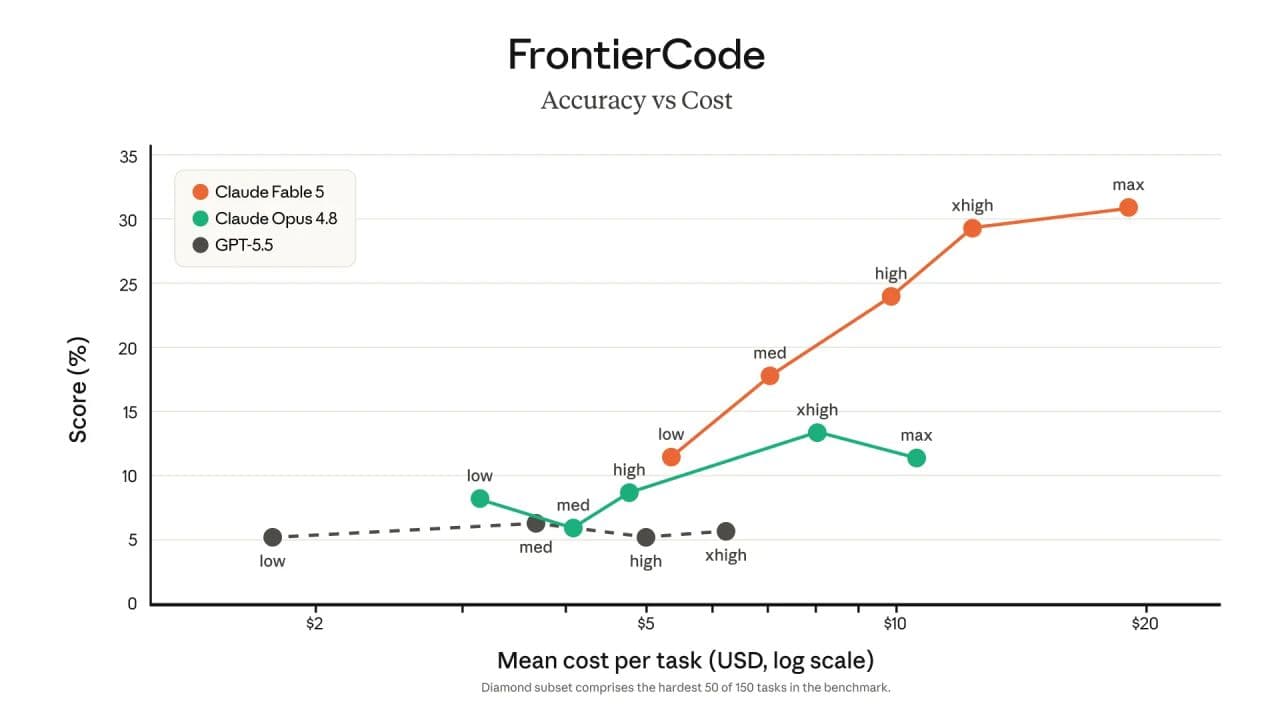
The chart above is from Anthropic's benchmarks, on the hardest 50 tasks in FrontierCode. Fable 5's accuracy keeps climbing as it gets more reasoning budget, ending at more than double Claude Opus 4.8's peak, and the top scores cost roughly twice as much per task. It's a coding benchmark, not a marketing one, but agent-driven lifecycle work runs on the same loop of tool calls, intermediate checks, and long task chains. Paying $20 for a run that replaces a week of cross-team handoffs is a trade most teams will take.
This isn't hypothetical. We've already done each piece of it:
- A four-part multichannel onboarding series (email, in-app inbox, mobile push, Slack) built in 30 minutes with Claude Code, Claude Design, and Courier
- A production product announcement shipped across four channels from a phone, using voice, from a park bench
- A full notification audit run entirely from Cursor
The rest of this post turns those one-off experiments into a department: the setup, the file structure, and the prompts for each lifecycle function.
Step 1: Connect your agent to Courier
You need a free Courier API key from app.courier.com. Then give your agent a way to use it. There are three, and they stack.
The CLI is the primary tool. The Courier CLI covers the full Courier API with a consistent courier [resource] <command> pattern across messages, templates, profiles, lists, automations, preferences, and bulk jobs. Your agent runs it as plain shell commands, so it works in any harness, and it's the fastest path for bulk operations and test sends.
npm install -g @trycourier/cliSet COURIER_API_KEY in your shell profile so it persists across sessions, and add a note in your CLAUDE.md, .cursor/rules, or AGENTS.md that the CLI is available, pointing at the CLI docs for command reference.
The API covers everything else. For anything the CLI doesn't wrap, point the agent at the Courier API reference. Coding agents are good at reading API docs and writing the call directly, and the full reference is public, so the agent never has to guess at an endpoint.
MCP, if you prefer structured tools. Courier also ships an open-source MCP server (github.com/trycourier/courier-mcp) that exposes the same operations as typed tool calls, with delete operations intentionally excluded so the agent can't wipe your workspace. One command in Claude Code:
claude mcp add --transport http courier https://mcp.courier.com --header api_key:YOUR_COURIER_API_KEYThe MCP docs cover setup for Cursor, VS Code, Windsurf, and the OpenAI Responses API.
One more addition worth making on day one:
Install Courier Skills. Courier Skills is an open-source collection of Agent Skills covering channel behavior, multi-channel routing, preference management, compliance, batching, and rate limits. The CLI gives your agent hands. Skills give it judgment.
# Claude Code
git clone https://github.com/trycourier/courier-skills.git ~/.claude/skills/courier-skills

# Cursor (global)
git clone https://github.com/trycourier/courier-skills.git ~/.cursor/skills/courier-skills
Step 2: Give the department a brain
A coding agent with tool access but no context will build technically correct campaigns that sound like nobody and target everybody. The fix is a small folder of markdown files that every session loads. This is the institutional knowledge a lifecycle team normally carries in heads and scattered docs.
lifecycle/
├── strategy.md        # ICP, lifecycle stages, what triggers what
├── voice.md           # Tone rules, banned phrases, example copy
├── channels.md        # When to use email vs push vs in-app vs Slack
├── journeys.md        # Inventory of live journeys and their exit criteria
└── compliance.md      # Quiet hours, frequency caps, unsubscribe rules
Reference these in CLAUDE.md (Claude Code), .cursor/rules (Cursor), or AGENTS.md (Codex) so the agent reads them before touching anything. When we built the 30-minute onboarding series, the strategy doc is what kept four templates across four channels speaking in one voice.
The journeys.md inventory matters more than it looks. The most common failure mode in lifecycle marketing is shipping journeys nobody coordinates, so users hit three flows at once. If the agent can read the inventory before building, it can flag collisions before they happen.
Step 3: Run each function
Here's how the actual work of a lifecycle department maps to agent sessions, with prompts you can copy. These assume the agent has the Courier CLI in its shell (or direct API access) and your lifecycle/ folder exists.
Strategy and planning
Start campaigns with a planning session, not a build session. The agent can read your live workspace, which makes its recommendations grounded instead of generic.
Read lifecycle/strategy.md and lifecycle/journeys.md. Then pull my
current templates and journeys from Courier. I want to launch a
re-engagement flow for users inactive 14+ days. Before building
anything: which existing journeys could a dormant user already be in,
and where would this flow conflict? Propose entry criteria, exit
criteria, and channel sequence. Don't create anything yet.
The "don't create anything yet" line is doing real work. Agents with write access default to building. Force the plan first.
Template design and production
This is the function that used to mean filing a ticket and waiting. Now the agent builds templates in Courier's Elemental format, a JSON markup whose elements map to drag-and-drop blocks in Design Studio. That detail matters: the agent ships the template, and a teammate can still open it in the visual editor and tweak the copy. The phone post walks through why Elemental beats raw HTML for this workflow.
Read lifecycle/voice.md. Create a Courier template for the
re-engagement email we planned. Use Elemental, not raw HTML, so the
team can edit it in Design Studio later. Pull the brand "main" for
styling. Subject line options: give me 3, pick the one that matches
the voice doc, and tell me why. Then create the template as a draft.
For visual-first work, mock the channels before building. We used Claude Design to render email, Slack, push, and inbox versions of each message before a single template existed, which caught layout problems at the cheapest possible moment.
Journey building
Journeys are where lifecycle logic lives: sends, delays, branches, throttles, and AI nodes. The agent can build the whole structure from a description, and that includes the AI nodes themselves. From your editor, you can drop an AI node into any journey to:
- Classify users into personas and branch on logic too nuanced for if/then
- Generate channel-appropriate message copy at send time, shaped by each user's profile and recent activity
- Enrich profiles with live data mid-flow
- Batch high-volume activity into recurring digests instead of one-message-per-event
This is personalization that used to require a dedicated ML team, and you're configuring it with a prompt. The onboarding series build used exactly this: a Claude-powered step reads the user's profile, classifies them as frontend, mobile, PM, or ops, and generates copy for whichever channel is firing.
Build the re-engagement journey we planned. Trigger: user.inactive_14d.
Step 1: the re-engagement email. Wait 3 days. Branch: if the user
opened but didn't return, send an in-app inbox message with a feature
highlight. If no open, send one push. Add an AI node before the
branch that classifies the user by role from their profile and
recent events, and have it generate the inbox copy for that persona
at send time. Exit criteria: any session event
ends the journey immediately. Add a throttle so users in onboarding
can't enter. Show me the structure as a diagram before publishing.
Event-based exits are the detail human-built journeys most often skip. A user who came back should stop hearing from your win-back flow the moment they return, not when the timer runs out.
QA and test sends
Never let the agent's first send hit a real user. Courier's test environment is fully isolated, and the agent can run the entire verification loop itself.
Create a test user with my email. Send the re-engagement template
to it through the test environment. Then pull the message status
and rendered content from the delivery logs and confirm: the brand
applied, all variables resolved, and the CTA link is correct. Report
anything that looks off.
This is the loop from the phone post: send, check logs, fix, resend, all in one session. Four parts times four channels meant sixteen surfaces tested in under five minutes during the onboarding build.
Auditing
Notification surfaces rot. Templates pile up, copy goes stale, variables break silently. The notification audit post covers the full quarterly process; the short version is one prompt:
Run a notification audit. List every template with its ID and state.
Pull the last 30 days of message statuses and flag anything
UNDELIVERABLE or UNROUTABLE. For each live journey, pull a sample
send and check the rendered content for broken variables or copy
that references outdated features. Give me a hit list ranked by
user impact.
If you expected 15 templates and the agent finds 40, the audit was overdue. The audit is also the longest-running job in this post, dozens of CLI calls across templates, logs, and journeys, so it's where you'll feel the difference between models. With earlier models we'd split it into a few sessions; a model in Fable 5's class can hold the whole sweep in one.
Debugging delivery
A customer says they didn't get an email. Before, that meant clicking through four dashboards. Now it's a conversation. The delivery debugging post covers the full investigative pattern, including wiring it into an automated pipeline.
User jane@acme.com says she didn't receive yesterday's billing
notification. Pull her profile, her preferences, and her message
history for the last 48 hours. If a message was attempted, trace its
delivery history step by step and tell me exactly where it stopped:
preference block, routing skip, or provider rejection.
Reporting
Close the loop weekly:
Pull message statuses for the last 7 days grouped by template.
Compare against the prior week. Flag any template whose delivery
rate dropped more than 5 points and any journey with rising exit
volume. Write a 5-bullet summary I can paste into Slack.
What stays human
The agent handles production, QA, auditing, and ops. The judgment calls stay with you: which lifecycle moments deserve a message at all, what the brand sounds like, and when to send nothing. Frequency discipline is a strategy decision, not a tooling one, and an agent that can ship a journey in minutes makes it easier to over-send, not harder. The compliance.md file with hard frequency caps is your guardrail. Write it before you need it.
Honest tradeoff: the first build takes longer than the headline numbers. The 30-minute onboarding series was 30 minutes because the brand, skills, and context files already existed. Budget real setup time for the foundation. Every build after that compounds, and the setup itself is model-agnostic: the day Fable 5 shipped, every team already running this configuration got a more capable department without changing a line of it.
Start here
- Sign up for Courier (free tier, 10,000 sends/month)
- Install the CLI and set
COURIER_API_KEY - Install Courier Skills
- Write your
lifecycle/context files - Run the audit prompt first. Know what you're already sending before you build more.
If you want to see the workflow before committing, watch the setup video or read the 30-minute multichannel build end to end.
Similar resources
Test Courier emails end to end with your AI agent
Give your coding agent an AgentMail inbox, and it can test your Courier emails the way a user would: send the change, check what arrives, review how it renders, and fix what it finds before the change reaches Production.

Let your agent check every email before it ships
Courier Device Preview gives your coding agent real screenshots from Outlook, Gmail, and Apple Mail. Here's the prompt and workflow to have it check every email, fix the draft, and check again before you publish.

Courier vs Customer.io: 2026 messaging platform comparison
Courier and Customer.io both send across email, push, SMS, and in-app, but they are not priced or built the same way. Courier bills by the send, puts journeys, experiments, broadcasts, an in-app inbox, preferences, and 50+ delivery providers on one platform, and exposes all of it through an API, a CLI, and an MCP server. Customer.io bills by the number of profiles in your database and fits a marketing team that needs deep behavioral segmentation. This comparison covers pricing, journeys, channels, in-app messaging, localization, and preferences, with every competitor figure linked to Customer.io's own pages.