12 Best Customer Journey Orchestration Tools in 2026
Compare the 12 best customer journey orchestration tools for 2026. API-first infrastructure, enterprise CEPs, and marketing suites ranked by best fit.
Updated Jul 3, 2026
TL;DR and comparison table
The best customer journey orchestration tools in 2026 split into three groups: API-first notification infrastructure (Courier, Knock, OneSignal, Novu) for engineering teams, UI-first customer engagement platforms (Customer.io, Braze, Iterable, MoEngage) for marketing teams, and enterprise suites (Salesforce, Adobe, HubSpot) for orgs tied to a CRM or martech stack.
| Tool | Best for | API or UI | Channels |
|---|---|---|---|
| Courier | Developer teams shipping product and transactional notifications | API-first with visual builder | Email, SMS, push, in-app, Slack, MS Teams |
| Knock | Engineering teams who want notification infrastructure as a service | API-first | Email, SMS, push, in-app, Slack |
| OneSignal | Mobile-first product teams that lead with push | API plus UI | Push, email, SMS, in-app, web push |
| Novu | Engineering teams that want open-source notification infrastructure | API-first, open source | Email, SMS, push, in-app, chat |
| Customer.io | Lifecycle marketing teams at growth-stage SaaS | UI-first with API | Email, SMS, push, in-app, webhooks |
| Braze | Enterprise consumer brands running large cross-channel campaigns | UI-first | Email, SMS, push, in-app, content cards |
| Iterable | Mid-market and enterprise lifecycle marketing | UI-first | Email, SMS, push, in-app, web push |
| MoEngage | Mobile-first growth teams in emerging markets | UI-first | Email, SMS, push, in-app, WhatsApp |
| Salesforce Marketing Cloud | Salesforce-centric enterprises | UI-first | Email, SMS, push, ads, social |
| Adobe Journey Optimizer | Adobe Experience Cloud customers | UI-first | Email, SMS, push, in-app, web |
| HubSpot Workflows | SMB and mid-market teams on HubSpot CRM | UI-first | Email, SMS, in-app, CRM actions |
| Twilio Engage | Teams using Twilio Segment as their CDP | UI plus API | Email, SMS, push, voice, WhatsApp |
What customer journey orchestration tools do
A customer journey orchestration tool decides which message goes to which user, on which channel, at which moment, based on events and profile data. The category sits above messaging providers (Twilio, SendGrid, FCM, APNs, Resend) and above email service providers like Mailchimp. The orchestration layer handles sequencing, routing, frequency capping, preferences, A/B testing, and observability across channels. For a deeper take on the discipline, see the customer journey orchestration guide.
The category split matters because the buyers are different. Marketers want a UI that lets them ship a six-step nurture sequence without filing a ticket. Engineers want an API their backend can call and observable delivery logs. The tools below sort cleanly into those two camps, with a third group of enterprise suites that orchestrate as part of a larger marketing platform. Teams shipping product-led notifications usually pair a multichannel notification platform with a CDP or warehouse-native event source.
Search interest in "customer journey orchestration tools" jumped sharply in early 2026 as teams consolidated away from point solutions for email, push, and SMS. Picking the right tool depends on who owns the journey: engineering, marketing, or both.
What to look for in a customer journey orchestration tool
Five criteria separate the strong tools from the rest.
Channel coverage. Cover the channels your users actually use today, plus the next one or two you plan to add. Email plus push plus in-app is the baseline for a SaaS product. Add SMS and Slack or MS Teams if you have transactional or workplace use cases.
Builder fit. If marketing owns the journey, a drag-and-drop canvas is required. If engineering owns it, a typed SDK and clean API matter more than a visual builder. The best tools offer both and let the right person work in the right surface.
Data model. Journey orchestration only works if the tool can read events and user attributes from your product. Look for ingestion via API, CDP integration (Segment, mParticle, RudderStack), and reverse ETL support. The Courier docs walk through profile ingestion, event triggers, and the data model behind a journey.
Governance and preferences. Frequency caps, quiet hours, channel preferences, and unsubscribe handling are baseline requirements. So is SOC 2 Type 2 if you sell to regulated industries.
Observability. Delivery logs, per-step analytics, and the ability to debug a single user's journey end-to-end. If you cannot answer "why did this user receive this message," the tool is too opaque.
Want to ship multichannel journeys without locking into a single vendor stack? Courier orchestrates email, SMS, push, in-app, Slack, and MS Teams from one API. Create a free developer account. No credit card required.
The 12 best customer journey orchestration tools in 2026
1. Courier
Positioning: API-first notification infrastructure with a visual journey builder. Sits above your existing provider stack (Twilio, Resend, FCM, APNs, SES), so you can swap providers without touching code.
Best for: Engineering teams at product-led SaaS companies that ship transactional and in-product notifications and want a visual builder PMs can use without filing tickets.
Key capabilities:
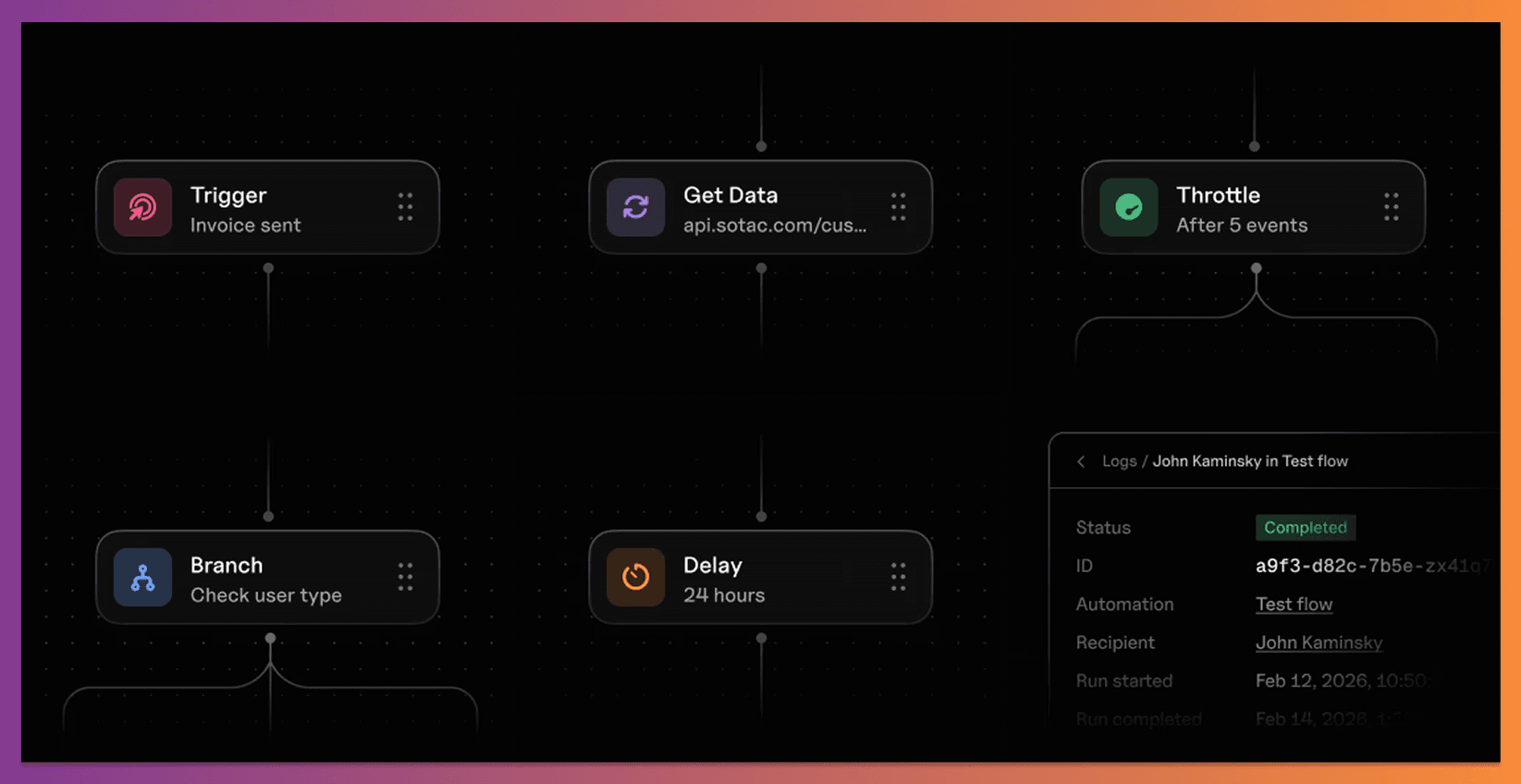
- Journeys: visual builder for multi-step sequences with batch, throttle, digest, and conditional logic
- Cross-channel send via a single
/sendendpoint - Bring Your Own Provider (BYOP): orchestrates across Twilio, Resend, SES, FCM, APNs, Slack, MS Teams, and more
- Drop-in Inbox and Preference Center components
- MCP server and typed SDKs in 7 languages. Get running in under 5 minutes via the quickstart
Channels: Email, SMS, push, in-app, Slack, MS Teams.
Approach: API-first with a visual builder. Engineers work in the API, CLI, or MCP. Non-technical users work in the Design Studio and Journeys canvas.
Pricing: Free plan up to 10,000 notifications per month. Paid plans on the pricing page.
Limitations: Built for transactional and product notifications first. Teams running heavy outbound marketing automation (lead scoring, complex attribution) will usually pair Courier with a marketing automation tool rather than replace one.
2. Knock
Positioning: Notification infrastructure for product teams. Smaller than Courier, with a similar developer-first posture.
Best for: Engineering teams that want a pure infrastructure layer for in-product notifications and are comfortable building their own UI.
Key capabilities:
- Workflow API for multi-step notification logic
- Cross-channel delivery via integrated providers
- In-app feed component
- Preference center API
Channels: Email, SMS, push, in-app, Slack.
Approach: API-first. Visual tooling is lighter than Courier's.
Pricing: Free tier, then usage-based. See the Knock pricing page.
Limitations: Less visual tooling for non-technical users. No BYOP across as broad a provider set, and no MS Teams support at the time of writing.
3. OneSignal
Positioning: Notification infrastructure with deep roots in mobile push. Expanded over time into email, SMS, in-app, and web push, with an API and a dashboard for both engineers and marketers.
Best for: Mobile-first product teams that lead with push and want a single tool to cover the other channels as they grow.
Key capabilities:
- Push SDKs for iOS, Android, web, Unity, React Native, and Flutter
- Journeys builder for cross-channel sequences
- Segmentation based on device, behavior, and tags
- Email, SMS, and in-app messaging on top of the push foundation
Channels: Push, email, SMS, in-app, web push.
Approach: API plus UI. The mobile SDKs are the primary integration point. The dashboard handles segmentation, templates, and journeys.
Pricing: Free tier with usage caps, then tiered plans by subscribers and feature set. See OneSignal pricing.
Limitations: Strongest on push, with email and SMS layered on later. Teams that lead with email or in-product notifications often find the data model and templating less flexible than Courier or a dedicated CEP. No native MS Teams or Slack support.
4. Novu
Positioning: Open-source notification infrastructure. Self-host or use the managed cloud. Developer-oriented and GitHub-driven.
Best for: Engineering teams that want an open-source layer they can run inside their own infrastructure, or teams that prefer the cost profile and extensibility of an open-source project.
Key capabilities:
- Open-source core under the Apache 2.0 license
- Workflow engine with code-defined steps
- Cross-channel delivery via integrated providers
- In-app notification center component
Channels: Email, SMS, push, in-app, chat (Slack, Discord, MS Teams).
Approach: API-first, open source. Self-hosted or managed cloud.
Pricing: Self-host is free. Managed cloud has a free tier and usage-based paid plans. See Novu pricing.
Limitations: Smaller ecosystem than Courier or Knock. Self-hosting shifts operational load (upgrades, scaling, observability) onto your team. Visual tooling for non-technical users is less mature.
5. Customer.io
Positioning: Lifecycle messaging platform built around segments and event-driven campaigns. Popular with growth-stage B2B SaaS marketing teams.
Best for: Lifecycle marketing teams that own onboarding, activation, and retention campaigns and have engineering support for event tracking.
Key capabilities:
- Visual journey builder with branching logic
- Segment-based and event-based triggers
- A/B testing and holdout groups
- Native integrations with Segment and other CDPs
Channels: Email, SMS, push, in-app, webhooks.
Approach: UI-first. The API exists but most work happens in the canvas.
Pricing: Starts around $100/month on the Essentials plan, with usage-based tiers. See Customer.io pricing.
Limitations: Marketing-oriented. Less suited to high-volume transactional notifications or in-product notification components like an inbox.
6. Braze
Positioning: Enterprise customer engagement platform used by large consumer brands for cross-channel marketing at scale.
Best for: Consumer brands running campaigns across mobile, email, and web with marketing teams that have the headcount to operate a complex tool.
Key capabilities:
- Canvas journey builder with multi-path branching
- Liquid templating for dynamic content
- Content cards for in-app messaging
- Predictive AI for send-time and channel selection
Channels: Email, SMS, push, in-app, content cards, web.
Approach: UI-first.
Pricing: Contact sales. See the Braze pricing page.
Limitations: Implementation is long and expensive. Not a fit for early-stage teams or for product and transactional notifications that engineering owns end-to-end.
7. Iterable
Positioning: Cross-channel marketing platform aimed at mid-market and enterprise lifecycle marketers.
Best for: Marketing teams running high-volume cross-channel lifecycle programs who want a unified canvas across email, push, and SMS.
Key capabilities:
- Studio canvas for multi-step journeys
- Catalog feature for product personalization
- AI Optimization for send-time and channel
- Snippet-based templating
Channels: Email, SMS, push, in-app, web push.
Approach: UI-first.
Pricing: Contact sales. See Iterable pricing.
Limitations: Like Braze, the price and implementation effort make it overkill for product-led teams whose primary use case is in-product and transactional notifications.
8. MoEngage
Positioning: Customer engagement platform with strong mobile and emerging-markets footprint.
Best for: Mobile-first growth teams, especially in APAC, the Middle East, and Latin America, that need WhatsApp and push as primary channels.
Key capabilities:
- Flows journey builder
- Sherpa AI for predictive engagement
- Strong WhatsApp Business support
- Native analytics layer (Analyze)
Channels: Email, SMS, push, in-app, WhatsApp, web push.
Approach: UI-first.
Pricing: Contact sales. See MoEngage pricing.
Limitations: Smaller US presence than Braze or Iterable. Mid-market teams in North America may find local support and integration partners harder to come by.
9. Salesforce Marketing Cloud Journey Builder
Positioning: Enterprise marketing orchestration inside the Salesforce ecosystem.
Best for: Large enterprises already standardized on Salesforce CRM that want journeys driven by Salesforce data.
Key capabilities:
- Journey Builder canvas tied to Salesforce data extensions
- Einstein AI for send-time and engagement scoring
- Deep integration with Sales Cloud and Service Cloud
- Ad audience activation via Audience Studio
Channels: Email, SMS, push, ads, social.
Approach: UI-first.
Pricing: Contact sales. See Marketing Cloud pricing.
Limitations: Heavy and slow to implement. The Marketing Cloud stack is intricate, and pricing assumes a six- or seven-figure annual commitment.
10. Adobe Journey Optimizer
Positioning: Real-time journey orchestration inside Adobe Experience Cloud.
Best for: Enterprises already using Adobe Experience Platform that want to extend their AEP data into cross-channel journeys.
Key capabilities:
- Real-time event-based journey triggering
- Native integration with Adobe Experience Platform (CDP)
- Decisioning for next-best-action
- Cross-channel canvas
Channels: Email, SMS, push, in-app, web.
Approach: UI-first.
Pricing: Contact sales. See Adobe Journey Optimizer.
Limitations: Tightly coupled to the rest of the Adobe stack. Outside an AEP implementation, the value drops sharply.
11. HubSpot Workflows
Positioning: Marketing automation and journey logic inside HubSpot's CRM.
Best for: SMB and mid-market teams running HubSpot as their CRM that want lifecycle journeys tied to deal and contact data.
Key capabilities:
- Workflow builder with branching logic
- Triggers from CRM property changes, form submissions, and behavior
- CRM actions (update properties, create tasks) alongside sends
- Native email and limited SMS
Channels: Email, SMS, in-app (CRM-native), webhooks.
Approach: UI-first.
Pricing: Workflows are part of HubSpot Marketing Hub Professional and above. See HubSpot pricing.
Limitations: Strongest when the team lives in HubSpot. Channel coverage is narrower than dedicated CEPs, and there is no push or true in-product notification channel.
12. Twilio Engage
Positioning: Journey orchestration built on top of Twilio Segment, the CDP, with native access to Twilio messaging channels. Twilio Engage is the CEP product layered on Segment, distinct from Twilio's underlying SMS and voice APIs that act as providers.
Best for: Teams already using Segment as their source of truth for customer data who want to act on that data without moving it elsewhere.
Key capabilities:
- Journeys built directly on Segment audiences
- Native delivery via Twilio email, SMS, voice, and WhatsApp
- Real-time profile sync from Segment
- Predictive traits for segmentation
Channels: Email, SMS, push, voice, WhatsApp.
Approach: UI plus API.
Pricing: Contact sales. See Twilio Engage.
Limitations: Assumes Segment is your CDP. Without that, the value proposition weakens. In-product notification components are not the focus.
How to choose
A short rubric to narrow the field.
- Engineering owns the notification surface, including in-product: start with the API-first infrastructure cluster: Courier, Knock, OneSignal, or Novu. Courier and Knock skew toward broad multichannel and developer ergonomics. OneSignal is the pick when push is the primary channel. Novu is the pick when open source or self-hosting is a hard requirement.
- Marketing owns lifecycle email and push, with engineering supporting the data layer: look at Customer.io, Braze, Iterable, or MoEngage. The right one usually maps to company size and budget.
- The company is standardized on Salesforce, Adobe, or HubSpot, and journeys need to draw on that data: stay in-suite with Marketing Cloud, Journey Optimizer, or Workflows.
- Segment is already the CDP: Twilio Engage is the simplest path.
- Product and marketing both need to ship journeys without stepping on each other: Courier's split between developer API and visual Journeys is built for this case.
Most teams end up using two tools: an orchestration layer for product and transactional notifications, and a marketing tool for outbound campaigns. The mistake to avoid is forcing one tool to do both badly. If you are still benchmarking transactional infrastructure, the rundown of the best email API providers for developers and the comparison of transactional email services are worth a read before you commit.
Frequently asked questions
See the FAQ section below.
Get started with Courier
Courier is the API-first orchestration layer for teams that want one platform across transactional, product, and marketing notifications without giving up developer ergonomics. Sign up free or read the customer journey orchestration guide for the longer take on the category.
FAQ
Frequently asked questions
Keep exploring
More guides
One API, every channel
Ship notifications without the boilerplate
Courier gives you one API for email, SMS, push, and chat, with templates, routing, retries, and delivery logs built in.
Last updated Jul 3, 2026. Code samples are illustrative; provider APIs and pricing change over time, so check each provider’s docs before relying on them.