What is Twilio? What it's used for, from SMS to Segment
Twilio is a cloud communications platform for SMS, WhatsApp, email, and voice. Learn what Twilio is used for, its main products, and how Courier fits in.
Updated Nov 6, 2026
Twilio is a cloud communications platform whose APIs let your app send text messages, WhatsApp messages, email, and phone calls without running telecom or email infrastructure yourself. Twilio was founded in 2008 to bring the phone network into software, and it now sells messaging, email, voice, video, and customer data products. The three Twilio products most apps use together are Twilio Messaging for SMS and WhatsApp, Twilio SendGrid for email, and Twilio Segment for the customer data that decides who should hear from you.
Each of those products is excellent at one job. None of them coordinates the others. The moment you send an email through SendGrid, follow up by text through Twilio, and trigger both from a Segment event, you're building a notification system: scheduling, preferences, retries, logs, and templates that live in three places. Twilio's own team hit the same problem in the Twilio Console, and they solved it with Courier, the customer messaging platform for humans and AI agents that runs on top of Twilio's products. Twilio is also an investor in Courier.
Key takeaways
- Twilio Messaging sends SMS, MMS, and WhatsApp. Twilio SendGrid sends email. Twilio Segment collects the product events and user traits that trigger your messages.
- Twilio also sells Verify (one-time passcodes), Voice (phone calls), and Video (real-time video rooms).
- Using the products together means writing the glue: event handling, scheduling, opt-out checks, retries, and logging across providers.
- Courier is that glue as a product. Segment events start a journey, Courier picks the channel and checks preferences, then sends through your own SendGrid and Twilio accounts.
What does Twilio do?
Twilio turns phone networks and email delivery into APIs. Your app makes an HTTPS request to Twilio, and Twilio delivers the message or call through its connections to mobile carriers, WhatsApp, and email inbox providers. Twilio then reports what happened, such as delivered, failed, or replied, by calling a webhook on your server.
A few things make that work:
- Phone numbers. You rent numbers from Twilio (standard 10-digit numbers, toll-free numbers, or short codes) to send and receive texts and calls.
- APIs and SDKs. Twilio has REST APIs and official libraries for Node.js, Python, Java, C#, PHP, Ruby, and Go.
- Webhooks. Incoming texts, calls, and delivery updates arrive as HTTP requests to URLs you configure.
- Pay-as-you-go pricing. You pay per message, per minute, or per verification, plus phone number and carrier fees.
What is Twilio used for?
Twilio is used to add communication to web and mobile apps: login codes, order and delivery updates, appointment reminders, password resets, receipts, support phone lines, and two-way texting with customers. Instead of negotiating with mobile carriers or running mail servers, you call an API and Twilio handles delivery.
Twilio sells a family of products. These are the ones you'll run into:
| Product | What it does | What you use it for |
|---|---|---|
| Twilio Messaging | Sends and receives SMS, MMS, and WhatsApp through one API | Login codes, delivery updates, appointment reminders, two-way texting |
| Twilio SendGrid | Sends email over an API or SMTP and manages deliverability | Password resets, receipts, invoices, account email, newsletters |
| Twilio Segment | Collects events and user traits and routes them to your other tools | Knowing what a user did and who they are, so you can message them at the right moment |
| Twilio Verify | Generates and checks one-time passcodes | Two-factor authentication and phone number verification |
| Twilio Voice | Places and receives phone calls, with recording and IVR menus | Support lines, call routing, voice alerts |
| Twilio Video | Embeds real-time video rooms in web and mobile apps | Telehealth, tutoring, and meeting features |
The first three cover customer messaging from end to end. Segment tells you something happened, and Messaging and SendGrid deliver the message about it. The rest of this section covers each one in depth.
What is Twilio Messaging used for?
Twilio Messaging is Twilio's API for SMS, MMS, and WhatsApp messages, and it's the product most people mean when they say "Twilio." You get a phone number from Twilio, then send a message with one API call. Twilio handles the carrier connections, number formatting, message segmentation, and delivery receipts.
const twilio = require("twilio");
const client = twilio(process.env.TWILIO_ACCOUNT_SID, process.env.TWILIO_AUTH_TOKEN);

const message = await client.messages.create({
  messagingServiceSid: process.env.TWILIO_MESSAGING_SERVICE_SID,
  to: "+15555550123",
  body: "Your order has shipped. Track it at acme.co/t/8812",
});
What you'll build with it:
- Login codes. One-time passcodes for sign-in and phone verification. Twilio Verify packages this with code generation, expiry, and rate limiting, so you don't store codes yourself.
- Transactional alerts. Order shipped, payment failed, appointment tomorrow at 9.
- Two-way conversations. Replies hit a webhook on your server, so a customer can text back to confirm an appointment. Replies like STOP are handled for you: Twilio blocks further messages to that number and returns error 21610 if you try.
- WhatsApp. The same API sends WhatsApp messages, using approved templates to start a conversation.
In the US, texting customers from a standard 10-digit number requires A2P 10DLC registration. You register your brand and each messaging use case, and carriers filter traffic that isn't registered. A Messaging Service, the container you see in the code above, groups your sending numbers and ties them to that registration.
What is Twilio SendGrid used for?
Twilio SendGrid is Twilio's email API. Twilio completed its acquisition of SendGrid in February 2019. You send through the SendGrid API or its SMTP relay, and SendGrid takes care of the parts of email that are hard to run yourself: sending IP reputation, SPF and DKIM authentication, bounce and spam-complaint handling, and suppression lists.
Most production email uses a dynamic template, designed in SendGrid and filled with data at send time:
const sgMail = require("@sendgrid/mail");
sgMail.setApiKey(process.env.SENDGRID_API_KEY);

await sgMail.send({
  to: "jane@example.com",
  from: "receipts@acme.co",
  templateId: "d-8f2c1a9e4b7d4c0f9a6e2b1c3d5f7a90",
  dynamicTemplateData: { name: "Jane", total: "$42.00" },
});
What you'll build with it:
- Transactional email. Password resets, receipts, invoices, and account notices that users expect within seconds.
- Engagement tracking. SendGrid's Event Webhook posts delivered, opened, clicked, bounced, and unsubscribed events to your server.
- Marketing email. SendGrid Marketing Campaigns handles newsletters and promotional sends to contact lists.
SendGrid retired its permanent free plan in May 2025. As of October 2026, new accounts start on a 60-day trial capped at 100 emails a day, then move to a paid plan.
What is Twilio Segment used for?
Twilio Segment is a customer data platform: it collects what users do in your app and who they are, then forwards that data to every tool you connect. Twilio completed its acquisition of Segment in November 2020. Segment doesn't send messages. It's where the data that triggers your messages comes from.
You add Segment's library to your app and server, then record traits with identify and actions with track:
analytics.identify("user_1234", {
  name: "Jane Rivera",
  email: "jane@example.com",
  phone: "+15555550123",
  plan: "pro",
});

analytics.track("Signed Up", {
  plan: "trial",
  signup_source: "pricing_page",
});
What you'll use it for:
- One event stream for every tool. Instrument once, then send the same events to your analytics, data warehouse, CRM, and messaging tools.
- User profiles. Traits like plan, company, and region stay attached to each user, so downstream tools can personalize.
- Triggers. An event like
Signed UporTrial Endingis usually the exact moment a message should go out.
What are Twilio Verify, Voice, and Video used for?
Twilio's other products sit outside customer messaging:
- Twilio Verify sends and checks one-time passcodes. Channels include SMS, voice, WhatsApp, email, authenticator apps (TOTP), push, and passkeys.
- Twilio Voice places and receives phone calls, with call recording, conferencing, and interactive voice response (IVR) menus.
- Twilio Video embeds real-time video rooms in web and mobile apps. Twilio planned to retire it, then reversed that decision in October 2024 and kept Video as a standalone product.
Twilio Live, a live-streaming product, reached end of life in November 2023. If an older article lists it as a Twilio use case, that article is out of date.
Who uses Twilio?
Apps and companies that use Twilio range from consumer apps like Duolingo and Lyft to hospitals like NYU Langone Health. These examples come from Twilio's customer stories:
| Company | Twilio product | What they use it for |
|---|---|---|
| Duolingo | Verify | Confirming phone numbers with one-time passcodes so learners can find friends |
| NYU Langone Health | Messaging | Appointment reminders and care information for patients |
| Lyft | Flex | A contact center for riders and drivers; earlier, automated ride notifications |
| Zendesk | Voice | Phone support inside Zendesk, next to chat, SMS, and email |
| StubHub | Voice | Automated calls asking sellers to confirm ticket availability |
Twilio itself runs the in-app notifications in the Twilio Console on Courier. More on that below.
What it takes to use Twilio products together
Using Twilio products together means writing the code that connects them: handling Segment events, scheduling follow-ups, checking opt-outs, retrying failures, and logging across SendGrid and Twilio. Each product is straightforward on its own. The work starts when one message depends on another, and onboarding is the clearest example.
A welcome drip that stops at activation. When someone signs up, you want to:
- Send a welcome email right away.
- A day later, if they haven't created their first project, email them the one step that gets them there.
- Two days after that, if they still haven't, send a short text, but only to people who agreed to get texts.
- The moment they create their first project, stop the drip and send an activation email with what to try next.
- Keep a record of what was sent, so you can see where people drop off and support can answer "did they get the setup email?"
Your app already sends Signed Up and Project Created events to Segment. Here's a simplified version of the code you'd write to do the rest with SendGrid and Twilio directly:
// Segment's Webhooks destination posts every event to this endpoint.
app.post("/segment-events", express.json(), async (req, res) => {
  if (!verifySegmentSignature(req)) return res.sendStatus(401);
  const event = req.body;

  // Segment retries on timeouts, so the same event can arrive twice.
  if (await db.processedEvents.exists(event.messageId)) return res.sendStatus(200);
  await db.processedEvents.insert(event.messageId);

  const userId = event.userId;

  if (event.event === "Signed Up") {
    await sendEmail(userId, process.env.SENDGRID_WELCOME_TEMPLATE_ID);
    // Your job queue: BullMQ, Sidekiq, Cloud Tasks, or similar.
    await scheduler.schedule("setup-email", { userId }, { delay: "1d", key: `onboarding-${userId}-1` });
    await scheduler.schedule("setup-sms", { userId }, { delay: "3d", key: `onboarding-${userId}-2` });
  }

  if (event.event === "Project Created" && event.properties.project_count === 1) {
    await scheduler.cancel(`onboarding-${userId}-1`);
    await scheduler.cancel(`onboarding-${userId}-2`);
    await sendEmail(userId, process.env.SENDGRID_ACTIVATED_TEMPLATE_ID);
  }

  res.sendStatus(200);
});

async function sendEmail(userId, templateId) {
  const user = await db.users.find(userId);
  const prefs = await db.preferences.find(userId, "onboarding");
  if (!user.email || prefs.email === false) return;

  const [response] = await sgMail.send({
    to: user.email,
    from: "hello@acme.co",
    templateId, // the copy lives in SendGrid
    dynamicTemplateData: { first_name: user.firstName },
  });

  await db.messageLog.insert({
    userId, channel: "email", provider: "sendgrid", providerId: response.headers["x-message-id"],
  });
}

scheduler.handle("setup-email", async ({ userId }) => {
  if (await db.projects.countFor(userId) > 0) return; // they activated; a cancel can lose the race
  await sendEmail(userId, process.env.SENDGRID_SETUP_TEMPLATE_ID);
});

scheduler.handle("setup-sms", async ({ userId }) => {
  if (await db.projects.countFor(userId) > 0) return;
  const user = await db.users.find(userId);
  const prefs = await db.preferences.find(userId, "onboarding");
  if (!user.phone || prefs.sms !== true) return; // texts are opt-in

  try {
    const message = await twilioClient.messages.create({
      messagingServiceSid: process.env.TWILIO_MESSAGING_SERVICE_SID,
      to: user.phone,
      // The copy lives in your code, so changing it means a deploy.
      body: `Hi ${user.firstName}, your Acme workspace is ready. Create your first project in 2 minutes: acme.co/start`,
    });
    await db.messageLog.insert({ userId, channel: "sms", provider: "twilio", providerId: message.sid });
  } catch (err) {
    if (err.code === 21610) {
      // The user replied STOP. Record it so you stop trying.
      await db.preferences.update(userId, "onboarding", { sms: false });
      return;
    }
    throw err; // let the scheduler retry
  }
});
That's about 80 lines, and it works. It also leaves a list of things you now own:
- A users table and a preferences table that have to stay in sync with Segment, plus a settings page where users can turn onboarding messages off.
- Copy in two places. The emails live in SendGrid's template editor. The SMS lives in a string in your code, so testing a new nudge means a deploy.
- Timing changes are code changes. Moving the text from day 3 to day 2, or adding a day-7 email, means editing the scheduler calls and redeploying, and users already in the drip keep the old timing.
- No fallback. If SendGrid or Twilio has an incident, the scheduler retries the same provider. Switching to a backup provider is more code.
- No view of the funnel. To see how many people got the setup email and then activated, you're joining your message log, SendGrid's activity feed, and the Twilio console.
- One channel at a time. Adding an in-app message for people who log in but stall means another integration, another preference flag, and another log format.
- Every other sequence. Trial-ending reminders, re-engagement, and usage alerts each need their own version of this code.
None of this is a flaw in Twilio. Twilio's products deliver messages. Deciding which message to send, to whom, on which channel, and when is a different job, and that's the job Courier does.
How does Courier work with Twilio, SendGrid, and Segment?
Courier is the customer messaging platform for humans and AI agents, and it sits on top of your Twilio accounts. Twilio's products keep doing the delivery: SendGrid sends the email, Twilio Messaging sends the text, and Segment supplies the events. Courier decides what to send, to whom, on which channel, and when. You don't replace anything, and your phone numbers, sending domains, and Segment setup stay as they are.
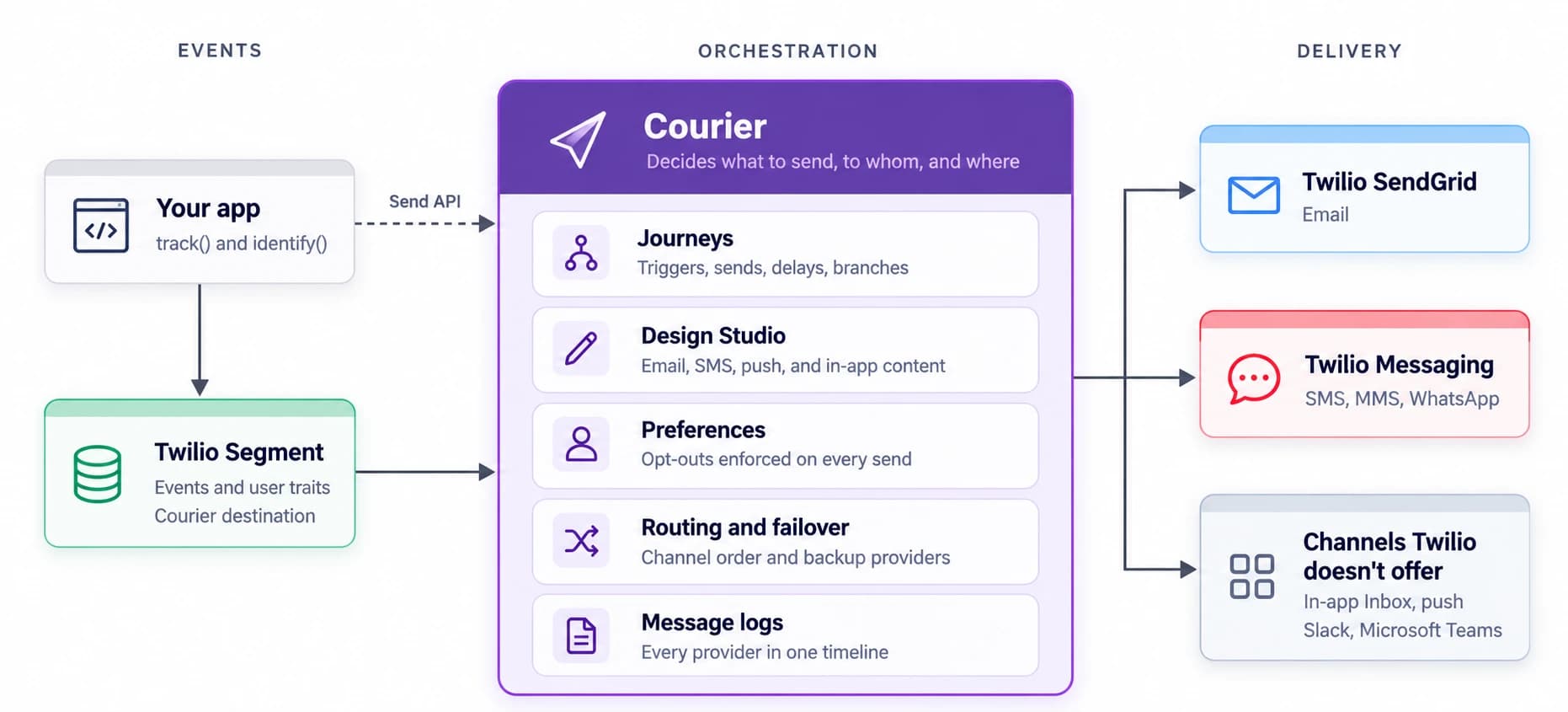
Connecting your Twilio accounts
Each Twilio product connects to Courier once, in the Courier dashboard or through the API:
- Twilio Messaging. Add the Twilio integration with your Account SID, Auth Token, and a Messaging Service SID or sending number. Your 10DLC registration stays with Twilio and keeps applying.
- Twilio SendGrid. Add the SendGrid integration with an API key that has Mail Send permission and your From address. Point SendGrid's Event Webhook at Courier so delivery events show up in Courier's logs, and import your existing SendGrid templates if you want a head start.
- Twilio Segment. Add Courier as a destination in Segment. Segment's
identifycalls keep each user's Courier profile current, including the email address and phone number Courier sends to, andtrackevents become triggers for journeys. You can also add Courier as a Segment source, so message events flow back into Segment next to your product analytics.
The same welcome drip in Courier
In Courier, the welcome drip and activation email become two journeys, Courier's multi-step workflows, triggered by the same Segment events.
Journey 1: Welcome drip
| Step | Node | What it does |
|---|---|---|
| 1 | Trigger: Twilio Segment, event Signed Up | Starts a run for the user in the event. Their traits from identify, like first_name, are ready to use in every message. |
| 2 | Send: email | Sends the welcome email through your SendGrid account. |
| 3 | Delay: 1 day | Waits. |
| 4 | Send: email | Sends the "create your first project" email through SendGrid. |
| 5 | Delay: 2 days | Waits. |
| 6 | Send: SMS | Sends the setup nudge through your Twilio account. |
In the journey's settings, set the cancellation token to onboarding-{{profile.id}}. That tags every run with the user it belongs to.
Journey 2: Activated
| Step | Node | What it does |
|---|---|---|
| 1 | Trigger: Twilio Segment, event Project Created, with the condition properties.project_count equals 1 | Starts only for a user's first project. |
| 2 | Cancel with token onboarding-{{profile.id}} | Stops that user's welcome drip, wherever it is. Someone who activates on day 2 never gets the text. |
| 3 | Send: email | Sends the activation email through SendGrid: their project is live, and here's what to try next. |
Both journeys start from Segment events your app already sends, so there's no new code on your side. If you'd rather drive them from your backend, it's one call each:
import Courier from "@trycourier/courier";

const courier = new Courier(); // reads COURIER_API_KEY

// On sign-up:
await courier.journeys.invoke(WELCOME_DRIP_JOURNEY_ID, {
  user_id: "user_1234",
  data: { plan: "trial" },
});

// When they create their first project:
await courier.journeys.invoke(ACTIVATED_JOURNEY_ID, { user_id: "user_1234" });
Then the rest of the glue code goes away:
- Preferences. Map the drip's templates to an "Onboarding" preference topic. Courier checks it on every send: a user who turns off onboarding messages gets none of the drip, and one who picks email only for that topic never gets the text. You can embed Courier's preference center in your app or link to a hosted page, instead of building one.
- Content and timing. Every email and the SMS are edited in Design Studio, and the delays are settings on the canvas. Moving the text to day 2 or adding a day-7 email is an edit and a publish, not a deploy.
- Failover. Add a backup email provider such as Amazon SES or Postmark, or a backup SMS provider such as Vonage or Telnyx, and Courier tries providers in priority order if one fails.
- One log. Every message in a run, from SendGrid and Twilio alike, appears in Courier's message logs with its status and the provider's response. You can step through one user's run to see exactly what they got and when.
- More channels. Add an in-app Inbox message for users who log in but stall, or a push notification, to the same journey without a new integration.
- Duplicate events. Send an
Idempotency-Keyheader on invoke and Courier returns the original run instead of starting a second one.
Twilio on its own vs. Twilio with Courier
| Job | Twilio on its own | Twilio with Courier |
|---|---|---|
| Trigger from Segment | A webhook endpoint, signature checks, and deduplication you write | Segment destination; events start journeys directly |
| Multi-step timing | A job queue and scheduled workers | Delay nodes, up to 93 days each |
| Stop a sequence early | Cancel queued jobs by key, and guard against races | A Cancel node or one API call with a cancellation token |
| Change timing or copy | Edit code and deploy | Edit the journey or template and publish |
| Pick the channel | Your code chooses SendGrid or Twilio | Routing rules try channels in order, or send on all of them |
| Write the content | SMS in code, email in SendGrid templates | Every channel in Design Studio, published without a deploy |
| Honor opt-outs | Preference tables and checks you maintain | Preference topics enforced on every send, with a hosted or embedded preference center |
| Provider incidents | Retries against the same provider | Failover to a backup provider in priority order |
| Trace a message | Your log, SendGrid's activity feed, and the Twilio console | One message log and step-by-step run history |
| In-app, push, and chat | Separate integrations | In-app Inbox, push, Slack, and Microsoft Teams in the same journey |
Everything in the UI is available via the API, CLI, and MCP server, so journeys, templates, and routing can live in your codebase and go through code review, and an AI agent can manage them.
Sending a single message from code
Not every notification needs a journey. For a one-off send, the Send API takes routing rules directly. This sends a receipt by email and falls back to SMS if the email can't be delivered:
await courier.send.message({
  message: {
    to: { user_id: "user_1234" },
    template: "order-receipt",
    data: { order_id: "ord_5512", total: "$42.00" },
    routing: { method: "single", channels: ["email", "sms"] },
  },
});
Courier looks up the user's email address and phone number from their profile, checks their preferences, and sends through SendGrid, then Twilio if needed, because those are the providers you connected.
How Twilio uses Courier
Twilio is a Courier customer and an investor in Courier. Inside the Twilio Console, where developers on Twilio monitor usage and account alerts, Twilio embedded Courier's Inbox to give every user one real-time feed for account alerts, usage notices, onboarding guides, and feature announcements. Non-urgent messages are grouped into digests, and each user chooses what they receive.
Raghav Katyal, Technical Lead, Twilio: "We chose Courier because the depth of the inbox and multi-channel integrations allowed us to choose one notification platform for all products and teams at Twilio."
When Twilio on its own is enough
Twilio on its own is the right call when:
- You send one kind of message on one channel, such as login codes over SMS through Twilio Verify.
- Your messages are independent. A receipt goes out, and nothing else depends on it.
- You're building voice or video. Calling, IVR, and video rooms are Twilio's domain, and you call those APIs directly.
Once messages start depending on each other, across channels and over time, that's the point where the glue code above starts to grow, and where Courier earns its place. For a side-by-side comparison, see Courier vs. Twilio, and for the setup end to end, see Start a journey from Segment.
FAQ
Frequently asked questions
Keep exploring
More guides
One API, every channel
Ship notifications without the boilerplate
Courier gives you one API for email, SMS, push, and chat, with templates, routing, retries, and delivery logs built in.
Last updated Nov 6, 2026. Code samples are illustrative; provider APIs and pricing change over time, so check each provider’s docs before relying on them.