WhatsApp Business messages: types, templates, and rules
 Emily LaneSeptember 25, 2026
Last updated: September 2026.
WhatsApp isn't one channel. It's two, and the customer decides which one you're in.
If they messaged you in the last 24 hours, you're in the easy one: send whatever you want, no approval needed. If they didn't, you're in the strict one: every WhatsApp Business message has to be a template Meta approved in advance, and Meta decides whether it counts as marketing. Most WhatsApp mistakes come from treating the two as the same thing.
The full reference, with every format and limit, is Every WhatsApp Business message type and the rules for each.
Key takeaways
- Every WhatsApp Business message is either a template, approved by Meta and sendable any time, or a free-form message, which needs no approval but only works within 24 hours of the customer's last message or call.
- Templates are marketing, utility, or authentication. Anything mixed or unclear counts as marketing.
- Beyond text, you get carousels, offers, coupon codes, catalogs, reply buttons, lists, Flows (in-chat forms), and calls.
- WhatsApp doesn't deliver marketing templates to US numbers at all.
Templates and free-form messages
The WhatsApp Business Platform, often called the WhatsApp Business API, is how businesses message customers at scale. Your messages land in the same app people use to talk to their friends, which is why Meta is strict about what you can send.
A WhatsApp message template is a message you write in advance and get approved by Meta. The wording is fixed, with blanks for the parts that change:
Hi {{first_name}}, your order {{order_number}} has shipped and should arrive {{delivery_date}}.
Approval takes up to 24 hours. After that, you can send it any time, including as the first message someone ever gets from you. Templates can have an image or video on top and buttons underneath. Mock yours up in the WhatsApp preview generator before you submit it.
A free-form message, also called a session message or non-template message, is anything you send without a template: text, photos, voice notes, buttons, menus, product carousels, and forms. No approval. The catch is you can only send one inside the customer service window, often called WhatsApp's 24-hour rule: the 24 hours after the customer last messaged or called you. Every new message from them resets the clock.
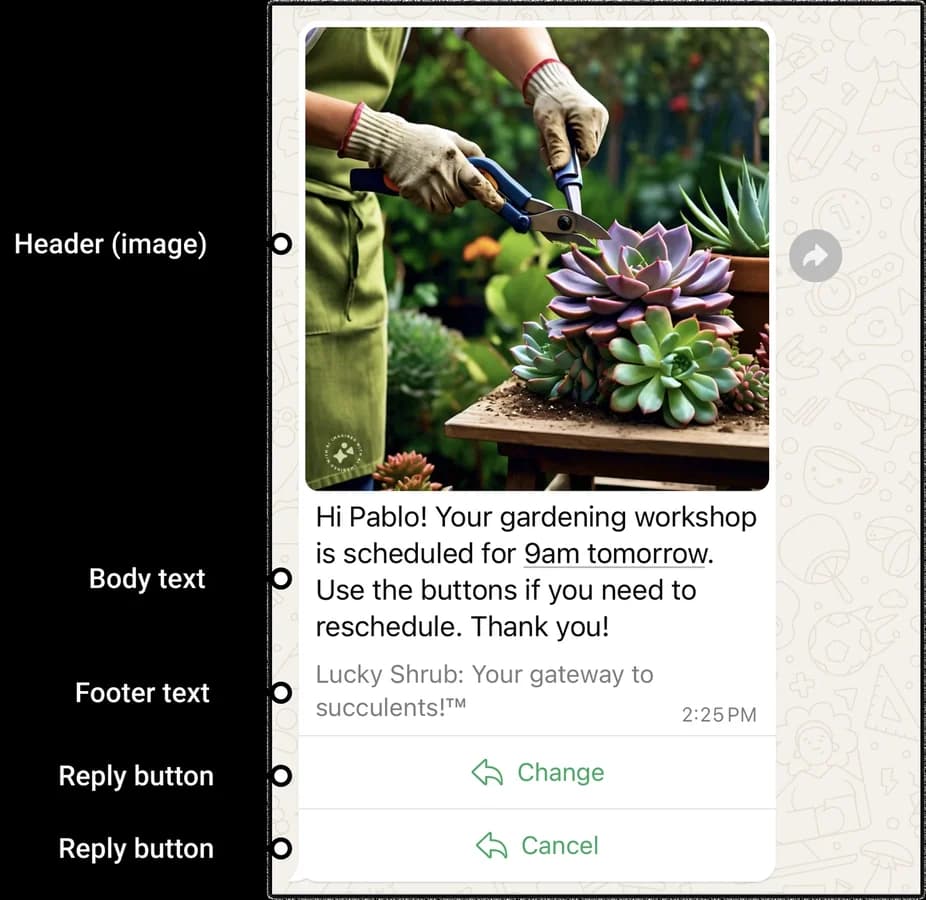
Reply buttons are a free-form message, so they only work inside the window.
Here's how the two work together on a typical order:
- Maya orders. You send a template: "Thanks for order 4417. We'll message you when it ships."
- She replies, "Can I get it faster?" That opens the window.
- You answer free-form with a list of shipping options. She picks one.
- Three days later it ships. The window closed long ago, so the update is a template again.
The takeaway: templates handle everything you start, and free-form handles everything the customer starts. So design your templates to get a reply. A reply opens the easy channel.
WhatsApp template categories
Every template is marketing, utility, or authentication, and the category decides how hard Meta looks at it.
| Category | What it's for | Examples |
|---|---|---|
| Marketing | Anything that promotes, sells, or re-engages | Launches, sales, cart reminders, birthday offers |
| Utility | A follow-up to something the customer did, or an essential alert | Order updates, account alerts, fraud alerts, feedback surveys |
| Authentication | One-time passcodes, nothing else | Login and sign-up codes |
Utility is where people get caught. Add one promotional line to an order update and the whole template becomes marketing. Submit it as utility anyway and Meta approves it as marketing. Keep utility templates boring on purpose, and send promotions separately.
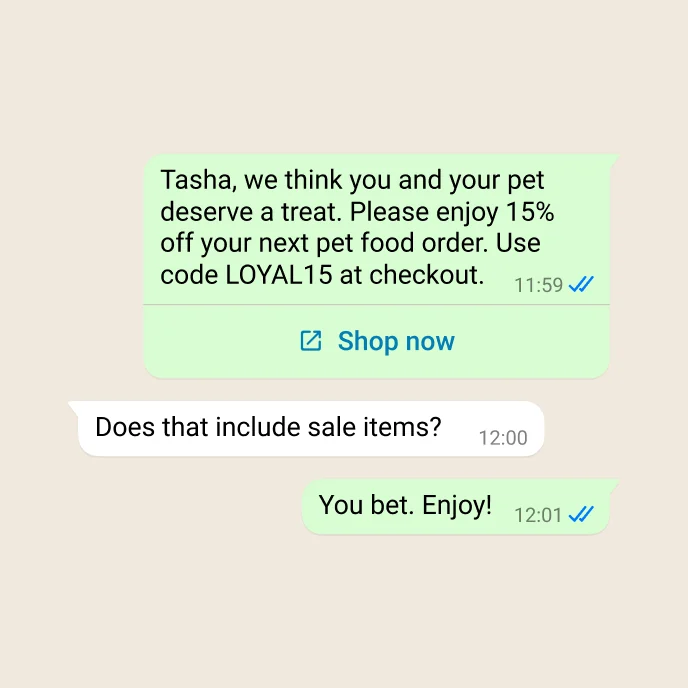
A marketing template: a personal offer with a code and a link.
WhatsApp message formats worth knowing
Templates can be more than text:
- Carousels: up to 10 swipeable cards with images and buttons. Product carousels pull from your catalog and let people shop without leaving the chat. Marketing only.
- Limited-time offers and coupon codes: a countdown with a code, or a button that copies the code. Neither displays properly on WhatsApp Web.
- Catalogs: your products, browsable and shoppable in the chat.
- Authentication codes: copy-code, one-tap autofill on Android, or zero-tap. On iOS 26 and later, the code also shows up as a keyboard suggestion.
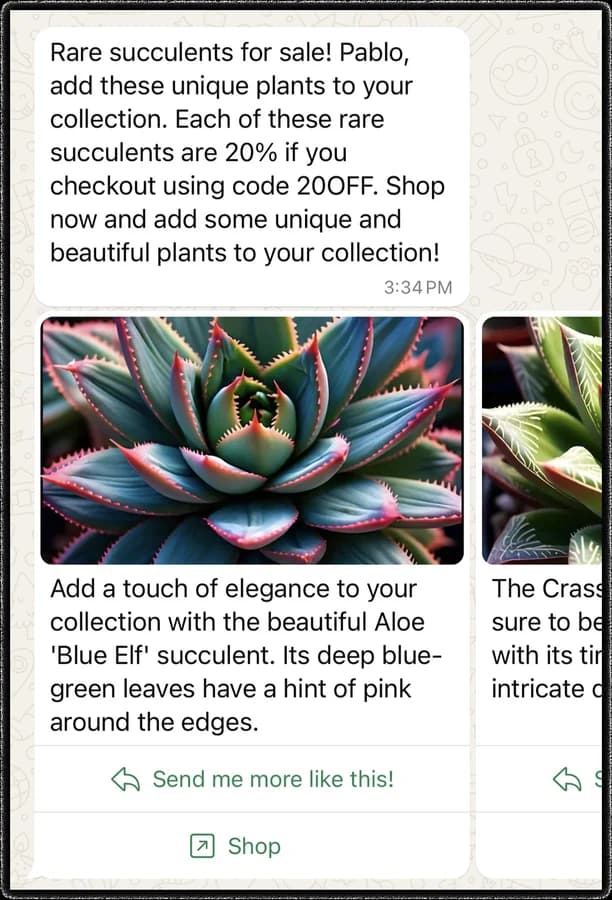
A media card carousel.
Free-form messages are built for conversation: up to three reply buttons, a list of up to 10 options, a button that asks for the customer's location, and product messages from your catalog.
Flows work either way. A Flow is a form inside the chat, with text fields, dropdowns, and date pickers, and the answers come back to you as data. It's the right tool for bookings, sign-ups, and surveys. Calls work either way too: customers can call you any time, but you need their permission before you call them.
The rules for WhatsApp Business messages
- Opt-in. You need permission before you message anyone, and it has to name your business. Customers can also stop your marketing from inside WhatsApp.
- Messaging limits. New businesses can start conversations with 250 people a day. Verify your business and it jumps to 2,000, then grows automatically. Replies in an open window don't count.
- Quality. Meta rates every template on how people react. Too many blocks and reports and it's paused, then disabled.
- Marketing caps. WhatsApp limits how much marketing each person gets from all businesses combined. There's no published number.
- No marketing to US numbers. As of September 2026, WhatsApp doesn't deliver marketing templates to US phone numbers. In the US, treat WhatsApp as a support and conversation channel, not a marketing one.
- Restricted content. No firearms, drugs, adult products, dating, payday loans, and more. Alcohol and gambling are allowed only in some countries, for adults.
- AI chatbots. A bot that serves your business is fine, as long as people can reach a human. Meta bans general-purpose AI assistants offered as the product itself.
Which WhatsApp message to send
| Job | Send |
|---|---|
| Order or shipping update | Utility template with a tracking link |
| Login code | Authentication template |
| Appointment reminder | Utility template with confirm and reschedule buttons |
| Flash sale | Limited-time offer (marketing) |
| New collection or abandoned cart | Carousel (marketing) |
| Booking or survey | Template with a Flow |
| Support conversation | Free-form reply buttons or a list |
Frequently asked questions
What's the difference between a WhatsApp template and a free-form message?
A template is approved by Meta in advance and can be sent any time, including as the first message to a customer. A free-form message needs no approval, but it can only be sent within 24 hours of the customer's last message or call.
What is the WhatsApp 24-hour rule?
The WhatsApp 24-hour rule, or customer service window, lets a business send free-form messages only within 24 hours of the customer's last message or call. Each new message from the customer resets the 24 hours. After that, only approved templates can be sent.
What is a session message on WhatsApp?
A session message is a free-form WhatsApp message sent without a template, inside the 24-hour customer service window. It needs no approval and can include text, media, buttons, lists, and Flows. Meta calls these non-template messages.
What are the WhatsApp template categories?
Marketing, utility, and authentication. Marketing covers promotions, utility covers follow-ups like order updates and essential alerts, and authentication is for one-time passcodes only. Meta labels mixed or unclear templates as marketing.
Can businesses send WhatsApp marketing messages to US customers?
Not as templates. WhatsApp doesn't deliver marketing templates to US phone numbers. Utility templates, authentication templates, and free-form replies still reach US numbers.
Keep reading
- Every WhatsApp Business message type and the rules for each: every format, limit, and rule
- WhatsApp pricing, explained, including what changes on October 1, 2026
Images: Meta, WhatsApp Business Platform documentation.
Similar resources

WhatsApp pricing changes on October 1, 2026
On October 1, 2026, two things become billable on the WhatsApp Business Platform: free-form replies inside the 24-hour customer service window, and utility templates sent in response to a customer. If your WhatsApp volume is conversations rather than campaigns, this is not a rate tweak. It adds a line to your invoice where there used to be a zero. Here is what changes, a worked example of the cost, and what to check.

Clinical alert and notification systems: how escalation works
A clinical alert is easy to send and hard to close. This is how alerting works inside a hospital: where alerts come from, how routing by role and shift works, and how the acknowledge, timeout, escalate loop is actually built, including what happens when nobody answers.

Courier vs Customer.io: 2026 messaging platform comparison
Courier and Customer.io both send across email, push, SMS, and in-app, but they are not priced or built the same way. Courier bills by the send, puts journeys, experiments, broadcasts, an in-app inbox, preferences, and 50+ delivery providers on one platform, and exposes all of it through an API, a CLI, and an MCP server. Customer.io bills by the number of profiles in your database and fits a marketing team that needs deep behavioral segmentation. This comparison covers pricing, journeys, channels, in-app messaging, localization, and preferences, with every competitor figure linked to Customer.io's own pages.