

data.ai_result.
Downstream nodes use that output to make decisions, personalize messages, or update user data.
AI nodes run on AI credits. A run fails at the AI node when the workspace has none. Add credits in .
AI nodes run in the US datacenter only. In the , creating, replacing, or publishing a journey with an AI node fails with AI steps aren't available in this region yet.
Configuration
Click the AI node on the canvas to open the summary panel, then click Configure to open the full configuration drawer.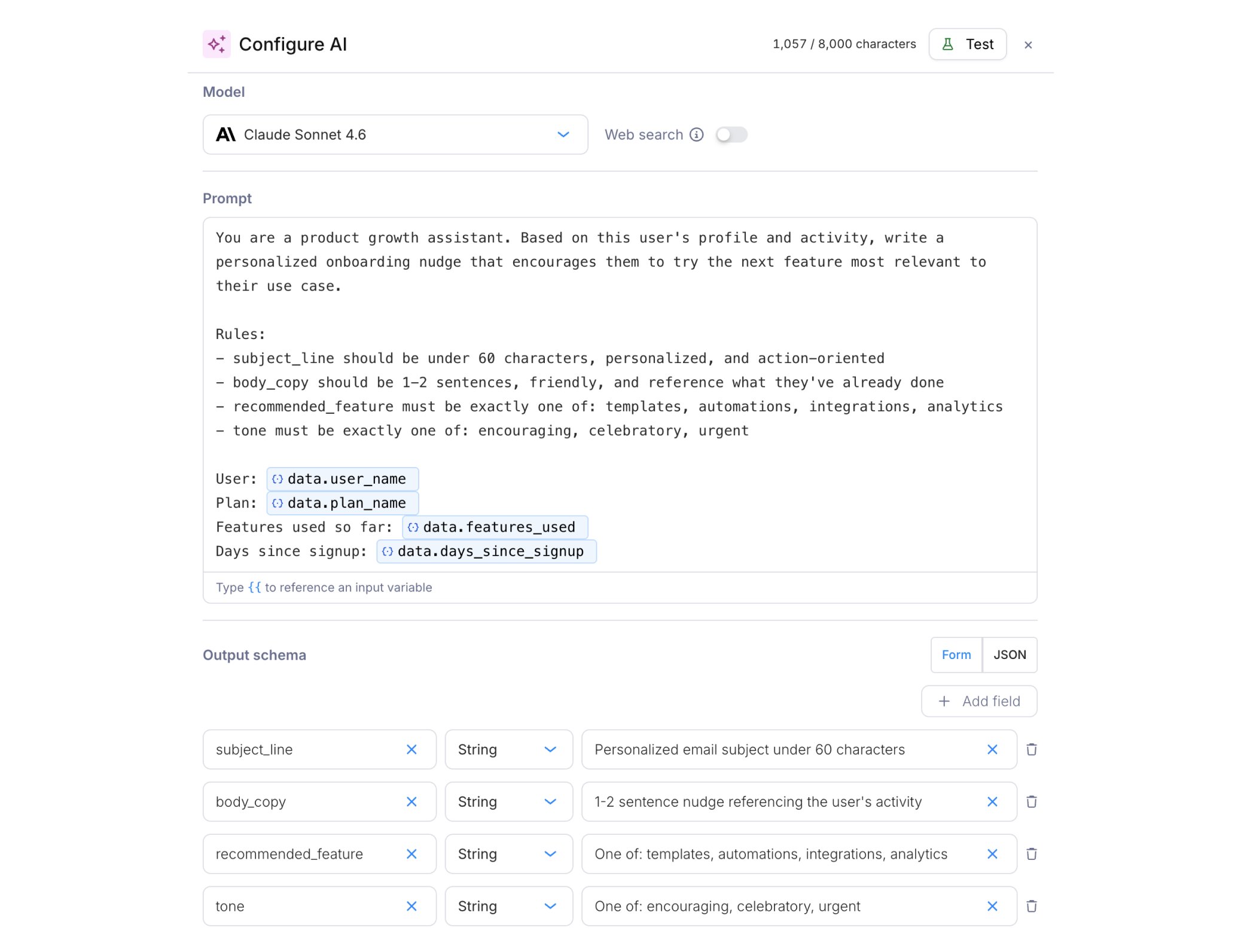
AI node configuration drawer with model selector, web search toggle, prompt, and output schema
AI model
Choose the model that fits what the AI node needs to do. Courier supports models from OpenAI and Anthropic, so each node can balance speed, cost, and output quality. Use smaller models for predictable structured tasks: classifying users, extracting fields, scoring engagement, or returning simple JSON. Use larger models when the prompt needs more context, nuanced reasoning, or higher-quality generated copy. Available models:
When you create or replace a journey through the API, set the AI node’s
model to the model ID and give it a user_prompt. Both are required, so a missing or blank one fails with AI step needs a model or AI step needs a prompt. An ID that isn’t in the table fails with unknown model, followed by the list of valid IDs. Retired model IDs keep working: Courier runs them on their successor model.
See Billing for credit costs, token overages, and web search pricing.
Web search
Toggle web search on when the prompt needs current information the journey context doesn’t have. The model can then query the internet before generating its structured response. Web search is available for Anthropic models only. Each invocation with web search enabled costs an additional 2 credits. Search results also count as input tokens, along with the prompt, output schema, journey context, and resolved variables. If the total input exceeds 3,072 tokens, input token overage applies.Prompt
Write a natural-language prompt describing what you want the model to do. The prompt field supports{{variable}} interpolation. Type {{ to see available fields from the trigger schema, profile, or upstream fetch responses.
For the onboarding nudge example below, the prompt might be:
Output schema
The output schema defines the structure of the model’s response. Define it in two modes: Form mode (default): Add fields with a name and type (string, number, or boolean). Optionally add a description telling the model what the field should contain. JSON mode: Write a JSON Schema directly. Use this for more complex schemas or when pasting from an existing definition. For the onboarding nudge example, the form-mode schema would be:
The model’s response is parsed as JSON and stored in the journey context under
data.ai_result. Downstream nodes read each field under that key:
- In : select
data.ai_result.toneordata.ai_result.recommended_featureas the field - In : use
{{ai_result.subject_line}}or{{ai_result.body_copy}}
data.ai_result. Read the first node’s output before the run reaches the next one.
Conditions
AI nodes support optional . If they aren’t met when the run reaches the node, it’s skipped and no credits are consumed.Testing
Click Test in the configuration drawer to open the test panel. Run the prompt against the selected model with sample variable values and see the structured response before publishing the journey.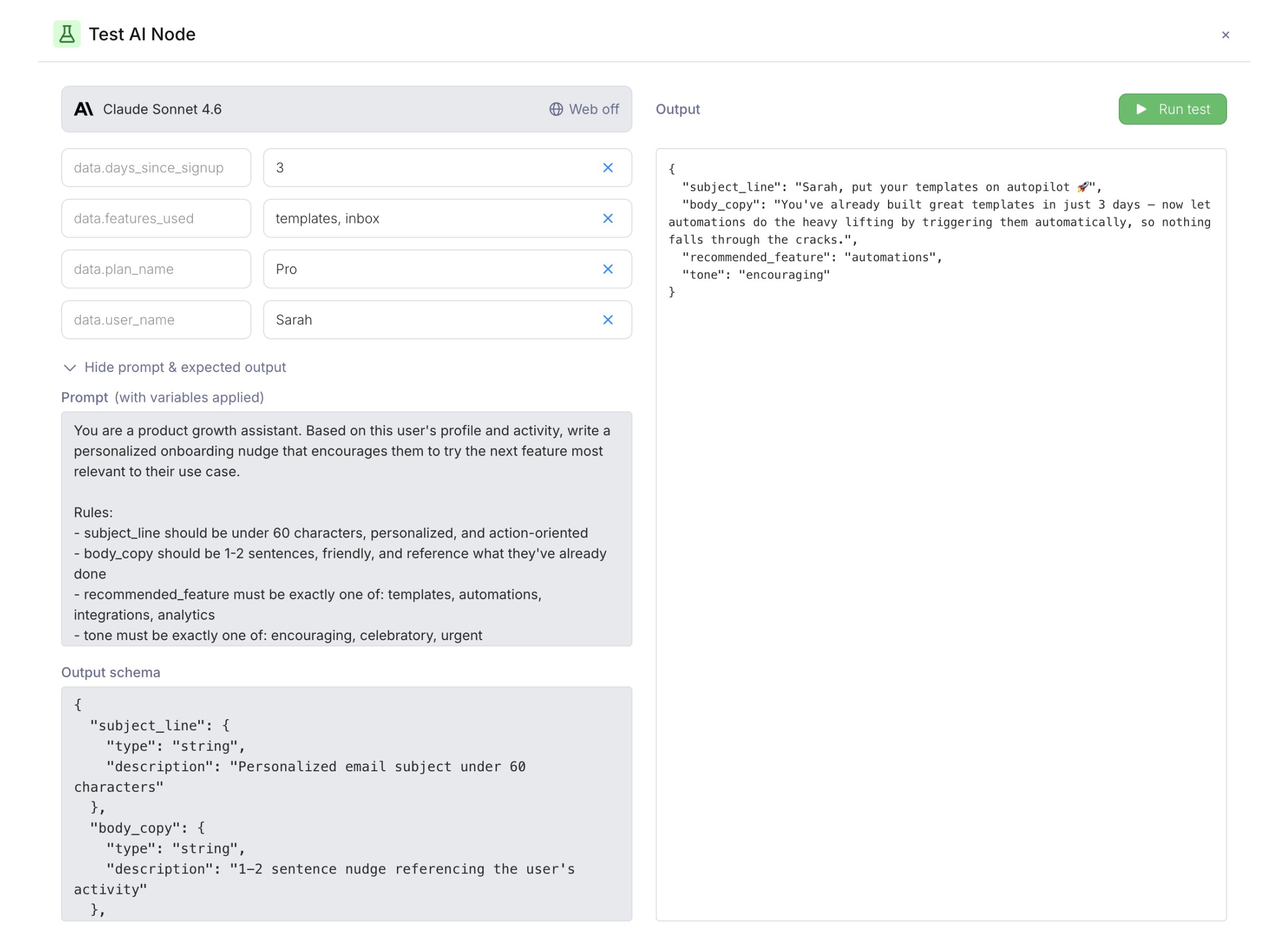
Test drawer showing prompt, output schema, and structured test result
Example: personalized onboarding nudge
A journey that generates tailored onboarding messages from each user’s activity: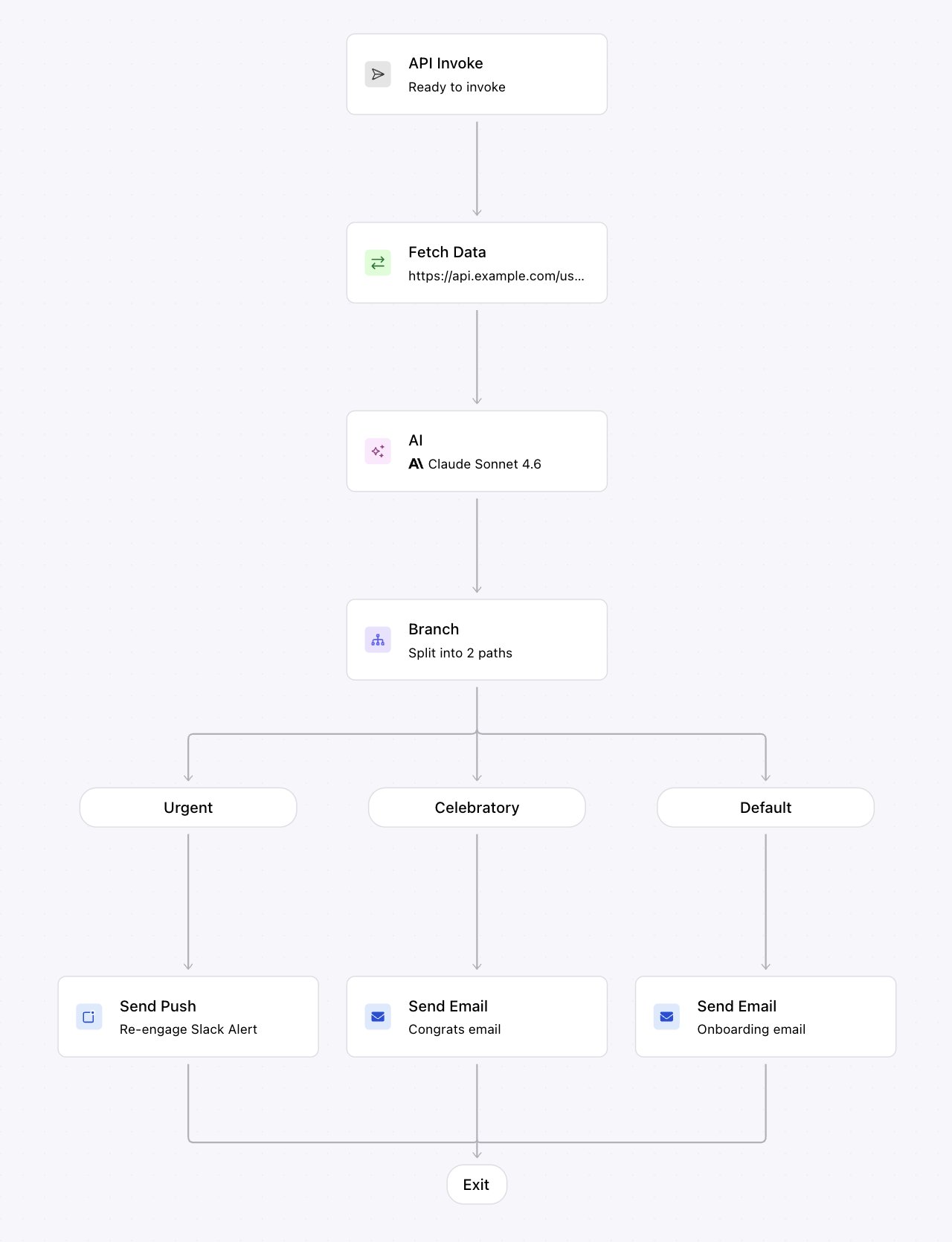
Onboarding nudge journey: API trigger → Fetch activity → AI generates personalized copy → branch on tone → send via the right channel
- Trigger: Fires on day 3 after signup. The trigger schema includes
user_name,plan_name,features_used, anddays_since_signup. - Fetch Data: Pulls the user’s recent activity summary from your application API.
- AI node: Given the user’s profile and activity, generates a personalized nudge with
subject_line,body_copy,recommended_feature, andtone. Model: Claude Sonnet 5.5 (1.75 credits per run). - Branch: Routes based on
data.ai_result.tone:- Path “Celebratory”: user has been active → sends a congratulatory email with
{{ai_result.subject_line}}and{{ai_result.body_copy}}. - Path “Urgent”: user hasn’t engaged → sends a push notification to re-engage.
- Default: sends a standard onboarding email with the AI-generated copy.
- Path “Celebratory”: user has been active → sends a congratulatory email with
Common patterns
Score and classify users: Feed product usage, behavior, and profile data into the LLM. Route the journey based on risk level, intent, engagement, or any structured category the model returns. Generate personalized notifications: Give the model your journey context and get back tailored subject lines, body copy, and recommended actions. Personalized content for every recipient without dozens of template variants. Enrich user profiles: Classify users into personas, derive lifecycle stage, or generate account summaries. Persist outputs to the profile so every future journey starts with richer context. Structured output for downstream logic: Define an output schema with field names, types, and enums. The LLM returns structured JSON that branch conditions, send nodes, and downstream integrations can act on directly.Debugging AI nodes
Open the run in and click the AI node step to see:- The model used and whether web search was enabled
- The resolved prompt (with variables substituted)
- The output schema that was sent to the model
- The structured JSON response
- Token usage (input and output token counts)
error, and no node after the AI node runs. The step’s error message names the cause:
Read the message on the AI step in , or in the step’s
error.message from .
Billing
On the Developer plan, AI nodes can’t be placed on the canvas, and credit packs can’t be bought. Each AI node invocation consumes credits based on the selected model. Credits are billed at 100 credits per $1 and bought as packs in the console, separately from your send bill. Auto top-up charges your card for another pack when the balance falls below a threshold, 100 credits by default.
The values above are base costs per invocation. Each invocation includes up to 3,072 input tokens and 1,000 output tokens. Most AI node runs stay within these included limits.
Input tokens cover everything sent to the model: the prompt, output schema, journey context, resolved variables, upstream fetch responses, and web search results. Input token overage applies when the node sends a large amount of text, such as long variables, large fetch responses, or web search results.
Output tokens are generated by the model response. Output token overage applies only when the model response exceeds 1,000 tokens. Control output length through the prompt and output schema.
Web search is available for Anthropic models only. When enabled, each invocation costs an additional 2 credits. Search results also count as input tokens, so web search can push the total past 3,072 tokens and trigger input token overage.