

Configuration
The fetch node has two panels: a summary panel (visible when clicking the node on the canvas) and a full HTTP request editor (opened by clicking Setup Request).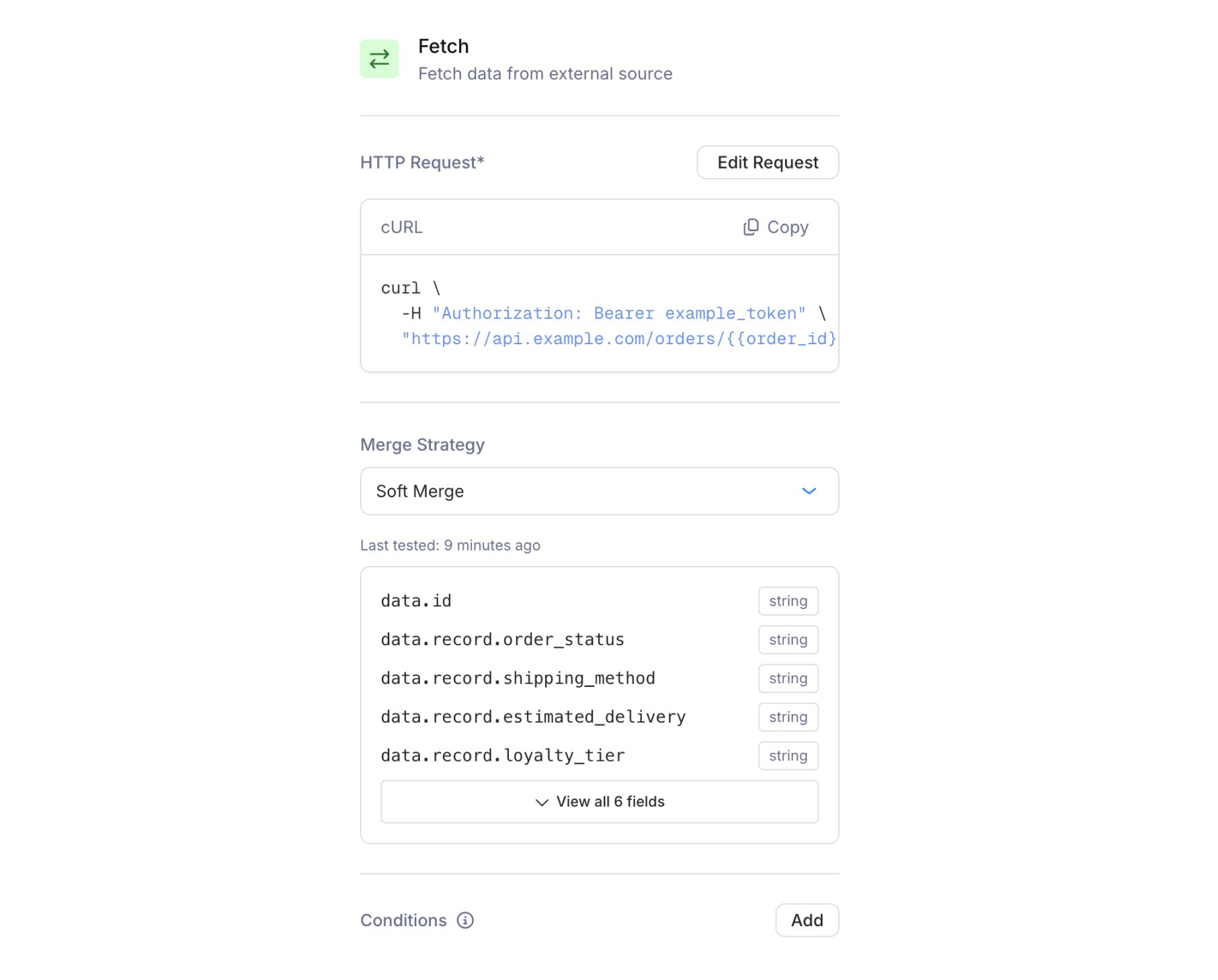
Fetch node summary panel showing HTTP Request, Merge Strategy, and Conditions
HTTP request editor
Click Setup Request to open the full-screen HTTP request editor. The editor has three columns: setup, input, and output.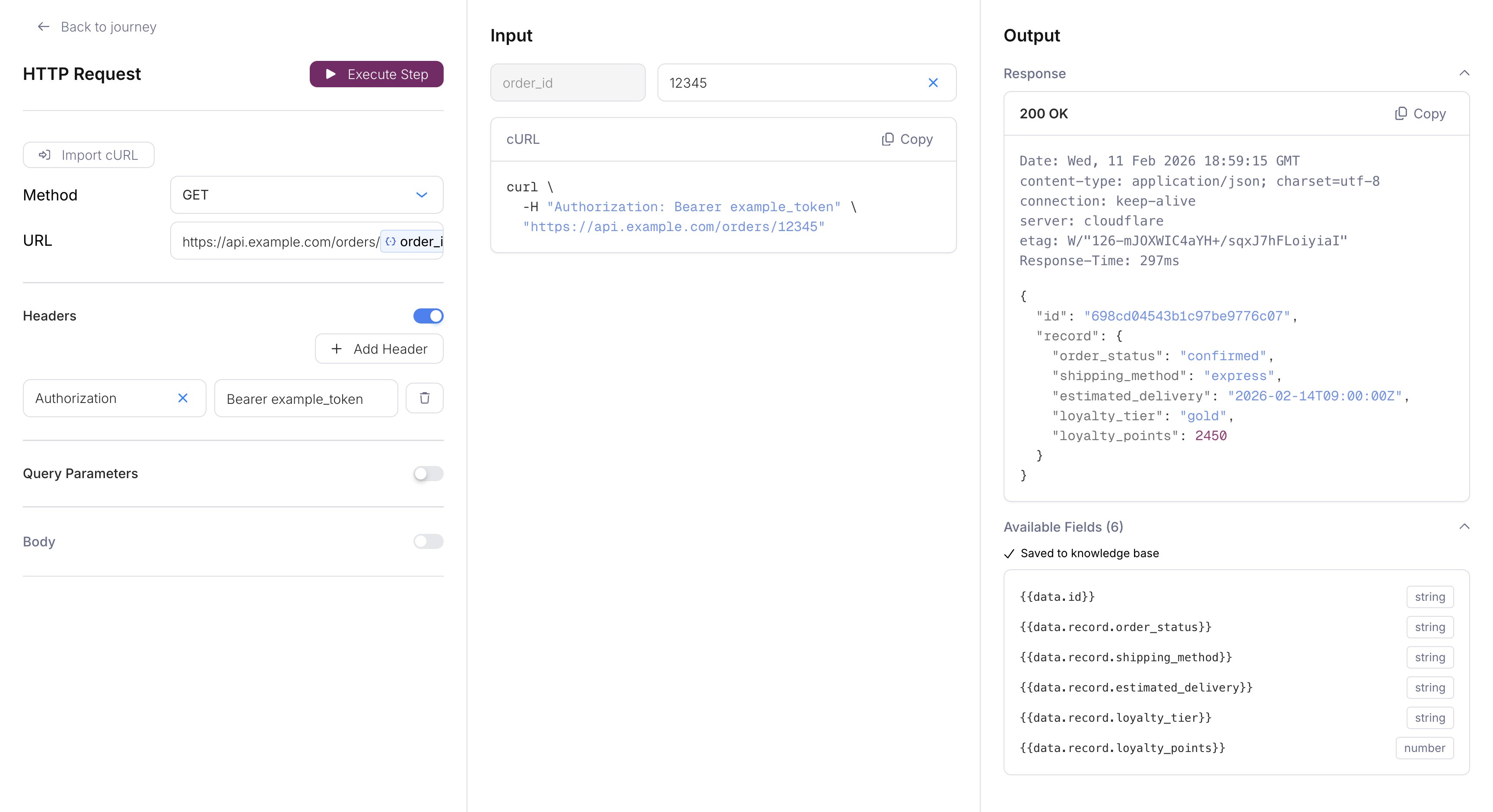
HTTP request editor with method, URL, toggleable sections for headers/params/body, a cURL preview, and response output
- Import cURL: Paste an existing cURL command to auto-populate the request configuration.
- Method: GET, POST, PUT, or DELETE.
- URL: The endpoint to call. Supports variables (e.g.,
https://api.example.com/users/{{recipient}}). Only HTTPS URLs are allowed, andlocalhostis rejected. - Headers: Toggle on to add key-value header pairs. Common use:
Authorization: Bearer {{data.api_token}}. - Query Parameters: Toggle on to add key-value query parameters appended to the URL.
- Body: Toggle on to add a JSON request body (available for POST and PUT only, disabled for GET and DELETE).
{{recipient}}, this column shows fields for test values. A live cURL preview updates as you fill them in.
Output (right column):
Click Execute Step to run the request and see the response. On a successful 2xx response, Courier extracts the response schema and saves the available fields. The summary panel then lists those field names and types, so you can confirm what data is available downstream. A “Last tested” timestamp shows when the schema was last captured.
Variables
The URL, headers, query parameters, and body can each use{{...}} variables. Every variable starts with one of these roots:
Spaces inside the braces don’t matter:
{{ data.user_id }} resolves the same as {{data.user_id}}.
Write the root on every variable. {{user_id}} doesn’t resolve to data.user_id. Creating or replacing a journey through the API fails on it with Variable {{user_id}} won't resolve. Use data., profile., tenant., or recipient. The API also rejects a URL that starts with a literal host and isn’t HTTPS on a public host, with URL must be https on a public host.
A variable with no value
A variable has no value when its path is missing,null, or an empty string in the run. What happens depends on where it sits:
Merge strategy
The merge strategy controls how the fetch response is combined with the existing journey context. Choose from the dropdown on the summary panel:
Soft Merge is the safest default. Trigger schema fields and profile data are never overwritten by a fetch response.
Conditions
Fetch nodes support optional . If they aren’t met, the node is skipped and the journey continues without making the HTTP request.Response handling
The response body is parsed as JSON and merged into the journey context using the selected merge strategy. If the fetch returns:- In : select
data.onboarding_completeas the field - In : use
{{onboarding_complete}}or{{last_login}} - In recipient overrides: select the field from the dropdown
When a fetch fails
A failed fetch stops the run. The step and the run both end inerror, and no node after the fetch runs. The step’s error message names the cause. <METHOD> is the uppercase HTTP method and <host> is the URL’s host and port. The path and query string are never shown, so a token in the URL stays out of the logs.
Read the message on the fetch step in , or in the step’s
error.message from .
Chaining fetch nodes
Fetch nodes can run in sequence. Each one merges its response into the journey context, and all fields are available downstream. For example:- Fetch order details: merges
order_id,total,statusinto context - Fetch user preferences: merges
email_frequency,localeinto context - Branch: check
email_frequencyto decide whether to send