Chapter 5
Notification Center Use Cases
How product teams use in-app notification centers: SaaS approvals, DevOps and incident alerts, healthcare care coordination, and marketplace transaction tracking.
Last updated: July 2026
Key takeaways
- The implementation pattern is the same across industries. What changes is what you send and when.
- In B2B SaaS, the highest-value use case is approvals: a decision that needs to reach the right person fast, with action buttons and an audit trail.
- For DevOps, the win is signal over noise. Group a single incident's events into one thread instead of scattering them across the inbox.
- In healthcare, in-app notifications carry clinical context that email and SMS can't, because they stay inside an authenticated session.
- In marketplaces, one event fans out to buyer, seller, and operations, each seeing only what's relevant to them.
How product teams use notification centers
An in-app notification center is the communication layer between your product and its users. The pattern is similar across industries: a persistent inbox, real-time delivery, action buttons, and preference management. What changes is what you send, and when.
SaaS approval workflows
Approval workflows are one of the most common notification center use cases in B2B SaaS. Something needs a human decision before it proceeds, and that decision has to reach the right person quickly.
Feature flag approvals
LaunchDarkly manages approvals for feature-flag changes through Courier Inbox. When an engineer requests permission to modify a production flag, the notification lands in the reviewer's inbox with context about the flag, the proposed change, and two action buttons: approve and reject. Reviewers act without leaving the app, and the inbox keeps a history of every request (pending, approved, and rejected), so teams audit decisions without querying a separate system.
Contract and access review
Legal and procurement workflows follow the same pattern. New contracts route to the right reviewer by value or department, and reviewers see the summary, counterparty, and deadlines right in the notification. Escalation triggers when an approval is delayed past its SLA. Permission requests for sensitive systems like production databases, admin consoles, and security tooling use the same routing: the request shows who's asking, what they need, and why, and reviewers can approve, deny, or ask for more information without navigating elsewhere.
DevOps and engineering alerts
Engineering teams need a notification center that surfaces actionable information without creating noise. The highest-value notifications are the ones that need action or add context you don't already have.
Deployment status
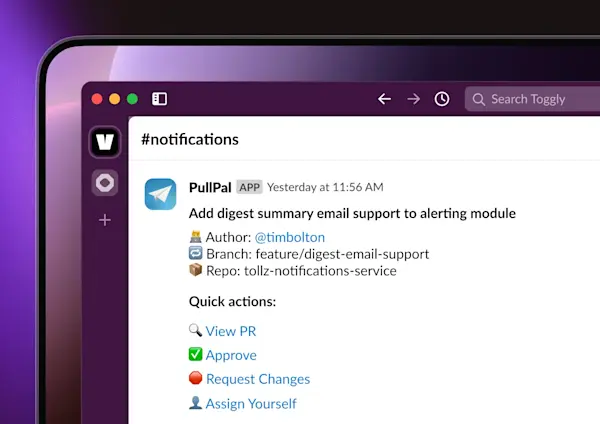
DroneDeploy uses Courier to alert users when long-running processing jobs finish. Map processing for construction drone footage takes real time, so rather than polling for status, users get a notification when the map is ready. The same pattern fits CI/CD pipelines: each stage emits an event (build started, tests passing, deployment queued, deployment complete, rollback triggered), and each notifies the relevant engineers. The inbox, or a Slack channel, becomes a deployment log you check between other work rather than a terminal you babysit.
Infrastructure and incident notifications
Monitoring integrations notify on threshold crossings: CPU above 90%, connection pool exhausted, error rate spiking. Notifications route to on-call engineers and update when the alert clears. A single incident might generate several related notifications (alert triggered, acknowledgment, mitigation deployed, recovery confirmed), and those group into one thread instead of scattering as separate inbox items.
Healthcare: care coordination
Healthcare platforms face a constraint other industries don't. HIPAA requires that email and SMS not contain protected health information, so in-app notifications inside an authenticated session become the place to carry clinical context that other channels can't.
Staff coordination
Trusted Health, which connects nursing professionals with thousands of healthcare facilities, routes staffing notifications through authenticated channels. Shift availability, assignment confirmations, and schedule changes reach nurses through the app rather than SMS or email, which keeps sensitive employment information inside the secure session.
Patient-facing and provider workflows
Healthcare apps use in-app notifications for lab-result availability, appointment reminders, and care-plan updates. The notification itself carries no clinical data. It signals that information is available and links to the authenticated view, which keeps the channel compliant while still giving a timely alert. Care coordination platforms notify physicians when a patient's condition changes or test results come back abnormal. Critical notifications require acknowledgment, while routine updates batch into digests.
Marketplace transaction tracking
Marketplaces coordinate multiple parties for every transaction. Buyers, sellers, and operations each need a different view of the same events.
| Transaction event | Buyer | Seller | Operations |
|---|---|---|---|
| Order placed | Confirmation with details | New order requiring action | (none) |
| Payment processed | Receipt | Payout timeline | (none) |
| Item shipped | Tracking information | Shipment confirmation | (none) |
| Delivered | Delivery confirmation + review prompt | Delivery confirmation | (none) |
| Dispute opened | Case reference + instructions | Case reference + response deadline | Case opened for review |
| SLA approaching | (none) | Warning with deadline | Escalation if unresolved |
Each role sees only the notifications relevant to their work. Sellers handling high volume get digest notifications rather than an individual alert for every update.
Frequently asked questions
How should I structure notification categories?
Start with the groupings users already think in: activity (things people did), alerts (things that need attention), and system (platform-level status). Within each, consider whether different roles need different notifications: an approval is relevant to the approver but not the requester once it's submitted. Don't create more categories than users can manage. Most preference centers with more than six types see users disable everything rather than configure it.
What notification types work best with action buttons?
Notifications with a binary decision or a single obvious next step. Approvals (approve/reject), assignments (accept/decline), invitations (join/decline), and confirmation prompts all work well. Informational notifications like "your report is ready" or "deployment complete" don't need buttons, because the notification is the information. Avoid more than three action buttons, since decision paralysis lowers action rates.
How do you keep a notification center from being ignored?
The main cause is irrelevance: notifications users didn't need. Audit each type against one test: does the user need to know this now, or can they discover it later? Anything that passes the second condition is a candidate for removal or a digest. The second cause is volume, and rate limiting plus batching address that without removing notifications entirely.
How do you handle notifications across time zones?
Store each user's time zone in their profile and apply it to every time-based delivery decision. That affects scheduling (send digests during business hours), display (show timestamps in local time), and urgency. Courier stores time zone as a profile attribute and applies it in workflow delay calculations when configured.
When should a notification require acknowledgment?
Require acknowledgment when you need to know the recipient is aware: security alerts, required compliance training, and incident acknowledgment in on-call workflows. Informational notifications like feature announcements or activity summaries don't need it. Overusing acknowledgment trains users to dismiss without reading, which defeats the purpose.
Ready to add an in-app notification center to your app? Talk to a solutions expert to walk through your use case, or get started for free with 10,000 notifications a month.