Email preview
See your email in real Outlook, Gmail, and Apple Mail
Courier opens your email in more than 100 real email clients, light and dark, and sends back a screenshot from each one. Run it from your coding agent, the API, or the editor. Results land in under two minutes.
Price
Real-device previews for a fraction of the price
Mailgun Inspect, which replaced Email on Acid, starts at $99 a month. Litmus sells through a sales call. Courier starts at $20, with the API on every plan.
- Courier$40
- Mailgun Inspect$99
- Parcel$78
- Litmus~$500
At 200 previews, Courier is $40 a month, $59 less than Mailgun Inspect.
Running more than 1,000 previews a month? We have volume pricing. Talk to us
Monthly prices from each vendor in November 2026. Parcel includes one $29 seat, and each teammate adds another. Litmus no longer publishes a price, so this is its last listed plan.
Coverage
Pick a client. See what your customer sees.
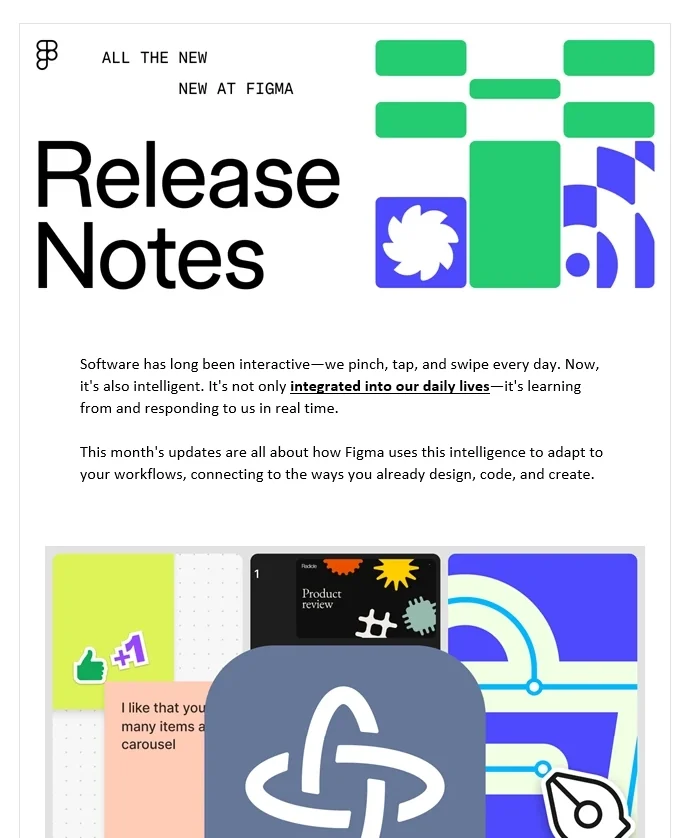
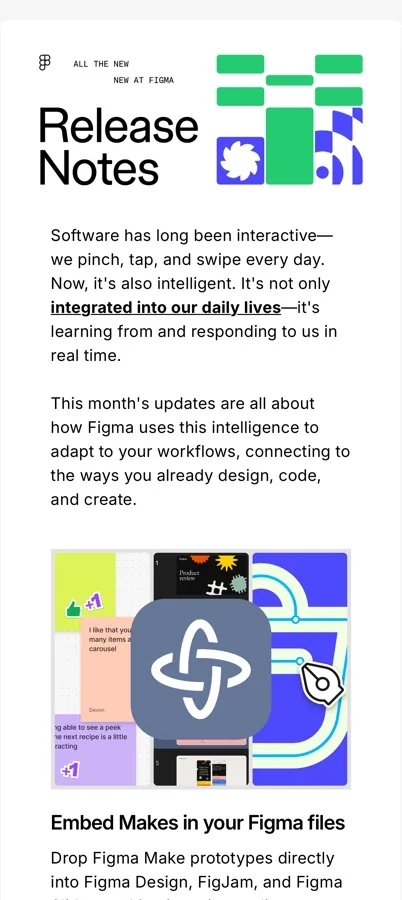
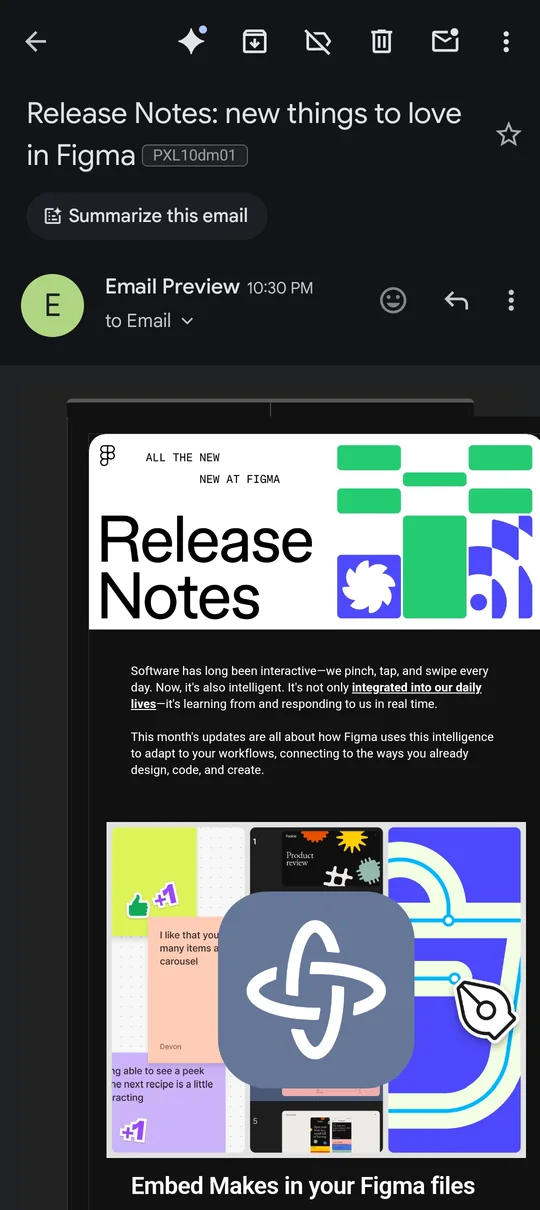
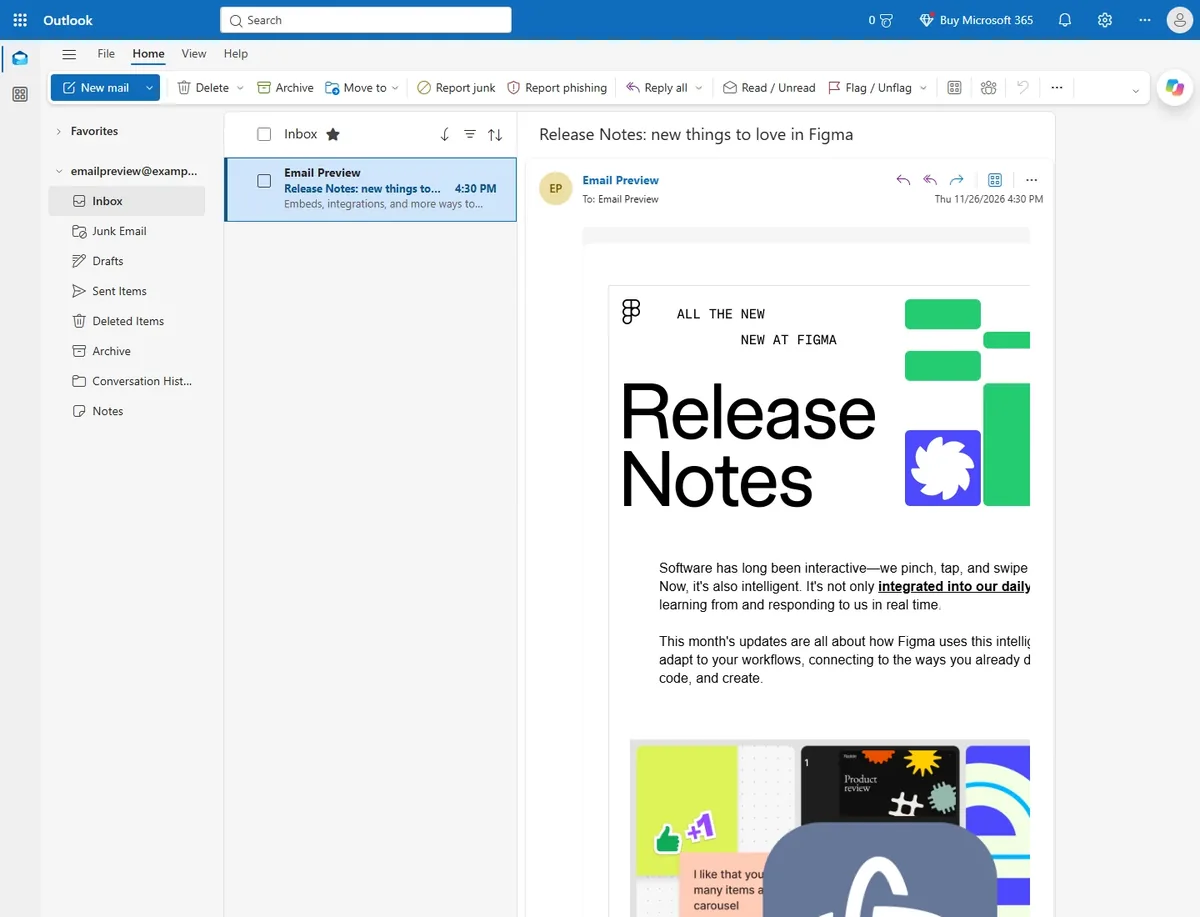
Every preview is a real screenshot from a real app on a real device or browser. These all come from one run of a Figma release notes email.
 Outlook
 Apple Mail
 Gmail
 Yahoo
 AOL
 GMX
 Web.de
 T-Online
 Libero
 Free.fr
106 real clients: 16 desktop, 42 mobile, and 48 webmail, most of them in light and dark mode. See the full client list
Switching
Switching from Litmus, Email on Acid, or Parcel?
You don't paste anything. Your coding agent creates the template, runs the preview, and reads every screenshot. Device Preview is built into the Courier MCP server.
- 01
Connect your agent
One command adds the Courier MCP server to Claude Code.
Set up Cursor, Codex, and moreclaude mcp add --transport http courier https://mcp.courier.com --header api_key:YOUR_COURIER_API_KEY
- 02
Point it at your email
Ask it to preview a file, like emails/release-notes.html, in Outlook, Gmail, and Apple Mail. It creates the template and starts the run.
- 03
Get every screenshot in about two minutes
Your agent reads each one and tells you what broke. Ask, and it fixes the template and runs it again.
- Preview emails/release-notes.html in Outlook, Gmail, and Apple Mail, light and dark. Tell me what breaks.
- create_notification · release-notes
- create_preview_run · 10 clients
- get_preview_run · COMPLETED
- All 10 screenshots are back, and the layout holds in every client. 2 things to look at:
- Outlook 2019 and 2021 swap Inter for a default font. Set the fallback you want.
- Outlook.com's reading pane cuts off the right edge of the 650px layout.
- Want me to set the Outlook fallback and rerun?
Rather script it?
One API call previews a template on every change, so it fits in CI.
Read the API docsconst run = await client.notifications.previews.runs.create(
"nt_01m3d2j79dfk1th1a2r7h494ye",
{
device_set_id: "pvs_01m0g557g5f6fsvbzx13fnk5p3",
data: { profile: { name: "Sarah Bennett" } },
}
);Moving off an annual contract? Talk to us about your switch Want to see an agent fix what it finds? Read the agent review
Plans
Pay per preview, from $20 a month
You pay per preview. One screenshot from one client is one preview, and your allowance resets each month.
| Plan | Price | Previews included | Each extra preview |
|---|---|---|---|
| Starter | $20 a month | 100 | $0.20 |
| Growth | $50 a month | 400 | $0.15 |
| Scale | $100 a month | 1,000 | $0.12 |
Catch it before your customers do
See your email in real Outlook, Gmail, and Apple Mail in under two minutes, from $20 a month.
FAQ
Frequently asked questions
What is an email preview tool?
An email preview tool shows how an HTML email renders in each email client before you send it. Outlook, Gmail, and Apple Mail all render the same HTML differently, so a layout that looks right in one can break in another. Courier Device Preview opens your email in more than 100 real clients and returns a screenshot from each one.
How do I test an email in Outlook, Gmail, and Apple Mail?
Run it through Courier Device Preview. Pick the clients, start a run, and Courier opens your email in each real app, such as Outlook 2019 on Windows or Apple Mail on an iPhone, then returns a screenshot of each. A run takes 10 to 120 seconds, and you don't need to own any of the devices.
Which email clients does Courier Device Preview cover?
106 clients: 16 desktop, 42 mobile, and 48 webmail. That covers Outlook 2016 through 2024 and Microsoft 365 on Windows and Mac, Apple Mail on iPhone 14 through iPhone 18 Pro and on Mac, Gmail on Pixel and iPhone, and Outlook.com, Gmail.com, Yahoo, AOL, GMX, Web.de, T-Online, Libero, and Free.fr in Chrome, Edge, and Firefox.
Are the previews from real devices or simulations?
Real apps, not simulations. Every Courier Device Preview screenshot comes from the email client itself: Outlook previews come from Outlook on Windows or Mac, Apple Mail previews from Apple Mail on an iPhone or Mac, and webmail previews from the live inbox in Chrome, Edge, or Firefox.
How much does Courier Device Preview cost?
$20 a month for 100 previews, $50 a month for 400, or $100 a month for 1,000. Extra previews cost $0.20, $0.15, or $0.12 each, depending on the plan. One preview is one screenshot from one client, so a run across 10 clients uses 10 previews. Included previews reset each month and don't roll over.
Is Courier an alternative to Litmus and Email on Acid?
Yes. Courier Device Preview does the same job, real screenshots from more than 100 email clients, and starts at $20 a month with API access on every plan. Mailgun Inspect, which replaced Email on Acid, starts at $99 a month for 1,000 previews, and Litmus sells through a sales call. Prices are from November 2026.
What happened to Email on Acid?
Email on Acid is now part of Mailgun Inspect. Sinch Mailgun began moving Email on Acid customers to Inspect in June 2026. As of November 2026, Inspect costs $99 a month for 1,000 previews or $199 a month for 2,000. Courier Device Preview covers Outlook, Gmail, Apple Mail, and webmail from $20 a month.
Do I have to send my email through Courier to preview it?
No. Courier Device Preview works on the HTML you send from any platform. Hand the file to your coding agent, create the template with the API, or paste the HTML into the editor, then run the preview. Courier also works as a full notification platform if you want it later.
Is there an API for email previews?
Yes, on every Device Preview plan. One call, POST /notifications/{id}/previews/runs, starts a run on a template, and a second call returns the screenshot from each client. That makes it easy to preview a template in CI on every change, or to show the screenshots inside your own product.
Can an AI agent check my emails for rendering problems?
Yes. Device Preview is built into the Courier MCP server. Ask a coding agent such as Claude Code, Cursor, or Codex to preview an email, and it starts the run, reads every screenshot, and reports what broke in each client. It can also fix the template and run the preview again.
Does Device Preview test dark mode?
Yes. Most clients in Courier Device Preview come in both light and dark mode, including Apple Mail, Gmail, Outlook 2021 and 2024, Outlook.com, and Yahoo. Each mode is its own client, so previewing one app in light and dark uses two previews.
Why does my email look broken in Outlook?
Outlook on Windows renders HTML with Microsoft Word's engine, which ignores flexbox, CSS gradients, rounded corners, and padding on links, and swaps web fonts for a default. Build the layout with tables, set widths as HTML attributes, and name a fallback font. Then preview it in Outlook 2016 through 2024 to confirm the fix.
Which Courier plan do I need for Device Preview?
Device Preview is an add-on for Business and Enterprise workspaces. Adding a credit card puts a workspace on the Business plan, and you turn the add-on on in Settings, under Billing. It's billed separately from the messages you send.
Can I preview personalized content and translations?
Yes. Set test values for variables such as profile.name before you run a preview, and choose which translation to render. A variable with no test value renders as nothing, which is the most common reason a preview looks broken when the template is fine.