5 Best Platforms for Product Messages in 2026
 Kyle SeylerApril 15, 2026
The five best platforms for sending product messages in 2026 are Courier, Resend, Customer.io, Supabase, and Novu. They solve different versions of the same problem: your product needs to tell users things (password resets, usage alerts, billing reminders, onboarding nudges), and wiring up providers directly stops working once you add a second channel or a second person who needs to change the copy. These five platforms cover the full range, from basic transactional email to cross-channel orchestration with AI tooling and provider flexibility.
TLDR
Quick picks:
- Courier -- Best for cross-channel product messaging with provider flexibility, visual sequences, and AI-native tooling
- Resend -- Best for transactional email with great developer experience
- Customer.io -- Best for marketing-adjacent teams running email and push journeys with product event triggers
- Supabase -- Best for early-stage products that need basic auth emails without adding another vendor
- Novu -- Best for teams that want open-source, self-hosted messaging infrastructure
The product messaging problem
Every SaaS product starts the same way. You need to send password resets, so you wire up SendGrid. Then the product team wants onboarding emails. Then someone asks for push messages. Then SMS for critical alerts. Then Slack for internal workflow updates.
Now you're maintaining five provider integrations with five different APIs. Routing logic lives in your application code. Template changes require deploys. There's no shared preference management, so users can't control what they get, and you have no way to cap frequency across channels. Every new message type is an engineering ticket.
This is the progression that creates demand for product messaging platforms. The question is how much of the problem you need to solve right now, and what kind of team is going to operate it.
What to look for
Before comparing platforms, it helps to know what actually matters for product messaging:
Channel coverage. Email is table stakes. The question is whether you need push, SMS, in-app, chat (Slack/Teams), or some combination. More channels means more routing complexity.
Provider flexibility. Can you bring your own providers, or are you locked into the platform's delivery infrastructure? Provider lock-in matters when you need to switch for deliverability, cost, or compliance reasons.
Non-technical access. Can PMs and marketers update templates, build sequences, and manage preferences without engineering? Or is every change a code change?
Governance. Frequency capping, preference management, compliance guardrails. As message volume grows, governance is the difference between useful product communication and spam.
Developer experience. API design, SDK quality, CLI tooling, documentation. If it's painful to integrate, it doesn't matter what features it has.
AI and automation primitives. Batch, throttle, digest, conditional routing. Increasingly relevant as products add AI-driven features that generate high-volume events.
The 5 best platforms for product messages in 2026
1. Courier
Courier is the platform you move to when product messaging has outgrown a single channel and a single provider. The core model is BYOP (Bring Your Own Provider). You connect your existing email, push, SMS, and chat providers (Twilio, Resend, APNs, FCM, Slack, Teams, and others), and Courier handles the orchestration on top. Swap a provider, add a failover, change routing logic. None of it requires a code change.
That provider flexibility is just the foundation. Where Courier pulls ahead is what you can build on top of it.
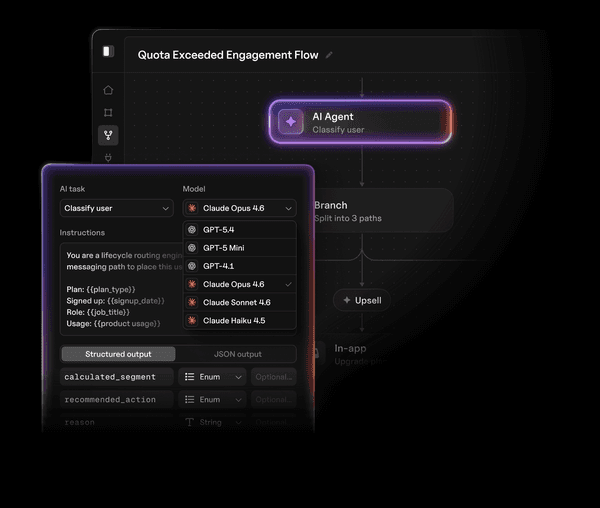
Journeys lets you design multi-step message sequences visually. Not just "send an email," but "send a push, wait two hours, check if the user opened it, if not send an SMS, if they did queue an in-app message for tomorrow." PMs and marketers build and edit these flows without filing engineering tickets. Developers set the data schema and the event triggers. Everyone else handles the messaging logic.
Design Studio is the template editor. It works across every channel, so you're designing your email, push, SMS, and in-app content in one place. Non-technical teams update copy and ship without a deploy.
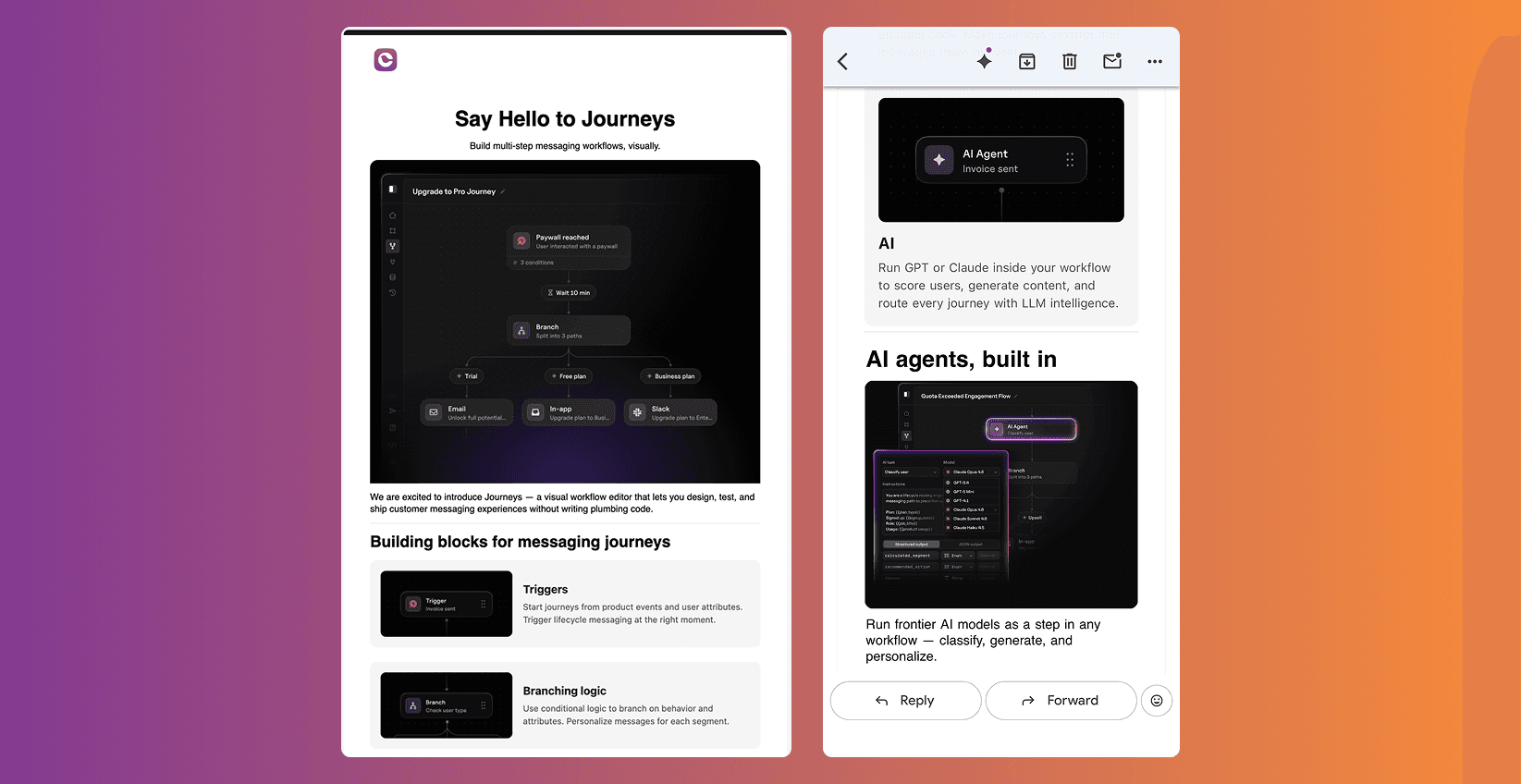
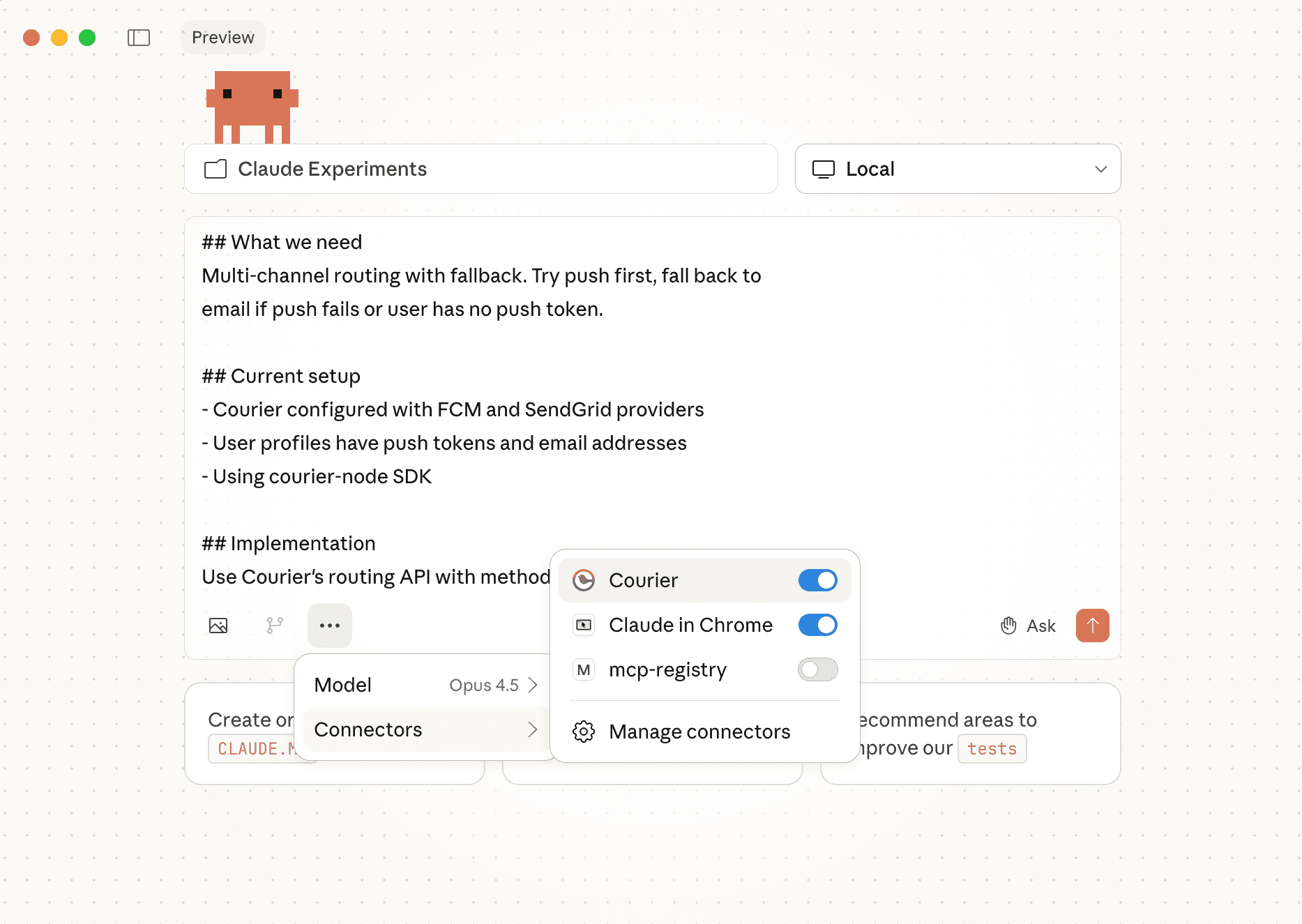
On the AI side, Courier has an MCP server that lets coding agents (Claude Code, Cursor, and others) call the API directly. An agent can create a message template, set up routing rules, build an automation sequence, test it, and ship it without leaving the IDE. For teams building agentic products, Courier's batch, throttle, and digest primitives keep AI-generated messages from becoming spam. Your agent can fire 50 events in a single run, and Courier batches them into a daily digest if that's what the user prefers.
Built-in governance (preference management, compliance guardrails) is available across plans, with deeper controls like channel-level frequency capping on Business and Enterprise tiers.
Best for: Teams that need cross-channel product messaging with provider flexibility, visual sequence tooling, and AI-native primitives.
See Courier's pricing | Read the docs
2. Resend
Resend is email, and it's not trying to be anything else. What it does, it does very well.
The developer experience is the selling point. The API is clean. The docs are good. The SDKs are typed. You can go from zero to sending transactional email in minutes, not hours. If you've fought with SES configuration or SMTP relay settings, Resend feels like a relief.
Resend also plays well with AI coding tools. The API surface is small and well-documented enough that an AI assistant can scaffold your entire email integration in a single prompt. Very little configuration overhead, very little ambiguity in the API design. That matters when you're building fast.
Templates are React-based (via react.email), which means your email templates live in your codebase, are version-controlled, and render with the same component model you already use. For frontend-heavy teams, that's a real workflow improvement.
The tradeoff is scope. If you need push, SMS, in-app, Slack, or any kind of cross-channel routing, you'll need to pair Resend with something else. There's no orchestration layer, no sequence builder, no preference management. It's a single-channel tool that executes that channel exceptionally well.
Best for: Developer teams that need transactional email with great DX and nothing else.
3. Customer.io
Customer.io started as a marketing automation platform and has grown into something that can handle product-adjacent messaging too. If your team lives primarily in email and push, and you want one tool for both lifecycle marketing and transactional messages, Customer.io covers that overlap.
The journey builder is solid. You can create multi-step flows triggered by user events, with branching logic, time delays, and A/B testing built in. It's designed for marketers to operate independently, which means the UI prioritizes visual clarity over raw flexibility. For email and push sequences, it works well.
Channel coverage is narrower than a full product messaging platform. Email and push are first-class. SMS and in-app are newer additions with less depth. If your product messaging strategy centers on those two primary channels, that's probably enough. If you need Teams, webhook-based integrations, or true cross-channel routing with automatic failover, you'll hit the edges quickly.
Where Customer.io earns its spot is the intersection of marketing and product messaging. Onboarding sequences, re-engagement campaigns, usage-based nudges. These are product messages that live on the marketing team's roadmap, and Customer.io gives marketers the tools to build and iterate on them without engineering support.
Best for: Marketing-adjacent teams that need journey-based email and push with product event triggers.
4. Supabase
Supabase isn't a messaging platform. It's an open-source Firebase alternative with a PostgreSQL backend. It makes this list because of what it gives you out of the box for basic transactional messages.
Supabase Auth includes built-in transactional email: confirmation emails, password resets, magic links, invite emails. These work immediately when you set up authentication. No separate provider integration, no template configuration, no API wiring. You sign up a user, they get a confirmation email. Done.
For teams in the early stages of a product, that's often enough. You don't need a messaging platform when your needs are "send the five emails that authentication requires." Supabase handles those with zero additional infrastructure.
You can also use Edge Functions with database webhooks to trigger more custom messages. A row gets inserted, a function fires, an email gets sent via whatever provider you wire up. It's not orchestration in the way Courier or Customer.io would handle it, but it's functional for straightforward event-driven messaging.
The limitation is obvious: this doesn't scale into a real messaging strategy. There's no template editor, no preference management, no multi-channel routing, no delivery tracking beyond what you build yourself. But as a starting point that keeps you from adding another tool on day one, it's hard to beat.
Best for: Early-stage products already on Supabase that need basic transactional email without adding another vendor.
5. Novu
Novu is the open-source product messaging infrastructure option. If your team wants to self-host, needs full control over the codebase, and is comfortable operating the infrastructure, Novu gives you the building blocks.
The core is a message management layer with support for email, SMS, push, in-app, and chat. You define messaging workflows in code, connect your providers, and Novu handles delivery routing. There's a web dashboard for managing templates and monitoring delivery, and a set of pre-built UI components (notification center, preference management) you can drop into your app.
The open-source model means you can inspect everything, customize anything, and host it wherever you need to. For teams in regulated industries or with strict data residency requirements, that level of control matters.
The tradeoff is operational overhead and feature depth. Self-hosting means you own uptime, scaling, and maintenance. The visual tooling is less polished than commercial alternatives. The sequence builder is functional but less dynamic than Courier's Journeys or Customer.io's journey builder. And the ecosystem of providers and integrations, while growing, is thinner than what the commercial platforms offer.
Novu also has a cloud-hosted version if you want the open-source foundation without managing infrastructure. At that point you're comparing it directly against commercial platforms on features and pricing.
Best for: Teams that want open-source messaging infrastructure they can self-host and fully customize.
How to choose
| Courier | Resend | Customer.io | Supabase | Novu | |
|---|---|---|---|---|---|
| Channels | Email, push, SMS, in-app, Slack, Teams | Email, push, SMS, in-app, Slack | Email (auth only) | Email, SMS, push, in-app, chat | |
| Provider model | BYOP (bring your own) | Is the provider | Is the provider | Built-in auth emails | BYOP |
| Visual tooling | Journeys + Design Studio | None | Journey builder | None | Dashboard + basic editor |
| AI/MCP integration | Yes (MCP server, batch, throttle, digest) | AI-friendly API | No | No | No |
| Non-technical access | Yes (PMs, marketers) | No (developer-only) | Yes (marketers) | No | Limited |
| Self-host option | No | No | No | Yes | Yes |
| Best for | Cross-channel product messaging | Transactional email DX | Marketing + product email/push | Auth emails on day one | Open-source, self-hosted |
The right platform depends on where your product is and what your team looks like. If you need transactional email with a clean API and nothing else, Resend gets you there fast. If you're on Supabase and just need auth emails working, you're already covered. If your messaging needs are marketing-weighted and limited to email and push, Customer.io handles that well. If you want to own the infrastructure and self-host, Novu is the open-source path.
If you've outgrown single-channel messaging and need cross-channel orchestration, provider flexibility, visual tooling for non-technical teams, and AI-native primitives for agentic products, that's what Courier was built for.
Similar resources

WhatsApp Business messages: types, templates, and rules
Every WhatsApp Business message is a template or a free-form message, and the type decides when you can send it and what it can look like. How businesses use each one, the template categories, the formats worth knowing, and the rules that stop messages from arriving.

WhatsApp pricing changes on October 1, 2026
On October 1, 2026, two things become billable on the WhatsApp Business Platform: free-form replies inside the 24-hour customer service window, and utility templates sent in response to a customer. If your WhatsApp volume is conversations rather than campaigns, this is not a rate tweak. It adds a line to your invoice where there used to be a zero. Here is what changes, a worked example of the cost, and what to check.

Clinical alert and notification systems: how escalation works
A clinical alert is easy to send and hard to close. This is how alerting works inside a hospital: where alerts come from, how routing by role and shift works, and how the acknowledge, timeout, escalate loop is actually built, including what happens when nobody answers.