Build and launch a hosted preference center that looks great on web and mobile
 Thomas SchiavoneJuly 18, 2026
A notification preference center is where your users decide what they hear from you, on which channels, and how often. Get it right and people mute the one topic that's bugging them instead of unsubscribing from everything. The catch is that building one is a real project, and keeping it branded and responsive across every device is more work still.
We've made it much easier. Courier's redesigned preference tooling lets you build a preference center in a visual editor, preview it before anyone sees it, and give users a page that looks great on web and mobile, with no frontend code.
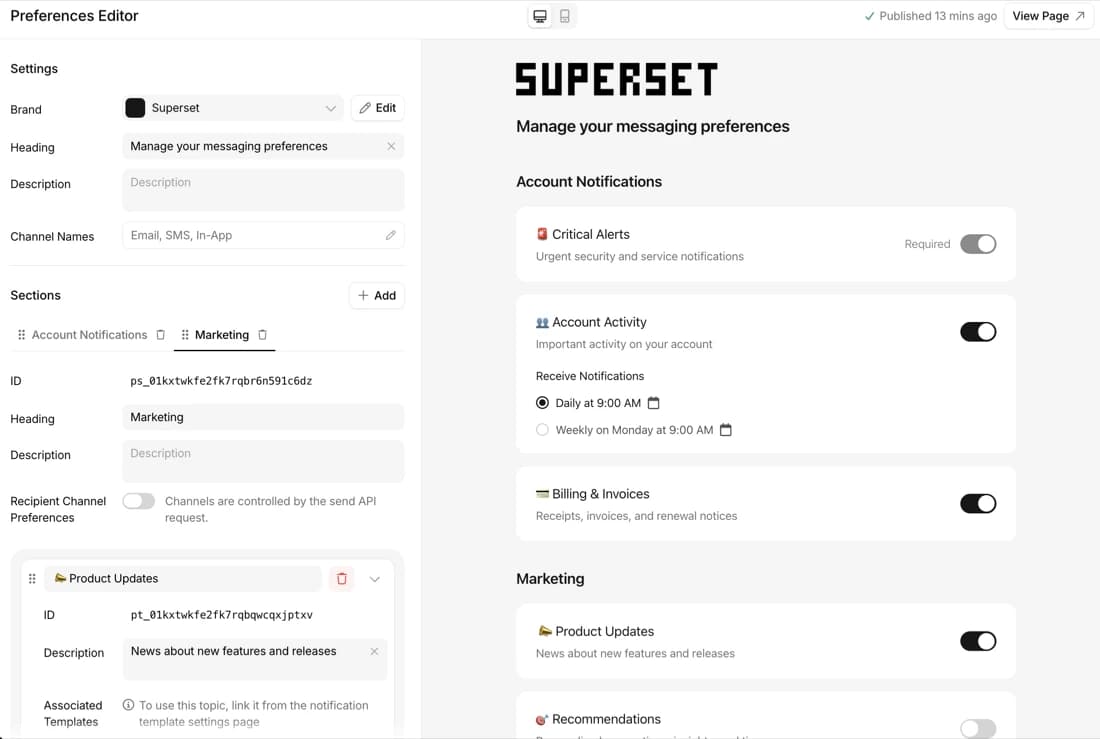 Configure topics, sections, and branding on the left. Preview the live page on the right, on desktop or mobile.
Design your preference center in a redesigned editor
The Preferences Editor is where you decide what users can control. We rebuilt it to be quicker to work in, with a live preview so you see exactly what users will get before you publish. The whole page is yours to shape:
- Subscription topics users opt in or out of, like Marketing or Account Activity, grouped into sections.
- Branding and wording, from your logo and colors to the heading, description, and channel names, so the page reads in your product's voice.
- Default states per topic: on, off, or required for the notifications users can't turn off.
- Digests, now simple to set up. Add delivery schedules like daily or weekly in a few clicks, and let users batch a noisy topic into one summary instead of a stream of individual messages.
- Channel selection, so users choose which channels deliver each topic, across any channel you send on, from email and SMS to push, chat, and more.
Preview before you publish
Your changes save as a draft and never reach users until you publish. Hit Preview Page to see the preference center exactly as a user will, marked with a "Draft mode" banner, then Publish when it's right. No more guessing what an edit will look like, and no more pushing changes straight to live users.
A hosted preference center, no code required
Courier hosts this page for you, so there's nothing to build, deploy, or maintain.
 The hosted preference center, matched to your brand. Users toggle topics on or off and pick a digest schedule, like daily or weekly.
The page picks up your brand automatically. Your logo, colors, and typography carry over, so it looks like part of your product instead of a bolt-on, and it follows along when you change your brand.
It's responsive, so it looks right on everything from a laptop to a phone without you touching any CSS. And one-click unsubscribe is built in, so you stay compliant without building opt-out flows yourself.
Start with the hosted page, customize later
Many teams start with the hosted page to launch in an afternoon, then build a fully custom experience once they know exactly what they want. You can embed the same preferences directly in your own product, with prebuilt components for web (React, web components) and mobile (iOS, Android, React Native, Flutter), and take full control of the layout and styling.
It's the same preference data underneath, so moving from hosted to embedded is a step forward, not a rebuild.
Migrate preferences in bulk
New bulk API endpoints update all of a user's preferences in a single request. Importing your existing subscription and opt-out data from another system becomes one call per user, instead of setting topics one at a time. Replace a user's entire set at once, or update only the topics you name.
Try it
Open the Preferences Editor to set up your topics, or read the preferences overview to see how it all fits together.
Frequently asked questions
What is a notification preference center?
A page where your users manage which notifications they receive from your product, on which channels, and how often. It usually covers subscription topics they can opt in or out of, channel choices, digest frequency, and one-click unsubscribe.
Do I need developers to set one up?
No. You configure and brand the whole page in the visual Preferences Editor and link to the hosted version, with no frontend code. Developers can step in later to embed a custom version or manage preferences over the API.
What's the difference between a hosted and embedded preference center?
A hosted preference center is a page Courier hosts and you link to, with no frontend code. Embedded preferences render inside your own web or mobile app with prebuilt components, for full control over layout and styling. Both read and write the same preference data, so you can start hosted and move to embedded later without a rebuild.
Can users choose how often they get notified?
Yes. Turn on digests for a topic and users pick a schedule, like instant, daily, or weekly, so a busy topic arrives as one summary instead of a stream of messages.
How do users unsubscribe?
Every subscription topic includes one-click unsubscribe, and you can add an unsubscribe link to any notification. Because users opt out of a single topic rather than all of your messages, you keep more of them subscribed overall.
Can I match the preference center to my brand?
Yes. The hosted page uses your brand automatically for its logo, colors, and typography, and it's responsive on web and mobile out of the box.
How do I move existing preferences into Courier?
Use the bulk API to set all of a user's preferences in one request. You can import your existing subscription and opt-out data one user at a time, without rebuilding it topic by topic.
Similar resources

Introducing Cross-Device Email Preview: see your email on real devices before you send
Cross-Device Email Preview renders your template on the real clients you pick, from Outlook on Windows to dark mode on iPhone, and returns a screenshot of each one. Pick from 96 clients across 21 apps without leaving Design Studio.

New settings page, easier to use, with new background colors
Courier settings has been redesigned. Workspace pages and developer pages are grouped separately, every page says what it's for, and the app now comes in light or dark with nine background colors.

Broadcasts: send one-time messages to your users, right from Courier
Broadcasts lets you send a one-time message to a group of your users, now or on a schedule, without leaving Courier.