Broadcasts: send one-time messages to your users, right from Courier
 Thomas SchiavoneJuly 21, 2026
Every so often you need to send the same message to a group of your users, or all of them at once: a product launch, an event invite, a policy update, a sale that starts Friday. Broadcasts is how you do that in Courier. Write the message, pick who should get it, and send it now or schedule it for later.
It's built for the announcements that don't wait on a trigger and don't need a workflow. One message, one group, sent when you say go, all from inside Courier.
Design, personalize, and schedule
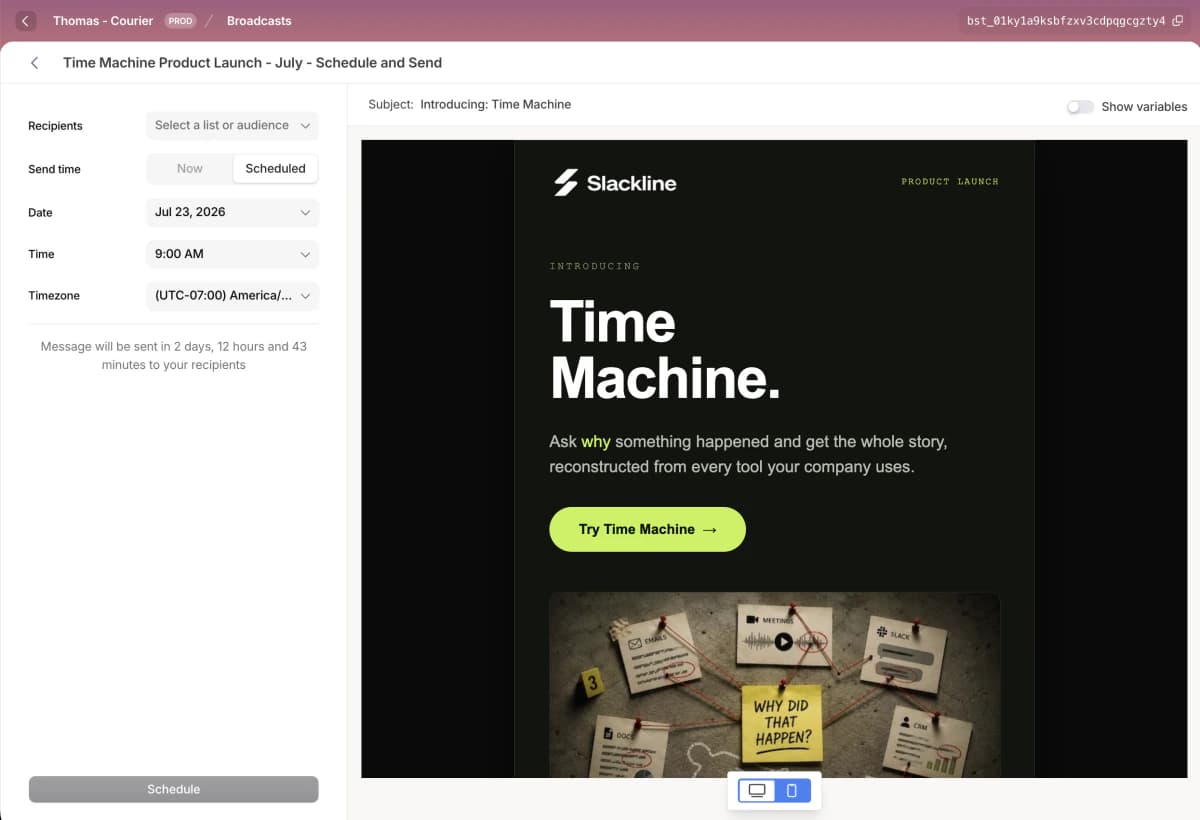
You build a broadcast in the same editor you use everywhere else in Courier, so your team is already up to speed. Build your email from drag-and-drop blocks, or drop into HTML mode when you want full control of the markup. Apply a brand and every send matches the rest of your emails automatically.
Personalization is built in. Variables pull each recipient's name, plan, and any other detail from their profile, so everyone gets a message written for them. AI translations render that message in every language your users speak, and side-by-side previews show you exactly how it looks on desktop and mobile before anything goes out.
Target it as broadly or as narrowly as you want. Send to a list of users, like your Beta Testers, or to an audience that updates itself as your user data changes, like everyone on the Pro tier or every user who signed up this week. Each broadcast goes out on one channel you choose, such as email, SMS, or push.
The timing is yours too. Send immediately, or schedule for a specific date, time, and timezone. Change your mind before it fires and you can reschedule or cancel in a click.
Tracking delivery, opens, and clicks
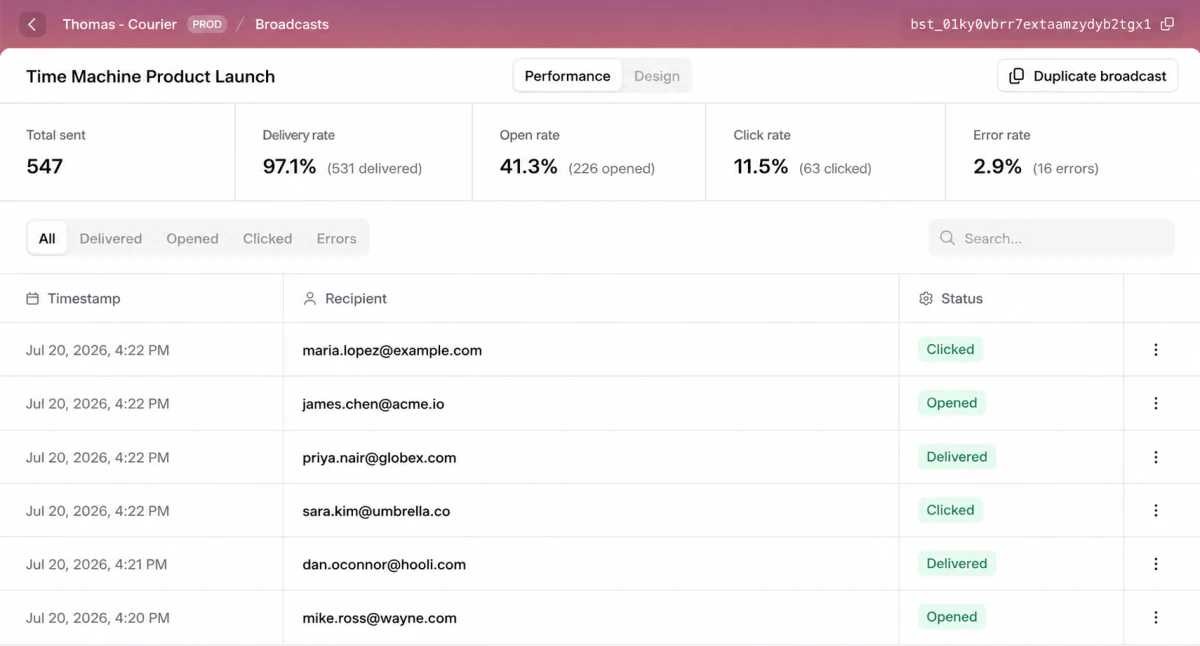
The moment a broadcast sends, the numbers start filling in: how many you sent, and how many were delivered, opened, clicked, or errored.
Under the rates sits every recipient, each with a status and timestamp. Filter down to just the errors, search for a single customer, or click a row straight through to the full logs for that send. When someone swears they never got the email, you can see exactly what happened to their copy of it.
One platform for transactional and marketing
Broadcasts is the piece that ties Courier together. The messages your app sends on its own still go through the Send API. The lifecycle flows that follow what a user does still run in Journeys. And now the one-off send to a whole group lives right next to them.
That means one platform, one editor, one set of brands and templates, and one place to look when something breaks. No exporting lists to a second tool, no rebuilding the same email twice, no guessing which system has the current version. Engineers keep the API they already build on. Your marketing and growth teams get a send they can own end to end, from writing the copy to reading the results, without filing a ticket.
Broadcasts is generally available today. Open Courier, go to Broadcasts, and send your first one.
Frequently asked questions
What is a broadcast in Courier?
A broadcast is one message you send to a list or audience of your users, either right away or on a schedule. It's built for announcements that don't depend on a trigger, like a product launch, a newsletter, a policy update, or a limited-time promotion. You write the content in Courier's editor, choose who receives it, and send it on a single channel such as email, SMS, or push.
How do I send a one-time or bulk email to a list of users?
Create a broadcast, write your email in Courier's editor with drag-and-drop blocks, and pick the list or audience that should receive it. Then send it right away or schedule it for a date, time, and timezone. Everything happens inside Courier, so you don't need to export your list to a separate tool.
What's the difference between a broadcast and a journey?
A broadcast sends one message to a list or audience at a moment you choose, while a journey runs per user when a user event or API call starts it. Use a broadcast for a newsletter or announcement, and a journey for something like a welcome sequence after signup or a receipt after a purchase. A journey can be a single message or many steps with delays and branching, but a broadcast is always one message to one group.
Can I schedule a broadcast and change it after scheduling?
Yes. When you send a broadcast you can choose Now or Scheduled, and a scheduled send takes a date, time, and timezone so it goes out exactly when you want. You can reschedule or cancel a scheduled broadcast any time before it fires. To change the content of a broadcast that's already scheduled, cancel it, edit the message, and schedule it again.
What channels can a broadcast use, and can I send to more than one at once?
A broadcast can use email, SMS, push, in-app, Slack, or Microsoft Teams, but each broadcast sends on a single channel. To reach the same group on another channel, create a separate broadcast for it.
How do I track delivery, opens, and clicks for a broadcast?
Open the broadcast's Performance tab after it sends: it shows total sent plus delivery, open, click, and error rates, with a log of every recipient's status and timestamp below. You can filter the log by delivered, opened, clicked, or errors, search for one recipient, and open any message in Logs. Opens and clicks only register on channels Courier can track, so SMS and chat show delivery status only.
Similar resources

Introducing Cross-Device Email Preview: see your email on real devices before you send
Cross-Device Email Preview renders your template on the real clients you pick, from Outlook on Windows to dark mode on iPhone, and returns a screenshot of each one. Pick from 96 clients across 21 apps without leaving Design Studio.

New settings page, easier to use, with new background colors
Courier settings has been redesigned. Workspace pages and developer pages are grouped separately, every page says what it's for, and the app now comes in light or dark with nine background colors.
Build and launch a hosted preference center that looks great on web and mobile
Courier's redesigned Preferences Editor and hosted preference center let you build, preview, and launch a branded notification preference center with no frontend code, plus new bulk APIs to migrate preferences.