Why You Need Multi-Tenant Infrastructure for Notifications
 Kyle SeylerAugust 08, 2025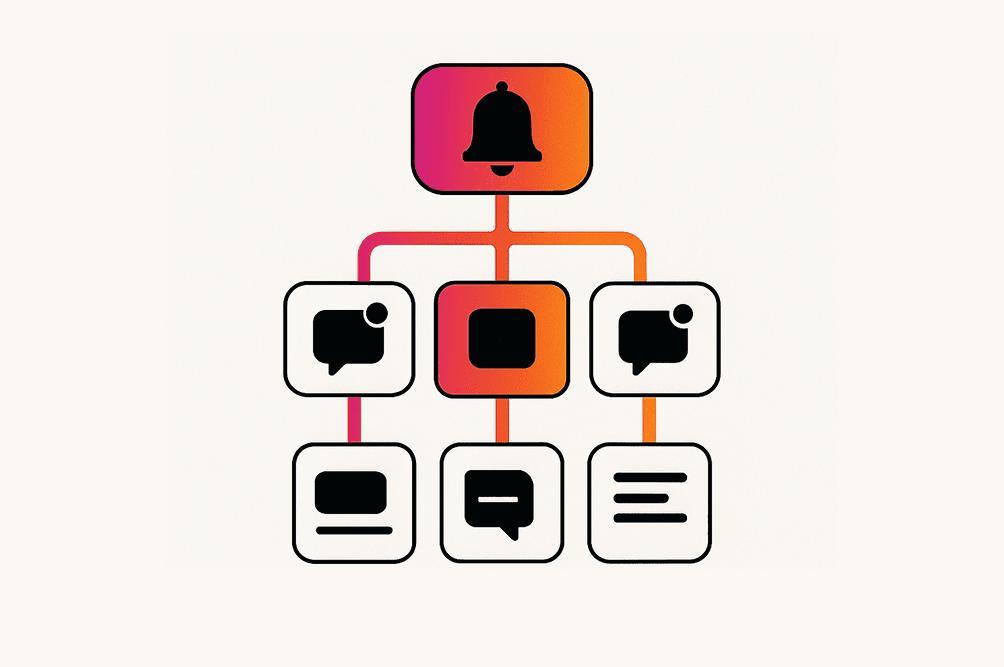
One notification system serves every customer you have. Each expects their own data boundary, their own branding, and their own rules about what gets sent. Get it wrong and one customer receives another's alerts. Hierarchical tenants, isolated resources, and layered preferences are what keep that from happening.
TL;DR
- Multi-tenant notifications require: Data isolation, preference management per tenant, white-labeling capabilities, and resource governance
- Common pain points: Cross-tenant data leakage, complex access control, brand consistency, provider credential management
- Courier's approach: 4-layer tenant hierarchy, data isolation, and dynamic branding
- Get started today: Start sending notifications free or talk to our engineers if you're thinking about scale
Why Multi-Tenant Architecture Matters
In B2B SaaS, your notification system is not only sending messages to users, it is managing complex organizational relationships. Each tenant (organization, workspace, or team) needs isolated data, custom branding, unique preferences, and distinct provider configurations. Without proper architecture, you face security risks, poor user experience, and operational nightmares.
Consider a project management tool where users belong to multiple workspaces. They might want critical alerts from their production workspace but only daily summaries from their personal projects. Each workspace might have different Slack integrations, email domains, and compliance requirements. This is where multi-tenant notification architecture becomes essential:
- Secure isolation: Prevent data leakage between tenants
- Customization: Enable per-tenant branding and routing
- Scale: Implement resource limits and usage controls
- Organizational context: Deliver notifications that respect organizational boundaries
Core Architectural Components
Hierarchical Tenant Structure
Modern multi-tenant systems need more than flat organization structures. Courier's tenant system implements a 4-layer hierarchy that maps to real-world relationships:
Organization (tenant0)└── Workspace (tenantQ)├── Team (tenantP1)│ ├── Project (tenantR1)│ └── Project (tenantR2)└── Team (tenantP2)└── Project (tenantR3)
This hierarchy enables:
- Inheritance: Settings flow from parent to child with override capabilities
- Scoped notifications: Send to all members of a tenant and its children using audience targeting
- Context preservation: Maintain organizational boundaries in notification delivery through user profiles
Multi-Dimensional Users
Users exist in multiple contexts simultaneously. A developer might receive notifications as:
- An individual (personal preferences)
- A team member (team notifications via Lists)
- A workspace participant (organization-wide alerts through Audiences)
Sending notifications with explicit tenant context ensures the right preferences and branding are applied. Pass the tenant in to.context:
{"message": {"to": {"user_id": "user1","context": {"tenant_id": "production-workspace"}},"content": {"title": "Deployment completed","body": "Your app in {$.tenant.name} is now live"}}}
The Three Biggest Pain Points in Multi-Tenant Notifications
1. Data Isolation & Security
Picture this: You're running a B2B SaaS platform where Company A and Company B are both customers. One day, a developer makes a seemingly innocent change to a notification query. Suddenly, Company A's users are receiving Company B's internal alerts. The support tickets flood in, trust is broken, and you're facing a security incident that could have been prevented with proper tenant isolation.
This nightmare scenario illustrates why data isolation is the fundamental challenge in multi-tenant notification systems. Every API call, every database query, and every message sent must respect tenant boundaries. The complexity compounds when users belong to multiple tenants. A consultant working with several clients needs to see notifications from all their workspaces without any cross-contamination.
Courier's approach to this challenge starts with JWT-based authentication that enforces tenant boundaries at the API level. When you generate an authentication token, you specify exactly which tenant resources it can access:
curl --request POST \--url https://api.courier.com/auth/issue-token \--header 'Authorization: Bearer $YOUR_AUTH_KEY' \--data '{"scope": "tenant:workspace-123:notification:write","expires_in": "24 hours"}'
Authentication is the starting point. The platform maintains complete audit trails with different access levels: support staff might see message status while only admins can view message content. Every operation validates tenant context, ensuring that even internal system errors can't cause data leakage. This defense-in-depth approach means tenant isolation is not a feature bolted on top, it is woven into every layer of the system.
2. Preference Management
Now imagine you're a freelance designer working with three different agencies. For Agency A, you want instant Slack notifications for any design feedback. For Agency B, you prefer email summaries at the end of each day. For Agency C, you've muted all notifications except urgent client requests. This is the reality of multi-tenant preference management. Users don't have one set of preferences, they have preferences per context.
Traditional notification systems force users into a one-size-fits-all preference model. But in a multi-tenant world, this breaks down immediately. A user might be an admin in one workspace and a viewer in another. They might want different channels, different frequencies, and different types of notifications based on their role and relationship with each tenant.
Courier solves this through a sophisticated layered preference system. Preferences cascade from global defaults to tenant defaults to user choices, with each layer able to override the previous one. When a notification is triggered, the system automatically resolves the correct preferences based on the user-tenant combination.
This goes beyond on/off switches. Users can configure routing preferences (email vs Slack vs SMS), frequency controls (immediate vs digest), and topic subscriptions, all scoped to their specific tenant context. For developers, this complexity is abstracted away. You send with tenant context, and Courier handles the preference resolution automatically.
3. White-Label Branding
Every customer wants their notifications to feel native to their brand. When a company sends a notification to their users, it should look like it came from them, not from your platform. This means custom logos, brand colors, email domains.
The traditional approach of creating separate notification templates for each tenant quickly becomes unmanageable. Imagine maintaining hundreds of templates across dozens of tenants, each with their own design requirements. A simple copy change becomes a massive undertaking. Version control becomes a nightmare. Testing becomes impossible.
Courier's solution elegantly separates branding from content through its tenant branding system. Instead of duplicating templates, you create a single template that dynamically pulls in tenant-specific branding elements. The same notification template can render completely differently based on the tenant context:
{"content": {"title": "Welcome to {$.tenant.name}","body": "Your workspace at {$.tenant.company_url} is ready","logo": "{$.tenant.brand.logo_url}","primaryColor": "{$.tenant.brand.primary_color}"}}
 This extends beyond simple variable substitution. Each tenant can have completely different email layouts, custom headers and footers, and even channel-specific branding. A notification sent via email might use the tenant's custom HTML template, while the same notification sent via Slack uses their workspace's branded app. The brand inheritance system means tenants can override specific elements while inheriting defaults, making it easy to maintain consistency while allowing customization.
Building Your Multi-Tenant Notification System
Implementing multi-tenant notifications requires careful planning and a phased approach. Whether you're retrofitting an existing system or building from scratch, the journey from single-tenant to multi-tenant architecture is best taken step by step. Let's walk through the setup process and best practices that will set you up for success.
Basic Setup: Getting Started with Courier Tenants
The first step is establishing your tenant structure. Start by creating your first tenant through the API:
curl --request PUT \--url https://api.courier.com/tenants/my-first-tenant \--header 'Authorization: Bearer $YOUR_API_KEY' \--data '{"name": "Acme Corporation","user_profile": {"company_name": "Acme Corp","slack": {"access_token": "xoxb-..."}}}'
Next, associate users with tenants. This creates the relationship between users and their organizational contexts. Once established, you can start sending notifications with tenant context, and Courier automatically applies the appropriate branding, preferences, and routing rules.
Best Practices for Scale
Start simple
Don't try to implement a complex hierarchy on day one. Begin with flat tenant structures and basic isolation. As your platform grows and requirements become clearer, you can introduce parent-child relationships and more sophisticated routing. Many successful implementations start with a simple workspace model before evolving to support teams, projects, and environments. Get started free with Courier to prototype your multi-tenant architecture without commitment.
Consider the impact
The most common mistake in multi-tenant systems is losing context as notifications flow through your system. Every function, every API call, and every background job must carry tenant context. This isn't just about adding a tenant_id parameter. It is about designing your system around the concept that every operation happens within a tenant context.
Implement security from day one
Security can't be retrofitted. From your first line of code, assume that tenant boundaries are sacred. Use tenant-scoped authentication for all API access. Log every cross-tenant operation. Implement role-based access control that respects tenant boundaries. Schedule regular security reviews specifically focused on tenant isolation.
Plan your data model
Your tenant hierarchy should mirror your business model. If you're building project management software, your hierarchy might be Organization → Workspace → Project. For a communication platform, it might be Company → Department → Team. The key is choosing a model that feels natural to your users and supports your growth plans.
Monitor notification health
Set up monitoring and alerting for each tenant's notification performance. Track delivery rates, channel preferences, and error patterns per tenant. This is not only system health, it is customer success. When you can proactively identify and resolve issues for specific tenants, you transform from a vendor into a partner. Courier's analytics dashboard provides real-time insights into tenant-specific notification performance.
Use templates and inheritance wisely
Build on Courier's template system to create reusable components while allowing tenant customization. Design your templates with variable substitution in mind, making it easy for tenants to customize content without touching code. The inheritance system lets you provide sensible defaults while giving power users complete control.
Ready to Build Multi-Tenant Notifications?
Start sending multi-tenant notifications today: Sign up for Courier and get started with a free tier that includes 10,000 sends per month.
Need to discuss enterprise requirements? Talk to our engineers about your multi-tenant architecture needs, custom SLAs, and advanced features.
Developer Resources
📚 Getting Started: Courier Tenants Overview
🔧 API Reference: Complete Tenant Management APIs
💡 Integration Guide: Step-by-Step Tenant Setup
📧 Email Providers: SendGrid, Mailgun, AWS SES, Postmark, SparkPost, Resend
💬 SMS Providers: Twilio, MessageBird, Telnyx, Vonage, Plivo
💬 Chat Providers: Slack, Microsoft Teams, Discord
🚀 Journeys: Journeys overview, Digest node, Delay node
📊 Analytics: Analytics Dashboard, Data Logs, Audit Trail
Why This Architecture Matters
Multi-tenant notification infrastructure is more than a technical requirement, it is a competitive advantage. Done right, it enables:
- Security: True data isolation with audit trails
- Flexibility: Per-tenant customization without code changes
- Scale: Handle enterprise customers alongside startups
- Experience: Context-aware notifications that respect boundaries
Courier's approach demonstrates that multi-tenant notifications don't require choosing between isolation and flexibility. With hierarchical tenants, context propagation, and layered preferences, you can build a notification system that scales with your business while maintaining security and user experience.
The key is starting with the right abstractions. Whether you're building from scratch or evaluating platforms like Courier, focus on tenant isolation, context preservation, and flexible routing. Your future self (and your enterprise customers) will thank you.
Take the next step: Start sending notifications with Courier's multi-tenant infrastructure or schedule a demo to discuss your specific use case with our engineering team.
Similar resources
Build with AI: let your agent handle notifications end to end
Courier's Build with AI toolkit gives coding agents direct access to your notification infrastructure. Four integration points, one goal: let your agent send messages, debug deliveries, manage users, and follow notification best practices without context-switching. Works with Claude Code, Cursor, and any agent that can run shell commands or call MCP tools.

How to Use Claude Code on Mobile to Design, Test, and Ship Multichannel Notifications
A walkthrough of using Claude Code's mobile app with Courier's MCP server and CLI to design, test, and ship a multichannel product announcement from a phone. Covers the full workflow: drafting the content outline, creating notification templates using Courier's elemental format, building channel-specific variants for email, Slack, push, and SMS, customizing brand styling through the API, iterating on design with test sends, getting team approval, and publishing with custom routing rules. The whole thing took a couple hours, mostly cold start and design iterations.
Transactional, Product, and Marketing Notifications: What Are the Differences?
Understanding the difference between transactional, product, and marketing notifications is essential for developers building notification infrastructure. Transactional notifications confirm user actions and require no opt-in. Product notifications drive feature adoption through education. Marketing notifications promote sales and require explicit consent. This guide explains the legal requirements, best practices, and when to use each notification type to build compliant systems users trust.Retry