Chapter 3
Design and Send Your First Message: CLI, API, and Prompts
Build a message in Elemental once and send it to email, SMS, push, Slack, and in-app from one template. Four surfaces work: prompts (fastest), the Courier CLI (scriptable), the REST API (production), and the Design Studio (visual fine-tuning). Covers brand setup, production concerns like idempotency and user identification, and channel routing.
Last updated: May 2026
If you haven't installed the MCP server or CLI yet, start with Chapter 2. This chapter assumes both are ready and at least one channel provider is connected.
How Courier represents a message across channels
A notification template in Courier isn't tied to one channel. The same template you send as an email also renders as an SMS, a push notification, a Slack message, and an in-app inbox entry, with each channel using the format and constraints that make sense for it. That's the practical advantage of cross-channel notification infrastructure: you describe a message once and Courier handles the rendering for each surface it ends up on.
Courier uses a format called Elemental to describe a message. Elemental is JSON: a structured document of typed elements (text, action buttons, images, dividers, channel overrides, conditional blocks) that the rendering layer translates into channel-appropriate output. A trial-ending message in Elemental is a couple of elements: a text block ("Your trial ends in 3 days.") and an action block with a button labeled "Upgrade your plan" pointing at your billing page. That single document renders as an email with a button, a push notification with a deep link, an SMS with the link inline, a Slack message with a button, and an in-app inbox message with an action. The Courier rendering layer translates each element into the right primitive for each channel.
Elements also support an if: expression for conditional rendering inside the template, so a hero image can vary per segment or a section can be gated by a data field without splitting the template. The condition reads any path available at render time: trigger data, fetch-merged data, profile fields, or AI output.
You don't have to write Elemental by hand. The MCP server's create_notification tool accepts a description in English and produces the Elemental JSON. When you ask an agent to "build a trial-ending email with an upgrade button," it generates the structure and stores the template in your workspace. Using Claude Design, Claude Code, and Courier AI to Create a Multichannel Onboarding walks through the full prompt-to-template path with real screenshots, and How to Use Claude Code on Mobile to Design, Test, and Ship Multichannel Notifications covers the same flow from a phone.
Four surfaces: CLI, API, prompts, Studio
You have four surfaces for building and sending messages. Prompts (via the MCP server) for ideation and one-off messages. The CLI for terminals, scripts, and CI/CD. The REST API for application code calling Courier in production. And the Design Studio for visual fine-tuning. All four read and write the same underlying template, so a template built one way is editable in any other. Pick the surface that matches the task: prompts win for speed, CLI for repeatability, API for production, Studio for polish. How Product Teams Build, Test and Ship Multichannel Notifications in Design Studio covers the design-and-test loop in depth.
"We were happy to get out of the business of having to design email templates and all of that awful stuff that comes with it."
Peter, Apartment List (engineering team adopted Courier as a central platform service across the company)
Multi-channel from day one
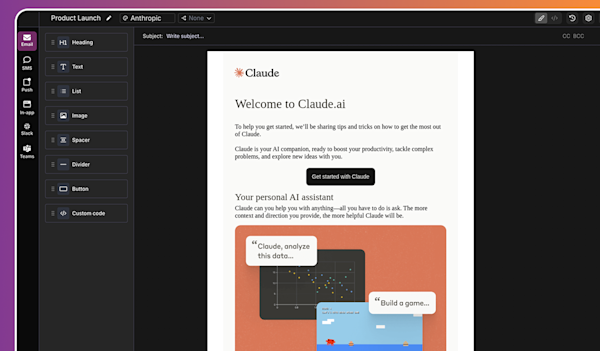
The reason Elemental matters is that one template targets multiple channels. With a single template you can:
- Send an email with full HTML rendering, an unsubscribe footer, and inline images.
- Send a 160-character SMS that strips out the visual blocks and keeps the action link.
- Send a mobile push notification with a title, body, and deep link.
- Post a Slack or Microsoft Teams message with a button or block kit elements.
- Drop a message into the in-app inbox with read state tracking, using Courier's in-app channel components.
That 160 assumes standard Latin text. One emoji or curly quote switches the message to UCS-2 encoding and drops the budget to 70 characters per segment, which the SMS preview generator counts as you type.
The send call takes a recipient, a template ID, and the data values that fill the template. Courier looks up the recipient's preferences, picks the channels they've opted into, and dispatches the message through your connected providers.
Multi-channel doesn't mean "send the same thing five times." A user with both email and push enabled doesn't need to get both for a low-priority message. Courier's routing and preferences management let you set channel priority and fallback behavior so the user gets the message once, through the right channel. If you omit the routing block on the send, Courier uses the template's configured routing; pass routing.method and a channels array on the send to override per call.
Brands and templates
Templates have content (text, buttons, dynamic data). Brands have look and feel (logo, fonts, colors, footer). A template references a brand, which means you can rebrand without touching templates.
You can ask the agent to set up your brand:
"Set up our brand. Logo is at brand.example.com/logo.png, primary color is #4F46E5, footer copy is '© 2026 Example Inc.'"
The agent creates the brand record and links it to your default template settings. Every new template inherits it.
If you operate multiple brands (white-labeling, a parent company with sub-brands), Courier supports a brand per template or a brand per tenant. The agent can configure either, but pick the model up front because changing later means re-linking templates.
Sending a test message

Once you have a template, sending a test is one call. You have three ways to make it.
Through your AI agent, ask it directly: "Send the trial-ending template to alex@example.com with first_name Alex." The agent picks the template ID, fills in the recipient and merge data, and dispatches.
Through the CLI, the same call uses dotted flags:
courier send message \--message.to.email "alex@example.com" \--message.template "<TEMPLATE_ID>" \--message.data '{"first_name": "Alex"}'
Through the REST API, POST https://api.courier.com/send with the same body wrapped in a message key and your API key as a Bearer token in the Authorization header. See the sending overview for the full schema.
All three return a requestId you can inspect in the message logs or fetch with courier messages retrieve --message-id
During early development, stay in the Test environment (its own API key, sandbox-only providers, built-in email so you don't have to wire Gmail or SendGrid before the first send). Switch to the Production key the same code reads when you're ready for real traffic.
Going to production
Three things change when you move from testing to production messages going to real users:
Identify users by a stable ID, not by email. Send to a user_id and Courier looks up the stored profile (email, phone, push tokens, Slack ID) and preferences against that user. Profiles are created with POST /profiles/{user_id} (courier profiles create --user-id
Use idempotency keys. Pass an Idempotency-Key HTTP header on the send call. If your code retries due to a network blip, Courier deduplicates against the stored response and the user gets the message once. Two notes worth knowing: replaying a key that previously errored returns the stored error unchanged (it does not retry with a corrected payload), and in the Node SDK the idempotencyKey request option silently no-ops, so pass the key in headers instead.
Handle delivery errors as events, not exceptions. A bounced email or a failed push doesn't fail the send call. It shows up in the message log with a status. Subscribe to delivery webhooks (or poll the log) and react to permanent failures by updating the user's preferences or deactivating the channel.
For anything more complex than a single send, you want a journey: a multi-step flow with delays, branches, and conditions. Chapter 4 covers how an AI agent can build one from a description.
FAQs
Do I have to write Elemental JSON by hand?
No. The agent generates Elemental for you. You write a description, the agent produces the JSON, and the template gets stored in Courier. You can read and edit the JSON if you want, but most of the time you won't need to.
How do I preview a message before sending?
Two options. From the Studio, open the template and click Preview, which renders email, SMS, push, and inbox side by side. From the agent, ask for a preview: "Show me how the trial-ending template will render for alex@example.com." The agent calls the preview endpoint and returns the rendered output.
How do channel fallbacks work?
In the routing config for a notification, you set a channel order. Email first, push second, SMS third. Courier tries the first channel. If the user hasn't opted in or the channel fails permanently, it moves to the next. You can also configure "best of" routing where Courier picks the channel most likely to be read based on past engagement.
Can I edit an AI-generated template in the Studio later?
Yes. Templates built through the API or MCP are first-class entries in your workspace. Open them in the Studio, change anything, save. The agent can read your edits the next time it touches the template, so you can use the Studio for polish and the agent for the next bulk edit.
Ready to put this into production? See pricing or talk to our solutions team.
Previous chapter
Install the Courier MCP Server and CLI
Install both Courier surfaces: the MCP server for AI tools (Claude Code, Cursor, Windsurf, ChatGPT, Claude desktop) and the CLI (@trycourier/cli) for terminals and CI/CD. Connect a channel provider, then verify with a test send from either prompt or CLI.
Next chapter
Journeys Built by AI
A Courier journey is a JSON document describing a multi-step messaging flow with triggers, sends, delays, branches, fetches, AI nodes, and throttles. This chapter walks through the node model, how an AI agent generates a journey from English, common patterns for onboarding, password reset, abandoned cart, and escalation, and the guardrails that keep live journeys safe.
© 2026 Courier. All rights reserved.