Chapter 4
Journeys Built by AI
A Courier journey is a JSON document describing a multi-step messaging flow with triggers, sends, delays, branches, fetches, AI nodes, and throttles. This chapter walks through the node model, how an AI agent generates a journey from English, common patterns for onboarding, password reset, abandoned cart, and escalation, and the guardrails that keep live journeys safe.
Last updated: May 2026
What a journey is
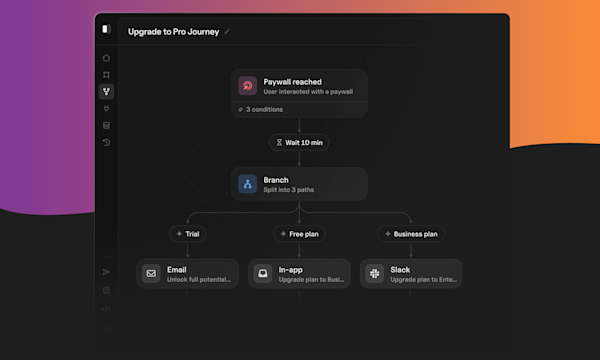
A Courier journey is a multi-step messaging flow stored as JSON. Think of it as a state machine: you describe the sequence of things you want to happen for a user (send a welcome email, wait two days, check whether they signed in, send a follow-up if not), and Courier runs that sequence on the server so your application code doesn't have to keep track of where each user is in the flow.
Steps include sending a message, waiting, branching on conditions, fetching data from your API, calling an LLM, throttling, and exiting. Each step is a node. Nodes connect in a graph that runs per-user when the journey is invoked. The same journey definition handles thousands of users in parallel, each at a different step.
Journeys are AI-powered orchestration for customer messaging. The whole point is that one definition, run server-side, handles the state and timing your application code would otherwise have to track itself.
For context on how the product evolved into this shape, see Customer Journeys Then and Now and Journeys: AI-powered orchestration for customer messaging. For the new AI node specifically, Introducing the AI Node in Courier Journeys covers how LLMs slot into a flow.
The full node reference is in the building journeys via API docs. The short version:
| Node | Purpose |
|---|---|
| trigger | Entry point. api-invoke or event-based. An optional schema declares the data fields the journey expects on invoke. |
| send | Dispatches a journey-scoped notification template. The message.template field references a template that already exists under this journey. |
| delay | Pauses execution. mode: "duration" with an ISO 8601 duration (PT2D = 2 days), or mode: "until" with a datetime or a templated reference. |
| branch | Routes to different paths based on conditions. Every branch requires a default path with its own nodes array, so a run can't fall off the edge. |
| fetch | Calls an HTTP endpoint mid-run. Result merges into the journey's data per the merge_strategy. |
| ai | Calls an LLM. Requires model, user_prompt, and output_schema (a JSON Schema). The model's response merges into data.ai_result.* keyed by the schema's properties. |
| throttle | Caps concurrent runs at scope: "user", scope: "global" (static cap), or scope: "dynamic" with a throttle_key template. |
| exit | Ends the journey path. |
A journey body is { name, nodes, enabled?, state? } on create. state is DRAFT or PUBLISHED; new journeys default to DRAFT. Server fields (the journey id, the minted node ids, timestamps, creator/updater) come back on the response. One naming quirk worth flagging: the docs and SDKs label the journey id path parameter as {templateId}. It is the journey id, not a notification template id; the journey-scoped notification template id is the second path segment as {notificationId}.
The five-pass create flow
POST /journeys does not accept send nodes inline. Two constraints force a multi-pass flow. First, the API rejects send nodes at create time (422 send nodes are not allowed at journey creation) because every send has to reference a template that already exists, scoped to this journey. Second, a journey-scoped template referenced by a send has to be published before the journey replace lands; a send pointing at a draft template renders but no provider accepts it. So creating a journey end-to-end via the API takes five passes:
- Create the shell. POST /journeys with the trigger, any non-send nodes (AI, branch, delay, exit), and no client-supplied node ids. The API mints the journey id and minted node ids; capture both.
- Create the journey-scoped templates. POST /journeys/{id}/templates once per (touch, channel). Each template specifies a single channel and an Elemental notification body; the response includes the template id.
- Publish each template. POST /journeys/{id}/templates/{notificationId}/publish. A send node referencing a template still in draft is a silent failure mode at runtime.
- Replace the journey with the wired body. PUT /journeys/{id} with the full nodes array, send nodes now slotted into the right branches and referencing the template ids from pass 2. Supply the minted node ids on every node so PUT preserves identity instead of re-minting.
- Publish the journey. POST /journeys/{id}/publish moves the draft to published. Invoking a draft *202*s but never delivers, so this step is required.
The stable Node (@trycourier/courier v7.11+), Python (trycourier), and Java (com.trycourier:courier-java) SDKs all expose the full journeys surface, including journeys.create, journeys.replace, journeys.publish, journeys.invoke, plus the parallel journeys.templates.* methods. The Courier CLI, as of 3.4.2, only ships courier journeys list and courier journeys invoke; the create, replace, publish, and template subcommands aren't in the CLI yet. Use an SDK or raw curl against the REST endpoints until they ship.
When you tell your agent "build a welcome flow that emails the user, waits 3 days, and sends an inbox follow-up if they haven't completed setup," the /courier-journeys-create skill performs all five passes for you. You get one journey id back.
Invoking a journey
Invocation is a separate POST /journeys/{id}/invoke call with user_id, profile, and data. It returns 202 with { "runId": "1-..." }. From the CLI: courier journeys invoke <journey-id> --user-id
There is no public runs API today, so the human checkpoint after an invoke is the message log. Filter by recipient and time window, or by the notification template ids, to find what the run produced. The per-message history endpoint (GET /messages/{message-id}/history) is the authoritative source for delivery status: a trailing type: SENT event is the real success signal. AI nodes add real latency (budget about 30 seconds per node), so a decider → copywriter → send sequence often needs 60-90 seconds before the first history event lands.
Working with nodes
The trigger node defines what data the journey accepts on invoke. Declaring fields upfront is worth the few extra lines: Studio's data picker treats declared paths as first-class fields, and any branch that reads a field has a known default value if the upstream populator (a fetch, an AI node, the invoke caller) doesn't overwrite it. A useful pattern is to add the activation flags a downstream branch will read to schema.properties with default: false, then let a fetch node overwrite them with merge_strategy: "overwrite".
Delay nodes use either a fixed mode: "duration" (ISO 8601, for example P2D or PT5M) or mode: "until" with a datetime or a templated reference like {{data.deadline}}. Throttle nodes accept scope: "global" for a static workspace-wide cap, scope: "user" for per-user, or scope: "dynamic" with a throttle_key template for fan-out by any data field.
Branch nodes route on conditions and require an explicit default path. Conditions are positional string tuples, not objects: a binary atom is [path, operator, value] (operators include is equal, is not equal, contains, greater than, less than, and so on), a unary atom is [path, operator] (exists, does not exist), and groups wrap atoms in { AND: [...] } or { OR: [...] }. Path labels render in Studio and run logs, so write them as English ("Churn risk", "Default") rather than snake_case identifiers; the condition expressions still use snake_case for data paths.
A fetch node calls an HTTP endpoint mid-run with method, url, optional body, headers, query_params, and a merge_strategy that controls how the response combines with the journey's data. The result is available to later nodes through {{data.\}} templated references and to branch conditions as *data.
AI nodes: required fields and how outputs are read
Every AI node must include three things: model, user_prompt, and output_schema (a valid JSON Schema). The API will accept an AI node missing model (no validation error) but the node silently no-ops at runtime: the invoke returns 202, no messages are produced, no errors are logged. Always set model to claude-opus-4-7 (or another supported model) and web_search: false unless you explicitly want the model to query the internet.
At runtime, each AI node writes its structured output into data.ai_result.*, keyed by the schema's top-level property names. Downstream branches and template mustache read from data.ai_result.
If two AI nodes run on the same path, the later one's data.ai_result.* overwrites the earlier one's keys. In practice this is fine because branches usually read the decider's output before any copywriter runs, and copywriters write keys (subject, body) the branches never read.
Pattern catalog
Real flows the agent can produce from a sentence:
- Onboarding sequence. Trigger on signup, send a welcome email immediately, delay 2 days, fetch setup state from your API, branch on whether setup was completed, send a follow-up if not.
- Password reset. Trigger on a password-reset event with a reset token in data, send one email, exit. The simplest journey worth building.
- Abandoned cart. Trigger on cart-abandoned, delay 1 hour, fetch cart status, branch on whether the cart was completed, send an email if not. Optionally chain another delay + push.
- Escalation. Trigger on alert-fired, send to the on-call engineer, delay 5 minutes, fetch acknowledgment status from your monitoring API, branch and escalate to the next person if not acknowledged. See the alert notifications solutions page for production examples.
- Trial-to-paid upsell with AI personalization. Trigger on trial start, send a quick-start touch (email + inbox), delay 2 days, fetch usage summary, run an AI decider that classifies engagement into a few buckets, branch on data.ai_result.classification, run an AI copywriter on each branch to draft channel-appropriate copy, then send.
These are shapes, not templates you copy. The agent assembles the right node graph from your description. For longer treatments of specific shapes, see How to Build B2B Customer Journeys and the common pitfalls in 5 Mistakes Teams Make Building Customer Journeys. The first 48 hours of a user's life in your product is its own pattern, covered in The First 48 Hours: Onboarding Notifications That Keep Users Around.
Editing and iterating
PUT /journeys/{id} replaces the journey body wholesale. The replace shape is the full nodes array, not a patch. Two constraints to keep in mind: every send node must reference a journey-scoped template id that already exists (workspace-level templates created via POST /notifications are not usable inside a journey, even though both kinds return nt_-prefixed ids), and supplying the minted node ids on each node preserves identity across PUTs. Omitting ids re-mints them, which is rarely what you want.
Reading a journey back uses GET /journeys/{id}?version=draft or ?version=published. The unqualified endpoint returns 404 by design. The canonical-on-read shape differs slightly from what you POST: a bare condition atom comes back wrapped as { AND: [atom] }, and an unlabeled default path comes back labeled Default. Don't file a round-trip bug; it's intentional.
The iteration loop is: describe the change in plain English ("Add a 1-hour delay before the second send, and skip the SMS for users with push enabled"), let the agent read the current journey, modify the node graph, PUT the new body, and inspect in the Courier studio. Publish when it looks right. The publish step is separate; the agent does not auto-publish unless you tell it to. Publish accepts an optional { "version": "vN" } body to promote a prior version instead of the current draft, which is also the rollback path.
Guardrails
Live journeys need guardrails because a wrong condition or a bad template can fan out to thousands of users fast.
Default state is DRAFT. Newly created journeys are drafts. Invoke a draft against a test user, inspect the messages in the log, then publish.
Use a test segment. If you trigger journeys from a backend event, gate the trigger on a feature flag or a user attribute (is_test_user: true) until you're confident.
Set throttle nodes for fan-out. A throttle node with scope: "global", max_allowed: 100, and period: "PT1M" caps the send rate so a bad branch doesn't blast your whole user base.
Audit through the message log. Every send within a journey shows up in the message log with a journey_id and run_id. Filter by journey to see what fired.
Version history is the rollback. POST /journeys/{id}/publish with { "version": "v0" } republishes a prior version. The journey id stays stable, so any in-flight runs continue under the version they started on.
LaunchDarkly's Feature Workflows team uses Courier to coordinate flag releases across email and Slack, including approval flows that route to the right reviewer before a change goes live. They picked Courier for multi-channel routing, SOC 2 compliance, and the ability to drop into their existing Go SDK and provider stack.
FAQs
Why does the create flow need five passes?
Two API constraints stack. Send nodes are rejected at journey creation (422 send nodes are not allowed) because every send must reference a template that already exists scoped to this journey. And a send referencing a template still in draft renders fine but no provider accepts the resulting message. So the canonical order is: create the shell, create each template, publish each template, PUT the full journey body with sends wired in, then publish the journey. Once the journey is live, ongoing edits are one-step PUTs followed by an optional publish.
Can AI edit a live journey safely?
The pattern that works: the agent edits the draft (via PUT), you review the diff, you publish manually with POST /journeys/{id}/publish. Letting the agent publish without a review step is fine for low-risk journeys (a transactional confirmation) but risky for marketing fan-outs. The journeys API supports both modes. Pick the trust level that matches the journey.
How do I version journeys?
PUT replaces the current draft. POST /journeys/{id}/publish snapshots the current draft as a new published version. GET /journeys/{id}/versions lists all versions with paging. To roll back, republish an older version by passing { "version": "
What happens when a user goes offline mid-journey?
Nothing. Journeys are server-side state machines. If a user is in a 7-day delay node, Courier resumes them at the end of the delay regardless of whether they were online. Send failures (a bounced email, a push to an uninstalled app) get logged but don't pause the journey unless you wire that behavior explicitly with a fetch and branch.
Can I review and approve a journey before it goes live?
Yes. The default state on create is DRAFT. Anyone with workspace access can review in the Courier studio at https://app.courier.com/journeys/{id}. Publishing requires a separate POST /journeys/{id}/publish call, so the create-and-publish step can be split between the agent (creates draft) and a human (publishes).
Are journey templates the same as notification templates I create outside a journey?
No. Journey-scoped templates live under /journeys/{id}/templates/* and belong to one journey. Workspace-level notification templates (managed via /notifications) are reusable across sends from your application code. Inside a journey, you reference a journey-scoped template; outside a journey, you reference a workspace-level template. Both use the same Elemental format, but the two ids are not interchangeable.
Can the Courier CLI create journeys today?
Not yet. As of CLI 3.4.2, courier journeys ships list and invoke only. Use a Courier SDK (Node, Python, Java) or call the REST endpoints directly for create, replace, publish, and the journey-scoped template operations. The /courier-journeys-create skill handles this automatically: it uses the SDK path for everything the CLI doesn't ship yet.
Ready to put what you've built into production? See pricing or talk to our solutions team.
Previous chapter
Design and Send Your First Message: CLI, API, and Prompts
Build a message in Elemental once and send it to email, SMS, push, Slack, and in-app from one template. Four surfaces work: prompts (fastest), the Courier CLI (scriptable), the REST API (production), and the Design Studio (visual fine-tuning). Covers brand setup, production concerns like idempotency and user identification, and channel routing.
Next chapter
Giving Autonomous Agents Messaging Tools
Autonomous agents need a real messaging surface (email, SMS, push, Slack, in-app inbox) not just a chat window. This chapter shows how to connect the Courier MCP server as an agent tool, handle identity and preferences, log every send for observability, and apply rate limits, approval gates, and dry-run mode to keep agent traffic safe.
© 2026 Courier. All rights reserved.