Chapter 5
Giving Autonomous Agents Messaging Tools
Autonomous agents need a real messaging surface (email, SMS, push, Slack, in-app inbox) not just a chat window. This chapter shows how to connect the Courier MCP server as an agent tool, handle identity and preferences, log every send for observability, and apply rate limits, approval gates, and dry-run mode to keep agent traffic safe.
Last updated: May 2026
Why agents need first-class messaging

An agent that can read and write inside your product but can't tell anyone outside of it is incomplete. The customer-support agent that resolves a refund still needs to email the receipt. The deployment agent that rolls back a release still needs to page the on-call engineer. The AI feature that finishes processing a long-running export still needs to push a notification when it's done.
Chat windows aren't enough. Real messaging means email, SMS, push, Slack or MS Teams, in-app inbox, and the routing logic that picks the right one based on user preferences, channel availability, and quiet hours. Building that layer per-agent is a waste of time. Courier's notification infrastructure gives any agent a complete messaging surface in a single integration through the MCP server (installed in Chapter 2).
The Courier MCP server as an agent tool surface
An MCP "tool" is a typed function the AI tool can decide to call: it has a name, a parameter schema, and a return type. The model reads your prompt, decides which tool fits, fills in the parameters, and gets a structured response back. From the agent's perspective, calling send_message to dispatch a notification is no different from calling any other tool in its loop. The MCP server handles request signing and response formatting transparently, and your Courier API key (passed by your AI tool as an api_key header on every call) determines which workspace the calls land in.
The Courier MCP server exposes Courier's API as 109 typed tools across send, messages, profiles, notifications, lists, audiences, brands, journeys, providers, tenants, automations, bulk operations, device tokens, and audit events. An agent that connects to mcp.courier.com gets tools like:
- send_message, send_message_template, send_message_to_list. Dispatch a notification.
- create_notification, publish_notification, put_notification_content. Build and ship templates.
- create_or_merge_user, get_user_profile_by_id, patch_profile. Manage user identity.
- subscribe_user_to_list, bulk_subscribe_to_list, list_lists. Manage subscriptions.
- list_journeys, invoke_journey. Trigger existing journeys.
- list_messages, get_message, cancel_message. Inspect and recall deliveries.
The agent picks tools by name and fills in parameters from the schema. There's no prompt engineering needed to teach the agent how to use Courier. The tool descriptions and parameter schemas are part of the MCP protocol.
Two scope notes worth flagging up front. First, creating journey definitions today happens through the REST API or a stable Courier SDK, not through MCP or the CLI's journey subcommands. Agents can list_journeys and invoke_journey over MCP, which covers the most common runtime use case: pick a pre-built journey and run it for a user. The /courier-journeys-create agent skill handles the build-side flow via the SDK path. Second, connecting channel providers (Gmail OAuth, Twilio API key, Slack bot token, and so on) is done through the Courier dashboard once; the MCP server then handles the runtime sends.
For deeper reads on this pattern, see How to Send Notifications from an AI Agent with Courier's MCP Server and Courier MCP: Let your AI agent handle customer messaging end to end.
Sending notifications from inside an agent loop
The minimum agent send call looks like this in Python with the Anthropic SDK's native MCP support:
from anthropic import Anthropicimport osclient = Anthropic()response = client.messages.create(model="claude-opus-4-7",max_tokens=1024,mcp_servers=[{"type": "url","url": "https://mcp.courier.com","name": "courier","authorization_token": os.environ["COURIER_API_KEY"],}],messages=[{"role": "user","content": "Email alex@example.com that their export is ready at https://app.example.com/exports/ex_123."}],)
The agent reads the request, picks send_message, fills in the recipient and message body, and the email goes out. No glue code. No template lookup. The agent does the work. The Courier MCP server reads the API key from the request authorization headers your SDK passes; whatever transport your client uses, the same key (the one you'd use against the REST API) gets the agent into the right workspace.
For more complex flows ("notify the user, then if they don't open it in an hour, follow up with a push"), the agent reaches for invoke_journey to trigger a pre-built customer journey instead of building the loop in your application code. Chapter 4 covers the journey node model and how to create journeys.
Identity, tenants, and user preferences
Agents that send messages on behalf of users need to know who the user is. Courier supports two identity models:
User-scoped. Pass a user_id on the send. Courier stores the profile (email, phone, push tokens, Slack ID) and preferences against that user. Subsequent sends to the same user_id find the right channels automatically. Profiles are managed with create_or_merge_user, patch_profile, and replace_profile from the MCP tool list; the same surface lives at POST /profiles/{user_id} on the REST API, with POST merging and PUT replacing.
Tenant-scoped. For B2B products where users belong to organizations, set a tenant_id on the send. Templates, preferences, and branding can be scoped to a tenant. An agent operating on behalf of a tenant's user sees only that tenant's data.
Preferences are user-controlled and managed through Courier's preferences management layer. If a user opts out of marketing email, your agent's send call respects that automatically. The send call doesn't fail; it just skips the email channel for that user and continues to the next channel in the routing config (or returns a filtered status if no channel applies).
For any send that should be safe to retry, include an Idempotency-Key HTTP header on the request. Courier deduplicates against the stored response, so a network retry doesn't produce a duplicate message. Two notes from the agent quickstart: replaying a key that previously errored returns the stored error unchanged, and the Node SDK's idempotencyKey request option silently no-ops, so pass the key in headers instead.
Logging and observability
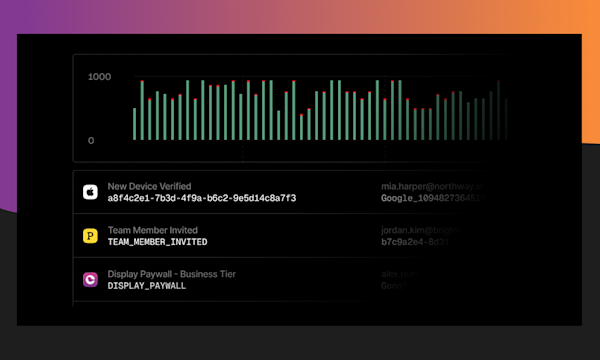
Every agent send shows up in the message log with:
- requestId. Stable ID for the send returned by the send call.
- user_id and tenant_id. Who it was for.
- Channel breakdown. Which providers were tried, which succeeded.
- Status events. Rendered, sent, delivered, opened, clicked, bounced.
For agent-initiated sends specifically, set a metadata field on the send with an agent identifier and the prompt that triggered the call. That separates agent traffic from your application's transactional sends and makes audits easier. The aggregate per-message truth is GET /messages/{message-id}/history; a trailing type: SENT event is the real delivery confirmation. Audit Notifications with Cursor or Claude Code walks through reviewing what an agent has sent across a workspace.
Agents that send messages need the same observability surface as the rest of your stack: structured logs, channel breakdowns, and the ability to filter by who initiated the send. The MCP server treats agent-initiated traffic as first-class, not as a side channel.
Safety
Agents can fan out fast. Three controls keep them safe.
Rate limits. Use throttle nodes in journeys or set per-workspace send caps in your Courier dashboard. Courier rejects sends that exceed the cap with a clear error, so the agent can retry with backoff rather than retrying blindly.
Approval gates. For high-stakes sends (a mass announcement, a refund confirmation), have the agent build the template or journey in DRAFT state and let a human publish. Notification publish, journey publish, and journey-scoped template publish are each separate tool calls on the MCP server (publish_notification, publish_journey, and the template-publish flow), so the create-and-publish split is supported natively.
Dry-run mode. Most send endpoints accept a dry_run: true parameter. The agent runs through the routing and rendering, returns what it would have sent, and skips the actual dispatch. Use this for any send the agent initiates without explicit human approval until you trust the behavior. For a worked example, Human-in-the-loop for AI payment agents shows how a payment-handling agent uses approval notifications to confirm high-stakes actions before they fire.
FAQs
Can my agent message arbitrary users?
Only users in the workspace your API key belongs to. The MCP server scopes calls to the authenticated workspace (every tool call carries the api_key your client passed at connection time). An agent can't reach users outside it. Within the workspace, the agent can send to any user the API key has access to, which means you should scope keys carefully if you're running multi-tenant. Generate separate keys per agent or per environment so you can revoke individually.
How do I log what an agent sent and why?
Set a metadata object on the send call with the agent's identifier, the prompt that triggered the send, and any reasoning the agent recorded. The metadata persists with the message log and is searchable. For high-volume agent traffic, pipe the Courier webhook stream into your observability tool for full traceability.
Can agents respect quiet hours and user preferences automatically?
Yes. User preferences (channel opt-ins, time zone, frequency caps) are stored on the user profile. Every send call checks them. If a user has opted out of a channel, Courier skips that channel and continues through the routing fallbacks.
How do I cap an agent's send rate?
Two options. Set a workspace-level rate limit in the Courier dashboard (sends per second, per minute, per hour). Or wrap the agent's sends in a journey with a throttle node. The journey approach gives you per-user, per-segment, or global throttles with a single config.
Ready to put this into production? See pricing or talk to our solutions team.
Previous chapter
Journeys Built by AI
A Courier journey is a JSON document describing a multi-step messaging flow with triggers, sends, delays, branches, fetches, AI nodes, and throttles. This chapter walks through the node model, how an AI agent generates a journey from English, common patterns for onboarding, password reset, abandoned cart, and escalation, and the guardrails that keep live journeys safe.
Next chapter
Use Cases and Why Courier
Concrete use cases for AI-native messaging (customer-support agents, workflow agents, in-product AI features), an honest build vs buy analysis, a comparison to Knock, Novu, and OneSignal for AI workloads, and the fastest path to a working setup. Closes with getting-started steps and migration guidance for teams with existing notification code.
© 2026 Courier. All rights reserved.