Chapter 1
Introduction: Creating Notifications with AI
Creating a notification with AI means describing the outcome and letting an agent build the template, configure providers, route across channels, and dispatch the send. This chapter introduces the Courier model (Your App → Courier → Providers → User), the four shifts (install through MCP and CLI, design and send by prompt, AI-built journeys, agents as senders), and how AI notifications and AI alerts relate.
Last updated: May 2026
What "creating notifications with AI" means

Creating a notification with AI means describing what you want to send, to whom, and on which channels, then letting an AI agent or assistant handle the rest: building the template, picking the provider, routing across channels, respecting preferences, and dispatching the message. The agent reads Courier's API surface through the MCP server, generates the right config, and calls the right endpoints. You move from "code an integration" to "describe the outcome."
That shift covers more than just message copy. The agent can:
- Create a reusable template that renders to email, SMS, push, Slack, and in-app inbox from one definition.
- Read your connected channel providers (Gmail, SendGrid, Twilio, FCM, Slack) and route through the ones you've set up.
- Build a customer journey (multi-step flow with delays, branches, and conditions).
- Send a message, fetch the delivery log, and react to bounces.
- Apply user preferences and quiet hours without extra code.
Courier exposes this whole surface to AI tools through the Courier MCP server at mcp.courier.com and the Courier CLI (@trycourier/cli). Both authenticate with the same API key from your Courier workspace: the MCP server takes it as an api_key header in your AI tool's MCP config, the CLI reads it from COURIER_API_KEY. Same surface, two transports.
A 60-second look at what this looks like
The simplest way to feel the difference: connect a provider once in the Courier dashboard, point your AI tool at the Courier MCP server, then prompt.
"Create a welcome email template that thanks the user by first name. Send a test to alex@example.com."
The agent calls two MCP tools in sequence: create_notification to build the template in Elemental, Courier's cross-channel JSON format, and send_message to dispatch the test. The send call returns a requestId you can use to check the log. The whole flow, including dashboard provider setup, takes about three minutes.
If you'd rather drive Courier from the terminal, the Courier CLI is the same surface. With COURIER_API_KEY exported in your shell, courier notifications create builds the template and courier send message dispatches it. The CLI accepts the message body as either flat dotted flags (--message.to.email, --message.content.title, --message.content.body) or piped JSON. Or hit Courier's REST API directly from your application code. The primitives are the same regardless of surface.
How Courier fits between your app and the user

The pattern Courier formalizes is Your App → Courier → Providers → User. You give Courier a recipient and a message; Courier handles routing, preferences, retries, and logging automatically.
When you (or your agent) call POST /send, Courier resolves the recipient from a stored profile if you passed a user_id, picks the channels the user has opted into, renders the template for each one, and dispatches through your connected providers in the order your routing config defines (priority, fallback, or engagement-based). Every event (rendered, sent, delivered, opened, clicked, bounced) lands in the message log filterable by user, template, journey, or run. The agent quickstart recommends sending to user_id rather than inline email so the same profile is reused for preferences, idempotency, and cross-channel routing.
This is the model behind every example in the rest of the guide. The four shifts below are all about who is responsible for setting up and operating this pipeline. The answer used to be "a developer for a week." Now it's "an AI agent for a few minutes." For a longer take on what changes when AI handles the work, see Turn customer context into personalized messaging with AI and Customer Engagement Platforms Are Splintered. Message Orchestration Is the Fix.
The four shifts
1. Install through MCP and CLI
Two surfaces matter. The MCP server is the AI-tool integration point: a remote endpoint at mcp.courier.com that exposes Courier's API as 109 typed tools across send, messages, profiles, lists, audiences, notifications, brands, journeys, providers, tenants, automations, bulk operations, device tokens, and audit events. Any MCP-capable client (Claude Code, Cursor, Windsurf, Claude Desktop, VS Code, plus the OpenAI Responses API) connects by adding the server URL to its MCP config and passing your Courier API key as an api_key header. There is no separate OAuth flow; the same key you use against the REST API is the key the MCP server reads.
The CLI (@trycourier/cli) covers the same surface from the terminal. It reads COURIER_API_KEY from your environment and ships with no other runtime dependencies. It's the right tool for CI/CD, scheduled jobs, and operational tooling where you want a deterministic action without an LLM in the loop.
Chapter 2 walks through both installs in detail.
2. Design and send by prompt

Courier represents a message in Elemental, a JSON-based templating format that lets you define a notification structure once and customize it per channel, locale, or user context. A single Elemental document renders to email, SMS, push, Slack, Microsoft Teams, WhatsApp, and the in-app inbox.
When an AI agent generates a message, it generates Elemental. That means one prompt produces one template that works everywhere you've connected a channel. You skip the "write the email, write the SMS, write the push, keep them in sync" loop.
Elemental supports text, images, action buttons, dynamic data via templating, conditional rendering with if: expressions, lists, and per-channel overrides. Chapter 3 covers how to build templates by prompt, by CLI, by API, or in the Design Studio, and how to send them through any of those surfaces.
3. Journeys built by AI
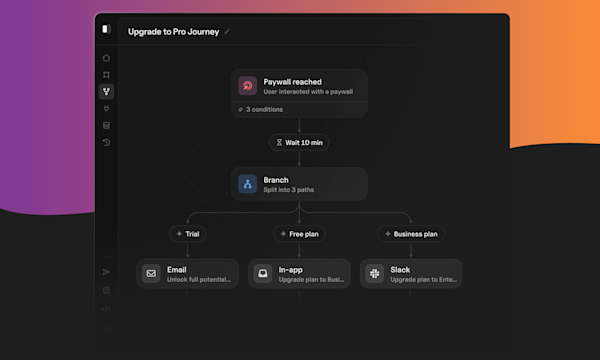
A journey is a directed graph of nodes that executes when triggered. The node types are:
| Node | Purpose |
|---|---|
| Trigger | The entry point. API-invoke or event-based. Optional schema declares the data the journey expects. |
| Send | Deliver a message through one or more channels via a journey-scoped template. |
| Delay | Pause for a duration or until a specific time. |
| Branch | Split into paths based on conditions. Requires a default path so no run falls off the edge. |
| Fetch | Pull data from your API or an external service mid-run. |
| AI | Call an LLM with a templated prompt. Requires a model, user_prompt, and output_schema. |
| Throttle | Cap concurrent runs at a global, user, or dynamic-key scope. |
| Exit | End the path. |
The Journeys API accepts a journey as a JSON document with a nodes array. When you say "build a trial-ending journey that emails the user at day 11, waits 2 days, branches on whether they upgraded, sends a push if not, then exits," the agent creates the journey shell, creates and publishes the journey-scoped templates the sends will reference, replaces the journey with the wired body, and publishes it. Send nodes cannot be included in the initial create call; the templates have to exist and be published first. Chapter 4 covers the full flow and the guardrails to set before letting AI publish to production.
4. Agents that send messages
The fourth shift is the agent itself becoming the sender. A customer-support agent that closes the loop with an email receipt. A workflow agent that pages on-call when a deploy fails. An in-product AI feature that pushes a notification when a long-running task finishes.
The Courier MCP server gives any agent a complete messaging surface in one integration: identity (profiles by user_id and tenant_id), preferences (channel opt-ins, frequency caps), rate limiting, and audit logs. The agent doesn't need to know how Twilio's webhook signatures work. It calls send_message, Courier handles the rest.
Chapter 5 covers agent-side patterns: how to scope what an agent can send, how to log what it did and why, dry-run mode, and approval gates for high-stakes sends.
Skills: the prompt-side counterpart
Alongside the MCP server, Courier publishes skills: agent skill packs that teach AI coding assistants Courier notification best practices. A skill is a SKILL.md markdown file (plus task-specific resource files) that lives in your AI tool's skills directory. The tool reads SKILL.md when a relevant prompt comes in and follows the routing inside.
The whole bundle ships in a single repository, trycourier/courier-skills, which you clone into your harness's skills directory. For Claude Code that path is ~/.claude/skills/courier-skills; for Cursor it's ~/.cursor/skills/courier-skills globally or .cursor/skills/courier-skills per project; Windsurf, Cline, and other agents use their own equivalents. There is no one-shot plugin install command; clone the repo, point your tool at it, and the skills become available next session.
Today's skills cover 7 channels (email, SMS, push, in-app inbox, Slack, Microsoft Teams, WhatsApp), 5 transactional notification types (authentication, orders, billing, appointments, account), 6 growth flows (onboarding, adoption, engagement, re-engagement, referral, campaigns), and 10 cross-cutting guides like multi-channel routing, preferences, compliance, reliability, batching, and throttling.
The MCP server is the API surface (what the agent can do). Skills are the playbook (how to do it well). You install both. Chapter 2 covers the install.
AI alerts vs. AI notifications: same thing?
Mostly yes. "AI alerts" usually refers to the source: an alert that an AI system produced, like a Datadog AI ops alert, an anomaly score from a fraud model, or an LLM-flagged security event. "AI notifications" refers to the delivery: any product message where AI helped design, route, or send it. The two terms describe different parts of the same pipeline.
In practice, you almost always need both. An ML model that flags suspicious activity is useless if you can't get the alert to the right person on the right channel at the right time. An AI agent that drafts a refund email is useless if it can't actually send it to the customer. The interesting work, and where most teams get stuck, is in the delivery layer: routing the alert through the right channel, respecting the user's preferences, retrying on a bounce, deduplicating across the three providers you're using.
If you're routing AI-generated content to people through email, SMS, push, Slack, or in-app, you're working on AI notifications. If your alerts are AI-produced and you need to dispatch them somewhere, the dispatch problem is an AI notifications problem.
The plumbing is the same either way: cross-channel templates that render once and dispatch many ways, user preferences and tenant isolation, idempotency and retries, audit logs that show what fired and why. Building that plumbing by hand for a new product was a multi-week project. With Courier's MCP server and CLI, your AI tool stands it up in an hour, and you spend your time on the AI part instead.
Where AI alerts come from

Alert notifications come from a handful of recurring sources:
- Observability tools (Datadog, Sentry, Grafana) firing AI-augmented anomaly detection.
- Security tools (CrowdStrike, Snyk, Wiz) flagging events with LLM-assisted triage.
- Fraud and risk models scoring transactions or sessions.
- Customer-success signals generated by LLMs reading support tickets or product telemetry.
- In-product AI features finishing a long-running task that the user is waiting on.
Each one needs a delivery layer to reach a person. That layer is what this guide covers.
Who this guide is for
If you're shipping a product that needs to message users and you'd rather have an AI do the integration work, this is for you. Concretely:
- Developers integrating notifications into a new product or replacing legacy notification code.
- AI engineers building agents that need to send messages as part of their loop.
- Product managers who want to prototype a messaging flow without filing a ticket.
- Indie builders and founders shipping AI products who don't want to spend a sprint on email infrastructure.
Familiarity with REST APIs and JSON helps but isn't required. If you can prompt an AI tool, you can follow along.
What you'll build
By the end of this guide you'll have the Courier MCP server and CLI installed in your AI tool of choice with at least one channel provider connected (Chapter 2). You'll have generated a working multi-channel notification template from a prompt and sent it as a test message (Chapter 3). You'll have built a customer journey with branching logic from a description rather than a drag-and-drop builder (Chapter 4). You'll have wired an autonomous agent loop that can send notifications, respect user preferences, and stay within rate limits (Chapter 5). And you'll have a clear picture of where AI notifications fit in real-world product, ops, and support use cases (Chapter 6).
Every step is shown with the actual CLI commands, API calls, or MCP tool calls that produce the result. You should be able to copy the prompts and have your AI tool execute them against your own Courier account. If you want a faster end-to-end walkthrough, the AI onboarding guide covers the same setup in tutorial form, and Courier publishes a machine-readable docs index at courier.com/docs/llms.txt so agents can discover capabilities on their own. For the broader narrative on how this shift is changing the way teams ship messaging, see Anyone on your team can ship a Courier journey from a prompt and Build with AI: let your agent handle notifications end to end.
LaunchDarkly uses Courier for the multi-channel notifications behind their Feature Workflows product, including Slack-based release approvals. The engineering team picked Courier specifically for cross-channel routing, SOC 2 compliance, and the ability to fit the existing Go SDK and provider stack.
Ready to put this into production? See pricing or talk to our solutions team.
FAQs
What does "create notifications with AI" actually mean in practice?
It means an AI agent (in Claude Code, Cursor, Windsurf, Claude Desktop, or any other MCP-capable client) reads your Courier account through the MCP server at mcp.courier.com, generates the right templates and journey definitions from your description, and calls the right endpoints. You describe the outcome ("send a welcome email when a user signs up, follow up after 3 days if they haven't completed setup"); the agent builds it. You're not writing template JSON or provider configuration code by hand.
What changes when notifications are built with AI instead of by hand?
The configuration work disappears. Building a notification system used to mean integrating one provider per channel, writing one template per message per channel, and writing application code to glue them together. With AI plus the MCP server, the agent does the configuration, generates the templates from a description, and produces the send code that calls Courier's API. You spend your time on what to send, not how to send it.
Do I need to rebuild my existing notification system to use AI?
No. Courier sits in front of whatever providers you already use. If you have SendGrid for email and Twilio for SMS, the MCP server can read your existing setup and add new templates or journeys without changing the providers. You can adopt one piece at a time.
Is this for engineers, product builders, or both?
Both. The MCP server exposes the same surface to a developer prompting Claude Code as it does to a PM prompting Claude Desktop. The output (a template, a journey, a send call) is the same. The difference is who's driving.
What's the difference between AI alerts and AI notifications?
"AI alerts" usually refers to the AI-generated content (an anomaly detection alert, a fraud signal, an LLM-flagged event). "AI notifications" refers to the delivery layer: how that content reaches a person through email, SMS, push, or chat. You almost always need both. This guide is about the delivery layer.
What's the difference between the MCP server, the CLI, and skills?
The MCP server is the API surface for AI tools, accessed at mcp.courier.com. The CLI (@trycourier/cli) is the same surface from the terminal. Skills are file-based guidance packs cloned into your AI tool's skills directory that teach the agent how to use Courier well. All three are free and live alongside each other. Chapter 2 covers installing each.
© 2026 Courier. All rights reserved.