IMAP vs POP3 vs SMTP - The Ultimate Comparison
SMTP sends email; IMAP and POP3 retrieve it. Compare the three email protocols, their ports, key differences, and when to use each.
Updated Jul 11, 2026
IMAP, POP3, and SMTP are the three email protocols developers work with. SMTP sends mail, while IMAP and POP3 retrieve it. IMAP keeps messages on the server so multiple devices stay in sync. POP3 downloads messages locally and removes them from the server. Together, they cover the full send-and-retrieve email flow.
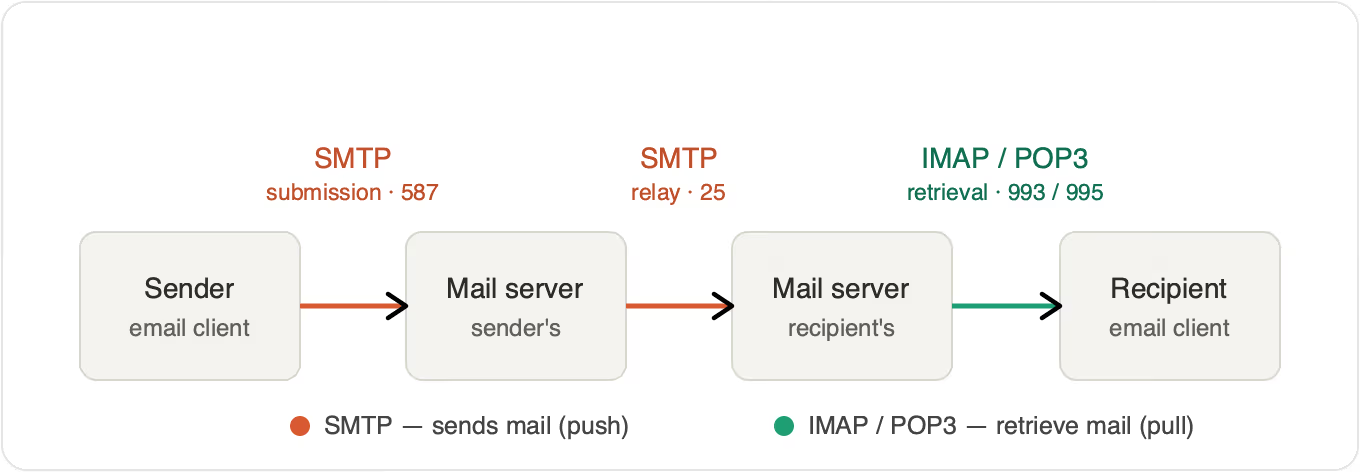
Quick comparison: IMAP vs POP3 vs SMTP
| Protocol | Purpose | Direction | Storage | Best for |
|---|---|---|---|---|
| SMTP | Send email | Client to server, server to server | Not applicable (transport only) | Outgoing mail |
| IMAP | Retrieve email | Server to client | Messages stay on server | Multi-device access |
| POP3 | Retrieve email | Server to client | Messages download to local device, removed from server | Single-device access, offline reading |
Ports used by SMTP, IMAP, and POP3
| Protocol | Default (unencrypted) | Secure (SSL/TLS) |
|---|---|---|
| SMTP | 25 (relay), 587 (submission) | 465 |
| IMAP | 143 | 993 |
| POP3 | 110 | 995 |
When to use each
- Use IMAP if you read email on more than one device and want folders, flags, and read/unread state synced everywhere.
- Use POP3 if you use a single device, have limited server storage, or need reliable offline access.
- Use SMTP whenever you send email. It is not an alternative to IMAP or POP3; it works alongside whichever you pick for retrieval.
For a broader view of how email fits alongside SMS, push, and in-app messaging in modern applications, see Courier's guide to multichannel notifications.
Understanding SMTP
What is SMTP?
SMTP (Simple Mail Transfer Protocol) is a widely used TCP protocol for email sending. The SMTP protocol is mainly used by clients to send emails to servers, or for email communication between servers. It is defined in RFC 5321.
There are two types of SMTP servers: Relays and Receivers. Relays accept emails from users and route them to recipients. Receivers deliver them to the mailbox after accepting the email from the Relay servers.
How does SMTP work?
The SMTP workflow consists of three steps:
- The SMTP client connects to the SMTP server.
- The email is transferred using that connection.
- The client and the server terminate the connection.
The SMTP client uses text-based commands such as HELO, MAIL FROM, EHLO, and RCPT to send messages to the SMTP server. The SMTP server responds to these messages using numeric codes like 220, 250, and 354.
Advantages of SMTP
- SMTP ensures the dependability of outgoing email messages.
- If a message is not successfully delivered, the SMTP server will repeatedly try to resend it until the transmission is successful.
- It is easy to use.
- In case of failure, SMTP will explain the failure.
Disadvantages of SMTP
- Firewalls often block ports used by SMTP.
- The security provided by SMTP is insufficient on its own.
- SMTP servers reject email messages that are longer than a certain length.
- Server limitations apply.
Common SMTP errors
Most SMTP problems come down to authentication, ports, or the server refusing the connection. If you hit one, these guides have the fix:
- SMTP error 554: message rejected or relay access denied
- SMTP error 535: authentication failed
- SMTP error 111: connection refused
- SMTP failed to connect to server
- SMTP port 465 not working
- SMTP server authentication error

Tired of managing SMTP yourself? Courier is a transactional notification platform that connects to your email provider (SendGrid, SES, Postmark) and handles delivery, templates, and failover so you don't have to debug connection errors. For a survey of provider options, see Courier's roundup of the best email API providers for developers.
Before picking a stack, it helps to know whether the messages you're sending count as transactional or marketing, since the two have different deliverability rules and infrastructure needs. The transactional vs marketing email guide covers where the line sits and why it matters for SMTP setup.
Understanding IMAP
What is IMAP?
The Internet Message Access Protocol, also known as IMAP, is a protocol for receiving emails from a server. Because IMAP allows access to emails from multiple locations simultaneously, it keeps the email on the server after delivery. It also doesn't download the entire email until the recipient opens it.
The fourth version of the IMAP protocol is currently in use, and it is one of the most widely used protocols for email retrieval. IMAP is defined in RFC 3501 (IMAP4rev1) and its successor RFC 9051 (IMAP4rev2).
How does IMAP work?
When using the IMAP protocol, the client connects to the server, checks for new messages, and saves them in the cache as temporary files. Only the date, sender, and subject are initially downloaded from the server. The content is only downloaded when you open the message, so it is possible to view an email's headers without downloading attachments.
When an email is modified, deleted, or marked as read, the changes are reflected on the server. This process syncs the status of emails across multiple devices in real time.
Advantages of IMAP
- Not affected by local machine failures, since emails are stored on the server.
- Can be accessed through multiple devices at the same time.
- Supports keyword-based email searching.
- Local storage use is minimal.
Disadvantages of IMAP
- Accessing emails can be slower than POP3 because all folders are synchronized every time there is a send or a receive.
- Emails will not work unless you have an active internet connection.
- If you use email frequently, you will need more mailbox storage space, which may be more costly.
Understanding POP3
What is POP3?
Post Office Protocol is a more straightforward method of accessing mailboxes. Version 3 is the most widely used version of this standard, and it is popular due to its low reliance on Internet connections. POP3 transfers emails from the server to the client, allowing you to read them even when you are not connected to the internet. POP3 is defined in RFC 1939.
What is the POP3 protocol used for?
POP3 is used for retrieving email from a mail server and storing it locally on a client device. After downloading, POP3 typically deletes the messages from the server, which keeps server storage low and lets users read mail offline. It is most useful for single-device setups where multi-device synchronization is not required.
How does POP3 work?
When a user checks for new email, the client makes a connection to the POP3 server. The email client provides the server with its username and password for authentication. After connecting, it issues text-based commands to retrieve all email messages. It then saves the downloaded messages on the user's local system, deletes the server copies, and disconnects from the server.
Advantages of POP3
- Popular, simple to set up and use.
- Emails are downloaded to the user's computer, and messages can be viewed even when the user is not connected to the internet.
- Opening attachments is quick because they have already been downloaded.
- Requires less server storage space, because all emails are stored on the local machine.
Disadvantages of POP3
- Email attachments may contain viruses that could harm the user's computer.
- Hard to export the local mail folder to another email client or physical machine.
- Email folders can become corrupted, potentially resulting in the loss of the entire mailbox.
Differences between SMTP, IMAP, and POP3
What is the difference between SMTP and IMAP?
- IMAP is used to retrieve messages. SMTP is used to send them.
- IMAP works between server and client for retrieval. SMTP works between servers to transfer information.
- IMAP lets users organize emails on the server, while SMTP focuses purely on transport.
For a breakdown of when SMTP alone is enough versus when you need an API-driven service, see Courier's guide to transactional email services.
What is the difference between SMTP and POP3?
- SMTP is a push protocol. POP3 is a pull protocol.
- SMTP sends email from the sender's device to the receiver's mailbox. POP3 retrieves and organizes email from the receiver's mail server to the receiver's computer.
- SMTP operates between the sender's and receiver's mail servers. POP3 operates between the receiver and the receiver's mail server.
What is the difference between IMAP and POP3?
| IMAP | POP3 | |
|---|---|---|
| Message storage | Stays on server | Downloads to device, deleted from server |
| Multi-device sync | Yes | No |
| Offline access | Limited (cached) | Full |
| Server storage use | Higher | Lower |
| Folder / read-state sync | Yes | No |
| Best for | Multiple devices, always online | Single device, offline, storage-limited |
- POP3 downloads all emails at once. IMAP shows the message header before downloading the full email.
- POP3 downloads an email from the server and then deletes it. IMAP stores the email on the server and syncs it across devices.
- POP3 does not let you organize emails in the server mailbox. IMAP supports server-side folder organization.
- IMAP keeps multiple copies of an email to make retrieval easier across devices.
For implementation details on how Courier handles the email channel across providers, see the email channel docs.
How IMAP, POP3, and SMTP work together
In a typical email flow, SMTP handles delivery from the sender's client to the sender's mail server, then from server to server until the message reaches the recipient's mail server. From there, the recipient's client uses IMAP or POP3 to retrieve the message. SMTP is the outbound transport. IMAP and POP3 are the two options for inbound retrieval. Most modern clients default to IMAP for multi-device sync.
Securing email connections: SSL, TLS, and STARTTLS
By default, SMTP, IMAP, and POP3 send login details and messages as plain text. Modern clients encrypt the connection with TLS (the successor to SSL), in one of two ways:
- Implicit TLS: the connection is encrypted from the first byte, on a dedicated port. SMTP uses 465, IMAP uses 993, and POP3 uses 995.
- STARTTLS: the connection starts in plain text on the standard port (587 for SMTP submission, 143 for IMAP, 110 for POP3), then upgrades to an encrypted channel before any credentials are sent.
For sending, use authenticated submission on port 587 with STARTTLS, or port 465 with implicit TLS. Avoid plain port 25 for client submission. It is meant for server-to-server relay and is widely blocked by residential ISPs and cloud providers. For retrieval, prefer the secure ports (993 for IMAP, 995 for POP3) over their plaintext equivalents.
Conclusion
SMTP, IMAP, and POP3 each cover one part of the email flow: SMTP sends, IMAP retrieves with server-side sync, and POP3 retrieves with local-only storage. Choosing between IMAP and POP3 comes down to whether you need multi-device access (IMAP) or single-device, offline-friendly storage (POP3).
Ready to simplify your notification stack? Start free →
FAQ
Frequently asked questions
Keep exploring
More guides
One API, every channel
Ship notifications without the boilerplate
Courier gives you one API for email, SMS, push, and chat, with templates, routing, retries, and delivery logs built in.
Last updated Jul 11, 2026. Code samples are illustrative; provider APIs and pricing change over time, so check each provider’s docs before relying on them.