The Twilio-Approved Alternative to Twilio Notify
Twilio Notify is nearing End of Life (EOL), and the recommended alternative is Courier—a developer notification platform from a company funded by Twilio.
Updated Jun 20, 2026
Twilio Notify is nearing End of Life (EOL), and the recommended alternative is Courier—a developer notification platform from a company funded directly by Twilio. It’s free to sign up and get started.
When Twilio introduced Notify, it offered developers a way to reach users across multiple notification channels with a single API call. It introduced an API primitive one layer above its core communications APIs that allowed you to build and control your notifications workflow across channels. Courier provides this same, core functionality as well as many additional features for Twilio that make sending event-triggered product notifications easier and more scalable.
Courier not only supports every available channel from mobile Push to email to SMS, but also offers a full in-app notification inbox for web and mobile. And that’s just the beginning. Courier is a complete notification platform for developers to craft exactly the experience that’s right for their users and that works in harmony with their application’s UX.
In this article, we will explore how Courier takes the baton from Twilio Notify and drives the concept much further, providing incredible value for developers tasked with building notifications.
Notify at the right time
Unlike Twilio Notify, Courier offers three different mechanisms to trigger a notification to users:
- Courier API: where your app makes an API call with Courier’s REST API to send a new message across one or multiple channels.
- Courier Web UI: where you can send a message by interacting with the Courier web app, for example with a one-time send.
- Event: where a message is triggered via an automation or another event firing. An event can even come from a Customer Data Platform (CDP) such as Twilio Segment or Rudderstack.
This gives developers the flexibility to automate notifications with almost any use case.
Here’s an example of using Node.js to send a notification to a specific user. Note that you would specify at least one recipient, as well as either a pre-defined template or specific content.
// Dependencies to install:// $ npm install node-fetch --saveconst fetch = require('node-fetch');const options = {method: 'POST',headers: {Accept: 'application/json'},};fetch('https://api.courier.com/send', options).then(response => response.json()).then(response => console.log(response)).catch(err => console.error(err));
Notify the right set of users
Once a notification has been triggered, Courier provides multiple ways to identify who will receive that notification:
- Manual addressing: by identifying a list of users to contact at runtime.
- List: by specifying a static list of users.
- Audience: by specifying a dynamic list of users based on their attributes.
Many developers make use of Courier’s Audiences API, where it’s possible to automatically notify an arbitrary collection of users that match a set of rules. As an example, you might want to send a billing alert to users with an Admin role who are located in North America. Once you define an audience and confirm what the rules are, including the correct set of users, you can use the Send endpoint to send a notification to the audience like this:
{"name": "Workspace Admins in North America","filter": {"operator": "AND","filters": [{"path": "location","operator": "EQ","value": "North America"},{"path": "user role","operator": "EQ","value": "Admin"}]}}
Notify at the right place
While Twilio Notify had limited options for sending a message, Courier is designed to work across channels and providers to ensure messages are delivered, and read. Courier uses advanced routed logic across:
- Channels
- Email, SMS, Mobile Push, Web Toast, chat (eg. Slack, MS Teams, Discord), alert systems, and in-app mobile and web inboxes. Simply identify the right logic and sequencing for each notification and everything is abstracted away in your code.
- Providers
- Choose the provider that makes the most sense for each use case, add conditionals, even failover between providers. For example, use Mailgun as your primary email provider and failover to Sendgrid when Mailgun API error rate increases, then go back to Mailgun once their service is operational again.
- User Preferences
- Honor user-selected preferences for channels and topics they want or don’t want to hear about.
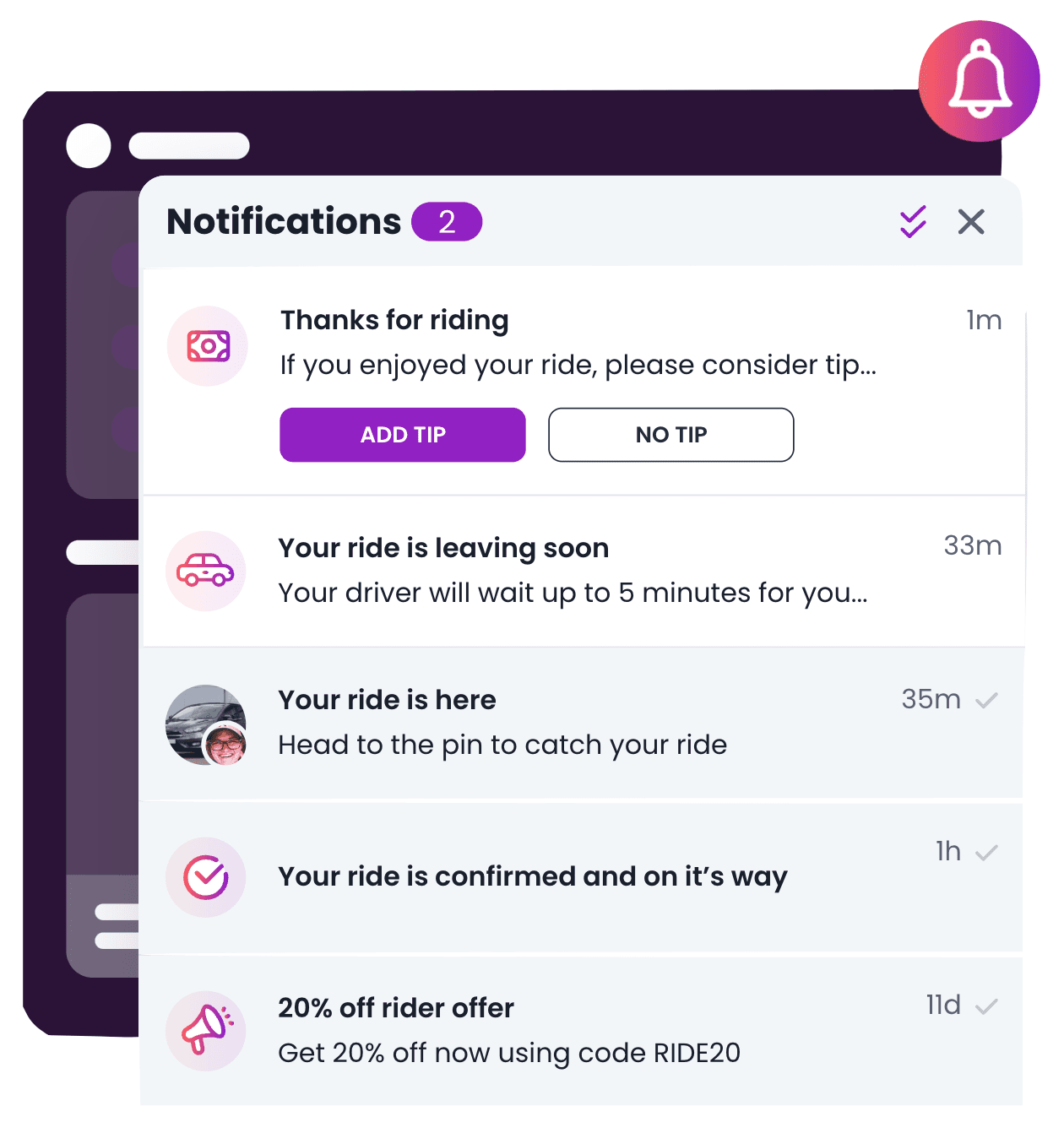
A significant advantage of Courier vs Twilio Notify is that it provides full UI components for an in-app notification center (inbox) and a notification preferences center. This is in addition to the backend logic to support these components. You can either run the fully hosted offerings for your app with minor brand customization or run a completely tailored headless version on Courier.
Notify with the right content and rendering
Now that we know who is getting notified and on which channels, it’s time to render the notification. Courier takes into account multiple factors to ensure that your users see the ideal version of a notification.
Custom data - Using a data object, you can specify any data you want to pass to the dynamic parts of your message template or accessor type. The data will then automatically populate a corresponding template at the time it’s sent.
Elemental - Courier offers a powerful JSON-based syntax for describing the content of a notification in a way that will work across multiple channels (email, push, chat, etc). That way it’s super easy to customize the look, language, and structure of your notification based on locale, channel, and other more advanced custom logic. For example, you can trigger a single notification that includes a call to action (CTA) for email, SMS, and Slack. The CTA would be an HTML button in email, a plain text link in SMS, and a Slack Block element in Slack.
Templates - Courier Templates allow you to deliver the same message across multiple channels using common data. Buttons, links, text, and more are auto-formatted for your channel and provider. A web based notification designer is also available for creating, editing, and managing templates.
Overrides - Sometimes it’s useful to change the request body for a notification. For example, you may want to override some of the fields supported by SendGrid's /mail/send endpoint, like changing the subject and adding an attachment:
{"message": {"template": "<COURIER_NOTIFICATION_ID>","to": {"email": "kpryde@xavierinstitute.edu"},"data": {"name": "Katherine Pryde"},"providers": {"sendgrid": {"override": {"body": {"subject": "Requested file - lockheed.json","attachments": [{"content": "eyJmb28iOiJiYXIifQ==","type": "application/json","filename": "lockheed.json"}]},"config": {"apiKey": "<your API Key>"}}}}}}
Notification Tracking - Courier allows you to set up and manage delivery status such as open and click-through tracking for notifications in your Live environment.
Branding - Give your notifications a consistent look and feel that perfectly aligns with your brand. Or allow your customers to apply their own branding when sending notifications from your software.
Internationalization - There are multiple ways to internationalize your notifications with Courier, ensuring that the language and content is appropriate to the user’s location. You can set up multiple pre-defined templates that are automatically selected by region. Or, you could use a single notification template and pull translated content from the data payload. In this case, you may want to use a translation API like Crowdin on the backend.
Tracking Delivery and Troubleshooting
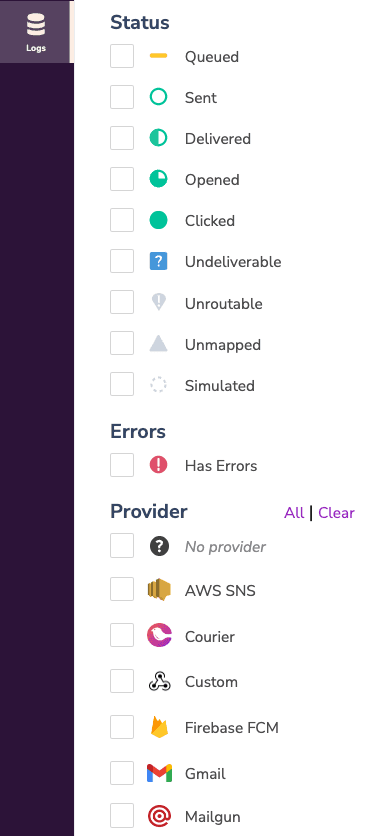
Courier provides a timeline and insights into the status of notifications, recipients, lists and automations. Unlike Twilio Notify, it does this across not only channels, but also multiple providers of the same channel.
Each step in the Send status has a visual representation.
The Leading Alternative to Twilio Notify for Product-Driven Notifications
Like Twilio, Courier is focused on providing infrastructure that’s tailored for developers.
And now, with Twilio publishing an End of Life Notice for the Notify API, Courier has become the leading choice for building product notifications with Twilio’s APIs, as well as any other communications provider.
Give Courier a try. It’s free to get started.
Keep exploring
More guides
One API, every channel
Ship notifications without the boilerplate
Courier gives you one API for email, SMS, push, and chat, with templates, routing, retries, and delivery logs built in.
Last updated Jun 20, 2026. Code samples are illustrative; provider APIs and pricing change over time, so check each provider’s docs before relying on them.