Twilio Notifications - Batching, Scheduling, Digests, and more
Updated Jun 20, 2026
While Twilio is one of the best options for programmatically communicating with people over SMS, email, and more, it lacks key capabilities for building transactional product notifications. In fact, Twilio recently abandoned development and support for its Notifications product, Twilio Notify.
This is where a new approach from Courier comes in. Courier is a company comprising ex-Twilio employees and directly funded by Twilio’s venture fund, its CEO, and its former CPO of over 10 years. As a result, Courier has become the go-to notification platform for web and mobile applications when using Twilio.
This article will focus on Courier's integration with Twilio communication channels like SMS and email. However, Courier provides deep integration across all Twilio products, including with its customer data platform, Segment.
This is just a snapshot of some of the key delivery features that Courier enables when using Twilio APIs for notifications:
- Batching Twilio notifications
- Scheduling Twilio communications
- Preset or user-defined digests for Twilio notifications
- Bulk send for Twilio notifications
- Throttling Twilio notifications
- Failover from Twilio to other providers
- Extending Twilio to in-app and alternate channels
- Delaying Twilio notifications
If you'd rather jump into a project and see how the code works, here are guides on using Courier with Twilio SMS, SendGrid email, and the Segment CDP.
Note that many of the features described below are based on Courier Automations, an API and visual designer for building notification logic and workflows of any complexity.
Batching Twilio notifications
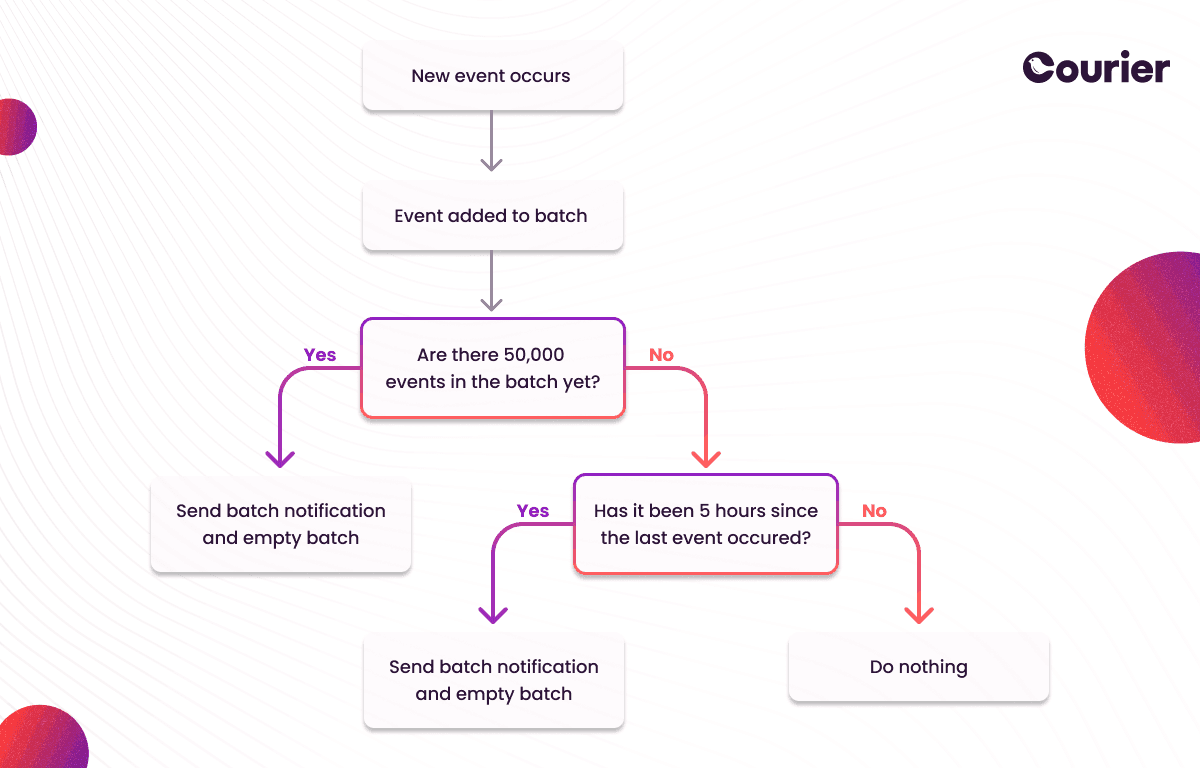
With Courier Automations it’s possible to group events together to create a single Twilio notification instead of sending several and overwhelming the end user. This decreases spam and boosts the chances of notifications being read. Batching works based on three criteria:
- Inactivity period: If there are no events for a set time, all earlier events are combined into one notification.
- Event count: Notifications are delayed until a specific number of events, for example 100, pile up. These are then sent out as one summary notification.
- Wait time: All events within a certain time frame, such as 24 hours, are combined into a single notification.
Batching can be used across various channels like email, SMS, chat, in-app inbox, push, and providers including Twilio, SendGrid, email (through an API or with SMTP), Slack, MS Teams, and WeChat.
Example use cases
Article performance summarization
Rather than sending a separate Twilio notification for each view, comment, and share of a news article, these actions can be bundled together using a Courier automation. After the activity slows down or a set wait time is reached, data is compiled about the views, top comments, and shares. The author then gets a summarized email report.
Data warehouse reports
For a company generating many reports from large data sets at different times, an event is made for each finished report. Batching allows these reports to be collected together and sent as a single email once all the day's reports are complete.
Social media notifications
For a popular social media post getting many likes quickly, instead of notifying the user for each like, batching can gather these notifications. The user is notified only after new likes stop coming for a while, with a message like, "Your post received 17 likes."
Head to the Courier docs to learn more about batching Twilio notifications.
Scheduling Twilio communications
With Courier Automations, it’s also possible to schedule Twilio SMS and Twilio SendGrid emails. This can be done via three methods:
- One-time: Choose a specific time and date to trigger the automation.
- Recurrence: Set a recurring schedule, much like creating a repeating event in a calendar app.
- Cron: A more precise version of Recurrence, using crontab expressions for scheduling.
This scheduling feature, part of Courier Automations, can be used across not just Twilio but any channel (like email, SMS, chat, in-app inbox, push) and provider (like Postmark, SMTP, Slack, MS Teams, WeChat, etc).
Read the Courier docs to learn more about scheduling Twilio notifications.
Preset or user-defined digests for Twilio notifications
Using Courier Automations, developers can create recurring user digests on configured time intervals for Twilio SMS and SendGrid email notifications. This can be useful for things like weekly reports or user digests, while also utilizing Courier Preferences to offer user-scheduled preferences if desired. It can dramatically reduce the number of notifications a user receives and increase the chances that they will read and interact with those communications.
Courier developer documentation provides more details on how to enable digests for Twilio.
Bulk send for Twilio notifications
Courier’s Bulk API makes it possible to incrementally build a Twilio notification that goes out to a very large number of users and then execute the send with a single API call. Compared to Courier’s Send API, which also allows multi-recipient Twilio messages, the Bulk API offers additional tools to track the job's progress as it executes.
Just like single messages, the Bulk API can be used across various channels like email, SMS, chat, in-app inbox, and push, and with different providers other than Twilio, including SMTP, Slack, MS Teams, WeChat, and more. Learn more in the Bulk API docs.
Throttling Twilio notifications
Courier's notification system offers a way to control the flow of Twilio communications. By utilizing the Throttle feature in Courier Automations, you can limit the number of events that activate notification automations. This prevents users from being bombarded with multiple messages about the same event. When a certain limit is exceeded, the system temporarily drops the excess events and prevents them from moving forward.
Throttling is particularly beneficial for alert notifications and email campaigns, as it allows you to maintain a healthy balance between keeping users informed and avoiding message overload.
For further information, you can refer to the Courier docs.
Failover from Twilio to other providers
It is recommended to have a backup service in place in case Twilio experiences downtime and fails to deliver notifications. Even though Twilio offers great communication APIs, having a failover service ensures that notifications can still be sent. For example, you can set up Mandrill as a backup for Twilio's SendGrid email service, or use MessageBird as a backup SMS provider for Twilio SMS.
Failover may be triggered by:
- An outage of a Twilio service (such as SendGrid)
- An invalid recipient destination
- Provider throttling / payment issues.
Learn more about automated provider failover.
Extending Twilio to in-app and alternate channels
In addition to failing over from Twilio to another provider, Courier Automations allows you to specify alternate channels — either between channels that Twilio supports or even to channels that Twilio doesn’t support, such as an in-app notification center (Inbox). This is useful when a service is down across multiple providers or when you want to configure a notification to automatically send on a higher-priority channel (such as Slack) if it hasn't been opened/read on a lower-priority channel (like email).
Learn more about all the channels Courier supports, Courier’s web and mobile SDKs for in-app notifications, and everything that’s possible with Courier Automations.
Delaying Twilio notifications
Courier also makes it possible to delay a notification from the time a product event or API call occurs to when a notification is sent via Twilio. This can be done via Courier’s Send API. There is a delay object where you can set the millisecond duration to delay the delivery of the message.
The best way to build notifications with Twilio
While Twilio remains an impressive solution for programmatically communicating via SMS, email, and more, it still requires a tremendous amount of development work to build notifications with Twilio. Courier is designed to fill this need and has become the go-to platform for building notifications into web and mobile applications with Twilio or over 50 other providers (see the full list of Courier integrations).
Offering extensive functionality, Courier integrates seamlessly with Twilio communication channels as well as Twilio’s customer data platform, Segment. Powerful API primitives make it easy for developers to build important notification features like batching, scheduling, digesting, bulk delivery, throttling, channel and provider failover, and delay. These features ensure robust, timely, and effective communication, enhancing the user experience while maintaining a healthy balance between keeping users informed and avoiding notification overload.
Give Courier a try today for free, or contact us to learn more about using Courier with Twilio.
Keep exploring
More guides
One API, every channel
Ship notifications without the boilerplate
Courier gives you one API for email, SMS, push, and chat, with templates, routing, retries, and delivery logs built in.
Last updated Jun 20, 2026. Code samples are illustrative; provider APIs and pricing change over time, so check each provider’s docs before relying on them.